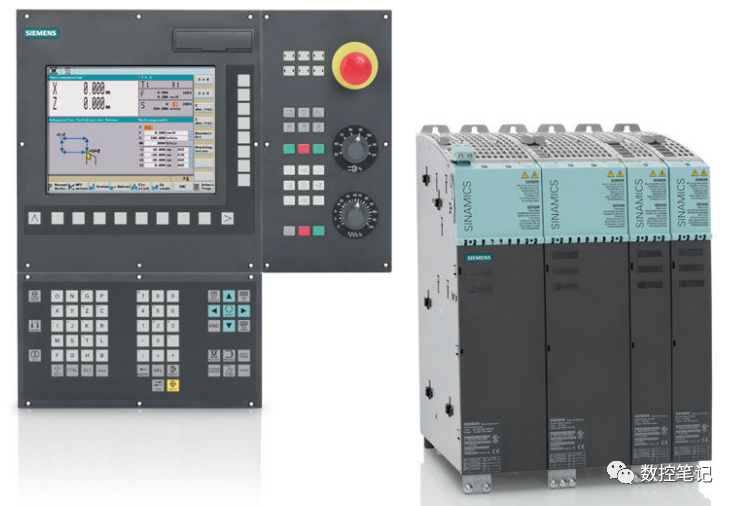
During the maintenance of the SINUMERIK 802D sl system, Siemens maintenance engineers summarized some issues regarding this aspect, such as inability to enter the system, progress bar stuck halfway, black screen, garbled screen, white screen, communication failure, etc. The following examples are for Siemens users’ reference; additionally, if your company’s Siemens 802D CNC system encounters faults, you can follow the methods below to resolve them.
1. Unable to enter the system when starting 802D, progress bar stuck halfway, digital tube displays 1 3
A: After confirming DRAM is correct, press the following keys in order:
(1) Horizontal left 2 key
(2) Vertical up 2 key, the display will show: default data ready?
(3) Press the extension key: If the above operation still results in a black screen, it indicates a hardware issue. Generally, it can start; the fault capacitor has failed, the system program is lost, and restoring to factory startup settings will resolve it.
Black screen: No high voltage, inverter damaged, lamp tube broken,
System does not start, displays 1 3, motherboard damaged.
Garbled screen / white screen: LCD screen damaged, replace directly.
Communication failure: DP communication interrupted, communication input station signal interrupted, system interface itself damaged. Keyboard and screen communication.
Key failure: All keys are unresponsive, individual keys are unresponsive, replacement is sufficient.
2. Alarm 14092: Channel 1 program segment axis A1 axis type error;
Define axis A1 as a rotating axis
If programming is A=10, alarm 10492 will occur.
3. Pressing the “increment” key, spindle stops rotating;
Delete the interface signal (VB380X0005) controlling the spindle increment in the PLC.
4. In MDI mode during startup, spindle does not rotate;
One method is to first use the “reset” key to stop the spindle, then switch to JOG mode to move the table. Another method is to modify the PLC, adding the following:
When switching from manual V31000000.2 to MDI or automatic mode, set reset signal V30000000.0, and after a 100ms delay, reset signal V30000000.0 resets.
5. 802D base line system spindle has no speed display;
Change parameter MD13070[0] to 8000, then restart the system.
6. The system displays positioning monitoring alarms 25040, 25060, etc.;
This is because the spindle is in positioning control mode, while the PLC processes only consider speed control mode. When the spindle is stationary, and the movement signal V380X0004.6 and V380X0004.7 are zero, activate M138.1. At this point, M138.1 will cancel the spindle servo enable V380X0002.1, thus the position loop effective signal V390X0001.5 needs to be set to 1 to not cancel the spindle servo enable V380X0002.1.
7. How to report alarm text on the screen in 802D;
(1) Import alarm text from the standard PLC subroutine library into the 802D system using the first language.
(2) Edit on the screen. Press the SYSTEM key, then press the PLC soft key. Press the PLC text soft key, use the up and down keys to find the alarm number to edit, press the Tab key to edit. Press the insert key to insert a cursor, press the ALT+S combination key to input Chinese using Pinyin.
8. Special function parameters for 802D;
P378: Display of PLC program:
Set 1 to indicate at the expert level.
9. From which version did the 64 user alarm messages start to exist?
Version 02.01.05, produced from December 1, 2002, supplied in January 2003.
10. Are user information screens and user startup screens used in 802D?
802D can design startup screens, but it requires a fee. Please contact Mr. Meng Erping from Siemens (Nanjing) CNC Co., Ltd. through the Siemens sales representative.
User information screens are currently not open yet.
11. Does 802D require its software or special compensation process software support when used for grinding machines and EDM machines?
802D is set for lathes and drilling/milling machines. The system does not have special options. Whether it can be used for grinding machines and EDM machines should be determined based on the control process of the machine.
12. M code cannot be recognized;
The grouped M codes have outputs in both dynamic and static code areas. Please refer to <802D Function Description> for M code grouping.
13. How does NCK know that the M code has been executed? Does PLC need to give NCK a response signal?
NCK only outputs the M code signal and does not require PLC to respond with an M code completion signal. Auxiliary functions are completed using PLC.
14. To make S, T, D, H codes searchable, is auxiliary function grouping required?
Auxiliary function grouping is automatically completed during initialization. If the system is initialized using the provided initialization file, the function you mentioned can be achieved. Please refer to <<802D Brief Debugging Manual>> for the initialization process and file path.
15. How to set V390x2000.0/1/2 to change gear levels for startup shifting and comparison judgment?
Please refer to the answer to the next question.
16. How to know the current spindle speed set value of NCK?
Manual shifting example (third axis as spindle):
(1) Condition: Spindle parameter MD35010=1 – spindle shifting enabled
No spindle motion command: V39020004.6=0 AND V39020004.7=0
(2) Accept manual shifting command and control shifting using PLC program. After shifting is completed.
(3) Write the required gear level code into V38022000.0~V38022000.2.
(4) Then send a shifting completion signal to NCK: V38022000.3=1, after a delay (2 PLC cycles), V38022000.3=0. At this point, the actual gear level will be displayed on the processing screen.
(5) Note: The system supports a maximum of 5-speed shifting.
17. When manually shifting with a selector switch, how to inform NCK of the current spindle speed set value?
For ordinary AC spindle motors, or switch-controlled spindles, there is no need to notify NCK. During system setup, the spindle can be canceled (lathe: channel parameter MD20070[2]=0, milling machine channel parameter MD20070[3]=0).
Note: For ordinary AC motor spindles, many fixed cycles cannot be used.
18. Issues regarding pitch compensation;
19. Is direction gap compensation done before or together with pitch compensation?
CNC machine tools are integrated precision processing devices. The accuracy of a high-precision CNC machine tool depends on the precision of the mechanical system. Compensation is just one of the means to reduce errors. For a CNC machine with an 8-meter stroke, is the operating environment in a constant temperature workshop? If not, how significant is the impact of temperature changes on accuracy? Therefore, when undertaking renovation projects, it is necessary to request mechanical experts to assess the mechanical condition. The achievable accuracy should be written in the contract. Otherwise, discussing accuracy after renovation can easily lead to conflicts.
20. User variables lost in SINUMERIK 802D system;
(1) Use WNPCIN to back up the tool data, R parameters, and zero point offsets within the system.
(2) Import the attachment files into the 802D system in binary format via WINPCIN (this file is only for 802D (V2.1)).
(3) Restore the backed-up tool data, R parameters, and zero point offsets into the system user variables.
Variable definition file description:
1) The same version lathe version is the same as the milling version.
2) V0103 and V0201 are the same, V0202 is different from others.
Variable definition file production instructions: (QQ group 736589871)
In SinuCom ARC software (Siemens system debugging software), open the tool box initialization file, keep the DEF.DIR directory and the INITIAL.INI file in the root directory, delete all others, delete the parts unrelated to user variables in the INITIAL.INI file, close SinuCom ARC software, prompt: select YES: enter the file name, save, production ends.
21. Input issues with 802D PLC program;
(1) Relevant parameter settings in the software are as follows:
MODULE:802D (COM1) can also be COM2, depending on your communication line connection.
(2) Relevant parameter settings in the system are as follows:
(3) Check the baud rate of the computer and the system, both should be consistent.
22. 802D axis not moving issue;
Parameter 20700 was turned off, later checked that indeed one enable in OB1 was not set.
23. How to solve spindle rotating slowly?
Resolve the fault by modifying parameter MD4010.
24. When compensating pitch in 802D, data transfer to the machine always triggers data protection alarm, and compensation has no effect;
There are two methods for compensation to take effect:
(1) Before transmission, set MD32700=0, export the compensation file, then measure and record, then transfer the file back to the system in the original path, set MD32700 to 1, return to the reference point, and the compensation value will take effect.
(2) Before transmission, set MD32700=0, export the compensation file, then measure and record, then transfer the file back to the system in the processing program path, then execute, and the compensation value will be automatically written into the system, set MD32700=1, and the feed axis will return to the reference point, taking effect.
25. Debugging RENISHAW workpiece measurement probe (MP10+MI12) on SINUMERIK 802D;
The debugging process is as follows:
(1) Use SinuCom ARC to define user global variables for RENISHAW measurement cycles:
(2) Change the original measurement cycle of 802D:
(3) Since the measurement cycle is designed for 810D/840D, 802D does not have these system variables:
This variable is only used for tool measurement and does not affect the workpiece measurement system.
Confirmed by RENISHAW, this type of probe does not use this variable.
Thus, the measurement cycle is modified as follows:
IF $A_IN[RENP[5]]==1 GOTOF LN5->delete
IF $A_IN[RENP[5]]==0 GOTOF LN5->GOTOF LN5
IF $A_IN[RENP[5]]<>0 GOTOF LN5->delete
26. 802D system output abnormal;
If the 802D system has a good 24V power supply, they should connect their zero together. Otherwise, the output will be abnormal.
27. 802D system appears garbled;
Re-transmit the second language version consistent with the system version and edit the alarm text with this version’s language to resolve the issue.
28. How to set the rotating axis (modal axis) to rotate along the shortest path?
To rotate the rotating axis (modal axis) along the shortest path: MD30455.2=1.
29. After pressing the reset key, there is a lot of noise from the spindle motor;
Reduce position loop gain or cancel optimization parameters to eliminate the noise.
Use Simo ComU software to set the drive parameters. Please refer to <<802D Brief Debugging Manual>>.
31. Alarm 25000: Encoder not found;
(1) Change the maintenance parameter of 611U to 1, the default value is 0.
(2) Replace the encoder feedback cable.
32. When using PLC examples, emergency stop operation;
Check the PLC, replace the relay, and can delay the time from 200ms to 300ms.
33. What does the 7 parts displayed after the average of SINUMERIK 802D mean?
After control import, it should display a lowercase “b” (from the German word -betriebsbereit- (operational ready)). If the system displays other symbols such as characters, please contact the SIEMENS hotline: 800 810 4288.
34. How to connect 802S, 802C, 802D to the same network;
SINUMERIK802 does not have a network interface, but can establish a connection with Ethernet through RS232 interface, with a speed of up to 115.2KB (802C/S are 38.4KB respectively).
Siemens IT-solution DNC NT-2000 can recognize such applications and manage them. Users can easily send commands, including fetching from external sources (DNC mode) or reading from the machine internally.
Using the DNC NT-2000 dialogue function, data conversion can be done directly from the machine without operating the PC. The operator can send commands to the PC, which include directory or partial program requests. Switch to “read” mode, and the required program will be automatically fetched from the PC later. Similarly, programs can also be sent to the PC.
35. Technical issues to pay attention to;
Please pay attention to the following two points:
(1) For Simo Drive 611U-802C base line (fireware is: 07.02.06) and 1FK7 single pole resolver. The drive data: P1011 should change the default value 04 (Hex) to 00 (Hex). The default value will cause errors.
(2) For spindle-like 802D base line. An additional data should be set as follows:
MD 137070[0] DRIVE_FUNCTION_MASK[0]=8000.
36. Test run data cannot be input into 802D;
If the system version is different from the test run data version, it cannot be input.
Reprint: Network, infringement deletion!