In today’s world of widespread multi-core CPUs, multi-threaded concurrent programming has become an essential skill for developers. Previously, when I developed on the Linux platform using C, I typically relied on the system’s built-in pthread library. However, the biggest issue was its lack of cross-platform compatibility, as it could not be used on Windows.
With the introduction of the <thread> header file in C++11, thread operations have been standardized. Now, you no longer need to depend on the operating system’s API (such as Windows’s CreateThread or Linux’s pthread_create); you can write cross-platform multi-threaded code directly using the standard library. This makes things much more convenient. Next, let’s take a look at how multi-threading works in C++.
Basic Principles of the thread Library
Essentially, std::thread can be understood as a “wrapper for operating system threads.” When we create a std::thread object, it internally calls the native thread API of the operating system (such as Linux’s pthread_create) to create a kernel-level thread. The thread function we write serves as the execution body of this kernel thread, which is scheduled by the operating system.
This abstracts away the underlying differences between different systems, allowing us to run multi-threaded programs on Windows, Linux, and macOS without modifying the code. This is the principle behind the thread’s cross-platform capability.
Core Components of the thread Library
The C++ thread library is like a toolbox that contains various tools for creating and managing threads, primarily including the following:
-
std::thread: Thread object used to create and control threads.
-
std::mutex: Mutex for protecting shared data and preventing simultaneous modifications by multiple threads.
-
std::lock_guard/std::unique_lock: Automatically manages the lifecycle of locks to avoid forgetting to unlock.
-
std::condition_variable: Condition variable for inter-thread communication and synchronization.
-
std::future/std::promise: Used to obtain the return value of a thread function.
-
std::atomic: Atomic variables for lock-free thread-safe operations.
-
std::jthread (new in C++20): A thread that automatically joins, providing safer lifecycle management.
These components work together to help you easily handle various multi-threading scenarios.
Thread Lifecycle
To briefly review, a thread goes through multiple states from creation to termination, much like a human life:
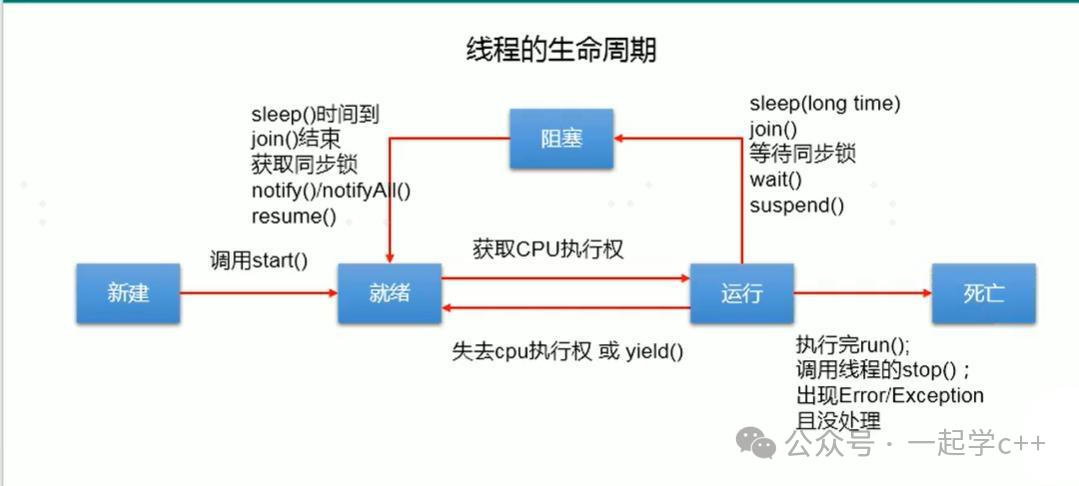
-
New State: When you create a std::thread object, the thread is in the new state but has not yet started executing.
-
Ready State: After calling thread::start() (implicitly called in C++), the thread waits for CPU scheduling.
-
Running State: The CPU schedules the thread to execute the thread function.
-
Blocked State: The thread enters a blocked state due to waiting for a lock, I/O operation, or sleep, temporarily yielding the CPU.
-
Dead State: The thread function has completed execution or has been terminated by an exception, ending the thread’s lifecycle.
It is crucial to understand this lifecycle as it forms the basis for correctly using the thread library. If you destroy a std::thread object while the thread is still running, the program will crash!
Basic Usage of the C++ thread Library
1. Thread Creation
The essence of creating a thread is to bind a callable object (function, lambda expression, or member function of an object) to a std::thread object. When the object is created, the thread automatically starts without needing to manually call start().
#include <iostream>
#include <thread>  // Thread library header
// Thread function: print thread ID
void print_id(){
    // Get current thread ID
    std::cout << "Thread ID: " << std::this_thread::get_id() << std::endl;
}

int main(){
    std::cout << "Main thread ID: " << std::this_thread::get_id() << std::endl;
    // Create thread object, passing in thread function
    std::thread t(print_id);
    // Wait for thread t to finish executing
    t.join();
    return 0;
}Output:Code Explanation:
-
std::thread t(func): Creates thread object t and immediately starts executing func.
-
t.join(): The main thread waits for thread t to finish; this must be called, otherwise the program will crash!
2. Parameter Passing: Passing Arguments to Thread Functions
If you want to pass parameters, std::thread supports direct passing:
#include <iostream>
#include <thread>
// Thread function with parameters: print number and string
void print_info(int num, const std::string& str){
std::cout << "Number: " << num << ", String: " << str << std::endl;
}
int main(){
int num = 42;
std::string str = "Hello, Thread!";
// Passing parameters: note that parameters will be copied; to pass by reference, use std::ref
std::thread t(print_info, num, str);
t.join();
return 0;
}Note When Passing Parameters:
-
By default, parameters are copied to the thread’s internal storage before being passed to the thread function.
-
If you want to pass by reference, you must wrap it with std::ref, like std::thread t(print_info, std::ref(num), str).
-
Avoid passing pointers or references to local variables! If the thread is still running while the local variable has been destroyed, it will lead to undefined behavior.
3. Getting Return Values: How to Obtain the Results of Thread Calculations
What if the thread function has a return value? std::thread does not support directly obtaining return values, but we can use std::future and std::promise together to achieve this.
#include <iostream>
#include <thread>
#include <future> // Include future and promise
// Thread function: calculate a + b, result passed out via promise
void add(int a, int b, std::promise<int>& p){
int result = a + b;
// Set the value of the promise, waking up the future
p.set_value(result);
}
int main(){
int a = 10, b = 20;
// Create promise object to store result
std::promise<int> p;
// Get the future object associated with the promise to obtain the result
std::future<int> f = p.get_future();
// Create thread, passing promise (note to use std::move to transfer ownership)
std::thread t(add, a, b, std::move(p));
// Wait for the thread to finish calculating and get the result (will block the current thread)
int result = f.get();
std::cout << a << " + " << b << " = " << result << std::endl; // Output: 10 + 20 = 30
t.join();
return 0;
}Code Explanation:
-
std::promise: A “container” used by the thread function to set the result.
-
std::future: A “channel” used by the main thread to obtain the result.
-
f.get(): Blocks the main thread until the promise sets a value, then returns the result. Note: get() can only be called once!
You can also use the simpler std::async, which can directly execute a function asynchronously and return a future:
// A simpler way: using std::async
int add(int a, int b){
    int result = a + b;
    // Set the value of the promise, waking up the future
    return result;
}

int main(){
    int a = 10, b = 20;
    std::future<int> f = std::async(std::launch::async, add, a, b);
    int result = f.get();
    // Output: 10 + 20 = 30
    std::cout << a << " + " << b << " = " << result << std::endl;
    return 0;
}
4. Resource Mutual Exclusion: Solving the “Data Collision” Problem
A significant issue in multi-threading is the competition for shared resources, so it is essential to ensure synchronization and mutual exclusion between threads. This is where the thread library’s mutex comes into play.
A classic example is two threads modifying the same variable:
#include <iostream>
#include <thread>
#include <mutex>  // Mutex header file
int count = 0;
std::mutex mtx;  // Global mutex

void increment(){
    for (int i = 0; i < 100000; ++i)
    {
        // Lock: if the lock is occupied, the current thread will block
        mtx.lock();
        count++;  // Critical section: only one thread can execute at a time
        // Unlock: release the lock, allowing other threads to acquire it
        mtx.unlock();
    }
}

int main(){
    std::thread t1(increment);
    std::thread t2(increment);
    t1.join();
    t2.join();
    std::cout << "Count: " << count << std::endl; // Should be 200000!
    return 0;
}
However, manually locking and unlocking carries risks: If an exception is thrown after locking, the unlock will never execute, leading to a deadlock.
It is recommended to use std::lock_guard, which automatically unlocks upon destruction, managing the lock like a “smart pointer” to ensure unlocking even in the event of an exception.
The above code can be modified as follows:
void increment(){
    for (int i = 0; i < 100000; ++i)
    {
        std::lock_guard<std::mutex> lock(mtx);  // Lock on construction, unlock on destruction
        count++;  // Safe!
    }
}
C++17 also introduced std::scoped_lock, which supports locking multiple mutexes simultaneously (using lock_guard directly may lead to deadlock as two threads wait for each other’s locks).
#include <iostream>
#include <thread>
#include <mutex>
mutex mtx1, mtx2; // Two mutexes

void func1(){
    // Lock both mtx1 and mtx2 simultaneously, atomic operation, no deadlock
    std::scoped_lock sl(mtx1, mtx2);
    std::cout << "func1: Locked mtx1 and mtx2 simultaneously" << std::endl;
    // Operate on shared resources
}

void func2(){
    // Order does not matter, scoped_lock will handle it automatically
    std::scoped_lock sl(mtx2, mtx1);
    std::cout << "func2: Locked mtx2 and mtx1 simultaneously" << std::endl;
    // Operate on shared resources
}

int main(){
    std::thread t1(func1);
    std::thread t2(func2);
    t1.join();
    t2.join();
    return 0;
}
5 Condition Variables: Solving Thread Synchronization
Condition variables (std::condition_variable) are used for thread synchronization mechanisms. The core usage is the “wait-notify” model, often used with unique_lock (which can be manually unlocked and automatically unlocked upon destruction).
A classic scenario is the “Producer-Consumer Model”: the producer produces data and notifies the consumer to consume; if the consumer has no data, it waits for the producer’s notification.
#include <iostream>
#include <thread>
#include <mutex>
#include <condition_variable>
#include <queue>
#include <chrono>
using namespace std;
mutex mtx; // Mutex to protect the queue
condition_variable cv; // Condition variable
queue<int> data_queue; // Shared queue (producer produces, consumer consumes)
bool is_produce_done = false; // Whether production is complete
// Producer thread: produces 10 data items
void producer(){
for (int i = 0; i < 10; ++i)
{
this_thread::sleep_for(chrono::milliseconds(300)); // Simulate production time
unique_lock<mutex> ul(mtx);
data_queue.push(i); // Produce data and store in queue
std::cout << "Producer: Produced data " << i << ", Queue size = " << data_queue.size() << std::endl;
ul.unlock(); // Unlock before notifying to improve efficiency
cv.notify_one(); // Notify one waiting consumer thread
}
// Production complete, notify consumer to exit
unique_lock<mutex> ul(mtx);
is_produce_done = true;
ul.unlock();
cv.notify_one(); // Wake up any waiting consumers
}
// Consumer thread: consumes data from the queue
void consumer(){
while (true)
{
unique_lock<mutex> ul(mtx);
// Core: wait for the condition to be met (queue not empty or production complete)
// Loop check is safer than if
cv.wait(ul, []() {
return !data_queue.empty() || is_produce_done;
});
// If production is complete and the queue is empty, exit the loop
if (is_produce_done && data_queue.empty())
break;
// Consume data
int data = data_queue.front();
data_queue.pop();
ul.unlock(); // Unlock before processing data to improve concurrency efficiency
std::cout << "Consumer: Consumed data " << data << ", Queue size = " << data_queue.size() << std::endl;
this_thread::sleep_for(chrono::milliseconds(500)); // Simulate consumption time
}
std::cout << "Consumer: Production complete, exiting" << std::endl;
}
int main(){
std::thread prod(producer);
std::thread cons(consumer);
prod.join();
cons.join();
return 0;
}Here’s a small detail: the consumer thread uses the predicate version of <span>wait()</span>, which is equivalent to looping to check the lambda expression’s condition !data_queue.empty() || is_produce_done. This is to handle “spurious wakeups”—the operating system may wake up waiting threads prematurely for various reasons (like scheduling optimizations), but the waiting condition may not be met (e.g., the queue is still empty). If an if statement is used to check the condition, the thread would proceed directly, leading to errors.
std::jthread Automatically Manages Thread Lifecycle
C++20 introduced std::jthread (Joinable Thread), which automatically calls join() upon destruction, preventing crashes due to forgetting to join:
#include <iostream>
#include <thread>  // jthread included in C++20
void task(){
    std::cout << "Jthread is running!" << std::endl;
}

int main(){
    {
        std::jthread t(task);  // Create jthread, automatically starts
        // No need to manually call join()! jthread will automatically join upon destruction
    }  // t is destructed here, automatically calls join()
    std::cout << "Main thread done!" << std::endl;
    return 0;
}
Common Pitfalls and Avoidance Guide
There are many pitfalls in multi-threaded programming. Here are a few common mistakes to be aware of and avoid during development.
1. Forgetting to join or detach a thread
void func() {}
int main(){
    std::thread t(func);
    // No t.join() or t.detach()
    return 0;  // Program crashes!
}
The destructor of std::thread checks if the thread is joinable, and if so, it calls std::terminate() to terminate the program.
Solution:
-
Always call join() (wait for the thread to finish) or detach() (detach the thread to run in the background) before destroying the thread object.
-
Use C++20’s std::jthread, which automatically calls join().
2. Thread Accessing Invalid Memory
Threads accessing local variables of the main thread through pointers or references may lead to invalid memory access if the main thread exits early, causing data errors or program crashes.
#include <iostream>
#include <thread>
using namespace std;
void func(int& ref){
this_thread::sleep_for(chrono::seconds(1));
cout << "Accessing local variable: " << ref << endl; // ref points to a variable that has been destroyed
}
int main(){
int local = 5;
thread t(func, ref(local)); // Pass by reference
t.detach(); // Main thread exits, local is destroyed
return 0;
}Solution:
-
Pass copies of variables instead of references or pointers.
-
If you must pass by reference, ensure the thread’s lifecycle is shorter than the variable’s lifecycle.
-
Use std::shared_ptr to manage dynamic memory.
3. Deadlock: Threads Waiting for Each Other to Release Locks
Deadlock is one of the most common problems in multi-threaded programming. Always remember the four necessary conditions for deadlock: mutual exclusion; hold and wait; no preemption; and circular wait. Breaking any one of these can prevent deadlock.
Solution Strategies:
- Unify the locking order (all threads lock mtx1 first, then mtx2);
- Use std::scoped_lock or std::lock to lock multiple mutexes simultaneously;
- Avoid holding locks for extended periods (perform operations quickly after locking, and unlock before doing time-consuming operations).
4. Misusing detach
Many people use detach() indiscriminately to avoid blocking the main thread, leading to “wild threads” that cannot control their lifecycle and are prone to accessing invalid memory.
Solution:
- Prefer using join() to clearly define the thread’s termination timing;
- If you must use detach(), ensure the thread does not depend on local variables of the main thread and has clear exit conditions (e.g., controlled by a global flag).
5. Overusing Locks Leading to Performance Decline
While locks ensure safety, excessive use can turn multi-threaded programs into “serial execution,” losing the meaning of concurrency. For example:
std::mutex mtx;
void process(){
    for (int i = 0; i < 100000; ++i)
    {
        mtx.lock();  // Lock granularity is too large!
        // Some simple operations, like local variable calculations
        mtx.unlock();
    }
}
Optimization Strategies:
-
Reduce lock granularity: Only lock when modifying shared data; do not lock for local calculations.
-
Use lock-free data structures (like std::atomic).
-
Use read-write locks (std::shared_mutex, new in C++17): Allow multiple threads to read simultaneously, with only one thread able to write.
6. Assuming Multi-threading is Always Faster than Single-threading
While multi-threading seems to allow multiple tasks to execute simultaneously, it is not suitable for all scenarios. Multi-threading incurs costs such as thread creation overhead, lock contention, and CPU context switching. If tasks are small or require frequent synchronization and locking operations, multi-threading may be slower than single-threading.
When Using Multi-threading, Be Aware:
-
Ensure tasks are CPU-intensive (heavy computation) rather than I/O-intensive (frequent waiting).
-
Do not exceed the number of CPU cores too much (generally set to the number of cores or cores + 1). Consider using a thread pool to manage and allocate threads.
-
Avoid unnecessary locks and shared data.
Conclusion
The thread library is a powerful tool for C++ concurrent programming and serves as a foundation for further learning about thread pools, asynchronous programming, and more. It is essential to master it. In fact, the thread library has many other features, but due to space limitations, and since I have only learned the basic usage, I will consider supplementing it after further study. Currently, remember the following key points:
-
Prefer using C++20 std::jthread, to avoid crashes due to forgetting to join().
-
Protect shared data, using std::mutex or std::atomic to avoid data races.
-
Avoid passing references or pointers to local variables to threads, to prevent accessing destroyed memory.
-
Be aware of deadlock risks, maintain a consistent locking order, or use std::lock.
-
Multi-threading is not always faster, design thread counts and task divisions reasonably.
Previous ArticlesC++ set and unordered_set containers: Ordered storage and unordered speedC++ function objects: Stateful “super functions”From explicit to smart: Core features of C++ class templates