
1. Concept of Stack
Stack is a linear data structure that follows the Last In First Out (LIFO) principle, allowing insertions (push) and deletions (pop) only at one end (top), while the other end (bottom) is fixed and cannot be operated on.
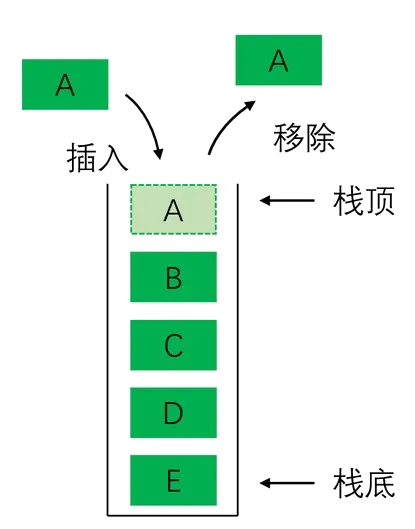
Last In First Out is expressed in English as “Last In First Out”, abbreviated as “LIFO”, hence, a stack is also called a “LIFO list”.
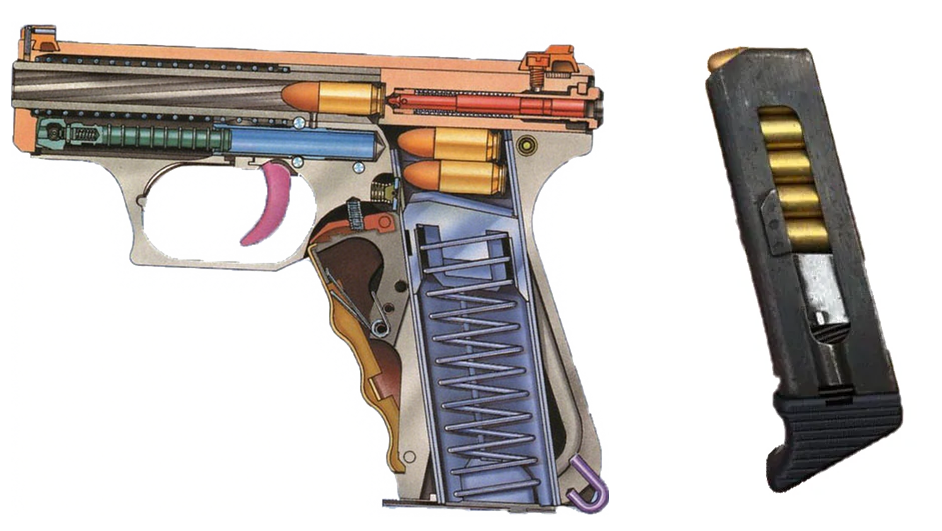
* Observation and Reflection *
What other scenarios in life also resemble a stack structure?
2. Basic Operations of Stack
1. Include Header File
Before using a stack, you need to include the stack header file.
Method (1)
Include the <span>stack</span> container from the STL (Standard Template Library).
#include <stack>
Method (2)
Use the universal header file.
#include <bits/stdc++.h>
The universal header file includes almost all commonly used headers in the C++ standard library, which can avoid the hassle of manually importing headers one by one.
For example: string (string class), vector (dynamic array container), queue (queue container), stack (stack container), list (doubly linked list container), cmath (mathematical functions such as: sin, sqrt, abs, power), etc.
Basic Operations of Stack
1. Push: Add an element to the top of the stack
2. Pop: Remove an element from the top of the stack
3. Top: View the top element of the stack
4. Size: View the number of elements in the stack
5. Empty: Check if the stack is empty
Stack Operations – Example Program
#include <stack>    // Include stack header from STL
#include <iostream>
using namespace std;

int main() {
    stack<int> sta; // Create an int type stack named sta
    sta.push(1);    // Push integer 1 onto stack sta (add operation)
    cout << sta.top() << endl;  // View the top element of sta (query operation)
    cout << sta.size() << endl;  // View the number of elements in sta
    sta.pop();      // Pop the top element of sta (delete operation)
    cout << sta.empty();  // Check if stack sta is empty (returns bool value)
    return 0;
}
When declaring an array, you need to specify the size; however, when declaring a stack, you do not need to specify the size, as it is determined by the system by default.
In C++, the default size of the stack is determined by the compiler and the operating system.
| Serial Number | Operating System | Main Thread Default Stack Size | New Thread Default Stack Size |
|---|---|---|---|
| 1 | Windows | 1MB | 1MB |
| 2 | Linux | 8MB | 2~8MB |
| 3 | macOS | 8MB | 512KB~8MB |
| 4 | Embedded Systems | Several KB to several tens of KB | Same as main thread |
3. Practical Applications of Stack
Stacks have many uses; below we will explore several classic application scenarios.
Application 1: Parenthesis Matching Problem
【 Problem Description 】
Assume that there are two types of parentheses in the expression: round brackets and square brackets, which can be nested arbitrarily. It is required that no matter how they are nested, each pair of parentheses must match correctly (appear in pairs), for example: [ ( ) [ ] ] or ( ( ) ( [ ] ) ) is a correct match; for example ( ) [ ] ] or ( ( ) ( [ ] ) is an incorrect match.
Now given a string that contains only round and square brackets, determine whether the parentheses in the string are correctly matched.
【 Input Format 】
A line of string containing only round and square brackets, with a length of less than 255.
【 Output Format 】
If correctly matched, output “Right”, otherwise output “Wrong”.
Application 1 Example Program
#include <iostream>
#include <stack>
using namespace std;
string str;
stack<char> sta;
bool is_ok(string str, stack<char> sta) {
    for (char c : str) {        //  Traverse each character of string str
        if (c == '(' || c == '[') {     // If the current character is a left parenthesis
            sta.push(c);        // Directly push the current character onto the stack (push)
        } else {        // Otherwise, check for pop
            if (sta.empty()) return false;      // If the stack is empty, return false
            char top_c = sta.top();             // Get the current top element of the stack
            if ((top_c == '(' && c == ')') ||
                (top_c == '[' && c == ']') ) {  // If the top element of the stack matches the current right parenthesis
                sta.pop();      // Pop the top element (pop)
            } else {            // If the current top element does not match the current right parenthesis
                return false;   // Directly return false
            }
        }
    }
    return sta.empty();         // Return whether the final stack is empty
}
int main() {
    cin >> str;
    if (is_ok(str, sta)) cout << "Right" << endl;
    else cout << "Wrong" << endl;
    return 0;
}
* Observation and Reflection *
1. What if the types of parentheses are increased to include curly braces? How would you improve the program?
2. What if several other odd-shaped parentheses are added?
Application 1 Improved Program
Tip: Use the string search function to determine the characters for push and pop.
#include <iostream>
#include <stack>
using namespace std;
string str;
string s_model = "()[]{}";        // Template string
bool check(string str) {
    stack<char> sta;
    for (char c : str) {        //  Traverse each character of string str
        if (string("([{ ").find(c) != string::npos) {     // If the current character is a left parenthesis
            sta.push(c);        // Directly push the current character onto the stack (push)
        } else {        // Otherwise, check for pop
            if (sta.empty()) return false;      // If the stack is empty, return false
            char top_c = sta.top();             // Get the current top element of the stack
            int idx = s_model.find(top_c);      // Get the index of the top element in the template string
            if (idx < 0) return false;          // If not found, return false
            else {
                // If the matching element of the top element of the stack is the same as the current character
                if (s_model[idx + 1] == c) sta.pop();   // Pop the top element
                else return false;      // Otherwise, return false
            }
        }
    }
    return sta.empty();         // Return whether the final stack is empty
}
int main() {
    cin >> str;
    string ans = check(str) ? "Right" : "Wrong";
    cout << ans << endl;
    return 0;
}
Application 2: Evaluating Reverse Polish Notation
【 Problem Description 】
Expressions with operators placed after their operands are called “Reverse Polish Notation”, also known as “Postfix Notation”.
For example, the postfix expression for <span>1 + 2 * 3 - 4 / 5</span> is:<span>1 2 3 * + 4 5 / -</span>.
Given a string of a postfix expression containing only addition, subtraction, multiplication, and division, calculate the value of the expression, with the postfix expression separated by single spaces, and division using floor rounding.
【 Input Format 】
A line of string containing a postfix expression with addition, subtraction, multiplication, and division, with a length of less than 255.
【 Output Format 】
An integer representing the value of the postfix expression.
Application 2 Example Program
#include <bits/stdc++.h>
using namespace std;
string str;
string arr[128];    // Declare a sufficiently long string array
stack<int> sta;     // Declare an int type stack sta
string symbol = "+-*/";     // Operators
// Declare function split_to_array to split the string by spaces into a string array
void split_to_array(string str) {
    string tmp = "";    // Temporary string
    int i = 0;          // Index for the string array
    for (char c : str) {    // Traverse each character of the string
        if (c == ' ') {     // If a space is encountered
            if (tmp.size() > 0) {   // And the temporary string has content
                arr[i++] = tmp;     // Store the temporary string in the array
                tmp = "";           // Clear the temporary string
            }
        } else {        // If the character is not a space
            tmp += c;   // Append the current character to the temporary string
        }
    }
    if (tmp.size()) arr[i] = tmp;   // Store the last string in the array
    return;
}
// Declare function calculate to compute the postfix expression
void calculate() {
    for (string str : arr) {
        if (str.size() == 0) break;
        int idx = symbol.find(str);
        if (idx >= 0) {
            int b = sta.top();      // Get the top element of the stack
            sta.pop();          // Pop the top element
            int a = sta.top();      // Get the top element again
            sta.pop();          // Pop the top element again
            switch (symbol[idx]) {  // Determine the operator
                case '+':       // If it is addition
                    sta.push(a + b);    // Perform addition and push onto the stack
                    break;
                case '-':       // If it is subtraction
                    sta.push(a - b);    // Perform subtraction and push onto the stack
                    break;
                case '*':       // If it is multiplication
                    sta.push(a * b);    // Perform multiplication and push onto the stack
                    break;
                case '/':       // If it is division
                    sta.push(a / b);    // Perform division and push onto the stack
                    break;
            }
        } else {
            sta.push(stoi(str));    // Convert the string to an integer and push onto the stack
        }
    }
    return;
}
int main() {
    getline(cin, str);      // Input the postfix expression (string with spaces)
    split_to_array(str);    // Split the string into a string array by spaces
    calculate();            // Calculate the postfix expression
    cout << sta.top() << endl;  // Output the calculation result
    return 0;
}
Homework:
Write a program to calculate the value of a prefix expression.
Application 3: Browser Forward and Backward Functionality
To implement the browser’s forward and backward page navigation, two stacks can easily achieve this.
* Observation and Reflection *
Think about it yourself, and try writing it out.
The browser accesses web pages via URLs (i.e., Uniform Resource Locator).
Steps to implement the browser’s forward and backward functionality are as follows:
1. Use one stack to store the currently visited URLs, pushing the current URL onto the stack;
2. If going back (backward functionality), simply pop the current page’s URL and push it onto the second stack;
3. If going forward (forward functionality), simply pop the top element of the second stack and push it onto the first stack.
4. The currently accessed web page is always the top URL of the first stack.
Students interested can try writing code to implement this functionality.
4. Concept of Queue
Queue is a data structure that follows the First In First Out (FIFO) principle, allowing elements to be inserted at the rear and deleted from the front.
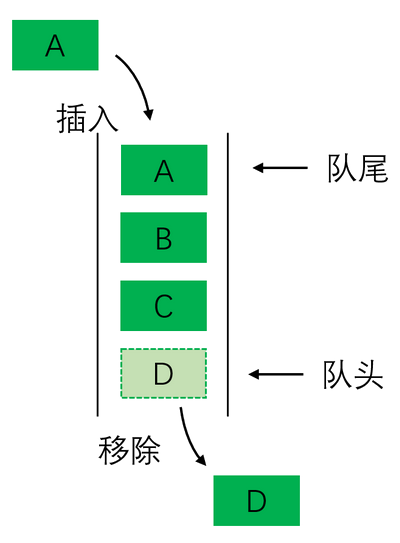
First In First Out is expressed in English as “First In First Out”, abbreviated as “FIFO”, hence, a queue is also called a “FIFO list”.

5. Basic Operations of Queue
1. Include Header File
Before using a queue, you need to include the queue header file.
Method (1)
Include the <span>queue</span> container from the STL.
#include <queue>
Method (2)
Use the universal header file.
#include <bits/stdc++.h>
2. Basic Operations of Queue
1. Enqueue: Add an element to the rear of the queue
2. Dequeue: Remove an element from the front of the queue
3. Front: Get the front element of the queue
4. Back: Get the rear element of the queue
5. Empty: Check if the queue is empty
6. Size: Get the number of elements in the queue
Queue Operations – Example Program
#include <iostream>
#include <queue>        // Include queue container
using namespace std;
int main() {
    queue<int> q;   // Declare an int type queue q
    q.push(10);     // Add element 10 to the rear of the queue (enqueue)
    q.push(20);     // Add element 20 to the rear of the queue (enqueue)
    cout << q.front() << endl;  // Get the front element
    cout << q.back() << endl;   // Get the rear element
    q.pop();        // Remove the front element (dequeue)
    cout << q.size() << endl;   // Get the number of elements in the queue
    cout << q.empty() << endl;  // Check if the queue is empty
    return 0;
}
3. Simulating Queue with Array
A queue can be viewed as a special array with two pointers, one pointing to the front position and the other pointing to the rear position, allowing deletion of elements only at the front and addition of elements only at the rear.
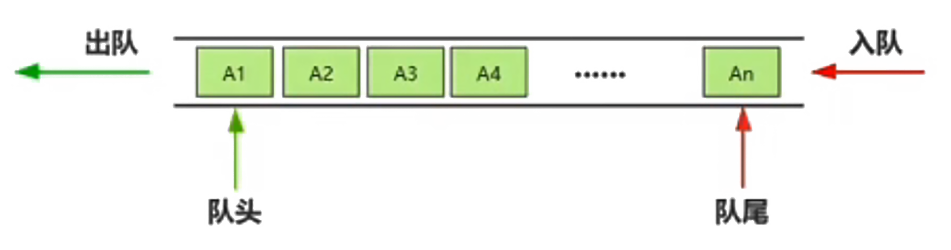
To add an element, simply move the rear pointer back one position and add the new element at that position;
To remove an element, simply move the front pointer back one position, indicating that the previous element has been removed.
- When the front equals the rear, meaning the front and rear coincide, the queue has only one element.
- When the front is less than the rear, it indicates that there are more than one element in the queue.
- When the front is greater than the rear, it indicates an empty queue.
Manual Queue Example Program
#include <bits/stdc++.h>
using namespace std;

const int SIZE = 10000;     // Declare array length SIZE
int q[SIZE];    // Declare an array of length SIZE

int main() {
    int head = 1;   // head is the front pointer, default is 1
    int tail = 0;   // tail is the rear pointer, default is 0
    q[++tail] = 1;  // Insert 1 into the queue (enqueue operation)
    ++head;         // Remove the front element (dequeue operation)
    cout << q[head] << endl;    // Access the front element
    cout << q[tail] << endl;    // Access the rear element
    head = 1; tail = 0; // Clear the queue
    cout << (head > tail) << endl;  // Check if the queue is empty
    return 0;
}
In practice, elements may be repeatedly added and removed, so the front and rear pointers will continuously move back; therefore, the array simulating the queue should be as large as possible to avoid unnecessary trouble.
Queue Exercise 1: Pairing Problem
【 Problem Description 】
A choir is practicing group singing, with each group consisting of two people, one male and one female. To avoid interference, only one group of singers can practice singing at a time.
Male and female singers stand in two lines, and after practice begins, one person from each line comes out to form a pair for practice. The singers who finish practicing automatically return to the end of their original line.
Please write a program to simulate the above pairing problem.
【 Input Format 】
The first line inputs two positive integers m and n, representing the number of males and females; (1 ≤ m, n ≤ 1000)
The second line inputs a positive integer k, representing the number of practice sessions. (1 ≤ k ≤ 1000)
【 Output Format 】
Output k lines, each containing two numbers, in the form: male singer number female singer number. (Separated by a space)
【 Sample Input 】
<span>2 4</span><span>6</span>
【 Sample Output 】
<span>1 1</span><span>2 2</span><span>1 3</span><span>2 4</span><span>1 1</span><span>2 2</span>
Queue Exercise 1 Example Program
#include <bits/stdc++.h>
using namespace std;

queue<int> q1;    // Declare male singer queue q1
queue<int> q0;    // Declare female singer queue q0

int main() {
    int m, n, k;
    cin >> m >> n;      // Input number of males and females
    for (int i = 1; i <= m; i++) q1.push(i);    // Generate male queue
    for (int i = 1; i <= n; i++) q0.push(i);    // Generate female queue
    cin >> k;           // Input number of practice sessions
    for (int i = 1; i <= k; i++) {
        // Output the current participating male and female singer numbers
        cout << q1.front() << " " << q0.front() << endl;
        q1.push(q1.front());    // Move the front element of the male queue to the rear
        q1.pop();               // Remove the front element of the male queue
        q0.push(q0.front());    // Move the front element of the female queue to the rear
        q0.pop();               // Remove the front element of the female queue
    }
    return 0;
}
Homework:
Write a manual queue (using an array to simulate a queue) to complete this problem.
Queue Exercise 2: Josephus Problem
【 Problem Description 】
In the Josephus circle (using a circular queue), n people are arranged in a circle, numbered sequentially from 1, 2, 3, 4, …, n. Starting from the first person, count to m, and the person at that position is eliminated, then the next person starts counting from 1 again, and the person at position m continues to be eliminated.
This continues until all people are out of the circle; please output the numbers of the people eliminated in order.
【 Input Format 】
Input a line with two integers n and m. (1 ≤ n, m ≤ 1000)
【 Output Format 】
Output a line with n integers, representing the numbers of the people eliminated in order, separated by spaces.
【 Sample Input 】
<span>10 3</span>
【 Sample Output 】
<span>3 6 9 2 7 1 8 5 10 4</span>
Queue Exercise 2 Example Program
#include <bits/stdc++.h>
using namespace std;

queue<int> q;   // Declare queue q

int main() {
    int n, m;
    cin >> n >> m;      // Number of people in the queue n and the number to count m
    for (int i = 1; i <= n; i++) q.push(i);     // Add numbers to the queue
    while (!q.empty()) {
        for (int i = 1; i < m; i++) {   // Repeat m-1 times
            q.push(q.front());  // Move the front element to the rear
            q.pop();            // Remove the front element
        }
        cout << q.front() << " ";   // Output the number of the m-th person
        q.pop();                    // Remove the m-th person (front element)
    }
    return 0;
}
6. Double-Ended Queue
The queue discussed earlier can only delete elements from the front and add elements at the rear, which can be understood as a “single-ended queue”.
A queue that allows adding and deleting elements at both the front and rear is called a “Double-Ended Queue”, which can be understood as an upgraded version of the queue.
1. Introduction to Double-Ended Queue
Before using a double-ended queue, you need to include the corresponding header file.
Method (1)
Include the <span>deque</span> container from the STL.
#include <deque>
Method (2)
Use the universal header file.
2. Basic Operations of Double-Ended Queue
1. Push Front (x): Add element x at the front;
2. Push Back (x): Add element x at the rear;
3. Pop Front: Remove an element from the front;
4. Pop Back: Remove an element from the rear;
5. Front: Get the front element;
6. Back: Get the rear element;
7. Size: Get the number of elements in the queue;
8. Empty: Check if the queue is empty;
9. Clear: Clear the queue;
10. At(i): Get the element at index i of the queue.
Double-Ended Queue Operation Example
#include <deque>
#include <iostream>
using namespace std;

deque<int> dq;      // Declare double-ended queue dq

int main() {
    int i = 0;
    dq.push_front(1);   // Add element 1 at the front
    dq.push_back(2);    // Add element 2 at the rear
    cout << dq.front() << endl; // Get the front element
    cout << dq.back() << endl;  // Get the rear element
    dq.pop_back();      // Remove an element from the rear
    dq.pop_front();     // Remove an element from the front
    cout << dq.size() << endl;  // Get the number of elements in the queue
    dq.clear();         // Clear the queue
    cout << dq.at(i);   // Get the element at index i of the queue
    cout << dq.empty() << endl; // Check if the queue is empty
    return 0;
}
Note:
A double-ended queue is not two queues, but one queue that allows both ends to enqueue and dequeue.
7. Practical Applications of Queue
Application 1: Keyboard Input
The speed of user key presses is much slower than the CPU processing speed, so the keyboard controller temporarily stores key data in an “input queue”. The CPU reads and processes from the queue in batches when idle, avoiding frequent interruptions to the CPU.
Application 2: Printer Queue
When multiple programs send print tasks simultaneously, the printer cannot process them in parallel. The system stores the tasks in a “print queue” in the order they were submitted. After completing one task, the printer automatically takes the next one from the front, ensuring tasks are executed in order.
Application 3: Disk I/O Queue
Disk read/write requests (such as opening files, saving data) first enter a queue, and the disk controller schedules requests in the queue using the “elevator algorithm” or “FIFO” to optimize disk read/write efficiency (reducing the number of head movements).
Application 4: Graph Traversal (BFS)
Graph traversal is a fundamental problem in algorithms, and breadth-first search (BFS) is one of the most typical and core application scenarios for queues.
The core idea of BFS is “starting from the starting point, first traverse all nodes at the current level, then sequentially traverse the next level nodes”. This “layered diffusion” logic perfectly matches the FIFO characteristic of queues.
Application 5: Task Scheduling (System-Level Algorithm)
In operating system process/thread scheduling, FIFO scheduling is one of the simplest scheduling algorithms, with the core logic being “the task that arrives first is executed first”, essentially managing tasks to be executed using a queue.
Application 6: Packet Queuing (Network Communication)
In network protocols (such as TCP/IP), routers and switches need to receive a large number of packets from different terminals. Due to limited hardware processing capabilities, queues are used to temporarily store packets, processing them in the order they arrive to avoid packet confusion.
Application 7: Sliding Window Problem (Specific Problem Solving)
The sliding window problem is a frequent issue in array/string processing.
For example, “find the maximum value of each subarray of length k in an array” or “count the occurrences of all substrings of length k in a string”.
Queues (especially monotonic queues) can efficiently optimize the time complexity of sliding windows (from O(nk) to O(n)).
In addition, stacks and queues have many other usage scenarios, and various application ideas are worth careful consideration.
< This lesson ends here >

Previous Recommendations
C++ Programming for Kids (20) Prefix Sum and Difference
C++ Programming for Kids (19) Algorithm Complexity
C++ Programming for Kids (18) Bit Manipulation
J30-01 Knapsack Problem (Dynamic Programming)
200 – Eliminate the Enemy (J) (scratch)
Scratch Version of “Gold Miner” (Paid)
Visual Training Mini Game – Find the Text (Paid)


Scan the QR code to get
More Exciting Content
Little Xiaoshan’s Programming for Kids