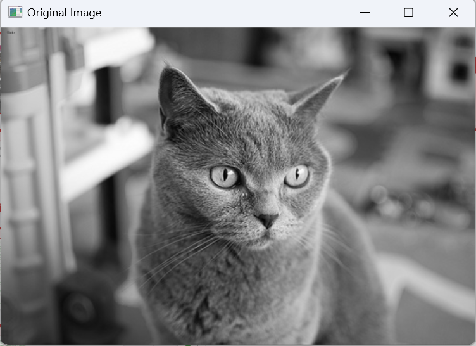
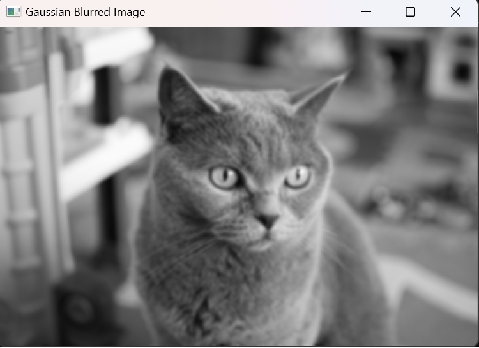
Image Smoothing
Image smoothing (blurring the edges of an image through integration processes)
The process of suppressing noise and improving image quality is called image smoothing or denoising. This can be performed in both the spatial domain and the frequency domain.
Spatial filtering modifies the image by replacing the value of each pixel with a function of that pixel and its neighborhood. If the operation performed on the image pixels is linear, the filter is called a linear spatial filter. Otherwise, it is called a nonlinear spatial filter.
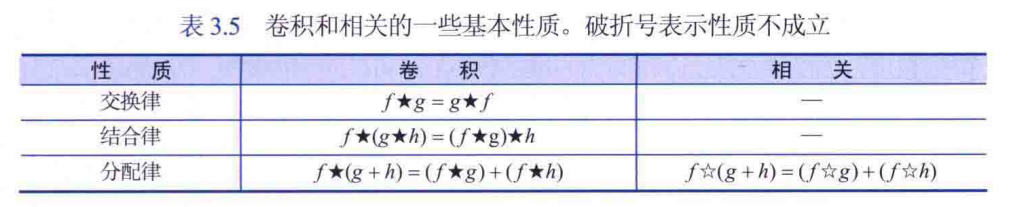
Linear filtering involves finding suitable methods to modify the frequency content of the image. In the spatial domain, this is achieved through convolution filtering. In the frequency domain, it is achieved using multiplicative filters.
1. Median Filtering
A nonlinear smoothing filtering method used to eliminate the influence of outliers such as salt-and-pepper noise. Median filtering sets the gray value of each pixel to the median of all pixel values within a certain neighborhood window. It is based on order statistics theory, and by selecting suitable points to replace the contaminated points, it can effectively preserve sharp edges in the image. Median filtering is particularly effective for removing noise caused by outliers but performs poorly with Gaussian noise.
OpenCV Call
/*
            // Box Filter
            Mat boxFilteredImage;
            boxFilter(image, boxFilteredImage, CV_32F, Size(5, 5));
            display_MatInQT(ui->label_1, boxFilteredImage);

            // Mean Filter
            Mat meanFilteredImage;
            blur(image, meanFilteredImage, Size(5, 5));
            display_MatInQT(ui->label_1, meanFilteredImage);

            // Median Filter
            Mat medianFilteredImage;
            medianBlur(image, medianFilteredImage, 5);
            display_MatInQT(ui->label_1, medianFilteredImage);

            // Gaussian Filter
            Mat gaussianFilteredImage;
            GaussianBlur(image, gaussianFilteredImage, Size(5, 5), 0);
            display_MatInQT(ui->label_1, gaussianFilteredImage);

            // Bilateral Filter
            Mat filteredImage;     // Filter diameter 15, color space standard deviation 50, spatial standard deviation 50
            bilateralFilter(image, filteredImage, 15, 50, 50);
            display_MatInQT(ui->label_1, filteredImage);
   */
Adding Salt-and-Pepper Noise
#include <iostream>
#include <opencv2/opencv.hpp>
// Add white or black salt-and-pepper noise
void addSaltAndPepperNoise(cv::Mat& image, double probability) {
for (int i = 0; i < image.rows; ++i) {
for (int j = 0; j < image.cols; ++j) {
// Generate a random number (value returned by rand()) and convert it to a double.
// Then, we divide it by RAND_MAX (the maximum value that the rand() function can return) to get a random number between 0 and 1.
// If this random number is less than the noise probability we set (a float between 0 and 1), we decide to add noise at this position.
if ((static_cast<double>(rand()) / RAND_MAX) < probability) {
// Randomly set to 0 (black) or 255 (white) rand() % 2 returns a random number of 0 or 1, when it returns 0, we set the pixel to 0, otherwise set it to 255.
image.at<uchar>(i, j) = (rand() % 2 == 0) ? 0 : 255;
}
}
}
}
int main() {
// Read grayscale image
cv::Mat grayImage = cv::imread("cat.jpg", cv::IMREAD_GRAYSCALE);
if (grayImage.empty()) {
std::cerr << "Could not open or find the image" << std::endl;
return-1;
}
// Display original image
cv::imshow("Original Image", grayImage);
// Add salt-and-pepper noise
double noiseProbability = 0.05; // Noise probability, 5% of pixels affected by noise, can be adjusted as needed
addSaltAndPepperNoise(grayImage, noiseProbability);
// Display noisy image
cv::imshow("Noisy Image", grayImage);
// Apply median filter for denoising
int filterSize = 3; // Filter size, usually 3, 5, 7, etc. odd numbers
cv::Mat filteredImage;
cv::medianBlur(grayImage, filteredImage, filterSize);
// Display denoised image
cv::imshow("Filtered Image", filteredImage);
// Wait for a key press, then close the window
cv::waitKey(0);
return0;
}
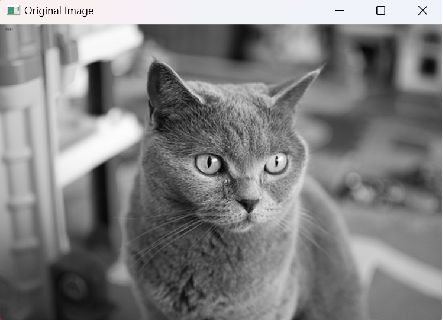
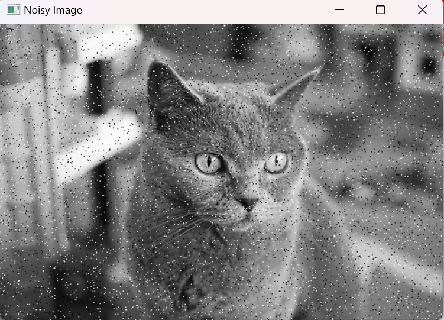
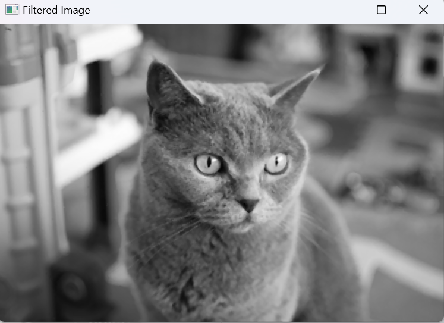
#include <iostream>
#include <vector>
#include <algorithm>
#include <opencv2/opencv.hpp>
#include <random> // Random number header file
usingnamespace cv;
usingnamespacestd;
void Salt(Mat image, int n); // n: number of noise points to add
// Get the median of pixels within the window
int getMedian(const std::vector<int>& window) {
std::vector<int> sortedWindow(window);
std::nth_element(sortedWindow.begin(), sortedWindow.begin() + window.size() / 2, sortedWindow.end());
return sortedWindow[window.size() / 2];
}
// Apply median filter
void medianFilter(cv::Mat& image, int filterSize) {
int halfSize = filterSize / 2;
cv::Mat filteredImage = image.clone();
for (int i = halfSize; i < image.rows - halfSize; ++i) {
for (int j = halfSize; j < image.cols - halfSize; ++j) {
std::vector<int> window;
for (int m = -halfSize; m <= halfSize; ++m) {
for (int n = -halfSize; n <= halfSize; ++n) {
window.push_back(image.at<uchar>(i + m, j + n));
}
}
int median = getMedian(window);
filteredImage.at<uchar>(i, j) = median;
}
}
image = filteredImage;
}
int main() {
// Read image
cv::Mat image = cv::imread("cat.jpg", cv::IMREAD_GRAYSCALE); // LenaNoise.png
if (image.empty()) {
std::cerr << "Could not open or find the image" << std::endl;
return-1;
}
cv::imshow("origin", image);
Salt(image, 5000); // Add 5000 noise points
imshow("SaltAndPepperNoise", image); // Display noisy image;
// Apply median filter
medianFilter(image, 3);
// Display processed image Save cv::imwrite("output.jpg", image);
cv::imshow("output", image);
cv::waitKey(0);
return0;
}
// Add white salt-and-pepper noise to the image
void Salt(Mat image, int n)
{
// Random number generator
default_random_engine generater;
uniform_int_distribution<int>randomRow(0, image.rows - 1);
uniform_int_distribution<int>randomCol(0, image.cols - 1);
int i, j;
for (int k = 0; k < n; k++)
{
i = randomCol(generater);
j = randomRow(generater);
if (image.channels() == 1)
{
image.at<uchar>(j, i) = 255;
}
elseif (image.channels() == 3)
{
image.at<Vec3b>(j, i)[0] = 255;
image.at<Vec3b>(j, i)[1] = 255;
image.at<Vec3b>(j, i)[2] = 255;
}
}
}
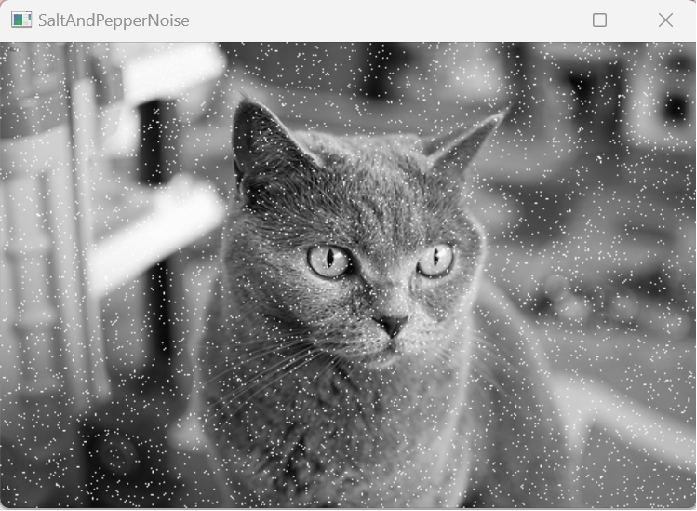
Principle of Median Filtering
/*
The principle of median filtering is as follows:
The basic principle of the median filter is to replace the value of a pixel with the median of the pixels in its neighborhood.
1. Select an odd-sized filter window (e.g., 3x3, 5x5, etc.), ensuring that there is a pixel at the center of the window.
2. Slide the filter window over the image, sorting the pixels within the window.
3. Assign the median of the sorted pixel array to the center pixel of the window.
4. Repeat steps 2 and 3 until all pixels in the image have been processed.
*/
#include <iostream>
#include <vector>
#include <algorithm> // To use std::nth_element
// Fill boundary so that padding does not count in median calculation
// Get the median of pixels within the window
int getMedian(const std::vector<int>& window) {
std::vector<int> sortedWindow(window);
// std::nth_element function rearranges elements so that the n-th element (counting from 0) is in the position it should appear in a fully sorted array, with all elements less than it in front and all greater behind it.
std::nth_element(sortedWindow.begin(), sortedWindow.begin() + sortedWindow.size() / 2, sortedWindow.end());
if (sortedWindow.size() % 2 == 0) {
// If the window size is even, return the average of the two middle numbers The median should not have decimals
return (sortedWindow[sortedWindow.size() / 2 - 1] + sortedWindow[sortedWindow.size() / 2]) / 2;
}
else {
// If the window size is odd, return the middle number
return sortedWindow[sortedWindow.size() / 2];
}
}
// Apply median filter
void medianFilter(std::vector<std::vector<int>>& image, int filterSize) {
int halfSize = filterSize / 2;
int rows = image.size();
int cols = image[0].size();
// Create output image
std::vector<std::vector<int>> filteredImage(rows, std::vector<int>(cols, 0));
// Traverse each pixel in the image
for (int i = halfSize; i < rows - halfSize; ++i) {
for (int j = halfSize; j < cols - halfSize; ++j) {
// Create window and fill pixel values
std::vector<int> window;
for (int m = -halfSize; m <= halfSize; ++m) {
for (int n = -halfSize; n <= halfSize; ++n) {
// Directly access pixel values by adding offsets m and n to the current indices i and j. Thus, boundary values for median are 0
window.push_back(image[i + m][j + n]);
}
}
// Get median and set to output image
filteredImage[i][j] = getMedian(window);
}
}
// Update original image
image = filteredImage;
}
// Apply median filter
void medianFilter(std::vector<std::vector<int>>& image, int filterSize) {
if (filterSize % 2 == 0) {
throwstd::invalid_argument("Filter size must be odd.");
}
int halfSize = filterSize / 2;
int rows = image.size();
int cols = image[0].size();
// Create new image with boundary extension
int paddedRows = rows + 2 * halfSize;
int paddedCols = cols + 2 * halfSize;
std::vector<std::vector<int>> paddedImage(paddedRows, std::vector<int>(paddedCols, 0));
// Create output image
std::vector<std::vector<int>> filteredImage(rows, std::vector<int>(cols, 0));
// Traverse each pixel in the extended image
for (int i = halfSize; i < paddedRows - halfSize; ++i) {
for (int j = halfSize; j < paddedCols - halfSize; ++j) {
// Create window and fill pixel values
std::vector<int> window;
for (int m = -halfSize; m <= halfSize; ++m) {
for (int n = -halfSize; n <= halfSize; ++n) {
// Calculate the actual position of the pixel in the original image using originalRow and originalCol, then check if this position is within the image boundary.
// If so, add this pixel value to the window. This method ensures that only pixels located inside the image are included.
int originalRow = i - halfSize + m;
int originalCol = j - halfSize + n;
if (originalRow >= 0 && originalRow < rows && originalCol >= 0 && originalCol < cols) {
window.push_back(image[originalRow][originalCol]);
}
}
}
// Get median and set to output image
if (!window.empty()) {
filteredImage[i - halfSize][j - halfSize] = getMedian(window);
}
}
}
// Update original image
image = filteredImage;
}
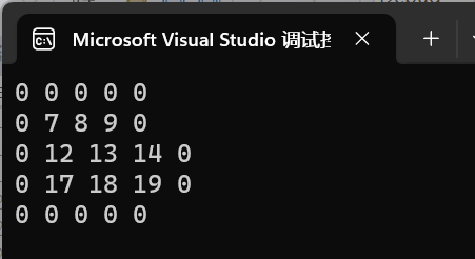
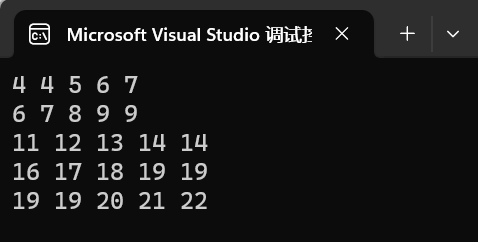 Padding of 0 does not count in sorting, no decimals
int main() {
// Example image (grayscale)
std::vector<std::vector<int>> image = {
{1, 2, 3, 4, 5},
{6, 7, 8, 9, 10},
{11, 12, 13, 14, 15},
{16, 17, 18, 19, 20},
{21, 22, 23, 24, 25}
};
// Apply 3x3 median filter
medianFilter(image, 3);
// Output filtered image
for (constauto& row : image) {
for (int pixel : row) {
std::cout << pixel << " ";
}
std::cout << std::endl;
}
return0;
}
2. Mean Filtering
A simple smoothing filtering method that uses the average of the pixels within the filter window to replace the value of the center pixel. For each pixel within the filter window, the average of all pixels in its neighborhood is calculated, and the result is used as the value of the center pixel. Mean filtering can effectively smooth the image and remove high-frequency noise, but it will blur the image and lose details.
OpenCV Call
#include <opencv2/opencv.hpp>
#include <iostream>

int main() {
    cv::Mat src, dst;

    // Read image
    src = cv::imread("cat.jpg", cv::IMREAD_GRAYSCALE);
    if (src.empty()) {
        std::cout << "Could not read the image!" << std::endl;
        return-1;
    }

    // Create target image
    //dst.create(src.size(), src.type());

    // Apply 3x3 mean filter
    cv::blur(src, dst, cv::Size(3, 3));

    // Display original image and processed image
    cv::imshow("Original Image", src);
    cv::imshow("Averaging Filter", dst);

    // Wait for user key press, then close window
    cv::waitKey(0);

    return0;
}
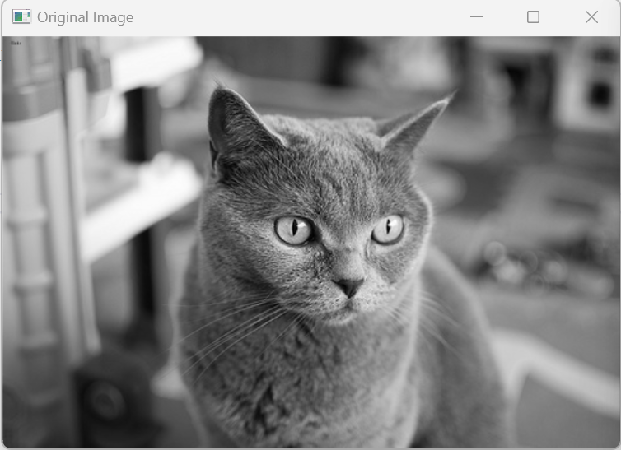
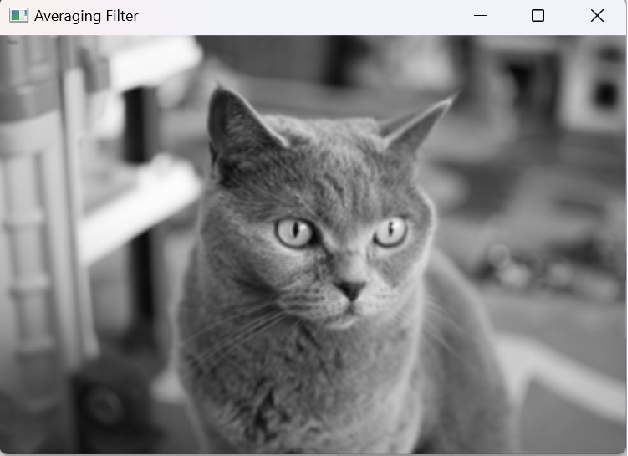
Principle of Mean Filtering
// The basic idea is to replace the value of a pixel with the average of the surrounding pixels
#include <iostream>
#include <vector>
#include <cmath> // for round()
// Fill boundary so that padding does not count in average calculation
// Calculate the average of pixels within the window
float getAverage(const std::vector<int>& window) {
int sum = 0;
for (int pixel : window) {
sum += pixel;
}
returnstatic_cast<float>(sum) / window.size();
}
void meanFilter(std::vector<std::vector<int>>& image, int filterSize) {
if (filterSize % 2 == 0) {
throwstd::invalid_argument("Filter size must be odd.");
}
int halfSize = filterSize / 2;
int rows = image.size();
int cols = image[0].size();
// Create new image with boundary extension Initialize the new image with extended boundary paddedImage, setting all pixel values to 0
int paddedRows = rows + 2 * halfSize;
int paddedCols = cols + 2 * halfSize;
std::vector<std::vector<int>> paddedImage(paddedRows, std::vector<int>(paddedCols, 0));
// Create output image
std::vector<std::vector<int>> filteredImage(rows, std::vector<int>(cols, 0));
// Traverse each pixel in the extended image
for (int i = halfSize; i < paddedRows - halfSize; ++i) {
for (int j = halfSize; j < paddedCols - halfSize; ++j) {
// Create window and fill pixel values
std::vector<int> window;
for (int m = -halfSize; m <= halfSize; ++m) {
for (int n = -halfSize; n <= halfSize; ++n) {
// Check if the current pixel is within the original image range
int originalRow = i - halfSize + m;
int originalCol = j - halfSize + n;
if (originalRow >= 0 && originalRow < rows && originalCol >= 0 && originalCol < cols) {
window.push_back(image[originalRow][originalCol]);
}
}
}
// Get average and set to output image, rounding
if (!window.empty()) { // Ensure window is not empty
filteredImage[i - halfSize][j - halfSize] = static_cast<int>(round(getAverage(window)));
}
}
}
// Update original image
image = filteredImage;
}
int main() {
// Example: Create a simple image and a 3x3 mean filter
std::vector<std::vector<int>> image = {
{10, 20, 30, 40, 50},
{20, 30, 40, 50, 60},
{30, 40, 50, 60, 70},
{40, 50, 60, 70, 80},
{50, 60, 70, 80, 90}
};
int filterSize = 3;
meanFilter(image, filterSize);
// Print filtered image
for (constauto& row : image) {
for (int val : row) {
std::cout << val << " ";
}
std::cout << std::endl;
}
return0;
}
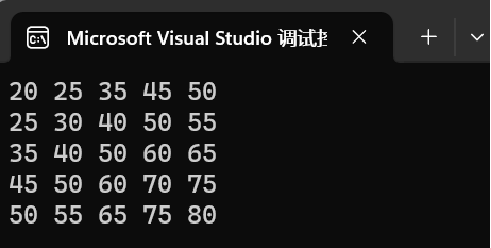 Padding of 0 does not count in average
3. Gaussian Filtering
A smoothing filtering method based on Gaussian distribution. It considers that the pixel values of neighboring pixels closer to the center pixel have greater weight. Gaussian filtering assigns a weight to each pixel in the neighborhood by calculating the Gaussian function, and then uses a weighted average to smooth the image. Gaussian filtering can better preserve image details and edge information while effectively removing noise.
Gaussian filtering is a linear smoothing filtering method widely used in the denoising process of image processing. Its main principle is to apply a Gaussian function to each pixel in the image to perform a weighted average of its neighboring pixel values.
The operation of the Gaussian filter can be described as: using a user-specified template (also known as a convolution kernel or mask) to scan each pixel in the image, replacing the value of the center pixel with the weighted average gray value of the pixels in the neighborhood determined by the template. The coefficients of this template are generated based on the Gaussian function, and its shape and size determine the degree of smoothing applied to the image.
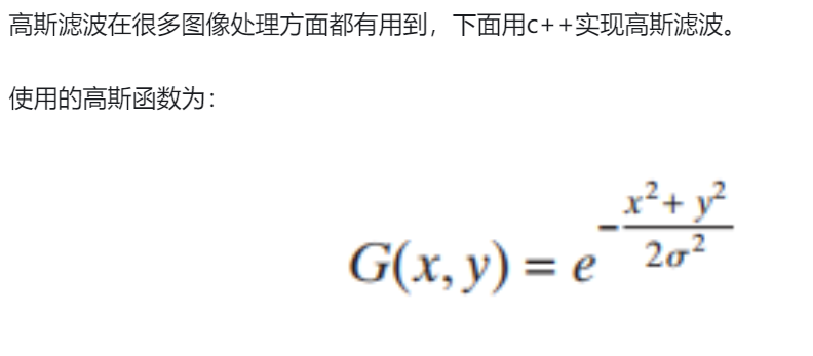
The Gaussian function is a bell-shaped curve, mathematically expressed as: G(x, y) = 1 / (2πσ^2) * e^-((x^2 + y^2) / (2σ^2))
Where (x, y) are the coordinates of the pixel, σ is the standard deviation of the Gaussian function, and G(x, y) is the Gaussian weight.
This Gaussian function determines the coefficients of the template; the closer to the center of the template, the larger the coefficient; the farther away, the smaller the coefficient. Therefore, compared to the mean filter, the Gaussian filter has a smaller degree of blurring on the image.
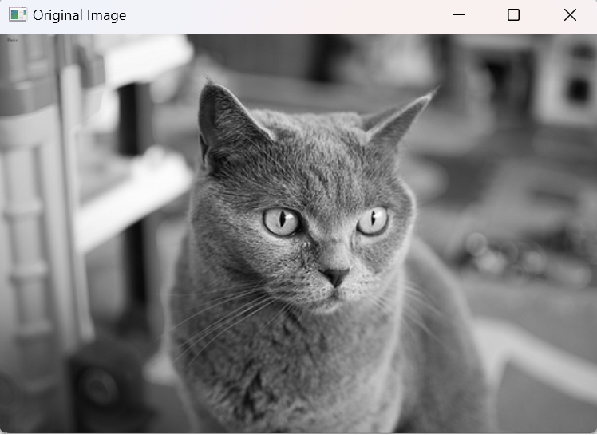
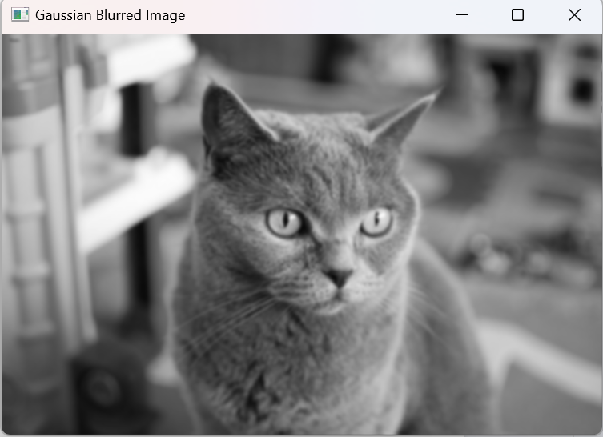
OpenCV Call
#include <opencv2/opencv.hpp>
#include <iostream>
usingnamespace cv;
usingnamespacestd;

int main() {
    // Read image
    Mat image = imread("cat.jpg");
    if (image.empty()) {
        std::cerr << "Unable to load image" << std::endl;
        return-1;
    }

    cvtColor(image, image, COLOR_BGR2GRAY);  // Convert to grayscale

    Mat gaussianFilteredImage;
    // Kernel needs to be odd  sigmaX and sigmaY parameters default to 0 (automatically calculated)  borderType parameter default value is cv::BORDER_DEFAULT, zero padding
    // sigmaX and sigmaY will be set to half the kernel size minus 1, then divided by 2. That is, if the kernel size is (5, 5), then sigmaX and sigmaY will be calculated as 1.40625 (because (5 - 1) / 2 / 2 = 1.40625)
    //GaussianBlur(image, gaussianFilteredImage, Size(29, 29), 0, 0, BORDER_DEFAULT);  // The larger the kernel, the larger the standard deviation, the more blurred
    GaussianBlur(image, gaussianFilteredImage, Size(5, 5), 0 ,0);

    // Display original image and filtered image
    imshow("Original Image", image);
    imshow("Gaussian Blurred Image", gaussianFilteredImage);

    // Wait for key press
    waitKey(0);

    return0;
}
Generating Gaussian Distribution with rng.fill
#include<iostream>
#include<opencv2/opencv.hpp>
usingnamespace cv;
usingnamespacestd;

// Gaussian noise
void Gaussian_noise(Mat image) {

    imshow("orign", image);// Display original image
    Mat gray;
    cvtColor(image, gray, COLOR_BGR2GRAY);
    Mat image_noise = Mat::zeros(image.rows, image.cols, image.type());
    Mat gray_noise = Mat::zeros(gray.rows, gray.cols, gray.type());

    imshow("gray", gray);// Display grayscale image

    RNG rng;// Create an RNG class
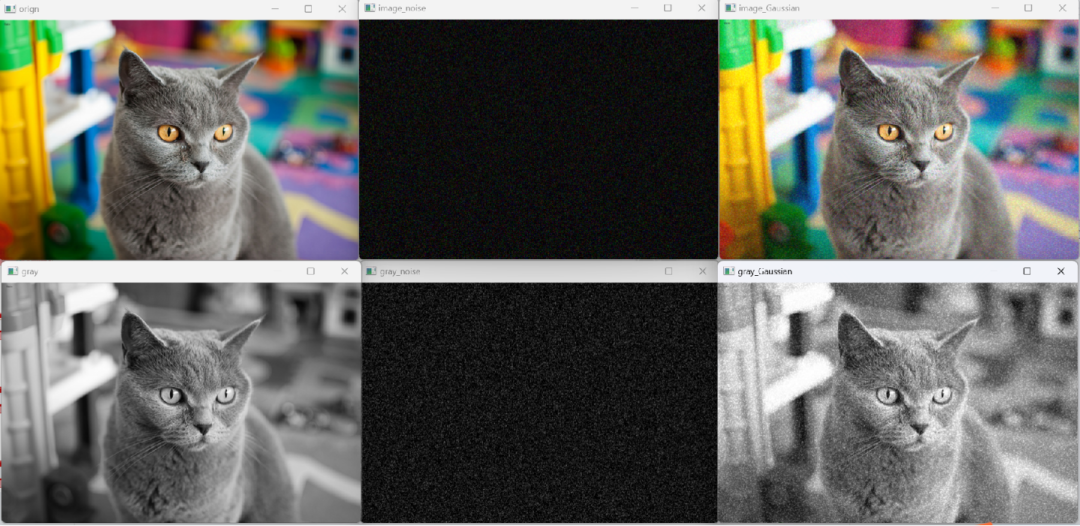
rng.fill(image_noise, RNG::NORMAL, 10, 20);// Generate three-channel Gaussian distributed random numbers  RNG::NORMAL may be an enumeration value indicating the type of random number distribution to generate, here it is normal distribution (Gaussian distribution) with mean 10 and standard deviation 20
    rng.fill(gray_noise, RNG::NORMAL, 15, 30);

    imshow("image_noise", image_noise);// Three-channel Gaussian noise
    imshow("gray_noise", gray_noise);// Single-channel Gaussian noise

    image = image + image_noise;// Add Gaussian noise to the color image
    gray = gray + gray_noise;// Add Gaussian noise to the grayscale image

    // Display image with added Gaussian noise
    imshow("image_Gaussian", image);
    imshow("gray_Gaussian", gray);

    waitKey(0);
}

int main() {

    Mat image;
    image = imread("cat.jpg");  // Read image;
    Gaussian_noise(image);

    return0;
}
Principle of Gaussian Filtering
// C++ implementation of Gaussian filtering
#include<iostream>
#include<opencv2/opencv.hpp>
usingnamespace cv;
usingnamespacestd;
// 1 Gaussian filtering
void Gaussfilter_ly(Mat input_image, Mat& output_image, int Gauss_size, double Sigma)
{
// Ensure Gaussian kernel size is an odd number greater than or equal to 3
if (Gauss_size < 3) Gauss_size = 3;
else Gauss_size = (int)(Gauss_size / 2) * 2 + 1;
// Generate Gaussian convolution kernel
double** Gausskernel = newdouble* [Gauss_size];
for (int i = 0; i < Gauss_size; i++)
{
Gausskernel[i] = newdouble[Gauss_size];
}
int center = Gauss_size / 2;
double sum = 0;
for (int i = 0; i < Gauss_size; i++)
{
for (int j = 0; j < Gauss_size; j++)
{
Gausskernel[i][j] = exp(-((i - center) * (i - center) + (j - center) * (j - center)) / (2 * Sigma * Sigma));
sum += Gausskernel[i][j];
}
}
// Normalize Gaussian convolution kernel
double sum1 = 1 / sum;
for (int i = 0; i < Gauss_size; i++)
{
for (int j = 0; j < Gauss_size; j++)
{
Gausskernel[i][j] *= sum1;
}
}
// Filtering
Mat tem_image = input_image.clone();
int rows = input_image.rows - center;
int cols = input_image.cols - center;
for (int i = center; i < rows; i++)
{
for (int j = center; j < cols; j++)
{
double sum = 0;
for (int m = -center; m <= center; m++)
{
for (int n = -center; n <= center; n++)
{
sum += Gausskernel[center + m][center + n] * input_image.at<uchar>(i + m, j + n);
}
}
tem_image.at<uchar>(i, j) = static_cast<uchar>(sum);
}
}
output_image = tem_image;
// Free memory
for (int i =0; i < Gauss_size; i++) delete[] Gausskernel[i];
delete[] Gausskernel;
}
int main() {
// Read image
Mat image = imread("cat.jpg");
if (image.empty()) {
std::cerr << "Unable to load image" << std::endl;
return-1;
}
cvtColor(image, image, COLOR_BGR2GRAY); // Convert to grayscale
Mat gaussianFilteredImage;
int Gauss_size = 5;
double Sigma = 1.5;
Gaussfilter_ly(image, gaussianFilteredImage, Gauss_size , Sigma);
// Display original image and filtered image
imshow("Original Image", image);
imshow("Gaussian Blurred Image", gaussianFilteredImage);
// Wait for key press
waitKey(0);
return0;
}