Click the blue Follow us
 C++ Basics 010 – Loop Control
 Loop Control: continue/break
In C++,<span><span>continue</span></span> and <span><span>break</span></span> are two keywords used to control the execution of loops. They are used in the loop body to change the flow of execution.
01
break: Directly “exit the current loop”
✦Function
When encountering break in a loop (for, while, do-while), it immediately terminates the current loop and continues executing the subsequent code outside the loop (the remaining statements in the loop are not executed, and the entire loop ends directly).
✦Applicable Scenarios
① End the loop early after finding the target value (for example, “stop when the first even number is found”);
② Force exit the loop when a certain condition is met (for example, “stop calculating when a negative number is input”).
Example: Count from 1 to 10, stop at 5
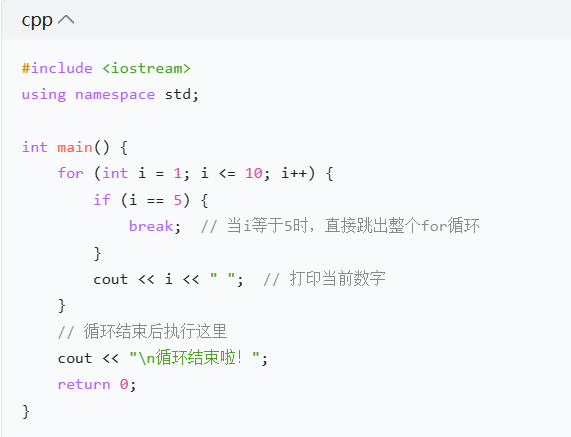
Output Result:
<span><span>1 2 3 4</span></span><span><span>Loop ended!</span></span>Explanation:When<span><span>i=5</span></span>, <span><span>break</span></span> is triggered, the entire for loop terminates directly, so 5 to 10 will not be printed.02continue: “skip the remaining part of the current loop and directly enter the next loop”
✦Function
When encountering <span><span>continue</span></span> in a loop, it will skip the remaining statements in the current loop and directly enter the next loop (the loop does not terminate, it just skips the subsequent code of the current round).
✦Applicable Scenarios
① Filter out unnecessary data (for example, “only print odd numbers, skip even numbers”);
② When a certain condition is met, do not execute the current round’s operation, and directly start the next round.
Example: Print odd numbers from 1 to 10 (skip even numbers)
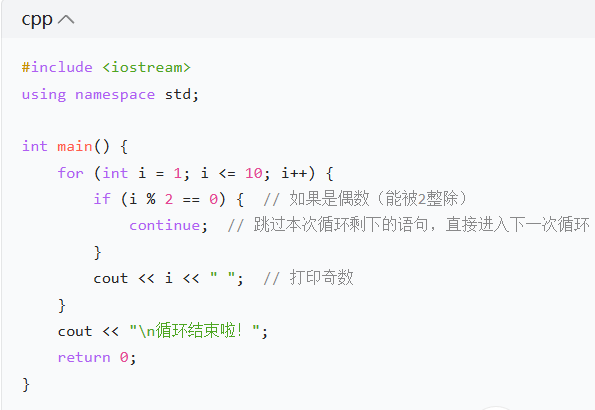
Output Result:
<span><span>1 3 5 7 9</span></span><span><span>Loop ended!</span></span>Explanation:When<span><span>i</span></span> is even (2, 4, 6, 8, 10), <span><span>continue</span></span> is triggered, skipping the <span><span>cout</span></span> statement, directly entering the next loop (<span><span>i</span></span> increments and continues checking), so only odd numbers are printed.03The core difference between break and continue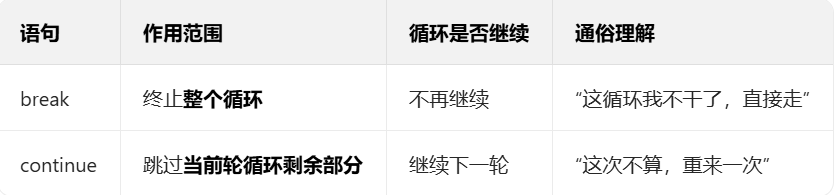 04Small Exercise (to deepen understanding)
① Use a while loop to implement: Start accumulating from 1, stop when the sum exceeds 20, and output the total. (Tip: use break)
② Use a for loop to implement: Print numbers from 1 to 20 that are not divisible by 3. (Tip: use continue)
 Youth Programming StudioWeChat ID: yy18337897171
Concern for Children’s Growth
Cultivating Innovative Abilities
 C++ Basics 001 [Notes Version]C++ Basics 002 [Notes Version]C++ Basics 003 [Notes Version – Summary of Operators]C++ Basics 004 [Notes Version – Common Data Types]C++ Basics 005 [Notes] Common Mathematical Library FunctionsC++ Basics 006 [Notes Version – Three Major Structures]C++ Basics 007 [Notes Version – Data Type Conversion]C++ Basics 008 [Notes Version – Nested Loops]C++ Basics 009 [Notes Version – Variable Assignment and Value Swapping]