“Assembly Language” 3rd Edition by Wang Shuang
Chapter 4: The First Program (Page 94)
Experiment 3: Programming, Compiling, Linking, and Debugging
(1) Save the following program as t1.asm and generate the executable file t1.exe.
assume cs:codeseg
codeseg segment
        mov ax, 2000H
        mov ss, ax
        mov sp, 0
        add sp, 10
        pop ax
        pop bx
        push ax
        push bx
        pop ax
        pop bx
        mov ax, 4c00H
        int 21H
codeseg ends
end
(2) Use Debug to trace the execution of t1.exe, writing down the contents of the relevant registers and the stack top after each step of execution.
(3) The first two bytes of the PSP are CD 20. Use Debug to load t1.exe and check the contents of the PSP.
==================
The experimental process is as follows:
(1) Edit the t1.asm file, write the above code (programming), then compile and link to generate the t1.exe file as follows:
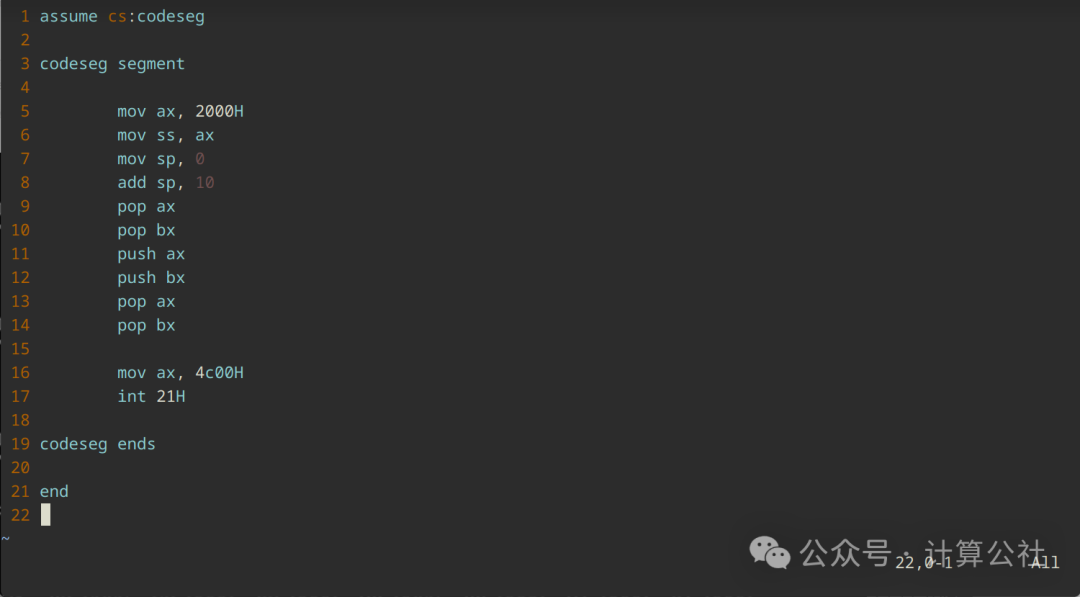
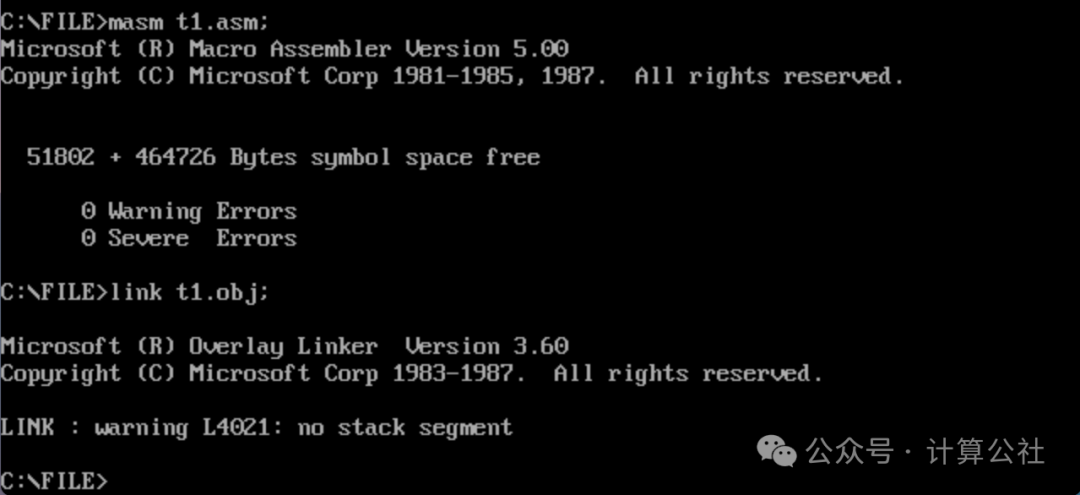
(2) Use Debug to trace the execution of t1.exe as follows:
After loading t1.exe with debug, first check the initial state of the registers, as shown in the figure below:

Based on the initial values of the registers, consider: what is the starting address of the program in memory? How are the values of CX, DS, and CS obtained? What is the relationship between CS and DS?
Then use the U command to disassemble and view the instructions, machine code, and instruction addresses.
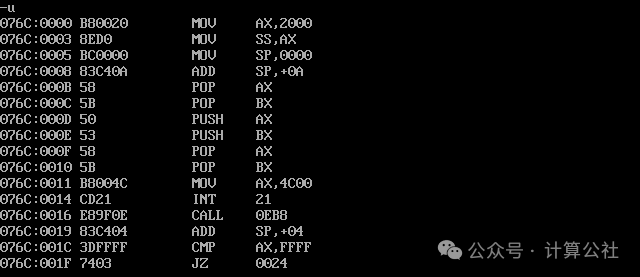
The code ranges from 076C:0 to 076C:15, totaling 22 bytes (16H, note that the preceding 0 and 15 are hexadecimal numbers).
Use the t command to start single-step execution:
After executing mov ax, 2000H, AX changes from FFFF to 2000H. The stack top ss:sp address is 076B:0, value is 0000.
After executing mov ss, ax, SS changes from 076B to 2000H, and mov sp, 0 is executed immediately after, SP remains 0. The stack top ss:sp address is 2000:0, value is 0000.
After executing add sp, 10, SP changes from 0000 to 000AH, note that the 10 in the code does not have an H suffix, indicating it is a decimal number, while Debug displays in hexadecimal, so it shows as 0A. The stack top ss:sp address is 2000:a, value is 0000.
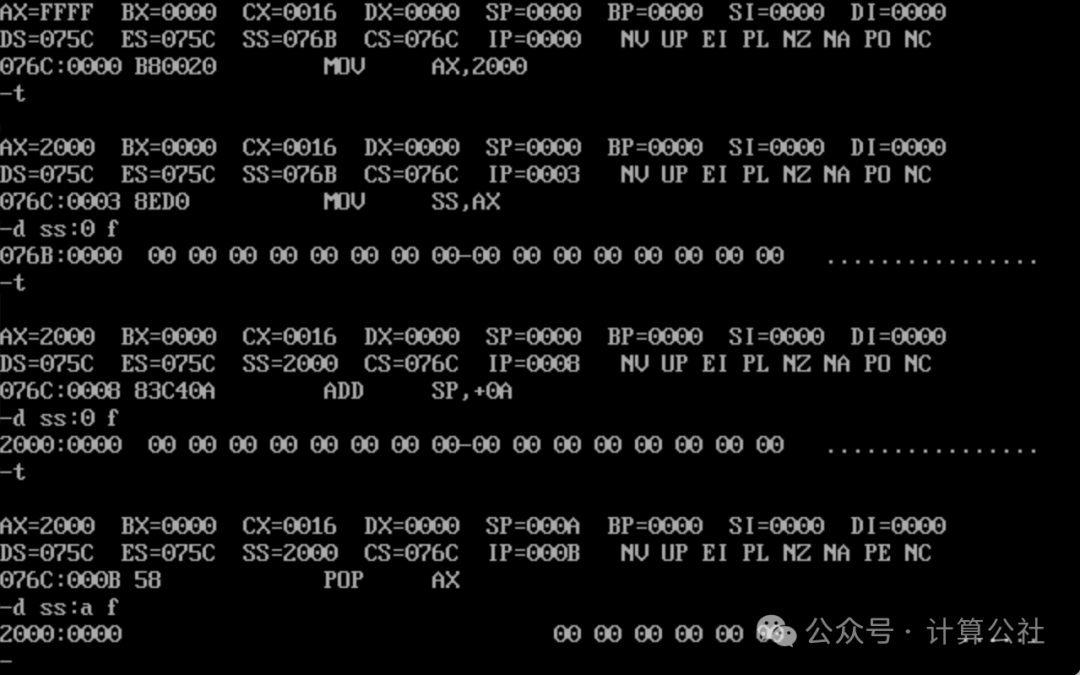
When executing pop ax, since the current SS:SP is 2000:000A, it will pop the two bytes from this memory unit into the ax register. First, check the data at 2000:000A: it is 0000, and the data at 2000:000C is also 0000.
After executing pop ax, AX changes from 2000H to 0000, SP changes to 000C (000A+2=000C). The stack top ss:sp address is 2000:c, value is 0000.
After executing pop bx, BX remains 0000, SP changes to 000E (000C+2=000E). The stack top ss:sp address is 2000:e, value is 0000.
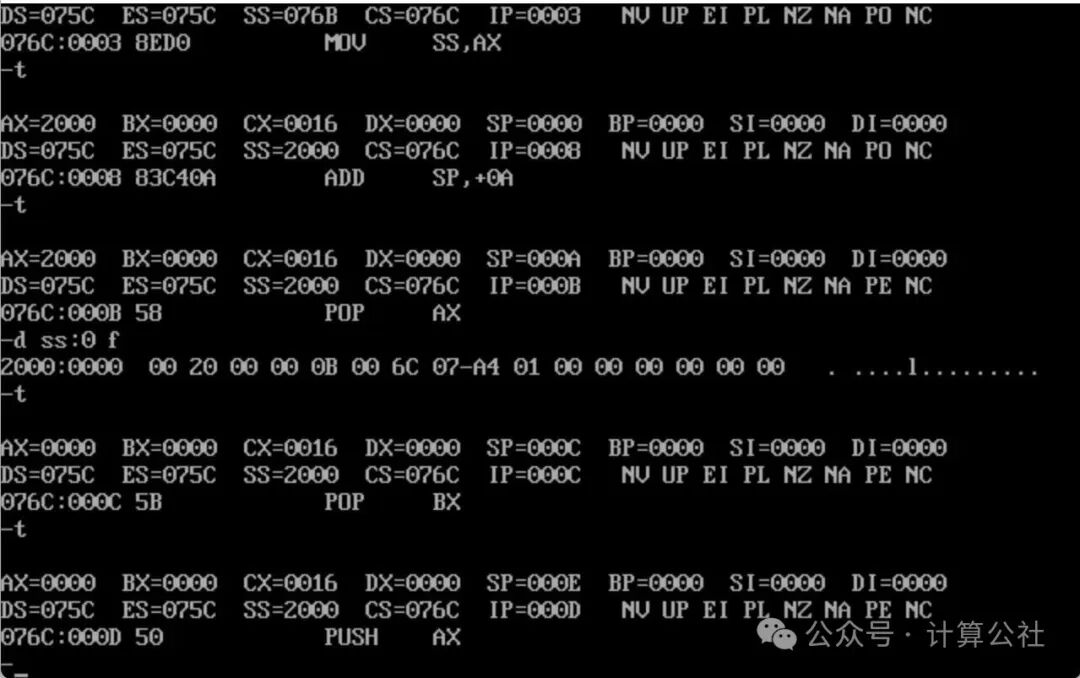
Continue single-step execution, but before executing push ax, let’s check the contents of the stack space, as shown in the figure below.
Before executing pop ax, CS:IP is 076C:000B, SP=000A. Using the d command, we see that the six bytes before 2000:000A are: 0B 00 6C 07 A4 01;
Before executing push ax, CS:IP is 076C:000D, SP=000E. Using the d command, we see that the six bytes before 2000:000E are: 0D 00 6C 07 A4 01;
We can also refer back to the last question of Experiment 2 to see the pattern of stack content changes during interrupt execution.
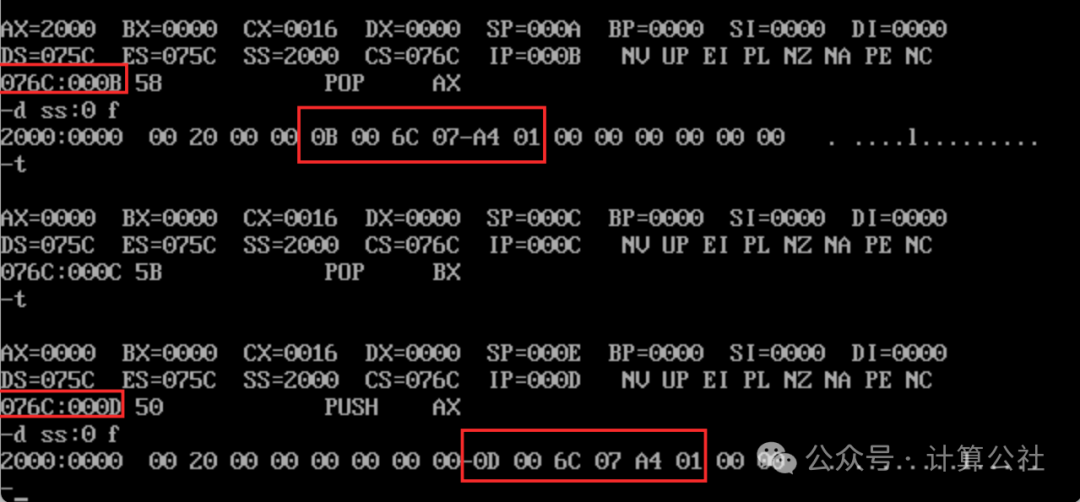
After executing push ax, SP changes to 000C (000E-2=000C), the top of the stack at 2000:000C changes to 0000 (the value of ax). Let’s check the stack space content, the six bytes before 2000:000C change to 0E 00 6C 07 A4 01. As shown in the figure below:
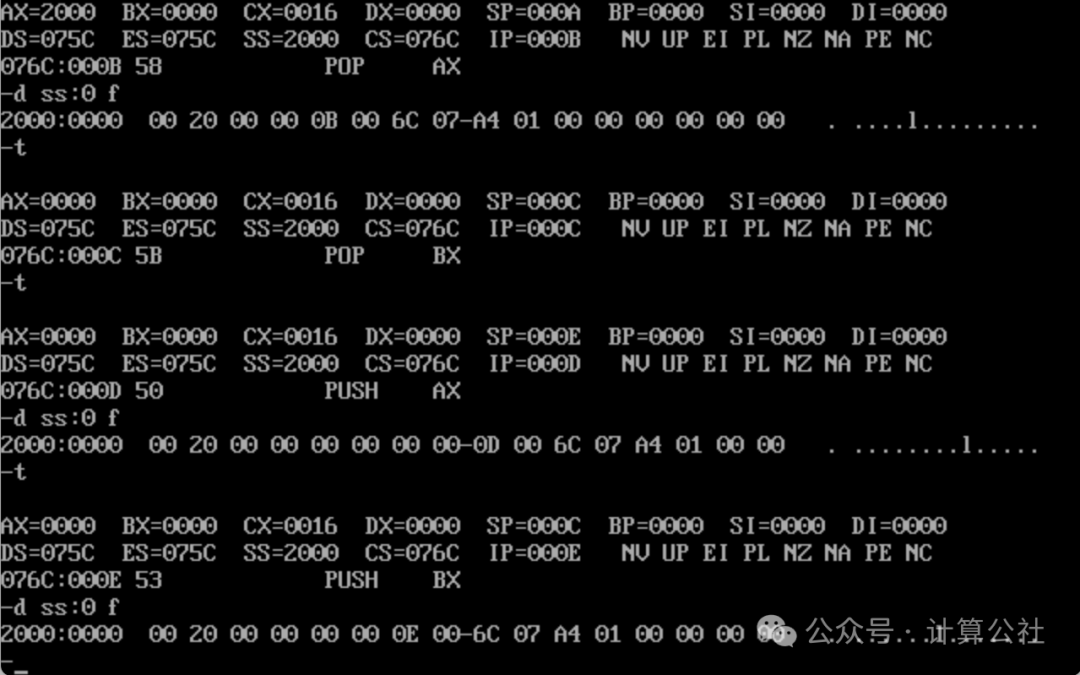
After executing push bx, SP changes to 000A (000C-2=000A), the top of the stack at 2000:000A changes to 0000 (the value of bx). Let’s check the stack space content, the six bytes before 2000:000A change to 0F 00 6C 07 A4 01. As shown in the figure below:
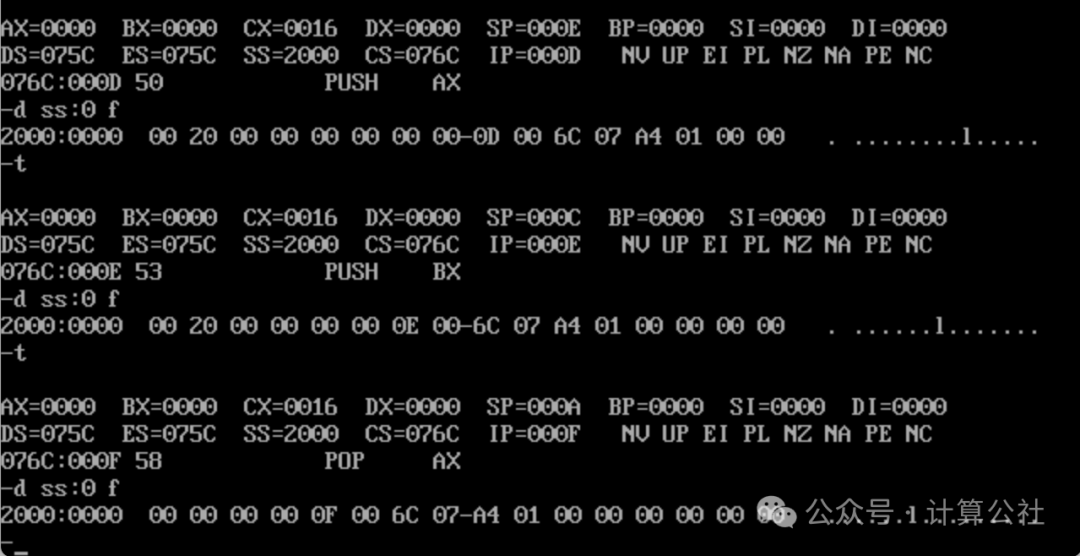
After executing pop ax, AX remains 0000, SP changes to 000C (000A+2=000C), the top of the stack at 2000:000C, value is 0000.
After executing pop bx, BX remains 0000, SP changes to 000E (000C+2=000E), the top of the stack at 2000:000E, value is 0000。
Using the d command, we see that the six bytes before 2000:000E are: 11 00 6C 07 A4 01;
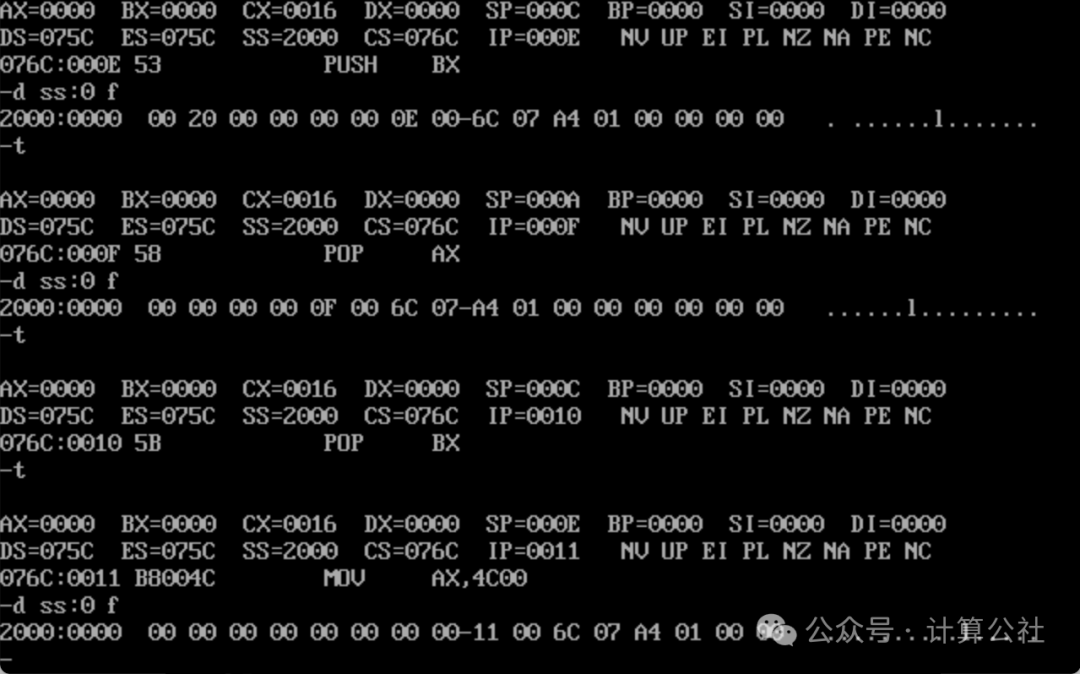
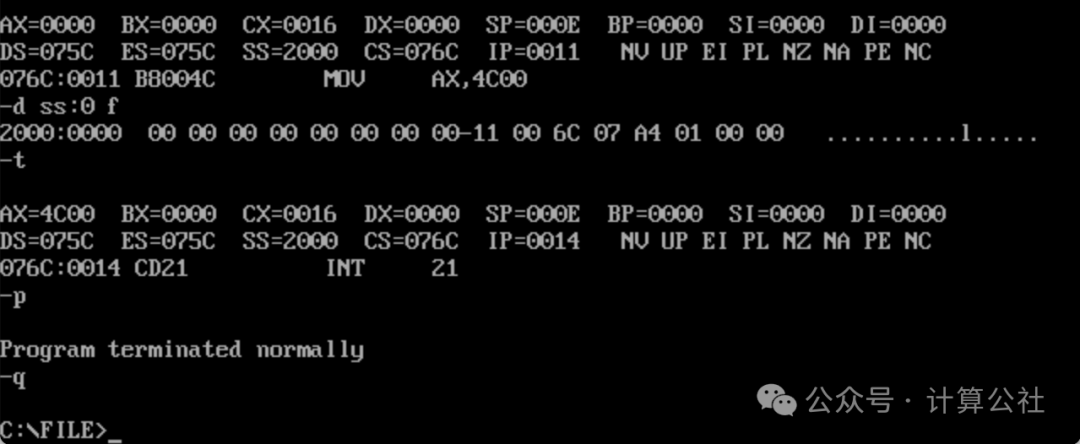
Continue with the t command for single-step execution, after executing mov ax, 4c00, AX=4C00, the top of the stack remains 2000:000E, value is 0000.
When executing int 21H, use the p command to let the program exit normally.
Finally, use the q command to exit Debug tracing. As shown in the figure below:
(3) Check the contents of the PSP
Since the contents of the PSP start from DS:0 and have a length of 256 bytes.
We execute the d command twice to view the complete contents of the PSP, as shown in the figure below:
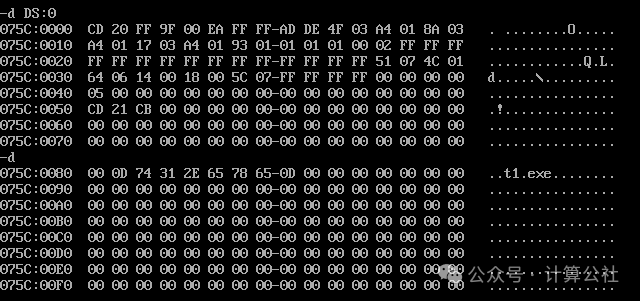
The first two bytes are CD 20. In line 075C:0080, the program name t1.exe is recorded.