Method for Building a Custom PPT Generation Agent with Claude Code
This method primarily addresses a long-standing issue that many people face: the AI PPT tools available on the market are mostly template-based, resulting in uniformity and lack of personality. The problem with traditional AI PPT tools is the absence of professional design thinking and production processes. Typically, they generate content in one step, making deep customization impossible, leading to PPTs that are either content-void or poorly designed, which makes it difficult to meet our customization needs.
Therefore, I have built a professional PPT design agent using Claude Code. It possesses genuine designer thinking, first collecting requirements, formulating content outlines, planning storyboard schemes, and only then generating code. The entire process is strictly executed according to professional procedures, with each step available for manual confirmation and adjustment.
The technical core is the application of “context engineering”: using a thinking engine for professional analysis and decision-making, the tool system reads documents and searches for information, and an external memory mechanism saves the complete design scheme. The most critical aspect is a complete visual design language, including a color system, layout specifications, and animation strategies, ensuring consistent output quality.
The agent intelligently plans the number of pages and layouts based on content complexity, supporting various presentation forms such as data visualization, flowcharts, and comparative analysis. The generated presentations are based on web technologies, supporting animations and PDF exports, making them particularly suitable for screen recording production.
This method is suitable for frequent users such as students, white-collar workers, and self-media creators who have high-frequency and speed requirements for making PPTs, harnessing AI creativity with strict rules and processes, allowing it to work like a professional designer, fundamentally solving the problem of AI PPT tools being “usable but not good enough”.
Core Functional Modules
/Requirement Analysis
The agent collects presentation requirements through structured inquiries, including key information such as content depth, audience scenarios, and style preferences. It supports direct uploads of PDF, Word, and other documents for content analysis and actively uses web_search to supplement professional background information. Through content complexity assessment and information hierarchy analysis, it provides accurate foundational data for subsequent storyboard planning.
/Intelligent Storyboarding
Based on content characteristics and complexity, the agent intelligently selects the most suitable layout type: ChartFocus for data presentation, Grid layout for concept explanation, Flow layout for process display, etc. The built-in decision tree automatically matches layouts based on time dimensions, composition relationships, comparative analysis, and strictly controls the content density of each page, automatically splitting when overloaded.
/Visual System
Utilizing a CSS variable system to achieve unified visual specifications, including Dark+Grid aesthetic technology, 16:9 aspect ratio, and strict spatial allocation mechanisms. All design elements are controlled parametrically, allowing theme colors, fonts, spacing, etc., to be adjusted with a single modification of variables, ensuring visual consistency across the entire PPT.
/Animation Implementation
Keynote-level animations, integrated with the GSAP animation library, achieve professional entrance effects: titles use Dissolve, cards use Push/Zoom, and data uses Counter animations. Strictly arranged according to the timeline, supporting Kinetic Typography effects at the word, phrase, and line levels. All animations are optimized for 60fps, ensuring a smooth presentation experience.
/External Memory
Using an independent Slides.md file to save the complete storyboard scheme, serving as the agent’s “external brain”. Users can directly edit this file to adjust any details, and the agent will accurately read and generate corresponding code. This mechanism makes the complex multi-step creative process controllable and iterative.
/Deliverables
Outputs complete HTML+CSS+GSAP code, supporting direct preview in browsers. Built-in PDF export functionality can generate PDF files in 16:9 landscape format. Particularly suitable for screen recording production and online presentation, offering more flexibility and modernity compared to traditional PPT formats.
Note: This method is based on a strict design process and a parameterized visual system, suitable for scenarios with high requirements for PPT design quality. The generated effect mainly depends on the quality and completeness of the input content, so it is recommended to prepare detailed materials and clear requirement descriptions. The technical implementation is based on web standards, ensuring good compatibility in modern browsers.
Configuration Methods
Method 1: Claude Code Version (Recommended)
Please follow the operational steps in the video above to create a professional PPT design agent using Claude Code. After configuration, your project should include the following content:
project/├── CLAUDE.md # PPT designer system prompt (manually created)├── Slides.md # Storyboard scheme file (generated at runtime)├── README.md # Project documentation (generated at runtime)└── presentation.html # Final PPT code (generated at runtime)Configuration Steps:
-
Start Claude Code – enter ‘claude’ in the terminal to start Claude Code
-
Create system prompt – manually create the CLAUDE.md file in the project root directory, copying the complete PPT designer prompt content
-
Start a conversation – directly converse with the agent, which will automatically enter the role of PPT designer and begin the requirement collection process
-
Upload materials – supports uploading content materials in PDF, Word, text, and other formats, and the agent will automatically parse them
Important Notes:
-
CLAUDE.md must be placed in the project root directory, and the file name case must strictly follow the requirements, as this is the key file for Claude Code to recognize the agent’s role
-
The system prompt must be copied in full, including role positioning, workflow, visual design language, etc., to ensure the agent understands its professional responsibilities
-
Material preparation – it is recommended to prepare detailed content materials in advance, including core viewpoints, data, charts, etc., as the quality of input directly affects output quality
-
Process instructions – use /storyboard and /development commands to control the workflow, do not skip intermediate steps
-
The agent will automatically use the web_search tool to supplement information, so ensure a stable internet connection
Method 2: Direct Use via Web Version
If you do not want to use Claude Code, you can also use it directly on AI platforms like ChatGPT, Gemini, Claude, etc. I have specifically adjusted the system prompt for the web version, removing some features unique to Claude Code while maintaining the core PPT design capabilities.
In the “Sneak Peek” section below, there is a complete demo video demonstration, and you can directly copy the adjusted system prompt to use on any AI platform. The web version also supports document uploads and intelligent analysis, although there are slight differences in file management and code generation.
This standardized configuration ensures that the agent can consistently output professional-level PPTs, and any configuration errors may affect the final result. Remember, high-quality PPTs require detailed content input and clear requirement descriptions.
👀 Sneak Peek
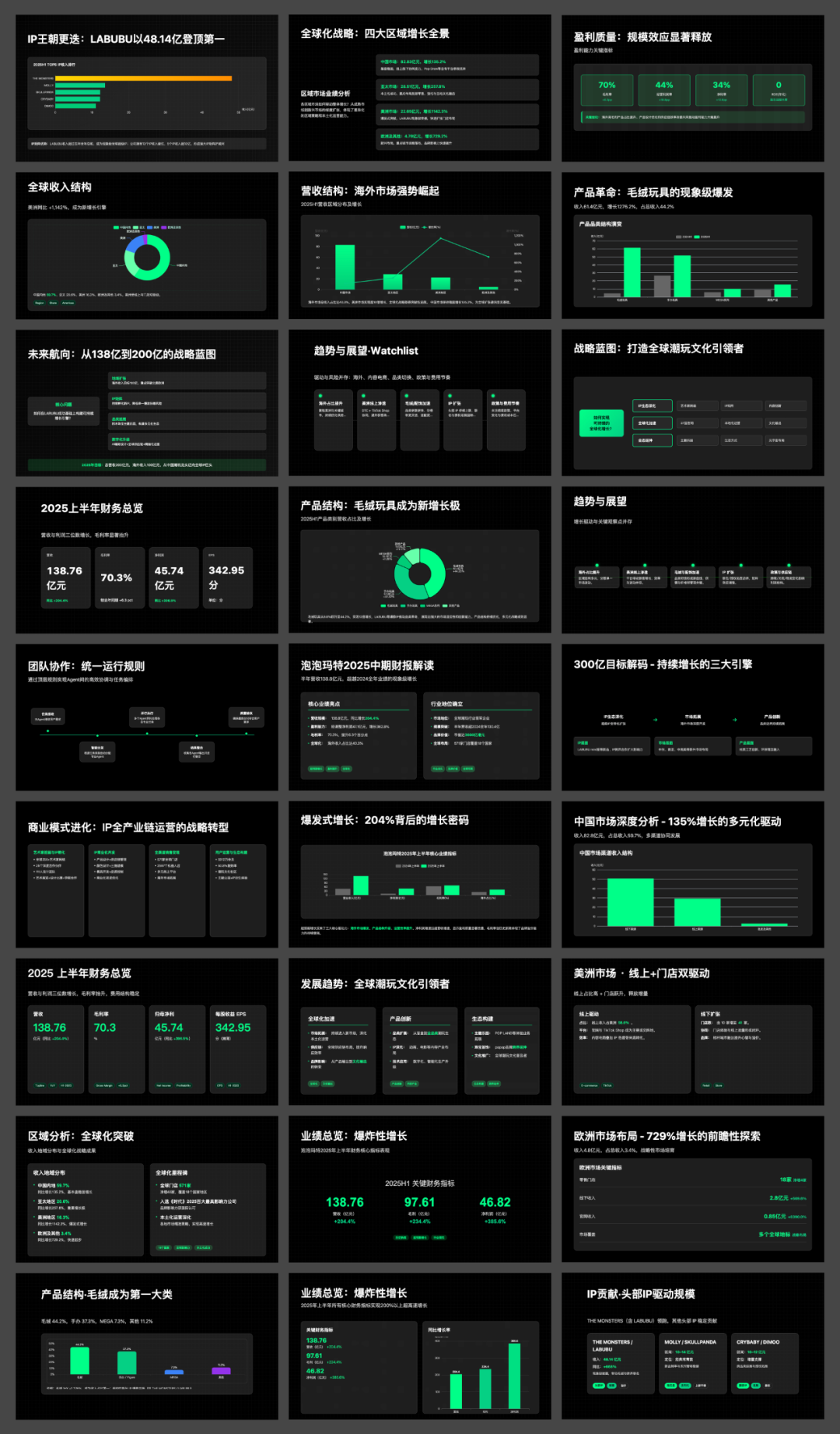
Using this PPT generation agent method, we generated a presentation for the Bubble Mart 2025 mid-term financial report analysis. The entire process showcased the complete workflow from uploading the PDF financial report file to generating a professional-level PPT, with the agent demonstrating complete design thinking in an independent workflow, including requirement analysis, content planning, storyboard design, and code implementation, with each link available for manual confirmation and adjustment to ensure the final effect meets expectations.
This presentation includes key data displays from the core financial summary, chart comparisons for industry position analysis, and layout planning for globalization strategies. Each page adopts a unified Dark+Grid aesthetic technology, combined with dynamic Keynote-level animations, presenting a professional and modern visual effect. The agent also automatically searched for industry background information on Bubble Mart, ensuring the professionalism and completeness of the content.
Important Notes:
-
The large model is the cornerstone. The core of this method is context engineering and system prompt design, which can theoretically be used on any large model capable of code generation and document processing. Whether it is Claude, GPT, Gemini, or other models, the key lies in the quality of the prompts and the design of the workflow. We have tested multiple models and achieved good results.
-
Content quality determines output effect. The agent has strong professional capabilities, but detailed input materials are required. It is recommended to prepare complete content materials, including core viewpoints, key data, chart materials, etc. The more detailed the input, the higher the quality of the generated PPT.
-
Strictly follow the process. The four-step process of “requirement collection → content outline → storyboard scheme → generate presentation” must be executed, using /storyboard and /development commands to control progress, without skipping intermediate links.
-
Make good use of the external memory mechanism. The Slides.md file is the core of the entire work, and you can directly edit this file to adjust any details, and the agent will accurately read and update the code. This makes the complex design process controllable and iterative.
-
Good browser compatibility. The generated code is based on modern web standards and runs normally in mainstream browsers such as Chrome, Safari, and Firefox, with animation smoothness reaching 60fps.
-
Suitable for various usage scenarios. Particularly suitable for business reports, academic presentations, product launches, training, and teaching scenarios that require professional design. The web format also gives it an advantage in screen recording production and online sharing.
-
Two configuration methods are available. It is recommended to use the Claude Code version for complete functionality, or you can use the web version directly on major AI platforms. The web version has the same functionality, with slight differences in file management.
-
Start with simple content. If you are using it for the first time, it is recommended to test with relatively simple content to familiarize yourself with the entire process before handling complex business presentations.
-
Set reasonable expectations for the generated effect. The agent can produce professional-level design quality, but you still need to provide accurate requirement descriptions and complete content materials. The final effect depends on the quality of the input and the clarity of the requirements.
👑 Get Complete MaterialsThe CLAUDE.md/system prompts shared in the video are paid content. Creating is not easy, and I hope you can support original work.Scan the QR code below to get the complete content: