Why Has Ansible Become an Essential Tool for Operations?
-
Agentless Architecture: Direct connection via SSH protocol, no need to pre-install clients on target machines
-
Declarative Syntax: Playbooks written in YAML, configuration is documentation
-
Modular Design: 2000+ built-in modules covering cloud management, networking, containers, and more
-
Idempotence Guarantee: Repeated execution does not change the final state
-
1. Prepare the Environment
Execute the following commands on 3 controlled endpoints:
| Host | IP | Login User | Group |
| cos701 | 10.168.2.51 | test | wheel |
| cos702 | 10.168.2.52 | test | wheel |
| cos703 | 10.168.2.53 | test | wheel |
1. Create user test
sudo useradd test
# 2. Set the password for user test to test
echo "test" | sudo passwd --stdin test
# 3. Add user test to the wheel group
sudo usermod -aG wheel test
# 4. Set no-password sudo for wheel group
#    Use sed command to directly modify /etc/sudoers file
sudo sed -i 's/# %wheel\s*ALL=(ALL)\s*NOPASSWD: ALL/%wheel        ALL=(ALL)       NOPASSWD: ALL/' /etc/sudoersecho "User test created, password set to test, added to wheel group, and no-password sudo for wheel group set."echo "Please be aware of security risks! Password 'test' is very insecure"
2. Quickly Set Up Ansible Environment
1. Install on Control Node
# Ubuntu/Debian
sudo apt update && sudo apt install ansible -y
# CentOS/RHEL
sudo yum install epel-release -ysudo yum install ansible -y
2. Configure SSH No-Password Login
ssh-keygen -t rsa
ssh-copy-id test@target-server
3. Verify Installation
ansible --version3. Ansible Configuration File (ansible.cfg)
-
Configuration File Path: The priority of Ansible configuration file paths is:
<span><span>ansible.cfg</span></span>in the current directory ><span><span>~/.ansible.cfg</span></span>in the user home directory ><span><span>/etc/ansible/ansible.cfg</span></span>. -
Common Configuration Items:
- Configuration of ansible.cfg is divided into ten sections:
[defaults] General configuration items[inventory] Configuration related to the host inventory[privilege_escalation] Configuration related to privilege escalation[paramiko_connection] Configuration related to using paramiko connections[ssh_connection] Configuration related to using openssh connections[persistent_connection] Configuration items for persistent connections[accelerate] Configuration related to acceleration mode[selinux] Configuration related to selinux[color] Configuration related to the color of ansible command output[diff] Whether to print diff (difference before and after changes) during execution
-
Example ansible.cfg File:
[defaults]# Define the default inventory file to use, currently using /etc/ansible/hosts, can modify to your desired file
inventory = /etc/ansible/inventory.yaml# When operating remote hosts, whether to input password during login, default is true. If using key authentication, set this to false
ask_pass = false# Which user identity to use when ansible operates remote hosts, default is root, for safety can use a normal user
remote_user = test
timeout = 10
log_path = ./ansible.log
[privilege_escalation]# Whether to escalate privileges
become = true# If using privilege escalation, how to escalate, default is sudo
become_method = sudo# Which user to escalate to, default is root
become_user = root# Whether privilege escalation requires a password, default is False
become_ask_pass = False
4. Configure Ansible Host Inventory
- Inventory File: Ansible manages managed hosts through the Inventory file, the default Inventory file path is
<span><span>/etc/ansible/hosts</span></span>. - Inventory File Format: The Inventory file can use either INI or YAML format, YAML format is recommended for easier organization and management.
- Host Grouping: Hosts can be grouped by function, environment, etc., for convenient batch management.
- Example Inventory File (YAML Format):
all:
  hosts:
    cos701:
      ansible_host: 10.168.2.51
      ansible_user: test
      ansible_ssh_private_key_file: ~/.ssh/id_rsa
    cos702:
      ansible_host: 10.168.2.52
      ansible_user: test
      ansible_ssh_private_key_file: ~/.ssh/id_rsa
    cos703:
      ansible_host: 10.168.2.53
      ansible_user: test
      ansible_ssh_private_key_file: ~/.ssh/id_rsa
  children:
    webservers:
      hosts:
        cos701:
    databaseservers:
      hosts:
        cos702:
        cos703:
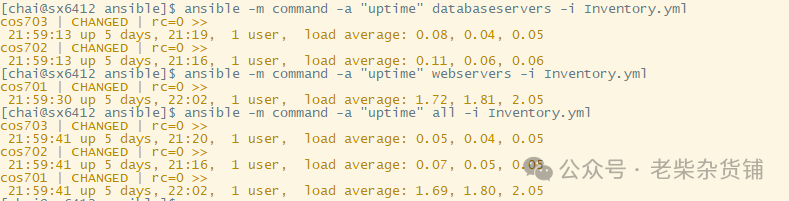
Test:
 5. Core Points in Writing Playbooks
-
YAML Syntax: Playbooks are written in YAML, with extensions
<span><span>.yaml</span></span>or<span><span>.yml</span></span>. -
Playbook Structure: A Playbook consists of one or more Plays, each Play defines operations on a group of hosts.
-
Core Elements of Playbooks:
<span><span>hosts</span></span>specifies the hosts or host groups that the Playbook affects (from the Inventory file).<span><span>tasks</span></span>defines the list of tasks to be executed by the Playbook, each task calls an Ansible module.<span><span>vars</span></span>defines variables used in the Playbook.<span><span>handlers</span></span>defines event handlers to execute tasks when specific events occur.<span><span>roles</span></span>introduces Ansible Roles for organizing and reusing Playbook code.-
Example Playbook (servers_setup.yaml):
- hosts: webservers
  become: true  # Use sudo for privilege escalation
  vars:
    web_package: nginx
  tasks:
    - name: Install web server package
      package:
        name: "{{ web_package }}"
        state: present
    - name: Start web server service
      service:
        name: "{{ web_package }}"
        state: started
        enabled: true
- hosts: databaseservers
  become: true
  vars:
    db_package: mariadb-server
  tasks:
    - name: Install database server package
      package:
        name: "{{ db_package }}"
        state: present
    - name: Start database server service
      service:
        name: "{{ db_package }}"
        state: started
        enabled: true
Common Modules: Ansible has a rich library of modules covering various common operational scenarios, such as:
<span><span>package</span></span>: Package management (installing, uninstalling, updating packages).<span><span>service</span></span>: Service management (starting, stopping, restarting, setting to start on boot).<span><span>copy</span></span>: File copying.<span><span>template</span></span>: Template file rendering.<span><span>user</span></span>: User management.<span><span>group</span></span>: User group management.<span><span>command</span></span>: Execute shell commands.<span><span>shell</span></span>: Execute shell commands (supports piping and redirection).<span><span>cron</span></span>: Scheduled task management.<span><span>firewalld</span></span>: Firewall management (firewalld).<span><span>iptables</span></span>: Firewall management (iptables).
Run Playbook:
- ansible-playbook command: Use
<span><span>ansible-playbook <playbook_file.yaml></span></span>command to run Playbook. - Common Options:
<span><span>-i <inventory_file></span></span>Specify the Inventory file path.<span><span>--check</span></span>Simulate run, does not actually execute any operations, used to check Playbook syntax and logic.<span><span>--diff</span></span>Show detailed information about configuration changes.<span><span>-v</span></span>or<span><span>-vvv</span></span>: Increase output verbosity for debugging.<span><span>--limit <host_pattern></span></span>Limit the scope of the Playbook.<span><span>--tags <tag_names></span></span>Only execute tasks with specified tags.<span><span>--skip-tags <tag_names></span></span>Skip tasks with specified tags.
Test Playbook:
ansible-playbook --check server_setup.yaml -i Inventory.yml 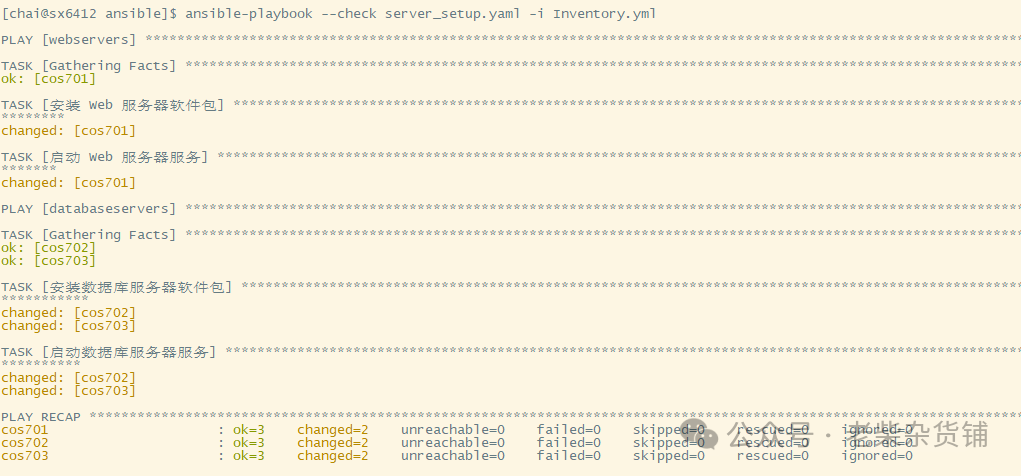
6. Common Module Practical Demonstration
1. File Management
- copy:
    src: /local/config.conf
    dest: /etc/app/
    owner: root
    mode: 0644
2. Service Management
- systemd:
    name: nginx
    state: reloaded
    daemon_reload: yes
3. Command Execution
- shell: /opt/scripts/health_check.sh register: result changed_when: "'ERROR' not in result.stdout"7. Enterprise Best Practices
-
Directory Structure Specification
production/
├── group_vars/
├── host_vars/
├── roles/
│   ├── nginx/
│   ├── mysql/
│   └── redis/
└── site.yml
1. Performance Optimization Guide
-
Enable SSH long connections:
<span><span>ansible.cfg</span></span>configuration<span><span>ssh_args</span></span> -
Use Mitogen plugin for acceleration
-
Asynchronous tasks + polling mechanism
2. Security Protection
-
Regularly rotate SSH keys
-
Use Vault encryption for sensitive variables
-
Restrict Playbook execution permissions
8. Debugging Tips
# Dry run mode check
ansible-playbook playbook.yml --check
# Detailed log output
ANSIBLE_DEBUG=1 ansible-playbook playbook.yml
# Single task debugging
ansible target -m setup  # Collect system information
Ansible, as a powerful automation operations tool, has flexible and diverse configurations and rich functionality. Mastering Ansible’s configuration guide can help you better utilize Ansible for automated operations, improve operational efficiency, reduce operational costs, and enhance the stability and reliability of IT infrastructure. We hope this article helps you quickly get started with Ansible and embark on your automated operations journey!