Failure is the mother of success, this article is a real debugging record of failure. Through this article, you will deeply experience several concepts in the Linux system:
-
Real-time processes and normal process scheduling strategies;
-
How the chaotic process priority is calculated in Linux;
-
Testing CPU affinity;
-
Program design for multi-processor (SMP) handling of real-time and normal processes;
-
The short circuit experience of ‘Dao Ge’ getting his head caught in a door;
Background Knowledge: Linux Scheduling Strategies
Regarding process scheduling strategies, different operating systems have different overall goals, so the scheduling algorithms vary.
This needs to be selected based on the type of process (CPU-intensive? IO-intensive?), priority, and other factors.
For the Linux x86 platform, the generally adopted algorithm is CFS: Completely Fair Scheduler.
It is called completely fair because the operating system dynamically calculates based on the CPU usage ratio of each thread, hoping that each process can equally use the CPU resource.
When we create a thread, the default scheduling algorithm is SCHED_OTHER, with a default priority of 0.
PS: In the Linux operating system, the kernel objects of threads are very similar to those of processes (which are just some struct variables), so threads can be considered lightweight processes.
In this article, threads can be considered equivalent to processes, and in some contexts, they may also be referred to as tasks, with different customary terms in different contexts.
It can be understood this way: if there are a total of N processes in the system, each process will get 1/N of the execution opportunity. After each process executes for a period of time, it will be swapped out for the next process to execute.
If the number N is too large, causing each process to only get a very short time at the beginning, and if task scheduling occurs at this moment, the system’s resources will be wasted on process context switching.
Therefore, the operating system introduces a minimum granularity, which guarantees each process a minimum execution time, called a time slice.
In addition to the SCHED_OTHER scheduling algorithm, the Linux system also supports two real-time scheduling strategies:
1. SCHED_FIFO: Schedules based on the priority of the process, once it preempts the CPU, it will keep running until it voluntarily gives up or is preempted by a higher-priority process;
2. SCHED_RR: Based on SCHED_FIFO, it adds the concept of time slices. When a process preempts the CPU, after running for a certain amount of time, the scheduler will put this process at the end of the current priority queue and choose another process of the same priority to execute;
This article aims to test the mixed situation of SCHED_FIFO and the normal SCHED_OTHER scheduling strategies.
Background Knowledge: Linux Thread Priority
In the Linux system, the management of priorities appears somewhat chaotic, first look at the following diagram:
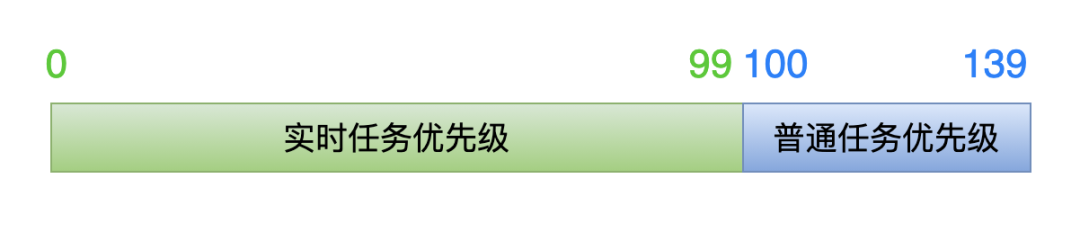
This diagram represents the priorities in the kernel, divided into two segments.
The first range of values 0-99 is for real-time tasks, and the second range 100-139 is for normal tasks.
The lower the value, the higher the priority of the task.
The lower the value, the higher the priority of the task.
The lower the value, the higher the priority of the task.
To emphasize again, the above priorities are viewed from the kernel perspective.
Now, the key point:
When we create a thread at the application layer, we set a priority value, which is from the application layer perspective.
However, the kernel does not directly use the value set at the application layer but calculates it through a certain formula to get the priority value used in the kernel (0 ~ 139).
1. For real-time tasks
When we create a thread, we can set the priority value like this (0 ~ 99):
struct sched_param param;
param.__sched_priority = xxx;
When the thread creation function enters the kernel layer, the kernel calculates the actual priority value using the following formula:
kernel priority = 100 - 1 - param.__sched_priority
If the value 0 is passed from the application layer, then in the kernel, the priority value is 99 (100 – 1 – 0 = 99), which is the lowest priority among all real-time tasks.
If the application layer passes the value 99, then in the kernel, the priority value is 0<span>(100 - 1 - 99 = 0</span><span>)</span>, which is the highest priority among all real-time tasks.
Therefore, from the perspective of the application layer, the larger the priority value passed, the higher the thread’s priority; the smaller the value, the lower the priority.
This is completelyopposite!
2. For normal tasks
Adjusting the priority of normal tasks is done through the nice value, and the kernel also has a formula to convert the nice value passed from the application layer into the kernel perspective priority value:
kernel priority = 100 + 20 + nice
The valid range for nice is: -20 ~ 19.
If the application layer sets the thread nice value to -20, then in the kernel, the priority value is 100<span>(100 + 20 + (-20) = 100</span><span>)</span>, which is the highest priority among all normal tasks.
If the application layer sets the thread nice value to 19, then in the kernel, the priority value is 139<span>(100 + 20 + 19 = 139</span><span>)</span>, which is the lowest priority among all normal tasks.
Therefore, from the perspective of the application layer, the smaller the priority value passed, the higher the thread’s priority; the larger the value, the lower the priority.
This is completelythe same!
The background knowledge has been clarified, and we can finally proceed with the code testing!
Test Code Explanation
Points to note:
#define _GNU_SOURCEmust be defined before#include <sched.h>;
#include <sched.h>must be included before#include <pthread.h>;This order ensures that the CPU_SET and CPU_ZERO functions can be successfully located when setting inherited CPU affinity later.
// filename: test.c
#define _GNU_SOURCE
#include <unistd.h>
#include <stdio.h>
#include <stdlib.h>
#include <sched.h>
#include <pthread.h>
// Function to print current thread information: What is the scheduling policy? What is the priority?
void get_thread_info(const int thread_index)
{
int policy;
struct sched_param param;
printf("\n====> thread_index = %d \n", thread_index);
pthread_getschedparam(pthread_self(), &policy, &param);
if (SCHED_OTHER == policy)
printf("thread_index %d: SCHED_OTHER \n", thread_index);
else if (SCHED_FIFO == policy)
printf("thread_index %d: SCHED_FIFO \n", thread_index);
else if (SCHED_RR == policy)
printf("thread_index %d: SCHED_RR \n", thread_index);
printf("thread_index %d: priority = %d \n", thread_index, param.sched_priority);
}
// Thread function,
void *thread_routine(void *args)
{
// Parameter is: thread index number. Four threads, index numbers from 1 to 4, used in print information.
int thread_index = *(int *)args;
// To ensure all threads are created, let the thread sleep for 1 second.
sleep(1);
// Print thread-related information: scheduling policy, priority.
get_thread_info(thread_index);
long num = 0;
for (int i = 0; i < 10; i++)
{
for (int j = 0; j < 5000000; j++)
{
// No meaning, purely simulating CPU intensive computation.
float f1 = ((i+1) * 345.45) * 12.3 * 45.6 / 78.9 / ((j+1) * 4567.89);
float f2 = (i+1) * 12.3 * 45.6 / 78.9 * (j+1);
float f3 = f1 / f2;
}
// Print count information to see which thread is executing
printf("thread_index %d: num = %ld \n", thread_index, num++);
}
// Thread execution ends
printf("thread_index %d: exit \n", thread_index);
return 0;
}
void main(void)
{
// A total of four threads created: 0 and 1 - real-time threads, 2 and 3 - normal threads (non-real-time)
int thread_num = 4;
// Assigned thread index numbers, will be passed to thread parameters
int index[4] = {1, 2, 3, 4};
// Used to save the IDs of the 4 threads
pthread_t ppid[4];
// Used to set the attributes of the 2 real-time threads: scheduling policy and priority
pthread_attr_t attr[2];
struct sched_param param[2];
// Real-time threads must be created by the root user
if (0 != getuid())
{
printf("Please run as root \n");
exit(0);
}
// Create 4 threads
for (int i = 0; i < thread_num; i++)
{
if (i <= 1) // The first 2 create real-time threads
{
// Initialize thread attributes
pthread_attr_init(&attr[i]);
// Set scheduling policy to: SCHED_FIFO
pthread_attr_setschedpolicy(&attr[i], SCHED_FIFO);
// Set priority to 51, 52.
param[i].__sched_priority = 51 + i;
pthread_attr_setschedparam(&attr[i], &param[i]);
// Set thread attributes: do not inherit the scheduling policy and priority of the main thread.
pthread_attr_setinheritsched(&attr[i], PTHREAD_EXPLICIT_SCHED);
// Create thread
pthread_create(&ppid[i], &attr[i],(void *)thread_routine, (void *)&index[i]);
}
else // The last two create normal threads
{
pthread_create(&ppid[i], 0, (void *)thread_routine, (void *)&index[i]);
}
}
// Wait for 4 threads to finish execution
for (int i = 0; i < 4; i++)
pthread_join(ppid[i], 0);
for (int i = 0; i < 2; i++)
pthread_attr_destroy(&attr[i]);
}
Compile the executable program with the command:
gcc -o test test.c -lpthread
Brain Dead Testing Begins
First, let’s talk about the expected results. If there are no expected results, then any other issues are not worth discussing.
There are a total of 4 threads:
Thread index 1 and 2: are real-time threads (scheduling policy is SCHED_FIFO, priority is 51, 52);
Thread index 3 and 4: are normal threads (scheduling policy is SCHED_OTHER, priority is 0);
My testing environment is: Ubuntu16.04, a virtual machine installed on Windows10.
I expect the results to be:
First, print the information for threads 1 and 2, as they are real-time tasks that need to be scheduled first;
Thread 1 has a priority of 51, which is lower than thread 2’s priority of 52, so thread 1 should only execute after thread 2 finishes;
Threads 3 and 4 are normal processes, and they should only start executing after threads 1 and 2 have finished, and threads 3 and 4 should execute alternately since they have the same scheduling policy and priority.
With high hopes, I tested it on my work computer, and the printed results are as follows:
====> thread_index = 4
thread_index 4: SCHED_OTHER
thread_index 4: priority = 0

====> thread_index = 1
thread_index 1: SCHED_FIFO
thread_index 1: priority = 51

====> thread_index = 2
thread_index 2: SCHED_FIFO
thread_index 2: priority = 52
thread_index 2: num = 0
thread_index 4: num = 0

====> thread_index = 3
thread_index 3: SCHED_OTHER
thread_index 3: priority = 0
thread_index 1: num = 0
thread_index 2: num = 1
thread_index 4: num = 1
thread_index 3: num = 0
thread_index 1: num = 1
thread_index 2: num = 2
thread_index 4: num = 2
thread_index 3: num = 1

No need to output the subsequent printed content, as the earlier output has already shown the problem.
The problem is obvious: Why are all 4 threads executing simultaneously?
Threads 1 and 2 should have been executed first, as they are real-time tasks!
Why is it like this? I’m completely confused, it does not meet expectations at all!
I couldn’t figure it out, so I had to seek help online! But I couldn’t find any valuable clues.
There was one piece of information related to the Linux system’s scheduling strategy, which I will record here.
In the Linux system, to prevent real-time tasks from completely monopolizing CPU resources, it allows normal tasks to have a small time gap to execute.
In the directory /proc/sys/kernel, there are 2 files that limit the time real-time tasks can occupy CPU:
sched_rt_runtime_us: default value 950000 sched_rt_period_us: default value 1000000
This means that within a period of 1000000 microseconds (1 second), real-time tasks occupy 950000 microseconds (0.95 seconds), leaving 0.05 seconds for normal tasks.
If there were no this limitation, if a certain SCHED_FIFO task had a particularly high priority and encountered a bug: it would continuously occupy CPU resources without giving up, we would not have any opportunity to kill that real-time task, as the system would be unable to schedule any other processes for execution.
However, with this limitation, we can utilize that 0.05 seconds of execution time to kill the buggy real-time task.
Back to the point: It is said that if real-time tasks are not prioritized for scheduling, this time limit can be removed. The method is:
sysctl -w kernel.sched_rt_runtime_us=-1
I did as instructed, but it still did not work!
Change to Another Virtual Machine for Testing
Could it be an issue with the computer environment? So, I put the test code on another virtual machine Ubuntu14.04 on my laptop for testing.
During compilation, there was a small issue that prompted an error:
error: ‘for’ loop initial declarations are only allowed in C99 mode
Just add the C99 standard to the compilation command:
gcc -o test test.c -lpthread -std=c99
Running the program printed the following information:
====> thread_index = 2

====> thread_index = 1
thread_index 1: SCHED_FIFO
thread_index 1: priority = 51
thread_index 2: SCHED_FIFO
thread_index 2: priority = 52
thread_index 1: num = 0
thread_index 2: num = 0
thread_index 2: num = 1
thread_index 1: num = 1
thread_index 2: num = 2
thread_index 1: num = 2
thread_index 2: num = 3
thread_index 1: num = 3
thread_index 2: num = 4
thread_index 1: num = 4
thread_index 2: num = 5
thread_index 1: num = 5
thread_index 2: num = 6
thread_index 1: num = 6
thread_index 2: num = 7
thread_index 1: num = 7
thread_index 2: num = 8
thread_index 1: num = 8
thread_index 2: num = 9
thread_index 2: exit

====> thread_index = 4
thread_index 4: SCHED_OTHER
thread_index 4: priority = 0
thread_index 1: num = 9
thread_index 1: exit

====> thread_index = 3
thread_index 3: SCHED_OTHER
thread_index 3: priority = 0
thread_index 3: num = 0
thread_index 4: num = 0
thread_index 3: num = 1
thread_index 4: num = 1
thread_index 3: num = 2
thread_index 4: num = 2
thread_index 3: num = 3
thread_index 4: num = 3
thread_index 3: num = 4
thread_index 4: num = 4
thread_index 3: num = 5
thread_index 4: num = 5
thread_index 3: num = 6
thread_index 4: num = 6
thread_index 3: num = 7
thread_index 4: num = 7
thread_index 3: num = 8
thread_index 4: num = 8
thread_index 3: num = 9
thread_index 3: exit
thread_index 4: num = 9
thread_index 4: exit
Threads 1 and 2 executed simultaneously, and after finishing, threads 3 and 4 executed.
However, this also does not meet expectations: thread 2 has a higher priority than thread 1, and should have executed first!
I didn’t know how to investigate this issue, so I had to consult the Linux kernel experts, who suggested checking the kernel version.
At that moment, I remembered that on the Ubuntu16.04 virtual machine, I had downgraded the kernel version for some reason.
Going down that path of investigation, I finally confirmed that it was not the kernel version difference that caused the problem.
Comparing Results, Finding Differences
So I had to look back at the differences in the printed information from both runs:
In the Ubuntu16.04 on my work computer: All 4 threads were scheduled and executed simultaneously, and the scheduling strategy and priority did not take effect;
In the Ubuntu14.04 on my laptop: Threads 1 and 2 (real-time tasks) were executed first, indicating that the scheduling strategy took effect, but the priority did not take effect;
Suddenly, CPU affinity popped into my mind!
Immediately, I felt that I had found the problem: this is most likely due to multi-core issues!
So I bound all 4 threads to CPU0, which is to set CPU affinity.
At the beginning of the thread entry function thread_routine, I added the following code:
cpu_set_t mask;
int cpus = sysconf(_SC_NPROCESSORS_CONF);
CPU_ZERO(&mask);
CPU_SET(0, &mask);
if (pthread_setaffinity_np(pthread_self(), sizeof(mask), &mask) < 0)
{
    printf("set thread affinity failed! \n");
}
Then I continued to verify in the Ubuntu16.04 virtual machine, and the printed information was perfect, completely met expectations:
====> thread_index = 1

====> thread_index = 2
thread_index 2: SCHED_FIFO
thread_index 2: priority = 52
thread_index 2: num = 0
…
thread_index 2: num = 9
thread_index 2: exit
thread_index 1: SCHED_FIFO
thread_index 1: priority = 51
thread_index 1: num = 0
…
thread_index 1: num = 9
thread_index 1: exit

====> thread_index = 3
thread_index 3: SCHED_OTHER
thread_index 3: priority = 0

====> thread_index = 4
thread_index 4: SCHED_OTHER
thread_index 4: priority = 0
thread_index 3: num = 0
thread_index 4: num = 0
…
thread_index 4: num = 8
thread_index 3: num = 8
thread_index 4: num = 9
thread_index 4: exit
thread_index 3: num = 9
thread_index 3: exit
Thus, the truth of the problem was unveiled: It was the multi-core processor that caused the issue!
Moreover, the CPU cores assigned during the installation of these two testing virtual machines were different, which led to the differences in the printed results.
The Truth is Revealed
Finally, let’s confirm the CPU information in these 2 virtual machines:
Ubuntu 16.04 CPU information:
$ cat /proc/cpuinfo
processor : 0
vendor_id : GenuineIntel
cpu family : 6
model  : 158
model name : Intel(R) Core(TM) i5-8400 CPU @ 2.80GHz
stepping : 10
cpu MHz  : 2807.996
cache size : 9216 KB
physical id : 0
siblings : 4
core id  : 0
cpu cores : 4
…other information

processor : 1
vendor_id : GenuineIntel
cpu family : 6
model  : 158
model name : Intel(R) Core(TM) i5-8400 CPU @ 2.80GHz
stepping : 10
cpu MHz  : 2807.996
cache size : 9216 KB
physical id : 0
siblings : 4
core id  : 1
cpu cores : 4
…other information

processor : 2
vendor_id : GenuineIntel
cpu family : 6
model  : 158
model name : Intel(R) Core(TM) i5-8400 CPU @ 2.80GHz
stepping : 10
cpu MHz  : 2807.996
cache size : 9216 KB
physical id : 0
siblings : 4
core id  : 2
cpu cores : 4
…other information

processor : 3
vendor_id : GenuineIntel
cpu family : 6
model  : 158
model name : Intel(R) Core(TM) i5-8400 CPU @ 2.80GHz
stepping : 10
cpu MHz  : 2807.996
cache size : 9216 KB
physical id : 0
siblings : 4
core id  : 3
cpu cores : 4
…other information
In this virtual machine, there are exactly 4 cores, and my test code created exactly 4 threads, so each core was assigned a thread, with none idle, executing simultaneously.
Therefore, the printed information shows that 4 threads were executed in parallel.
At this point, what scheduling strategy and what priority, all do not take effect! (To be precise: scheduling strategy and priority take effect on the CPU where the thread resides)
If I had created 10 threads in the test code from the beginning, I might have discovered the problem much sooner!
Now let’s look at the CPU information for the virtual machine Ubuntu14.04 on my laptop:
$ cat /proc/cpuinfo
processor	: 0
vendor_id	: GenuineIntel
cpu family	: 6
model		: 142
model name	: Intel(R) Core(TM) i5-7360U CPU @ 2.30GHz
stepping	: 9
microcode	: 0x9a
cpu MHz		: 2304.000
cache size	: 4096 KB
physical id	: 0
siblings	: 2
core id	: 0
cpu cores	: 2
…other information

processor	: 1
vendor_id	: GenuineIntel
cpu family	: 6
model		: 142
model name	: Intel(R) Core(TM) i5-7360U CPU @ 2.30GHz
stepping	: 9
microcode	: 0x9a
cpu MHz		: 2304.000
cache size	: 4096 KB
physical id	: 0
siblings	: 2
core id	: 1
cpu cores	: 2
…other information
In this virtual machine, there are 2 cores, so threads 1 and 2 (real-time tasks) were executed first (since there are 2 cores executing simultaneously, the priority of these 2 tasks is not very significant), and only after they finished did threads 3 and 4 execute.
Further Reflection
After this round of testing, I really want to hit my head on the keyboard for not considering the multi-core factor earlier!
The deeper reason:
Many previous projects were on single-core situations like ARM, MIPS, STM32, and the fixed mindset made me not realize the multi-core factor sooner;
Some x86 platform projects I worked on did not involve real-time task requirements. Generally, the system’s default scheduling strategy was used, which is also an important metric of Linux x86 as a general-purpose computer: to allow each task to use CPU resources fairly.
As the x86 platform gradually applies to industrial control fields, real-time issues become more prominent and important.
Thus, there are intime in Windows systems, and preempt, xenomai and other real-time patches in Linux systems.
Personal WeChat

All articles in this public account have been organized into a directory. Please reply “m” in the public account to get it!
Recommended Reading:
Wow, so many big shots!
This domestic lightweight remote desktop software is super awesome!
Illustration: How to bind processes to CPU
5T technology resources are being released! Including but not limited to: C/C++, Linux, Python, Java, PHP, artificial intelligence, microcontrollers, Raspberry Pi, etc. Reply “1024” in the public account to get it for free!!