When using WeChat, do you often receive Douyin commands sent by friends? For example:
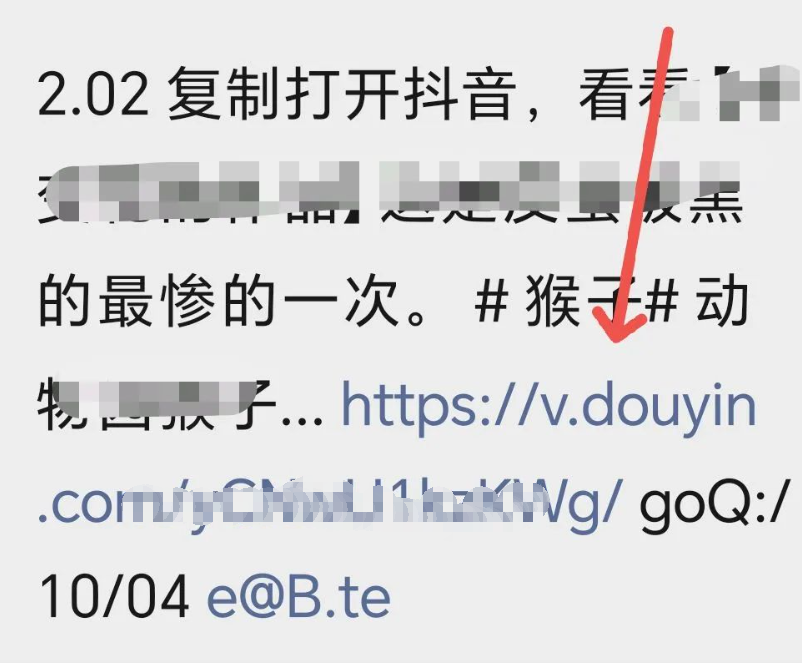
“Long press to copy this message, open Douyin Lite search, and view product details #[Douyin Lite Command]”
“Copy #Open 【Douyin Lite】, check out 【Somebody’s Works】#[Douyin Lite Command]”
It’s frustrating! Sometimes the command can’t be copied, sometimes it doesn’t respond after copying, and even when opening the APP, it doesn’t work. Are you eager to throw your phone? Don’t panic! Today, I will teach you 3 tricks that can easily solve the problem for both Douyin and Douyin Lite~
1. Open Douyin Commands, Try These 2 Simple Methods First!
Method 1: Click the Blue Link, One Step Done ✨
If the command contains a blue link starting with “https”, don’t hesitate, just click it!
After clicking, it will automatically redirect to a transition page, then click on “Open to See”, and you will be instantly redirected to the Douyin / Douyin Lite APP, super convenient!
Method 2: Copy the Full Text, Let the APP “Recognize” It 📝
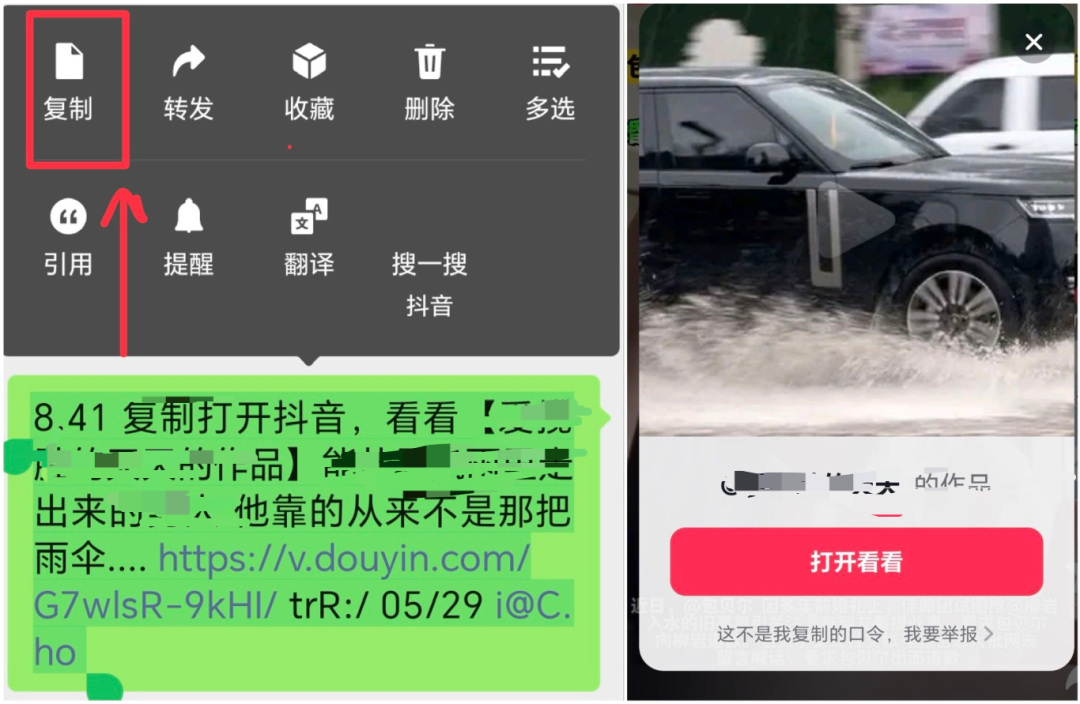
If you don’t see the blue link, or if it doesn’t respond when clicked, use the “copy and paste method”:
- Long press the command text, drag from the beginning to the end (don’t miss the end command code!), ensure the entire text is selected, then click “copy”;
- Open the Douyin / Douyin Lite APP—most of the time, the APP will automatically pop up a prompt, such as “Detected that you copied a command, do you want to open it?” Click “Open” to complete;
- If the prompt doesn’t pop up? Don’t panic! Copy the command again, return to the APP, wait a few more seconds, and the prompt will likely appear~
If it still doesn’t respond? The ultimate trick: after opening the APP, paste the copied content into the top search box, click “search”, and you will immediately jump to the target page!
2. Stuck in WeChat? Use the Browser as a “Bridge” 🖥️
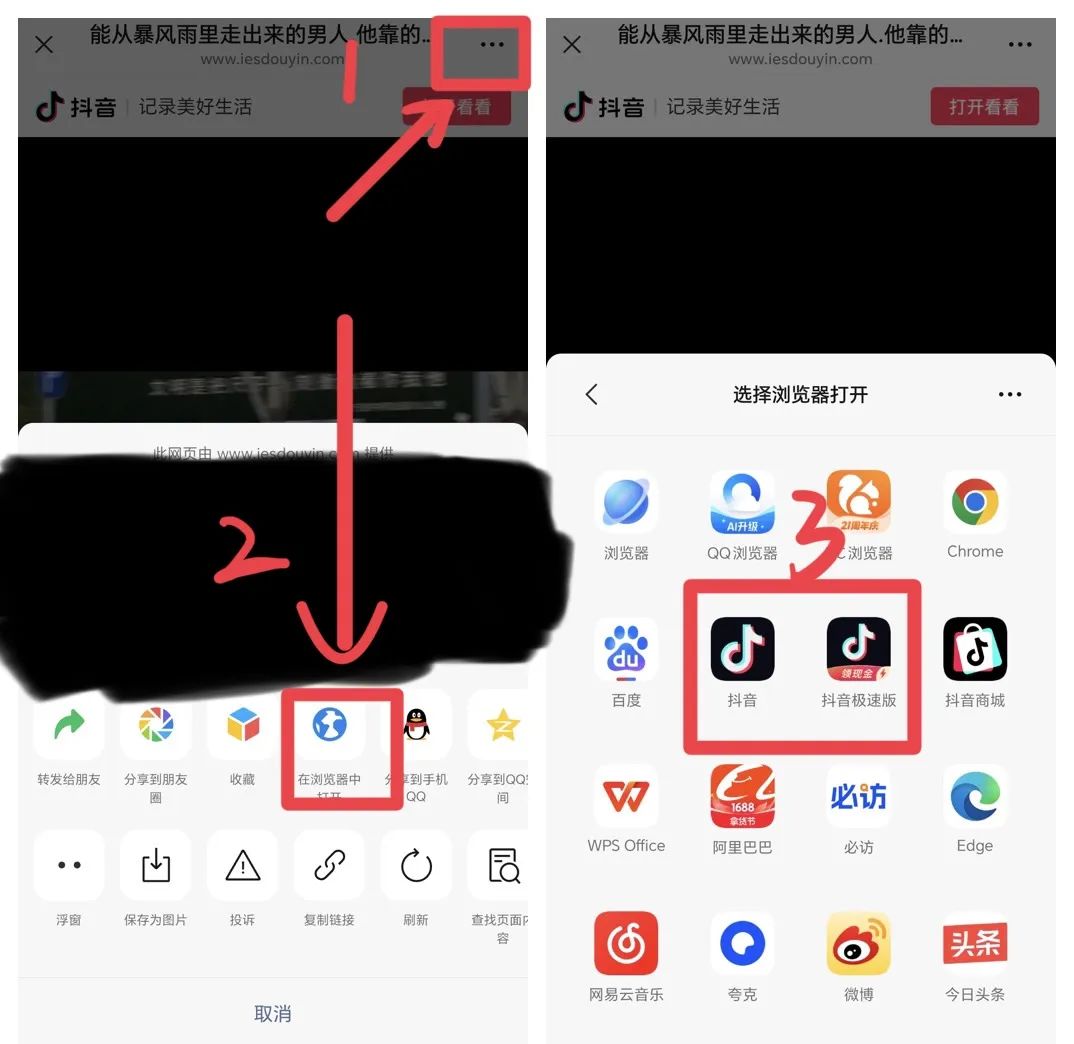
Many people see the prompt “To browse, please long press the URL to copy and use a browser to visit” when clicking the command link in WeChat. In this case, do the following:
- Long press the command link in WeChat, first “copy”;
- Click the “…” in the upper right corner of the WeChat page, select “Open in Browser” (any browser will do, such as Chrome, Safari, or the phone’s built-in browser);
- After opening the browser, it will prompt “Do you want to open with Douyin / Douyin Lite?”, click “Yes”, and it will directly jump to the APP, perfectly solving the issue!
3. Avoid These Pitfalls! Common Questions Answered ❓
Q1: What if the command is not fully copied and cannot be recognized?
A: Most likely, it has been collapsed by WeChat! Check if there is a “More” button at the end of the command, click it to expand the full command. Remember: missing even one character may cause recognition failure, so be sure to copy the complete version!
Q2: I am using Douyin Lite, can these methods be used?
A:Absolutely! The methods are exactly the same!
There is only one small exception: the “new user command” for Douyin Lite can only be opened in Douyin Lite, not in the Douyin APP, but other types of commands (watching videos, viewing products, viewing works) are universal for both~

Finally, a Heartfelt Message 💖
These methods are super simple. If your elders at home don’t know how to operate, share this article with them, and guide them step by step. They will no longer have to worry about not being able to open commands! Next time you encounter a problem, refer back to this guide, and it will surely help. You can share this article with your family members, and they will definitely find these tips useful.