Continuing from the previous article! I have created a visual search tool for the captured thematic data, reasons for price limits, and business descriptions, doubling the analysis efficiency!
1. Function Overview: Three-column Layout for Clear Information
✅ Stock Search: Enter code/name to quickly locate the target✅ Thematic Evidence Search: Enter keywords to find all stocks mentioned in business reviews✅ Information Aggregation Display: Concept themes, reasons for price limits, and business reviews presented in one view
Final interface effect (three-column layout):
- Left Column: Search results list (stocks + thematic evidence)
- Middle Column: Business review search (supports multi-keyword AND queries)
- Right Column: Detailed information display (including highlighted matches)
2. Core Implementation: Perfect Combination of Streamlit and Playwright
1. Data Loading and Mapping
def load_stock_mapping():
    """Load stock code and name mapping"""
    # Read stock list from Excel and create code-name dictionary
    df = pd.read_excel(EXCEL_FILE, usecols=[0, 1], skiprows=1,
                       header=None, dtype=str)
    for code, name in zip(df[0], df[1]):
        if str(code).isdigit() and len(str(code)) == 6:
            stock_mapping[str(code)] = str(name)
2. Intelligent Search Logic (Exact + Fuzzy Dual Mode)
def search_stocks(keyword: str) -> List[Dict]:
    """Search stocks: prioritize exact matches, then fuzzy search"""
    results = []
    # Exact match (code or name)
    for stock in stock_list:
        if keyword in stock['name'] or keyword.zfill(6) == stock['code']:
            results.append(stock)

    # Fuzzy search (name pinyin, partial matches, etc.)
    if not results:
        for stock in stock_list:
            if keyword.lower() in stock['name'].lower():
                results.append(stock)
    return results[:50]  # Limit return quantity
3. Business Review Keyword Search (Multi-keyword AND Query)
def search_keyword_in_reports(keyword: str) -> List[Tuple[str, str, str]]:
    """Search for files containing all keywords in business reviews"""
    keywords = [kw.strip() for kw in keyword.split() if kw.strip()]

    for filename in os.listdir(REPORT_DIR):
        if filename.endswith('.txt'):
            with open(file_path, 'r', encoding='utf-8') as f:
                content = f.read()

            # Core: return only if all keywords match
            if all(kw in content for kw in keywords):
                results.append((stock_code, stock_name, filename))
4. Context Highlight Extraction (Optimizing Reading Experience)
def extract_context_from_content(content: str, keyword: str,
                                 context_length: int = 500) -> List[str]:
    """Extract 500 characters of context before and after the keyword, and highlight"""
    pos = content.find(keyword, start)
    context_start = max(0, pos - context_length)
    context_end = min(len(content), pos + len(keyword) + context_length)

    # Highlight processing
    highlighted = context.replace(keyword, f'**{keyword}**')
    return [highlighted]
3. Step-by-step Deployment Tutorial
Environment Installation (2 minutes)
pip install streamlit pandas openpyxl
# openpyxl is used to read the Excel stock list
File Structure Preparation
D:\1jiuniu\F10ths\
├── gntc_ths\          # Concept themes (results from previous article)
├── ztyy_jygs\         # Reasons for price limits (see historical articles)
├── output_ths\        # Business reviews (see historical articles)
├── 全部A股.xlsx       # Stock code table
└── search_app.py      # Code for this tool
Running Method
streamlit run search_app.py
The browser will automatically open, and you can use it!
4. Practical Application Scenarios
Scenario 1: Thematic Linkage Mining
Search “Huawei Ascend”, find all stocks mentioned in business reviews → Check concept themes for verification → Quickly establish a target pool
Scenario 2: Price Limit Reason Tracing
Click on a stock → Right column displays “Reasons for Price Limit” → Combine with “Concept Themes” → Determine sustainability
Scenario 3: Fundamental Cross-validation
Search “Significant Performance Increase” → Filter stocks mentioning this term → Compare F10 thematic points → Identify true growth vs. pure speculation
Effect Diagram
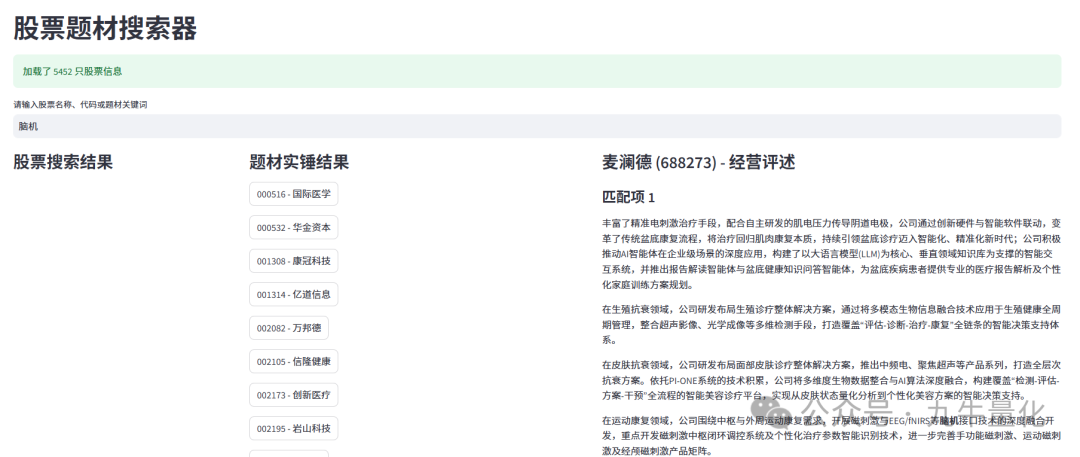
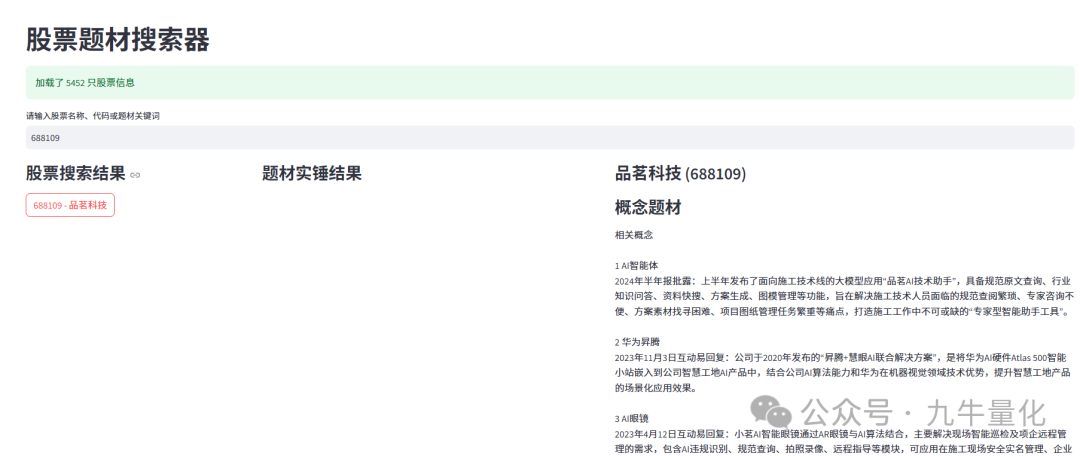
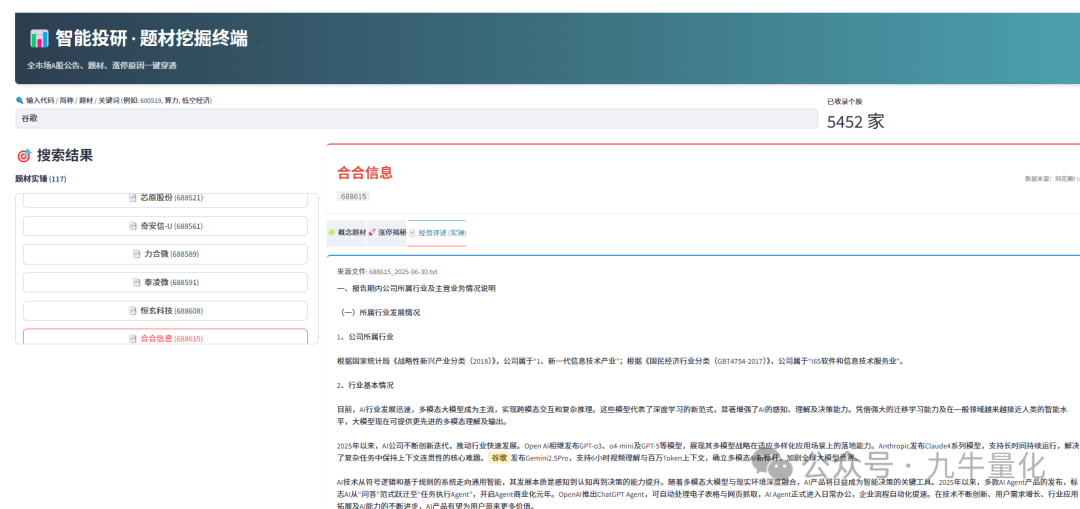
However, the default seems a bit low-end, so we are using the latest Gemini 3.0 to help us create a more professional front-end display. The final effect diagram is as follows.
5. Compliance Statement and Extension Suggestions
Disclaimer
- This tool is designed for personal research and learning and should not be used for commercial purposes
- Data scraping should comply with website service terms and control request frequency
- Investment carries risks; please refer to official announcements for data accuracy
6. Complete Code (Core Segments)
import streamlit as st
import pandas as pd
import os
import re
from typing import Dict, List, Tuple

# ---------------------------------------------------------
# Configuration and Style Settings
# ---------------------------------------------------------
st.set_page_config(
    page_title="Intelligent Investment Research · Thematic Mining Terminal",
    page_icon="📈",
    layout="wide",
    initial_sidebar_state="expanded"
)

# Custom CSS: Create a financial terminal style
st.markdown("""
<style>
    /* Global font and background */
    .main {
        background-color: #f5f7f9;
    }
    h1, h2, h3 {
        font-family: 'Microsoft YaHei', sans-serif;
        color: #1f2d3d;
    }

    /* Top title bar */
    .title-container {
        background: linear-gradient(90deg, #2c3e50 0%, #4ca1af 100%);
        padding: 1.5rem;
        border-radius: 8px;
        color: white;
        margin-bottom: 20px;
        box-shadow: 0 4px 6px rgba(0,0,0,0.1);
    }

    /* Search box style */
    .stTextInput > div > div > input {
        border: 2px solid #e0e0e0;
        border-radius: 8px;
        padding: 10px;
        font-size: 16px;
    }
    .stTextInput > div > div > input:focus {
        border-color: #4ca1af;
        box-shadow: 0 0 5px rgba(76, 161, 175, 0.3);
    }

    /* Sidebar result list button */
    .result-card {
        background-color: white;
        padding: 10px;
        border-radius: 6px;
        border-left: 4px solid #ddd;
        margin-bottom: 8px;
        transition: all 0.2s;
        cursor: pointer;
        box-shadow: 0 1px 3px rgba(0,0,0,0.05);
    }
    .result-card:hover {
        border-left-color: #4ca1af;
        transform: translateX(2px);
        box-shadow: 0 2px 5px rgba(0,0,0,0.1);
    }

    /* Detail page card */
    .info-card {
        background-color: white;
        padding: 20px;
        border-radius: 8px;
        box-shadow: 0 2px 8px rgba(0,0,0,0.05);
        margin-bottom: 15px;
        border-top: 3px solid #3498db;
    }

    /* Keyword highlight */
    .highlight-tag {
        background-color: #fff3cd;
        color: #856404;
        padding: 2px 6px;
        border-radius: 4px;
        font-weight: bold;
        border: 1px solid #ffeeba;
    }

    /* Tab style optimization */
    .stTabs [data-baseweb="tab-list"] {
        gap: 2px;
    }
    .stTabs [data-baseweb="tab"] {
        height: 50px;
        white-space: pre-wrap;
        background-color: #eef2f6;
        border-radius: 4px 4px 0 0;
        gap: 1px;
        padding-top: 10px;
        padding-bottom: 10px;
    }
    .stTabs [aria-selected="true"] {
        background-color: white;
        border-top: 2px solid #4ca1af;
        color: #4ca1af;
        font-weight: bold;
    }
</style>
""", unsafe_allow_html=True)

# ---------------------------------------------------------
# Data Path Configuration (Keep Original)
# ---------------------------------------------------------
GNTC_DIR = r"D:\1jiuniu\F10ths\gntc_ths"      # Concept theme directory
ZT_DIR = r"D:\1jiuniu\F10ths\ztyy_jygs"         # Price limit reason directory
EXCEL_FILE = r"D:\1jiuniu\全部A股.xlsx"        # Stock information file
REPORT_DIR = r"D:\1jiuniu\F10ths\output_ths"# Business review directory

# ---------------------------------------------------------
# Data Loading Logic (Add Cache Optimization)
# ---------------------------------------------------------

@st.cache_data
def load_stock_data():
    """Load stock code and name mapping (with cache)"""
    mapping = {}
    s_list = []
    try:
        if os.path.exists(EXCEL_FILE):
            df = pd.read_excel(EXCEL_FILE, usecols=[0, 1], skiprows=1, header=None, dtype=str)
            df = df.map(lambda x: x.strip() if isinstance(x, str) else x)
            codes = df[0].tolist()
            names = df[1].tolist()

            for c, n in zip(codes, names):
                if pd.notna(c) and pd.notna(n):
                    if str(c).isdigit() and len(str(c)) == 6:
                        mapping[str(c)] = str(n)

            s_list = [{'code': code, 'name': name} for code, name in mapping.items()]
            return mapping, s_list
    except Exception as e:
        st.error(f"Loading stock mapping failed: {e}")
        return {}, []

# Initialize global data
stock_mapping, stock_list = load_stock_data()

def load_gntc_content(code: str) -> str:
    """Load concept theme content"""
    try:
        file_path = os.path.join(GNTC_DIR, f"{code}.txt")
        if os.path.exists(file_path):
            with open(file_path, 'r', encoding='utf-8') as f:
                return f.read()
        return""# Return empty string if not found, interface processing
    except Exception:
        return""

def load_zt_content(code: str, name: str) -> str:
    """Load price limit reason content"""
    try:
        if not os.path.exists(ZT_DIR): return""

        # First try code matching
        for filename in os.listdir(ZT_DIR):
            if filename.endswith('.txt') and filename.startswith(code):
                with open(os.path.join(ZT_DIR, filename), 'r', encoding='utf-8') as f:
                    return f.read()

        # Then try name matching
        for filename in os.listdir(ZT_DIR):
            if filename.endswith('.txt') and name in filename:
                with open(os.path.join(ZT_DIR, filename), 'r', encoding='utf-8') as f:
                    return f.read()
        return""
    except Exception:
        return""

def search_logic(keyword: str) -> Tuple[List[Dict], List[Tuple[str, str, str]]]:
    """Core search logic"""
    if not keyword:
        return [], []

    # 1. Search stocks (code or name)
    s_results = []
    # Exact match
    for stock in stock_list:
        if keyword == stock['name'] or keyword == stock['code']:
            s_results.append(stock)

    # Fuzzy search (deduplication)
    seen_codes = {s['code'] for s in s_results}
    if len(s_results) < 50:
        for stock in stock_list:
            if stock['code'] in seen_codes: continue
            if keyword.lower() in stock['name'].lower() or keyword in stock['code']:
                s_results.append(stock)
                if len(s_results) >= 50: break

    # 2. Search business reviews (keyword evidence)
    r_results = []
    if os.path.exists(REPORT_DIR) and keyword.strip():
        keywords = [kw.strip() for kw in keyword.split() if kw.strip()]
        if keywords:
            temp_results = []
            # Traverse files (if there are too many files, consider optimizing the index later, currently keeping the original logic)
            # For performance, only traverse the most recently modified or limit the number, here keep the full amount but note performance
            try:
                files = [f for f in os.listdir(REPORT_DIR) if f.endswith('.txt')]
                # Simple optimization: only look at files containing all keywords in their content
                for filename in files:
                    file_path = os.path.join(REPORT_DIR, filename)
                    try:
                        with open(file_path, 'r', encoding='utf-8') as f:
                            content = f.read()
                        if all(kw in content for kw in keywords):
                            stock_code = filename.split('_')[0]
                            stock_name = stock_mapping.get(stock_code, "Unknown")
                            temp_results.append((stock_code, stock_name, filename))
                    except: continue
            except: pass

            # Deduplication to get the latest
            unique = {}
            for code, name, fname in temp_results:
                if code not in unique or fname > unique[code][2]:
                    unique[code] = (code, name, fname)
            r_results = list(unique.values())

    return s_results, r_results

def highlight_text(text: str, keywords: List[str]) -> str:
    """Highlight text using HTML"""
    if not text or not keywords:
        return text

    # Escape HTML to prevent injection, but here we control the content ourselves, so no strict escaping to support simple line breaks
    # Simple handling of line breaks
    text = text.replace("\n", "<br>")

    for kw in keywords:
        if not kw.strip(): continue
        # Use regex to replace ignoring case
        pattern = re.compile(re.escape(kw), re.IGNORECASE)
        text = pattern.sub(lambda m: f'<span class="highlight-tag">{m.group(0)}</span>', text)
    return text

def get_report_context(code: str, filename: str, search_keywords: List[str]) -> str:
    """Get and format research report content"""
    try:
        path = os.path.join(REPORT_DIR, filename)
        if not os.path.exists(path): return"File does not exist"
        with open(path, 'r', encoding='utf-8') as f:
            content = f.read()

        if not search_keywords:
            return content.replace("\n", "\n\n") # Markdown line break

        # Extract summary logic
        contexts = []
        for kw in search_keywords:
            # Simple context extraction
            indices = [m.start() for m in re.finditer(re.escape(kw), content)]
            for idx in indices[:5]: # Limit the number of matches for each word
                start = max(0, idx - 200)
                end = min(len(content), idx + 200)
                snippet = content[start:end]
                contexts.append(f"...{snippet}...")

        if contexts:
            return"\n\n---\n\n".join(contexts)
        else:
            return content # If no keywords found (possibly code matching), display full text

    except Exception as e:
        return f"Read error: {e}"

# ---------------------------------------------------------
# Main Interface Logic
# ---------------------------------------------------------
def main():
    # Top title
    st.markdown("""
    <div class="title-container">
        <h2 style="margin:0; color:white;">📊 Intelligent Investment Research · Thematic Mining Terminal</h2>
        <p style="margin:5px 0 0 0; opacity:0.8;">One-click penetration of all market A-share announcements, themes, and reasons for price limits</p>
    </div>
    """, unsafe_allow_html=True)

    # Search bar
    col_search, col_info = st.columns([3, 1])
    with col_search:
        search_term = st.text_input("🔍 Enter code / abbreviation / theme / keyword (e.g.: 600519, computing power, low-altitude economy)", placeholder="Supports fuzzy search and multi-keyword combinations")
    with col_info:
        if stock_mapping:
            st.metric("Recorded stocks", f"{len(stock_mapping)} companies")

    if not search_term:
        st.info("👆 Please enter keywords above to start mining...")
        return

    # Execute search
    stock_results, report_results = search_logic(search_term)

    # Layout: left list, right detail
    left_col, right_col = st.columns([1, 2.5])

    # --- Left: Result List ---
    with left_col:
        st.markdown("### 🎯 Search Results")

        # Use Session State to manage the currently selected item
        if 'selected_item' not in st.session_state:
            st.session_state.selected_item = None

        # Result merge display
        if not stock_results and not report_results:
            st.warning("No matching results found")

        # 1. Stock matching list
        if stock_results:
            st.markdown(f"**Stock Matches ({len(stock_results)})**")
            with st.container(height=300): # Scrollable area
                for s in stock_results:
                    # Use custom styled button logic
                    label = f"📈 {s['code']} {s['name']}"
                    if st.button(label, key=f"btn_s_{s['code']}", use_container_width=True):
                        st.session_state.selected_item = {'type': 'stock', 'data': s}

        # 2. Research report/theme matching list
        if report_results:
            st.markdown(f"**Thematic Evidence ({len(report_results)})**")
            with st.container(height=300):
                for code, name, fname in report_results:
                    label = f"📑 {name} ({code})"
                    if st.button(label, key=f"btn_r_{code}_{fname}", use_container_width=True):
                        st.session_state.selected_item = {'type': 'report', 'data': (code, name, fname)}

    # --- Right: Detail Display ---
    with right_col:
        selection = st.session_state.selected_item

        if not selection:
            st.markdown("""
            <div class="info-card" style="text-align:center; color:#666; padding:50px;">
                <h3>👈 Please select a stock on the left to view details</h3>
                <p>Supports viewing concept themes, price limit revelations, and original business reviews</p>
            </div>
            """, unsafe_allow_html=True)
        else:
            # Extract basic information
            if selection['type'] == 'stock':
                s_data = selection['data']
                code, name = s_data['code'], s_data['name']
                filename = None # Default load latest
            else:
                code, name, filename = selection['data']

            # Header card
            st.markdown(f"""
            <div class="info-card" style="border-top-color: #e74c3c; display:flex; justify-content:space-between; align-items:center;">
                <div>
                    <h1 style="margin:0; font-size: 28px; color:#e74c3c;">{name}</h1>
                    <span style="background:#f0f0f0; padding:2px 8px; border-radius:4px; color:#666; font-family:monospace;">{code}</span>
                </div>
                <div style="text-align:right;">
                    <span style="font-size:12px; color:#999;">Data Source: Tonghuashun F10</span>
                </div>
            </div>
            """, unsafe_allow_html=True)

            # Get data
            gntc = load_gntc_content(code)
            zt_reason = load_zt_content(code, name)

            # If coming from a keyword search, need to pass keywords for highlighting
            display_keywords = []
            if search_term and not search_term.isdigit():
                display_keywords = search_term.split()

            # Tab layout
            tab1, tab2, tab3 = st.tabs(["🧩 Concept Themes", "🚀 Price Limit Revelation", "📄 Business Review (Evidence)"])

            with tab1:
                if gntc:
                    st.markdown(f'<div class="info-card">{gntc.replace(chr(10), "<br>")}</div>', unsafe_allow_html=True)
                else:
                    st.info("No concept theme data available")

            with tab2:
                if zt_reason:
                    st.markdown(f'<div class="info-card">{zt_reason.replace(chr(10), "<br>")}</div>', unsafe_allow_html=True)
                else:
                    st.info("No recent price limit reason data available")

            with tab3:
                # Load research report/review
                # If filename is not specified (clicked from stock list), automatically find the latest
                current_file = filename
                if not current_file:
                     # Simple logic to find the latest file
                    all_files = [f for f in os.listdir(REPORT_DIR) if f.startswith(code)] if os.path.exists(REPORT_DIR) else []
                    if all_files:
                        all_files.sort(reverse=True) # Assume filenames contain dates and can be sorted
                        current_file = all_files[0]

                if current_file:
                    # Read original content
                    raw_content = ""
                    try:
                        with open(os.path.join(REPORT_DIR, current_file), 'r', encoding='utf-8') as f:
                            raw_content = f.read()
                    except:
                        raw_content = "File reading failed"

                    # Keyword highlighting processing
                    if display_keywords:
                        # Extract context and highlight
                        formatted_html = highlight_text(raw_content, display_keywords)
                        # If content is too long and there are matches, prioritize displaying matching paragraphs, but also provide an option to view the full text
                        st.markdown(f"""
                        <div class="info-card">
                            <div style="color:#666; font-size:0.9em; margin-bottom:10px;">Source file: {current_file}</div>
                            <div style="line-height:1.6; font-size:15px;">{formatted_html}</div>
                        </div>
                        """, unsafe_allow_html=True)
                    else:
                        # Display full text
                        st.text_area("File Content", raw_content, height=600)
                else:
                    st.warning(f"No business review file found for {name}")

if __name__ == "__main__":
    main()
Reasons for fluctuations and business descriptions reference:Python Quantitative Collection
Disclaimer: This tool is only an auxiliary tool for information acquisition, all data comes from third-party website pages. Users are responsible for the accuracy and completeness of the data, and any investment decision risks arising from the use of this tool are unrelated to the tool developers.