
1. Introduction
Fans often complain to me about why I always use Baidu Cloud to distribute materials. After downloading them, they have to upload them to the server again for analysis. In fact, there is no need for such a roundabout process; Baidu Cloud also has a Linux version. Using the Python package bypy to manage and transfer resources from Baidu Cloud is very convenient (don’t ask me why I don’t use Alibaba Cloud or Tencent Cloud… I still get the same questions when I do). If you find the following tutorial confusing, you can first learn from the Linux tutorial:Learn Linux in Ten HoursBioinformatics Linux and Server Usage TipsIf your computer is not powerful enough to support the calculations in the following process, you can choose suitable computing resources according to your needs:Shared (Economical):A shared server with root access, mention my name for a discount of 200¥Dedicated (Energy-saving and Worry-free):Bioinformatics analysis without asking for help
Physical (Stable and Efficient):Configure a workstation of your choice (hardware + environment configuration)
Access link:https://biomamba.xiyoucloud.net/
For more content, you can consult customer service WeChat [Biomamba_zhushou]


2. Using Baidu Cloud with bypy
First, ensure that your Linux environment has Python (Bioinformatics Python Quick Reference) My version here is 3.10.0.
# Install bypypip install bypy# Configure account password: bypy infoThis will return the following page: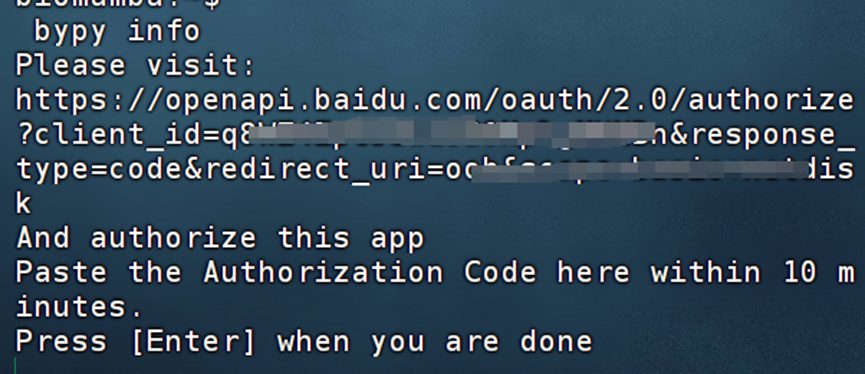 Use a browser to visit the provided URL and log in to your Baidu Cloud account:
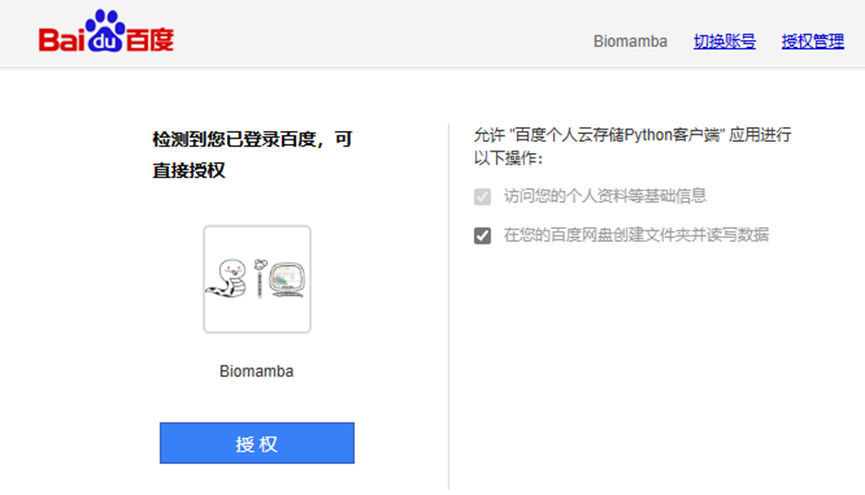 After authorization, you will receive an authorization code; copy the authorization code:
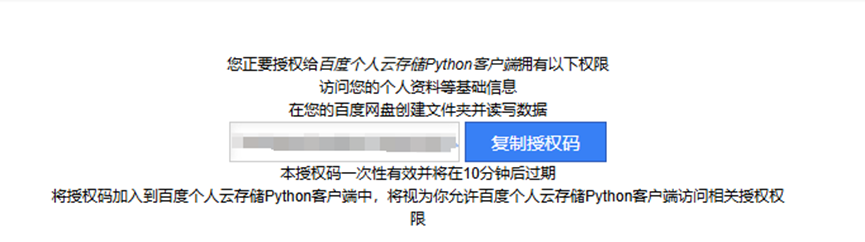 Return to the terminal, paste the authorization code, and press Enter. This will automatically configure your Baidu Cloud account password and initial settings, returning the storage information of Baidu Cloud, which will be consistent with your Windows client:
 After configuration, a new folder will appear in the Windows client. This folder serves as a bridge for file exchange between Linux and Windows:
 To use Baidu Cloud in the Linux terminal, you will need to use the command line. The most commonly used commands are:1. View the contents of the directory:
bypy list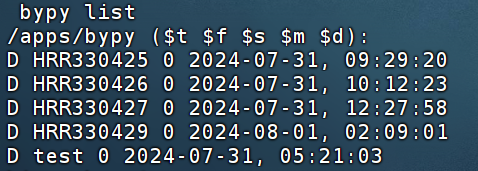 /apps/bypy/ is the root directory accessed by bypy
2. Upload a file
bypy upload /path/to/local/file /remote/path3. Download a file
bypy download /remote/path /path/to/local/fileIf I have a folder named test under “My Cloud Disk/My Application Data/bypy” and I want to download it to my home directory, I should:
bypy download test /home/biomambaThere will also be a progress bar during the download:

For large files, it is recommended to mount and download in the background:The program can run by itself without needing to be monitored
More usage:
positional arguments: command operations (quota, list, etc)options: -h, --help show this help message and exit -V, --version show program's version number and exit -d, --debug set debugging level (-dd to increase debugging level, -ddd to enable HTPP traffic debugging as well (very talkative)) [default: 0] -v, --verbose set verbosity level [default: 0] -r RETRY, --retry RETRY number of retry attempts on network error [default: 5 times] -q, --quit-when-fail quit when maximum number of retry failed [default: False] -t TIMEOUT, --timeout TIMEOUT network timeout in seconds [default: 300] -s SLICE, --slice SLICE size of file upload slice (can use'1024', '2k', '3MB', etc) [default: 20 MB]--chunk CHUNK size of file download chunk (canuse'1024', '2k','3MB', etc) [default: 20 MB] -e, --verify verify upload / download [default :False] -f, --force-hash force file MD5 /CRC32 calculation instead ofusing cached value--no-resume-downloadresume instead of restarting when downloading iflocalfile already exists [default: True]--include-regex INCREGEX regular expressionof files to include.ifnot specified (default), everything is included. for download, the regex applies to the remote files; for upload, the regex applies to the local files. to exclude files, think about your regex, some tips here: https://s tackoverflow.com/que stions/406230/regula r-expression-to- match-string-not- containing-a-word [default: ]--on-dup ONDUP what to do when the same file / folder exists in the destination: 'overwrite', 'skip', 'prompt' [default: overwrite]--no-symlink DON'T follow symbol links when uploading / syncing up--disable-ssl-check DON'T verify host SSL cerificate--cacerts CACERTS Specify the path for CA Bundle [default: None]--mirror MIRROR Specify the PCS mirror (e.g. bj.baidupcs.com. Open 'https://pcs.ba idu.com/rest/2.0/pcs /manage?method=listh ost' to get the list) to use. [default: pcs.baidu.com]--select-fastest-mirror Let the program runsome tests andselect the fastest PCS mirror it detectes. [default:False]--rapid-upload-only only upload large files that can be rapidly uploaded--resume-download-revert-back RCOUNT Revert back atleast RCOUNT downloadchunk(s) and aligntochunk boundarywhen resuming the download. A negativevalue means NO reverts. [default:1]--move Delete source files/directoriesafter download/uploa d/syncdown/syncup is successful (This will force verification of the files). [default:False]--processes PROCESSESNumberofparallel processes. (Only applies to dirsync/dl/ul). [default: 1]--downloader DOWNLOADER downloader touse (use python ifnot specified). validvalues: ['aria2'] [default: ]--downloader-arguments DOWNLOADER_ARGS arguments for the downloader: normally, the stringis the arguments to be passed to the downloader. however,when it begins with'@', it will be treated as the nameoffile, whosecontents will be used as the downloader arguments (example: when specifying'@args.txt', filecontentsof'args.txt' will be used as the downloader arguments, not thestring'@args.txt' itself). you can also use environmentvariable'DOWNLOADER _ARGUMENTS'to specify the downloader arguments (the environmentvariable has lowerpriority compared to this argument).defaultvalues: {'aria2': '-c -k10M -x4 -s4 --file- allocation=none'}--config-dir CONFIGDIR specify the configpath [default: /home /biomamba/.bypy] -c, --clean remove the tokenfile (need re-auth)and upload progressfile, -cc: cleanhashcachefileas wellCommands:help <command> - provide some information for the commandcdl_add <source_url> [save_path] [timeout] - add an offline (cloud) download taskcdl_addmon <source_url> [save_path] [timeout] - add an offline (cloud) download task and monitor the download progresscdl_cancel <task_id> - cancel an offline (cloud) download taskcdl_list - listoffline (cloud) download taskscdl_query <task_ids> - query existing offline (cloud) download taskscleancache - remove invalid entries fromhashcachefilecombine <remotefile> [localfile] [md5s] - try tocreate a fileat PCS by combining slices, having MD5s specifiedcompare [remotedir] [localdir] - compare the remote directorywith the localdirectorycopy/cp <from> <to> - copy a file / dir remotely at Baidu Yundelete/remove/rm <remotepath> - delete a file / dir remotely at Baidu Yundowndir [remotedir] [localdir] - download a remote directory (recursively)downfile <remotefile> [localpath] - download a remote file.download [remotepath] [localpath] - download a remote directory (recursively) / filedumpcache - display filehashcachelist/ls [remotepath] [format] [sort] [order] - list the 'remotepath'directoryat Baidu PCSlistrecycle [start] [limit] - list the recyclecontentsmeta <remotepath> [format] - get information of the given path (dir / file) at Baidu Yun.mkdir <remotedir> - create a directoryat Baidu Yunmove/mv/rename/ren <from> <to> - move a file / dir remotely at Baidu Yunquota/info - display the quota informationrefreshtoken - refresh the access tokenrestore <remotepath> - restore a filefrom the recyclebinsearch <keyword> [remotepath] [recursive] - searchfor a fileusing keyword at Baidu Yunstream <remotefile> <localpipe> [format] [chunk] - stream a video / audio file converted to M3U formatat cloud side, to a pipe.syncdown [remotedir] [localdir] [deletelocal] - sync down from the remote directoryto the localdirectorysyncup [localdir] [remotedir] [deleteremote] - sync up from the localdirectoryto the remote directoryupload [localpath] [remotepath] [ondup] - upload a fileordirectory (recursively)whoami - display the user information This tutorial references:https://github.com/houtianze/bypy
How to Contact Us

 Leave a message to receive materials, an out-of-the-box single-cell analysis image on WeChat [Biomamba_zhushou], for convenient communication at any time. We have also built a group chat matrix, and everyone is welcome to join the discussion.After reading these articles, you can add tips for beginners in bioinformaticsWithout retrieval, there is no right to speak
Students who already have contact information for the bioinformatics basedo not need to add again

 Your likes and views are taken seriously as appreciation