Today, I will share some insights on networks and protocols, particularly when dealing with projects. If a project is deployed using the HTTPS protocol, how can we call HTTP interfaces from the frontend? Conversely, if a project is deployed using the HTTP protocol, how can we call HTTPS interfaces from a webpage?For example, when accessing a website via HTTPS, calling an HTTP interface on the corresponding page results in the following error. How can we resolve this?Website address: When calling the HTTP interface on the corresponding open page, the browser’s network tracking shows a mixed content error.
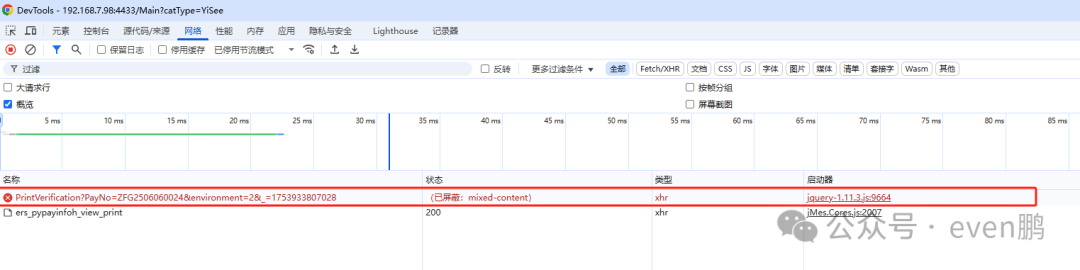 It displays:(Blocked: mixed-content). When you place the interface in Postman or create a new HTML file and call the interface directly via AJAX, you can retrieve data. However, when deployed to the website, it reports the error (Blocked: mixed-content), making it difficult to troubleshoot. At times, it can be challenging to identify the issue.At this point, you may also find that placing the interface in an HTTP-access project and calling it via AJAX works successfully!Generally, this issue arises not only due to cross-origin (CORS) but also requires us to revisit what cross-origin is. As the name suggests, it refers to Cross-Origin Resource Sharing (CORS).Cross-Origin
This is a concept commonly encountered in web development, involving how browser security policies handle requests from different origins. In a web environment, an “origin” consists of three parts: protocol (such as HTTP or HTTPS), domain name (like example.com), and port number (like 80 or 443). When the three parts of two URLs are identical, they are considered the same origin; if any part differs, it is regarded as cross-origin.
Cross-Origin Resource Sharing (CORS)
Cross-Origin Resource Sharing (CORS) is an HTTP header-based mechanism that allows servers to declare which origins can access their resources. By setting appropriate CORS headers, servers can explicitly inform browsers whether to allow or deny requests from specific origins. Common CORS response headers include:
<span>Access-Control-Allow-Origin</span>: Specifies the external URI allowed to access the resource. It can specify a specific domain (like<span>http://example.com</span>) or use a wildcard<span>*</span>to allow all domains.<span>Access-Control-Allow-Methods</span>: Indicates the HTTP methods (like GET, POST, etc.) that are allowed for the actual request.<span>Access-Control-Allow-Headers</span>: Used for preflight requests, indicating which custom header fields are allowed in the actual request.
How to Resolve Cross-Origin Issues?
-
Server-Side Configuration: The most direct way is to correctly configure CORS response headers on the server side. This usually requires backend developers to set it according to business needs.
-
JSONP (JSON with Padding): An older technique that utilizes the
<span><script></span>tag’s lack of same-origin policy restrictions to achieve cross-origin requests. However, it only supports GET requests and has security risks, gradually being replaced by CORS. -
Proxy Server: If modifying the server-side CORS settings is not possible for various reasons, a proxy server can be set up to bypass cross-origin restrictions. The client sends requests to a proxy server within the same domain, which then forwards them to the target server and returns the response to the client.
-
WebSocket: Unlike the HTTP protocol, the WebSocket protocol is not affected by the same-origin policy, allowing cross-origin communication through WebSocket connections.
After this explanation, if you still feel confused about cross-origin, we can think from another perspective: why do protocols have cross-origin issues? Consider why mobile devices can access the internet after connecting to a network.In fact, this understanding of networks can be divided into two parts: network segmentation and network coverage.Network Segmentation
Network segmentation is the practice of dividing a computer network into smaller parts to improve security and performance. By segmenting the network, organizations can limit the lateral movement of potential attackers within the network and manage network traffic more effectively. Here are some key concepts and methods of network segmentation:
Main Types of Network Segmentation
- Physical Segmentation
- Involves using separate hardware devices to isolate different network segments. For example, using different switches or routers to serve different departments or applications.
- Creating multiple virtual network environments on the same physical network. This can be achieved through technologies like Virtual Local Area Networks (VLANs) and Virtual Private Networks (VPNs).
Technologies for Implementing Network Segmentation
- VLANs (Virtual Local Area Networks)
- VLANs allow the creation of multiple logically independent networks within the same physical network. This is very useful for controlling broadcast domains and enhancing security.
- Subnetting
- Subnetting is the process of dividing an IP network into several smaller networks, helping to reduce network congestion and improve security.
- Firewalls
- Firewalls can monitor and control the traffic entering and leaving the network based on predefined security rules, making them an important tool for implementing network segmentation.
- Access Control Lists (ACLs)
- ACLs are used to specify which users or systems can access resources within the network on routers or switches.
- Network Address Translation (NAT)
- NAT can change the source IP address of packets as they leave the network, enhancing security while making the internal network more obscure.
Benefits of Network Segmentation
- Improved Security: Limits the attacker’s range of activity, reducing potential security threats.
- Enhanced Performance: By controlling network traffic and reducing unnecessary broadcast information, network efficiency is improved.
- Simplified Management: After segmenting the network, it becomes easier to manage and maintain each part.
Implementing network segmentation requires a comprehensive consideration of the organization’s specific needs, existing network architecture, and available resources. Properly executing network segmentation can help organizations build a more secure and efficient network environment.
Networks can also be categorized based on coverage and functionality
Networks can typically be divided into Local Area Networks (LAN), Metropolitan Area Networks (MAN), and Wide Area Networks (WAN) based on coverage and functionality. Here is a brief introduction to these three types of networks:
Local Area Network (LAN)
- Definition and Purpose: A LAN is a network that connects computers and other devices within a relatively small geographical area (such as a home, school, or office). It is primarily used to facilitate communication and resource sharing among these devices.
- Characteristics:
- Small range, generally not exceeding a few kilometers.
- Fast data transmission speeds.
- Lower installation costs and relatively simple management.
- Common technologies include Ethernet and Wi-Fi.
Metropolitan Area Network (MAN)
- Definition and Purpose: A MAN is a type of network that lies between a LAN and a WAN, covering a city or a large campus. It can connect multiple LANs and provide users with high-speed data transmission services.
- Characteristics:
- Coverage area larger than a LAN but smaller than a WAN, typically covering several tens of kilometers.
- Can connect different LANs using fiber optics or other high-bandwidth technologies.
- Provides high data transmission rates, suitable for situations requiring resource sharing over larger areas.
Wide Area Network (WAN)
- Definition and Purpose: A WAN covers a very large geographical area, ranging from several cities to an entire country or even globally. The Internet is the most well-known example of a WAN. Businesses may also build their private WANs to connect offices located in different regions.
- Characteristics:
- Wide coverage, capable of spanning cities, countries, and even the globe.
- Uses public communication facilities, such as telephone lines and satellite links, for long-distance data transmission.
- Due to the long distances involved, it may encounter higher latency and lower transmission speeds.
- The TCP/IP protocol is the foundation for WAN communication.
Each type of network has its specific application scenarios and advantages. Choosing the right type of network depends on specific usage needs, budget, and intended goals. For example, businesses that require fast internal communication may prefer to build efficient LANs, while those needing cross-regional collaboration may rely on WAN technologies.
Once we understand networks and protocols, we can return to the beginning: why can’t HTTPS call HTTP interfaces from the frontend? Because these two cannot be mixed; HTTPS pages can only call HTTPS interfaces. If you must call an HTTP interface, you can use Node.js or Nginx as a proxy to achieve this, accessing the address via HTTPS and then proxying to the HTTP interface, allowing you to call the HTTP interface from the HTTPS page or project.Here is a detailed explanation of how IIS can proxy, supporting both HTTP and HTTPS access, as shown in the image below: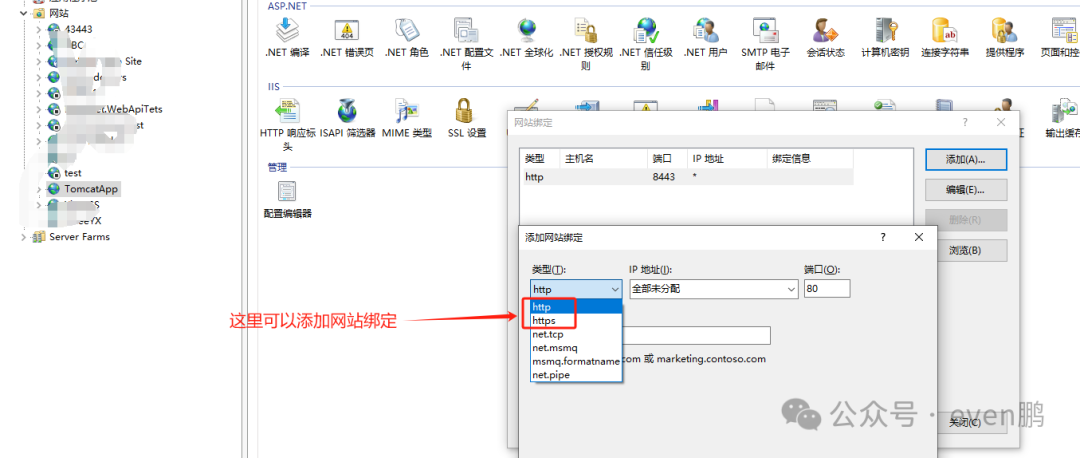 Note that when adding HTTPS, you must configure an HTTPS protocol; otherwise, it cannot be saved.
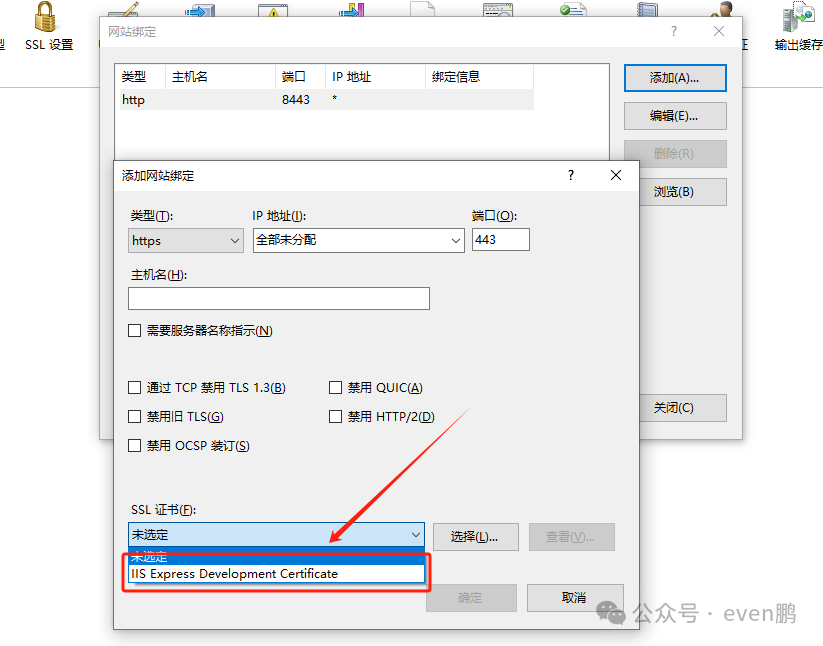 Also, ensure that both HTTPS and HTTP ports are open; at this point, you can access the project.Finally, let’s discuss HTTP and HTTPS: why sometimes interfaces can be either HTTP or HTTPS, but generally, there are no strict regulations in projects. Let’s understand HTTP and HTTPS.
HTTP (HyperText Transfer Protocol) and HTTPS (HyperText Transfer Protocol Secure) are communication protocols used for transmitting hypertext (such as web pages) over the network. They are both foundational to the World Wide Web, but there are significant differences in security between the two.
HTTP
- Definition: HTTP is a request-response protocol between a client and a server. It is a stateless protocol, meaning each request is independent, and the server does not retain any state information from previous requests.
- How It Works: When a user attempts to access a website, the browser (client) sends an HTTP request to the server, which processes the request and returns an HTTP response containing the requested data or error information.
- Characteristics:
- Plaintext transmission: All data is sent in plain text, including URLs and form inputs, making it easy to eavesdrop or tamper with.
- Insecure: Due to the lack of encryption, HTTP is not suitable for transmitting sensitive information such as passwords and personal data.
HTTPS
- Definition: HTTPS is essentially the secure version of HTTP, using SSL (Secure Sockets Layer) or TLS (Transport Layer Security) encryption to protect communication between the client and server.
- How It Works: HTTPS first establishes an encrypted channel, then performs HTTP operations over this secure connection. This ensures that all transmitted data is encrypted, preventing man-in-the-middle attacks.
- Characteristics:
- Data encryption: Uses a combination of symmetric and asymmetric encryption to secure transmitted data, ensuring confidentiality and integrity.
- Authentication: HTTPS requires obtaining a digital certificate from a trusted certificate authority to verify the authenticity of the website, preventing phishing sites.
- Security: HTTPS provides a more secure environment, suitable for online transactions, logins, and other operations involving personal privacy.
Summary of Differences
- Security: HTTPS is more secure than HTTP because it provides data encryption, authentication, and message integrity checks.
- Performance Impact: HTTPS may slightly increase processing time and server resource consumption due to encryption and decryption operations. However, modern hardware and optimization techniques have significantly reduced this impact.
- SEO Advantages: Search engines tend to prioritize websites using HTTPS, considering them more trustworthy and secure.
In summary, although HTTP is simple and easy to implement, its insecurity makes HTTPS the recommended choice for handling sensitive information. As the internet evolves, more and more websites are transitioning to HTTPS to enhance user security and privacy protection.
$.ajax({ url: 'xxxxxxxxxx', type: 'GET', dataType: 'json', headers: { 'Content-Type': 'application/json', 'Authorization': 'Bearer your-token-here' // If authentication is needed }, success: function(response) { console.error('Request successful:', response); }, error: function(xhr, status, error) { console.error('Request failed:', xhr.responseText); } });Note:
You cannot (and should not) modify <span>$.ajax</span> to be a true synchronous request.
This is a fundamental principle of modern web development and a security restriction of browsers.
Why “Cannot” Modify to Synchronous?
- Browsers Have Enforced Restrictions: Modern browsers (like Chrome, Firefox, Edge, Safari) have explicitly prohibited the use of synchronous mode (
<span>async: false</span>) for<span>XMLHttpRequest</span>(the underlying mechanism of<span>$.ajax</span>) on the main thread for security and user experience reasons.
- If you attempt to add
<span>async: false</span>, the browser will throw an error (e.g.,<span>Synchronous XMLHttpRequest on the main thread is deprecated</span>) or simply ignore the setting, forcing it to be asynchronous.
Why “Should Not” Modify to Synchronous?
- Against Web Design Principles: JavaScript and the web platform are designed based on an event loop and an asynchronous non-blocking model. Using synchronous requests completely contradicts this core principle.
- Performance Issues: It would lead to unresponsive applications, severely degrading perceived performance.
- Poor Maintainability: Synchronous code is difficult to maintain and debug when handling complex processes.
Ok By!