|
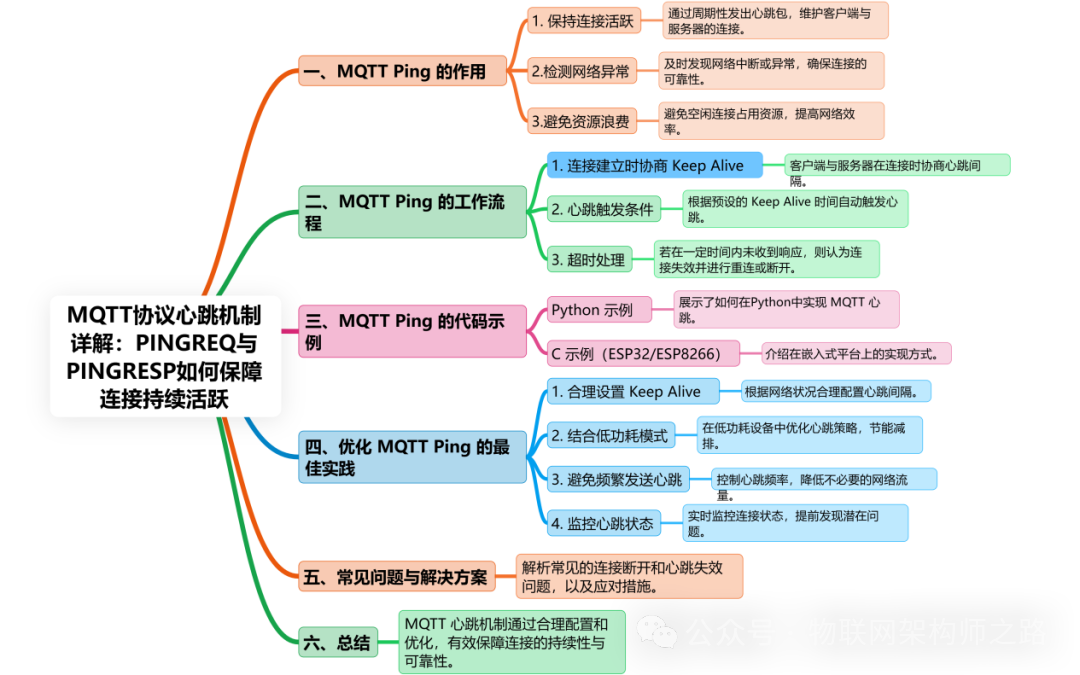
In the MQTT protocol, Ping is a mechanism used to maintain the activity of the connection between the client and the server. It is implemented through two control messages: PINGREQ (heartbeat request) and PINGRESP (heartbeat response), ensuring that both parties are aware that the connection is still valid, especially in cases of prolonged inactivity. |
1. The Role of MQTT Ping
1. Keep Connection Active
MQTT uses the Keep Alive parameter to set the heartbeat interval. If no other packets are transmitted within 1.5 × Keep Alive time, the client or server will send a PINGREQ, and the other party must respond with a PINGRESP. Otherwise, the connection will be deemed disconnected.
2. Detect Network Anomalies
If the client or server does not receive a PINGRESP within the timeout period, it is considered that the connection has been interrupted, triggering the reconnection logic.
3. Avoid Resource Waste
In low-power devices (such as ESP32, ESP8266), properly configuring the heartbeat interval can reduce unnecessary network communication and lower power consumption.
2. The Working Process of MQTT Ping
1. Negotiate Keep Alive During Connection Establishment
When the client sends the CONNECT message, it carries the Keep Alive parameter (in seconds). For example:
|
JSON { “keepalive”: 60 // Client sends a heartbeat every 60 seconds } |
2. Conditions for Triggering Heartbeat
○If no other packets (such as PUBLISH, SUBSCRIBE, etc.) are sent within 1.5 × Keep Alive time, the client or server will send a PINGREQ.
○Upon receiving the PINGREQ, the other party must immediately respond with a PINGRESP.
3. Timeout Handling
○If the client does not receive a PINGRESP within 1.5 × Keep Alive, it disconnects and attempts to reconnect.
○If the server does not receive a PINGREQ, it closes the connection and publishes a will message (if set).
3. Code Example for MQTT Ping
|
Below is an example of configuring Keep Alive and heartbeat using the Paho-MQTT client library: |
Python Example
|
Python import paho.mqtt.client as mqtt # Create client instance client = mqtt.Client() # Set Keep Alive to 60 seconds client.connect(“mqtt.broker.address”, keepalive=60) # Start network loop (automatically handles heartbeat) client.loop_start() |
C Example (ESP32/ESP8266)
|
Configure MQTT client using ESP-IDF or Arduino IDE: |
|
C++ #include |
4. Best Practices for Optimizing MQTT Ping
1. Set Keep Alive Reasonably
○Unstable Network: Increase Keep Alive (e.g., 120 seconds) to reduce heartbeat frequency.
○High Real-Time Requirements: Decrease Keep Alive (e.g., 30 seconds) for quick disconnection detection.
2. Combine with Low Power Mode
On devices like ESP32/ESP8266, enable Modem-sleep mode to reduce Wi-Fi power consumption while maintaining heartbeat functionality:
|
C++ // Enable Modem-sleep on ESP32 wifi_set_sleep_type(MODEM_SLEEP); |
3. Avoid Frequent Heartbeat Sending
○If the device frequently sends data (such as sensor data), appropriately increase Keep Alive, as the data packets themselves will reset the heartbeat timer.
4. Monitor Heartbeat Status
Use Wireshark or the logging feature of the MQTT Broker to monitor the frequency and success rate of PINGREQ/PINGRESP.
5. Common Issues and Solutions
|
Issue |
Cause |
Solution |
|
Heartbeat packet loss leading to disconnection |
Network delay or weak signal |
Increase Keep Alive or enable automatic reconnection |
|
Excessive heartbeat packets leading to increased power consumption |
Keep Alive set too small |
Adjust Keep Alive based on network stability |
|
Client did not receive PINGRESP |
Server did not respond correctly |
Check server configuration or switch MQTT Broker |
|
Will message triggered incorrectly |
Client did not send heartbeat in time |
Optimize heartbeat interval or enable persistent session |
6. Conclusion
|
The Ping mechanism of MQTT is a core function for maintaining connection stability, especially in IoT devices. Properly configuring the heartbeat interval can balance network reliability and power consumption. Here are the key points summarized: |
•Keep Alive: The client and server negotiate the heartbeat interval.
•PINGREQ/PINGRESP: Maintain the connection through heartbeat packets when no data is transmitted.
•Low Power Optimization: Combine with sleep modes of ESP32/ESP8266 to reduce the impact of heartbeat on power consumption.
•Troubleshooting: Analyze the sending and response status of heartbeat packets through logs or packet capture tools.