Click the blue word to follow us
Compilation environment: Linux environment compiled into a 64-bit program using g++ 4.4.6
1. Introduction to printf()
printf() is a standard library function in C language used to output formatted strings to standard output. The standard output, which corresponds to the terminal screen, refers to the standard output file. printf() is declared in the header file stdio.h.
Function prototype:
int printf ( const char * format, ... );Return value: It returns the total number of characters output on success and a negative value on error. Meanwhile, the error flag of the input-output stream will be set, which can be checked using the indicator function ferror(FILE *stream). If ferror() returns a non-zero value, it indicates an error.
Call format:
printf("format string", output list)The format string contains three types of objects: (1) string constants; (2) format control strings; (3) escape characters.
String constants are output as they are and serve as prompts in the display. The output list provides the various output items, requiring that the format control string and each output item correspond in number and type. The format control string is a string starting with %, followed by various format specifiers to indicate the type, width, precision, etc. of the output data.
2. Detailed Explanation of Format Control Strings
The format control string of printf() consists of:
%[flags][width][.prec][length]typeWhich are:
%[flags][minimum width][.precision][length type]type.2.1 Type
First, let’s explain the type, as it is the most crucial part of the format control string and an essential component; the other options are optional. The type is used to specify the type of data to output, with the following meanings:
| Character | Corresponding Data Type | Meaning | Example |
|---|---|---|---|
| d/i | int | Outputs a signed 32-bit integer in decimal, with i being the old style | printf("%i",123); outputs 123 |
| o | unsigned int | Outputs an unsigned octal integer (does not output the prefix 0) | printf("0%o",123); outputs 0173 |
| u | unsigned int | Outputs an unsigned decimal integer | printf("%u",123); outputs 123 |
| x/X | unsigned int | Outputs an unsigned hexadecimal integer, with x corresponding to abcdef and X corresponding to ABCDEF (does not output the prefix 0x) | printf("0x%x 0x%X",123,123); outputs 0x7b 0x7B |
| f/lf | float(double) | Single precision float uses f, double precision float uses lf (printf can mix, but scanf cannot) | printf("%.9f %.9lf",0.000000123,0.000000123); outputs 0.000000123 0.000000123. Note to specify precision; otherwise, printf defaults to six decimal places |
| F | float(double) | Same as f format, but outputs infinity and NaN in uppercase form. | For example, printf("%f %F %f %F\n",INFINITY,INFINITY,NAN,NAN); outputs inf INF nan NAN |
| e/E | float(double) | Scientific notation, using exponent to represent floating-point numbers; here, the case of e indicates the case of the output | printf("%e %E",0.000000123,0.000000123); outputs 1.230000e-07 1.230000E-07 |
| g | float(double) | Outputs in the shortest way based on the length of the number, either %f or %e | printf("%g %g",0.000000123,0.123); outputs 1.23e-07 0.123 |
| G | float(double) | Outputs in the shortest way based on the length of the number, either %f or %E | printf("%G %G",0.000000123,0.123); outputs 1.23E-07 0.123 |
| c | char | Character type. Can convert the input number to the corresponding character based on ASCII code | printf("%c\n",64) outputs A |
| s | char* | String. Outputs characters in the string until the null character (strings end with a null character ‘\0’) | printf("%s","Test"); outputs: Test |
| S | wchar_t* | Wide string. Outputs characters in the string until the null character (wide strings end with two null characters) | setlocale(LC_ALL,"zh_CN.UTF-8"); |
wchar_t wtest[]=L"Test";printf("%S\n",wtest); outputs: Test | | p | void* | Outputs pointer in hexadecimal | printf("0x%p","lvlv"); outputs: 0x000000013FF73350 | | n | int* | Outputs nothing. %n corresponds to a pointer to signed int, and the number of characters output before it will be stored at the location pointed by the pointer | int num=0;printf("lvlv%n",&num);printf("num:%d",num); outputs: lvlvnum:4 | | % | Character % | Outputs the character ‘%’ itself | printf("%%"); outputs: % | | m | None | Prints the error message corresponding to errno | printf("%m\n"); | | a/A | float(double) | Outputs floating-point numbers in hexadecimal format; a is lowercase, A is uppercase | printf("%a %A",15.15,15.15); outputs: 0x1.e4ccccccccccdp+3 0X1.E4CCCCCCCCCCDP+3 |
Note: (1) When using printf() to output wide characters, you need to use setlocale to specify localization information and also indicate the current encoding method. In addition to using %S, you can also use %ls.
(2) There is no specific type identifier for outputting bool type in printf(); it actually outputs boolean values as integers 0 or 1.
(3) %a and %A are formatting types introduced in C99, using hexadecimal format to output floating-point numbers. The p format is similar to the E scientific notation but differs slightly. It starts with 0x, followed by the hexadecimal floating-point part, followed by p and the exponent base 2. For example, converting 15.15 to binary gives 1111.00 1001 1001 1001 1001 .... Due to the discrete nature of binary representation, computers cannot sometimes represent decimals accurately; for example, 0.5 can be accurately represented, while 0.15 cannot. Shifting 15.15 in binary three bits to the right gives 1.1110 0100 1100 1100 1100 ... and converting to hexadecimal gives 0x1.e4ccccccccccd, noting that rounding up adds 1 bit. Since it was shifted three bits, the binary exponent is 3. The final result is 0x1.e4ccccccccccdp+3.
(4) The format control string not only specifies the type of output data but can also include other optional format specifications, which are flags, width, .precision, and length, which will be explained one by one.
2.2 Flags
Flags specify the output style, with the following values and meanings:
| Character | Name | Description |
|---|---|---|
| – | Minus | Left-align the result, filling spaces on the right. The default is right-aligned, filling spaces on the left. |
| + | Plus | Output sign (positive or negative) |
| space | Space | Add a space for positive values, and a negative sign for negative values |
| # | Hash | When type is o, x, or X, adds prefixes 0, 0x, or 0X. |
When the type is a, A, e, E, f, g, or G, a decimal point is always used. By default, if using .0 control does not output the decimal part, the decimal point will not be output. When the type is g or G, trailing 0s are preserved. | | 0 | Zero | Pads the output with 0s until it fills the specified column width (cannot be used with “-“) |
Example:
printf("%5d\n",1000);     // Default right-aligned, fills spaces on the left
printf("%-5d\n",1000);    // Left-aligned, fills spaces on the right

printf("%+d %+d\n",1000,-1000);  // Outputs positive and negative signs

printf("% d % d\n",1000,-1000);  // Positive sign replaced by space, negative sign output

printf("%x %#x\n",1000,1000);  // Outputs 0x

printf("%.0f %#.0f\n",1000.0,1000.0)// When not outputting values after the decimal point, still outputs the decimal point

printf("%g %#g\n",1000.0,1000.0); // Preserves the decimal point after the 0

printf("%05d\n",1000);    // Pads with 0s
Output result:
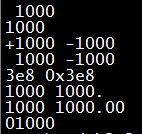
2.3 Minimum Width (width)
Represents the minimum number of digits to output as a decimal integer. If the actual number of digits exceeds the specified width, the actual number of digits will be output. If the actual number of digits is less than the defined width, it will be padded with spaces or 0. The possible values for width are as follows:
| width | Description | Example |
|---|---|---|
| Value | Decimal integer | printf("%06d",1000); outputs: 001000 |
| * | Asterisk. Does not display the specified minimum width, but is replaced by an asterisk, provided in the output parameter list of printf | printf("%0*d",6,1000); outputs: 001000 |
2.4 Precision (.precision)
The precision format specifier starts with a “.” followed by a decimal integer. Possible values are as follows:
| .precision | Description |
|---|---|
| .Value | Decimal integer. |
(1) For integer types (d,i,o,u,x,X), precision indicates the minimum number of digits to output, padding with leading zeros if insufficient, and truncating if exceeded. (2) For floating-point types (a, A, e, E, f), precision indicates the number of digits after the decimal point, defaulting to six digits, padding with trailing 0s if insufficient, and truncating if exceeded. (3) For type specifiers g or G, it indicates the maximum significant digits that can be output. (4) For strings (s), precision indicates the maximum number of characters that can be output, outputting normally if insufficient, and truncating if exceeded. If precision is not specified, it defaults to 0 | | .* | Replaced by an asterisk, similar to width’s *, specifying precision in the output parameter list. |
Example:
printf("%.8d\n",1000);   // Pads with leading 0s to meet specified width, equivalent to %08d
printf("%.8f\n",1000.123456789);// Exceeds precision, truncating
printf("%.8f\n",1000.123456); // Insufficient precision, padding with trailing 0
printf("%.8g\n",1000.123456); // Maximum significant digits is 8
printf("%.8s\n", "abcdefghij"); // Exceeds specified length, truncating
Output results:
00001000
1000.12345679
1000.12345600
1000.1235
abcdefgh
Note: When truncating floating-point and integer numbers, rounding occurs.
2.5 Length Type (length)
The length type specifies the length of the data to be output. Since the same type can have different lengths, for example, integer types can be char (8bits), short int (16bits), int (32bits), and long int (64bits), and floating-point types can have single precision float (32bits) and double precision double (64bits). To specify different lengths of the same type, the length type should be included as part of the format control string.
Because Markdown tables do not support merging cells, background color, and other styles, we directly reference the C++ reference. printf http://www.cplusplus.com/reference/ccstdio/printf/?kw=printf for the table.
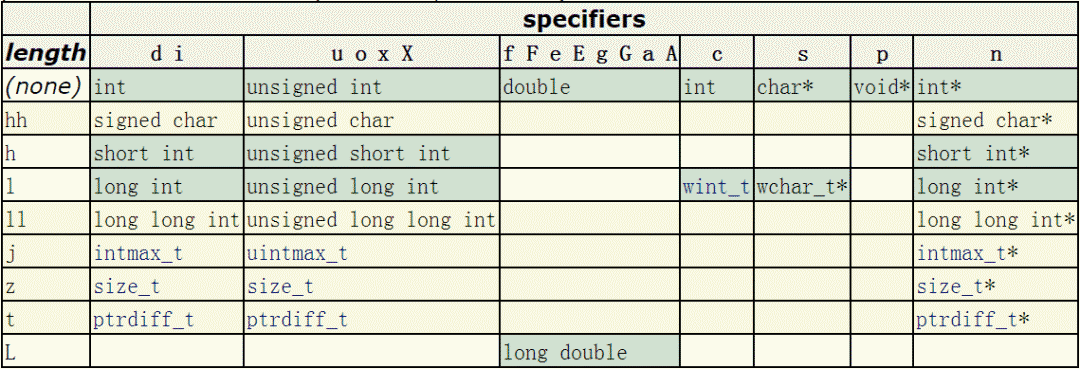
Note: The rows with yellow backgrounds indicate the length specifiers and the corresponding data types introduced in C99.
Example code:
printf("%hhd\n",'A');    // Outputs signed char
printf("%hhu\n",'A'+128);   // Outputs unsigned char
printf("%hd\n",32767);    // Outputs signed short int
printf("%hu\n",65535);    // Outputs unsigned short int
printf("%ld\n",0x7fffffffffffffff); // Outputs signed long int
printf("%lu\n",0xffffffffffffffff); // Outputs unsigned long int
Output results:
65
193
32767
65535
9223372036854775807
18446744073709551615
Note: Whether long int is 32bits or 64bits corresponds to whether the generated program is 32bits or 64bits. If using g++ to compile the program, you can generate 32bits and 64bits programs using -m32 or -m64 options respectively. Since I tested the code and compiled it into a 64bits program, long int is also 64bits.
3. Escape Characters
Escape characters in strings will be automatically converted to corresponding operation commands. The common escape characters used by printf() are as follows:
| Escape Character | Meaning |
|---|---|
| \a | Alert (bell) character |
| \b | Backspace character |
| \f | Form feed character |
| \n | New line character |
| \r | Carriage return character |
| \t | Horizontal tab character |
| \v | Vertical tab character |
| \\ | Backslash |
| \” | Double quote |
4. About printf Buffering
In the implementation of printf, data is first written to the IO buffer before calling write, which is a user-space buffer. System calls are soft interrupts, and frequent calls require frequent transitions into kernel mode, which is not very efficient. In fact, printf writes to the user-space IO buffer and only calls the write system call under certain conditions to reduce the number of IO operations and improve efficiency.
printf(…) in glibc is by default line-buffered, and the buffer will be flushed and output under the following conditions: (1) The buffer is full; (2) There is a newline character \n or carriage return character \r in the written characters; (3) Calling fflush(…) to manually flush the buffer; (4) When calling scanf(…) to read data from the input buffer, the data in the output buffer will also be flushed.
You can use setbuf(stdout,NULL) to disable line buffering or setbuf(stdout,uBuff) to set a new buffer, where uBuff is your specified buffer. You can also use setvbuf(stdout,NULL,_IOFBF,0); to change the standard output to fully buffered. The difference between fully buffered and line buffered is that the buffer is not flushed when encountering a newline character.
printf(…) in VC++ has buffering disabled by default, and output will be sent to the screen immediately. [3] ^{[3]} [3]. If buffering is enabled, only full buffering can be set. Since Microsoft is closed source, the implementation source code of printf(…) cannot be studied.
For buffer management under Linux and Windows, see: C’s Full Buffering, Line Buffering, and No Buffering http://blog.csdn.net/k346k346/article/details/63259524.
5. printf and wprintf Cannot Be Used Together
This section was written on January 15, 2018. Two years later, today, after searching for answers online, I finally solved the previous confusion.
When outputting wide strings, it was found that if printf and wprintf are used together, the latter function will not output anything. It is recommended not to use printf and wprintf together to avoid errors.
Example code where printf and wprintf cannot be used together:
#include <stdio.h>
#include <wchar.h>
#include <locale.h>

int main(int argc,char* argv[])
{
 char test[]="Test";
 setlocale(LC_ALL,"zh_CN.UTF-8");
    wchar_t wtest[]=L"0m~K0m~UTest";
 printf("printf:%S\n",wtest);     // Statement 1: Outputs "Test" normally
    wprintf(L"wprintf:%S\n",wtest);  // Statement 2: No output
}
In the above code, statements 1 and 2 cannot exist together; otherwise, only the first one will output normally. It is unknown whether this issue exists on the Windows platform; interested readers can try it. Regarding the reason, the GNU official documentation clearly states that printf and wprintf cannot be used together
It is important to never mix the use of wide and not wide operations on a stream. There are no diagnostics issued. The application behavior will simply be strange or the application will simply crash.This is because the output stream is not directed when created; once printf (multi-byte string) or wprintf (wide string) is used, it is set to the corresponding stream direction and cannot be changed. You can use the following function to get the current output stream’s direction.
// @param: stream: file stream; mode: values can be >0, =0, or <0
// @ret: <0: stream has been set to multi-byte stream direction; =0: stream has not been set; >0: stream has been set to wide character stream direction
int fwide (FILE* stream, int mode);

// Get the current standard output stream direction
int ret=fwide(stdout,0);
You can set the current stream direction through fwide, provided that no I/O operations have been performed, meaning the current stream has not been set to any stream direction. By the way, I wonder why the standard library function fwide is implemented so limited. The specific operations are as follows:
// Set the standard output stream direction to multi-byte stream direction
fwide(stdout, -1);

// Set the standard output stream direction to wide character stream direction
fwide(stdout, 1);
Since GNU C has this problem, how can we solve it? There are two solutions: (1) Use a unified function. For example:
wprintf(L"%s","a\n");
wprintf(L"b\n");

// or
printf("a\n");
printf("%ls\n", L"b");
(2) Use the C standard library function freopen(…) to clear the stream direction.
// Reopen the standard output stream, clearing the stream direction
FILE* pFile=freopen("/dev/tty", "w", stdout);
wprintf(L"wide freopen succeeded\n");

// Reopen the standard output stream, clearing the stream direction
pFile=freopen("/dev/tty", "w", stdout);
printf("narrow freopen succeeded\n");
The above allows printf(…) and wprintf(…) to be used together.
6. Conclusion
It took nearly two years to complete this seemingly basic but complex printf(…) usage. Due to limited time and personal skills, there are bound to be shortcomings in the article; readers are welcome to criticize and correct, much appreciated.
Original link: https://dablelv.blog.csdn.net/article/details/52252626

 Click to read the original text for more information.