Computer-Aided Design (CAD) software is an essential tool for engineers, product designers, and anyone looking to turn their design ideas into reality. While professional-grade CAD software can cost hundreds or thousands of dollars each year, surprisingly powerful free versions and completely free products exist that are often as good as some paid programs.
Free CAD software is widely available for both professional and amateur designers. Unfortunately, choosing the right CAD program can be challenging due to the differences between CAD applications.
This list focuses on CAD software used for product design, mechanical engineering, or architecture.
01 Onshape
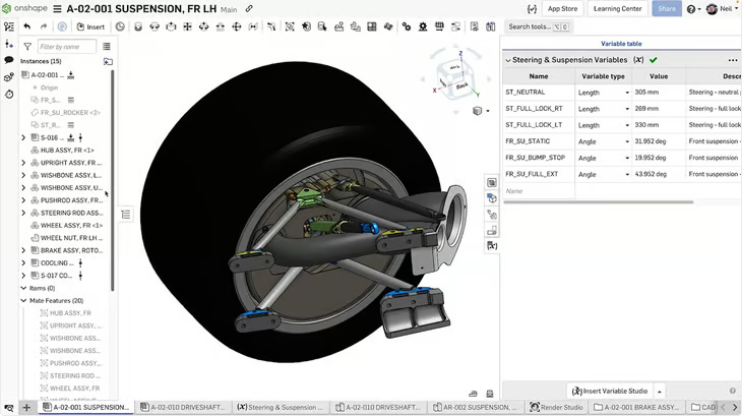
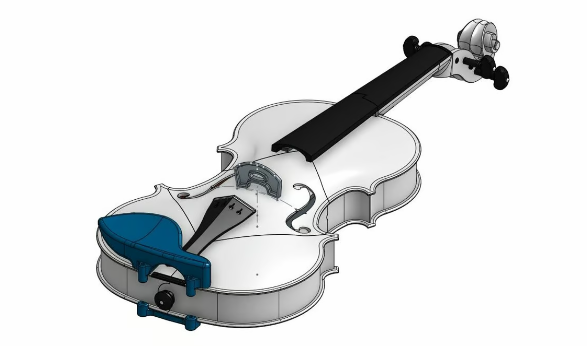
Onshape is a powerful web-based CAD program (with CAM capabilities) suitable for engineers and designers, and it is one of our favorite tools at All3DP. It is browser-based, requiring no downloads or installations, and offers real-time collaboration features similar to Google Docs for CAD.
The free version is more powerful than you might expect, covering all the basics of CAD, including full 3D parametric modeling, components, and drawings. Additionally, it can be accessed from any device or browser anywhere. The catch is that it is only available for personal use, non-commercial purposes, and all documents are public (anyone can view them), so do not develop new product prototypes here.
With that in mind, Onshape’s “free plan” is an excellent tool for development and CAD editing.
Onshape offers more free services beyond just the free plan. Additionally, Onshape has an invite-only “Creator Program” for educators, influencers, and advanced users to create content around Onshape. Accepted creators may receive software stipends and can earn from Onshape-branded YouTube content.
If you fall in love with this software, you can upgrade to a paid version for a powerful, cloud-native, professional-grade platform that includes simulation, rendering, and enterprise analytics for professionals.
Usability
If you log into Onshape as a user unfamiliar with CAD programs, it can be quite overwhelming at first. Such a powerful tool and robust toolset available through a browser is indeed impressive. However, as a professional enterprise user, Onshape does not seem overly concerned with the accessibility of its user interface.
Fortunately, when you first launch Onshape, you will see a live tutorial that introduces you to the basics of its interface. From there, you can click on the “Learning Center” in the upper right corner to find a variety of courses—some free and some paid.
Top Free Features
Real-time Collaboration: In addition to the entire community, free users can access many Onshape enterprise-style features that make collaboration easy. Free users can use real-time collaboration, meaning you and your co-designers can edit, comment, tag, and do anything else you want in real-time, which helps get work done remotely.
Design Branching and Merging: If simultaneous live editing feels a bit stressful, you can always branch your design and then merge changes back into the original design. This is a great way to experiment with models without the hassle of undoing a lot of changes later. If everything goes well, you can apply those changes to the original design, and the whole team will see the updates.
Practicality
Onshape Free provides you with a relatively unobstructed, high-priced, highly professional program for complex engineering and product design, but limited to non-commercial activities. Fortunately, its collaborative features for large design teams also make it an excellent tool for free users to collaborate remotely, and if your designs are open-source anyway, it is a great choice. Another advantage is that there are plenty of tutorials and resources available on the software’s website.
Scalability
Unfortunately, transitioning from Onshape Free to Onshape’s paid tier is a bitter pill to swallow. Want to use the professional software you are already familiar with? The standard plan starts at about $1,500 per year for commercial use, with higher tiers available for enterprise needs. Essentially, this is just owning your work.
Best for: Designing mechanical parts and complex objects using a powerful browser-based parametric design program.
Address:https://www.onshape.com/en/products/free
 02 FreeCAD
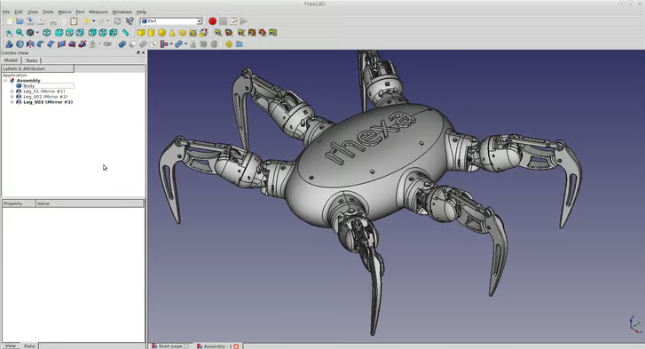
If you want a locally installed, powerful, forever-free CAD software, we recommend FreeCAD. After all, that’s the name.
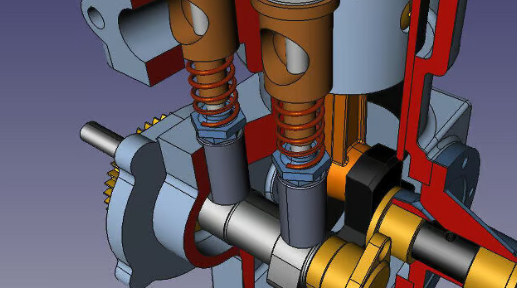
What we love about FreeCAD is its open-source parametric modeling capabilities, which excel in all major CAD tasks, including product design, mechanical engineering, and architecture.
Usability
For example, FreeCAD’s interface is not as user-friendly as Autodesk’s Fusion, as it is modular and based on workbenches, which may confuse new users not accustomed to this model. If you are not familiar with CAD workflows, you should be prepared for a learning curve and watch some beginner interface tutorials that will introduce you to the most important features.
If you are already an intermediate CAD user, you will be able to customize the UI to suit your preferences and find an amazing number of advanced features in this open-source software.
Top Free Features
Python Integration: The top layer of FreeCAD is built with Python, making it easy to customize the program. If you enjoy coding a bit, FreeCAD is ready for you to customize your design experience—from the user interface to macros, all the way to programming your own tools.
2D Drawing: Surprisingly, 2D drawing is often a paid feature in CAD programs. It can be very convenient to work from schematics, so if you are dealing with many complex designs, it will quickly become a coveted feature. Fortunately, FreeCAD provides you with various dimensions to work with.
OpenSCAD Workbench: FreeCAD’s OpenSCAD workbench allows you to import and use OpenSCAD models. While it does not replicate the full scripting environment of OpenSCAD, it provides useful interoperability for those familiar with code-based modeling. Keep in mind that OpenSCAD needs to be installed to use this feature—but it is also free and open-source.
Practicality
It is worth noting that FreeCAD also has some CAM capabilities. It includes a path workbench for basic CAM operations, such as generating G-code for CNC machines. While not as advanced as Fusion’s CAM features, it can accomplish many manufacturer-level tasks.
As a fully open-source program, FreeCAD truly has no strings attached. Your projects can be used commercially for free, and there are no terms and conditions that can capture you in later details. If you are looking for a cost-effective, high-quality, and relatively easy-to-use CAD program for small businesses, be sure to give it a try.
Scalability
Since FreeCAD is free and open-source, there is not much in terms of scaling up, although there is no commercial tier to upgrade to, FreeCAD expands through a growing ecosystem of community-developed plugins and workbenches provided through the Addons Manager.
Once downloaded, you have complete unrestricted access to the program. It will keep up with your skills. The software can be upgraded through community plugins, so as your CAD skills improve, just check the content available through the Addons Manager—chances are you will be able to adjust your experience with products already available from the community to compete with the most expensive products. If not, you can customize it using Python.
Best Choice: Free and open-source design through a locally installed program with no strings attached.
Address:https://www.freecad.org/
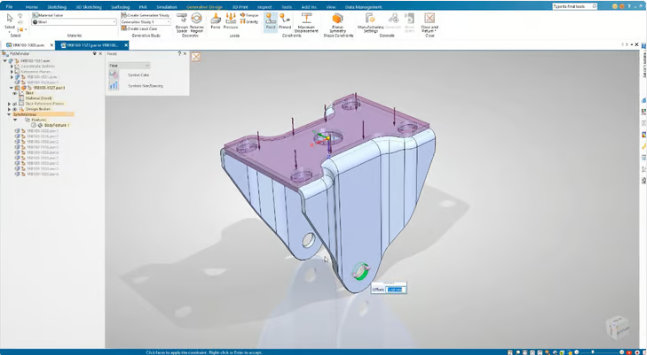
 03 Solid Edge
Siemens Solid Edge is a very popular CAD platform that provides a powerful set of tools for professional mechanical and electronic product development. It is not free, but one version is free. The free version is called Solid Edge Community Edition.
The Community Edition includes part modeling, assembly design, sheet metal, and welding tools. You can also use dimensioning tools to create 2D drawings and prepare designs for additive manufacturing.
Siemens offers a very generous and feature-rich free Community Edition, as well as a full free version for teachers and students. Unfortunately, Solid Edge is only available for Windows. Files created in the Community Edition can be exported as STL, STEP, and other formats. However, they contain watermarks on 2D drawings, and Community Edition files cannot be opened in the commercial version, which may pose collaboration or scaling issues.
Usability
Solid Edge has a good reputation among CAD software users for being easy to use, and its free version, Solid Edge Community Edition, offers many advanced features for experienced CAD users. However, while Siemens, the company that developed the software, has done a great job of simplifying most processes, it may not be the best fit for beginners. Some criticism has been directed at the software because some of its processes are trickier than they should be—pattern commands are one such area. Nevertheless, there are some free training resources available to help people master the tricks.
Unlike some CAD software, Solid Edge does not restrict its exports (although you cannot open files in the commercial version of the software), so you can export a range of file formats commonly used in the industry.
Top Free Features
Sync Technology: Solid Edge uses a technology called synchronous technology, which directly relates to the 3D modeling method used in its software. In short, this technology allows you to change the form of a 3D model without its history or sketches, enabling you to switch between parametric and direct modeling. With it, you should be able to adjust individual components of assemblies without messing up the entire model. Therefore, many consider it to provide a superior workflow.
Simulation: The software has a powerful selection of simulation tools that allow you to test your models against factors such as motion, vibration, temperature, and pressure. If you are designing functional components, the ability to run strength simulations among other material performances may prove invaluable before manufacturing—not to mention that capturing failures can save a lot of time. Most CAD tools only offer paid simulations.
3D Printing Features: For 3D printing enthusiasts, Solid Edge has dedicated tools for 3D printing, equipped with the latest manufacturing technologies and specially prepared for the often complex geometries in this field. Conveniently, you can print directly from the software.
Practicality
If you are an experienced CAD user just enjoying the software for research, home design, or other purposes, then Solid Edge’s free Community Edition offers you a lot. Anyone below an intermediate knowledge level in CAD software may find it a bit daunting at first, but Siemens’ free training materials will certainly help you better understand Solid Edge’s capabilities.
Solid Edge’s Community Edition is for personal use only, so as long as you do not intend to generate income from the software, you can use it for free. Siemens states that if you feel you have a commercial idea that can be implemented, some startups may qualify for a free year of Solid Edge Premium.
Scalability
If you have outgrown the Community Edition, there are several different Solid Edge subscriptions with different features, but the basic “Solid Edge Design and Drafting XaaS” starts at $110 per month, which is where you want to begin.
Design and Drafting offers basic part and assembly design features. If you need more, Solid Edge Foundation expands to sheet metal structures, welded joints, and frames, and is touted as “a complete software package with 3D CAD applications and support.” Solid Edge Classic and Solid Edge Premium are built for more advanced users and requirements, with Classic featuring KeyShot rendering and basic FEM simulation, while Premium offers complete FEM simulation, piping, and tubing design capabilities.
Best for: Mechanical, electrical, and engineering design; students and hobbyists with at least intermediate CAD knowledge.
Address:https://solidedge.siemens.com/en/solutions/users/hobbyists-and-makers/
 04 Fusion
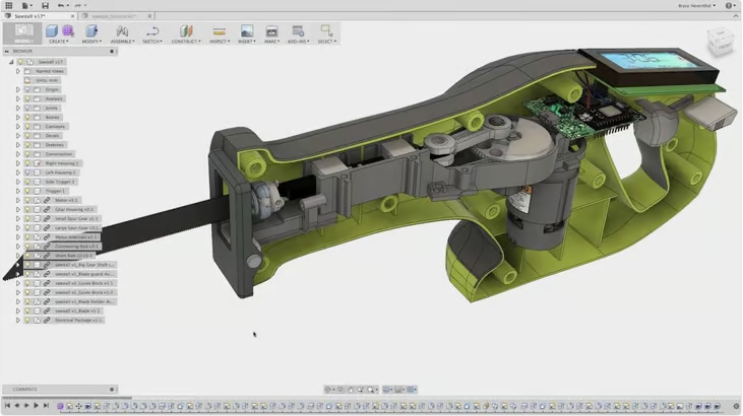
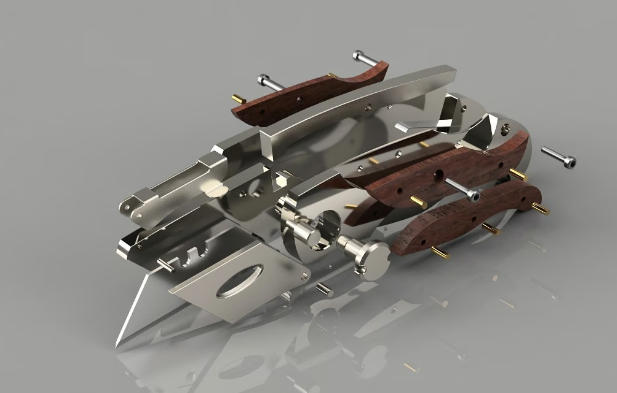
Autodesk’s Fusion may be the complete CAD software used by most design professionals, and fortunately, it is free for personal use. Of course, Autodesk does not provide the full version for free, but you can use all the most important features of the software. The free version has limited CAM capabilities and limited import/export file types, and do not expect any support beyond user forums, but what you get is certainly more than what you miss.
Fusion supports additive manufacturing (3D printing) through built-in tools for 3D printing optimization and toolpath generation.
The free personal use version allows you to try it out for a long time to see if you are willing to give up the still affordable full version at $85 per month, which is still a bargain.
Usability
For such an advanced and powerful software, Fusion is very easy to operate even for new users. Its toolbar is context-sensitive, depending on the workflow you choose, so you won’t face a bunch of unknown and irrelevant tools as you switch between design, rendering, animation, or anything else you might use the software for. All menus are customizable, so once you master the tricks, you can change them to suit your preferences.
This simple menu makes Fusion very approachable for beginners, but that doesn’t mean the software doesn’t have a learning curve. If this is your choice, take some time to familiarize yourself with the hotkeys and right-click menus—both will come in handy.
Top Free Features
Local Computer-Aided Manufacturing (CAM): If you are broadening your horizons into the world of CNC, Fusion has you covered. The software has native CAM integration to save you from the hassle of importing/exporting and working with another program. If you are unfamiliar with machining, CAM is the slicer for CNC that creates the G-code for your design.
Diversity of Design Approaches: Autodesk has packed what seems like every type of CAD into Fusion. We really aren’t sure what it’s missing. You can use it for direct modeling, parametric modeling, subdivision modeling, and more. It easily becomes the best all-around software in free CAD options.
Collaboration and Cloud: Even as local software, Fusion uses cloud features to run better and simplify things like collaboration and storage. As a free user, you can have 10 active designs stored by Autodesk (unlimited inactive designs) and share your designs via publicly accessible links for others to provide comments and tags.
Practicality
The main drawback of Fusion’s free license for hobbyists is the non-commercial agreement. By using Autodesk’s software for free, you agree that it is for personal use only, meaning you are not designing anything you intend to sell. While many of the most advanced features are isolated from the free license, you can access almost all the features that a typical hobbyist would want in modern, updated, professional-quality software.
Scalability
If your CAD skills take your designs beyond personal use, a paid Fusion license will cost you $85 per month or $680 per year, but annual licenses are often sold at a price of $43 per month. The paid version can access the software’s most advanced features, including generative design processed through Autodesk’s powerful cloud computing; simulation, allowing you to virtually test designs under static stress, thermal distribution, modal frequency, and other stresses; and multi-user management so you can collaborate with others.
It is worth noting that eligible startups can also use Fusion commercially at a significant discount. There are stricter requirements and obligations for these entities—venture capital, angel investment, or self-funding, focusing on design or manufacturing physical products—but there are also provisions for commercial activity.
Best for: Non-commercial projects ranging from simple tools to complex machines.
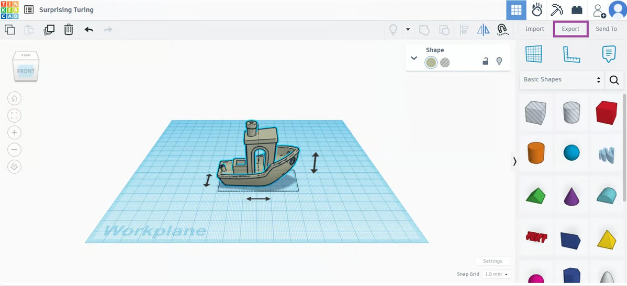
 05 TinkerCAD
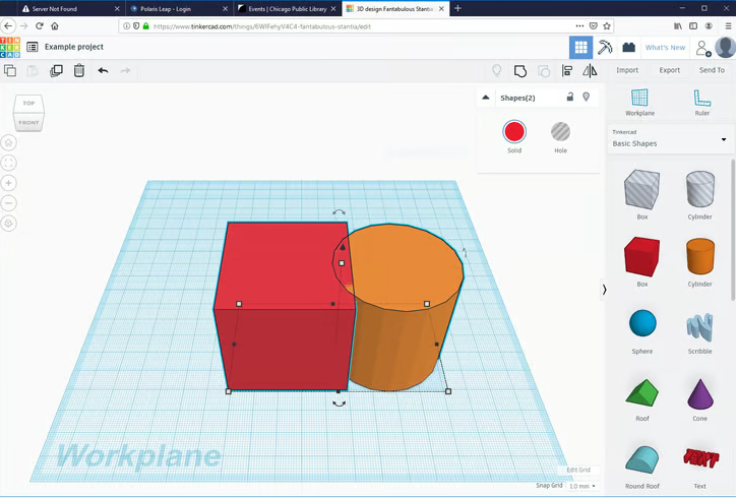
Just because you want a free CAD tool doesn’t mean you are a CAD novice, but if you are, we have added TinkerCAD to our list. This is the basic knowledge of CAD that everyone should start with, even if it only takes you a few weeks to master before you can move on to the more complex free options above.
TinkerCAD is a web-based 3D design and modeling tool from Autodesk that is very beginner-friendly. It is great for creating basic 3D models and 3D printing. It features simple drag-and-drop tools that are intuitive for users without CAD experience. It is not suitable for complex or parametric modeling; it is more like a stepping stone to achieving that goal.
Usability
TinkerCAD is entirely web-based, meaning it requires no downloads or installations. It runs directly in your browser, making it accessible from any computer with an internet connection. TinkerCAD supports exporting to STL and OBJ formats, both widely used for 3D printing. This makes it easy to transfer your designs directly to a 3D printer.
Top Free Features
Electronic Simulation: TinkerCAD also includes a circuit feature that allows users to design and simulate simple electronic circuits. This is a great tool for those interested in electronics and microcontrollers. You can also use Arduino components and simulate their behavior in actual circuits. It is perfect for beginners to learn how to program and design with microcontrollers. The software includes a virtual breadboard for creating circuits and an integrated code editor to write, test, and debug Arduino code directly on the platform.
Visual Programming: TinkerCAD’s code blocks feature allows users to create 3D models using a block-based programming interface, similar to Scratch. This is a fun and interactive way to learn programming concepts while creating designs. Using code blocks, users can control their designs through code, allowing for parametric design where certain features can be dynamically adjusted using code.
Direct Print Integration: TinkerCAD partners with several 3D printing service companies, allowing you to easily send print designs directly from the platform. The process of creating and preparing 3D printing designs in TinkerCAD is streamlined, especially for beginners.
Practicality
TinkerCAD is completely free, with no hidden fees or subscription plans. It is an ideal choice for educators, hobbyists, and students looking for a simple and easy-to-use CAD tool.
Scalability
TinkerCAD is not designed for highly scalable professional or industrial-grade projects. It serves as a beginner-friendly, easy-to-use tool, but its capabilities are limited when it comes to handling more complex, large-scale, or professional-grade designs.
Best for: Entry-level CAD tool that provides a simple, fun way to start with 3D design, electronics, and coding.
Address:https://www.tinkercad.com/
 06 Blender
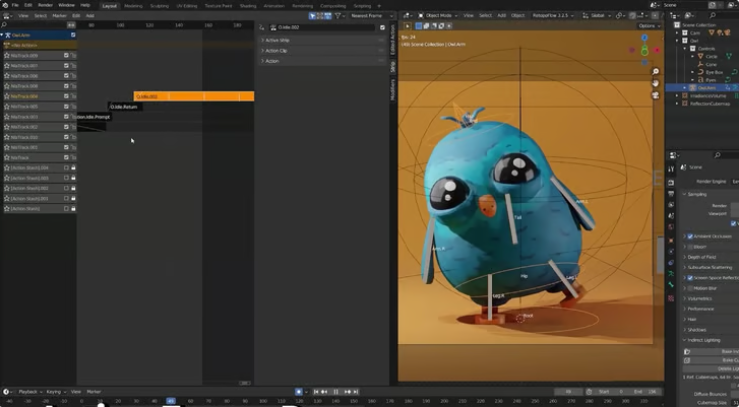
In terms of reliability and versatility, there is no better free 3D graphics software than Blender; it is definitely one of our favorite software. It is primarily used for making animated films, visual effects, art, and 3D games, but it also offers a very comprehensive set of tools for 3D modeling, sculpting, texturing, rendering, and compositing.
This free open-source program has been used by professionals to create big-budget animated films, and it has a dazzling array of features, including some very interesting capabilities like fluid and smoke simulation, particle simulation, soft body simulation, sculpting, camera tracking, and compositing.
Blender stands out in this list because it is not specifically designed for engineering applications. If you want to learn mechanical engineering, architecture, product design, or similar professions, you would be better off choosing another more specialized program from this list. That said, it is a very versatile program and can certainly be used for those applications.
The software has a top-quality free foundation and a wealth of plugins available for almost any CAD application you can think of, including parametric modeling. If you want to primarily do artistic 3D modeling but want to choose more engineering-focused CAD work, Blender is a great choice.
Best for: Professional 3D modelers, 3D designers, and game developers. Additionally, hobbyists interested in art design can also use it flexibly.
Address:https://www.blender.org/
 END
END




 Welcome to add the editor’s WeChatto learn about the latest trends in the 3D printing industry
 About 3D Printing Technology
Timely integration of insights, technology trends, application scenarios, competitive strategies, and in-depth dynamics from China, the United States, and globally for practitioners in 3D printing and artificial intelligence, providing high-value information. We are passionate about 3D printing and welcome contributors from around the world.
Disclaimer:3D Printing Technology has no commercial cooperation, sponsorship, employment, or other interests with the companies mentioned in the text.3D Printing TechnologyImages and videos from the internet are for auxiliary reading purposes only, with no commercial intent.All rights belong to the original authors. If there are any infringement issues, please contact the rights holder in a timely manner, and we will delete it as soon as possible. The copyright of the images in this article belongs to the copyright holder,3D Printing Technologywatermarks are automatically added for auxiliary reading and do not represent copyright ownership of the images. If you need to use the images, please consult the relevant copyright parties.3D Printing TechnologyThe article does not constitute any investment advice,3D Printing Technologyis not responsible for any direct or indirect losses caused by the use of the information in this article.