In embedded systems, display devices serve as core components for human-machine interaction, and the diversity of their hardware interfaces presents challenges for driver development. The Zephyr RTOS supports a variety of display devices, from low-power OLEDs to high-definition MIPI panels, through a unified driver model. This article explains the hierarchical relationship between hardware and software in drivers and demonstrates this hierarchy in display drivers using device trees.
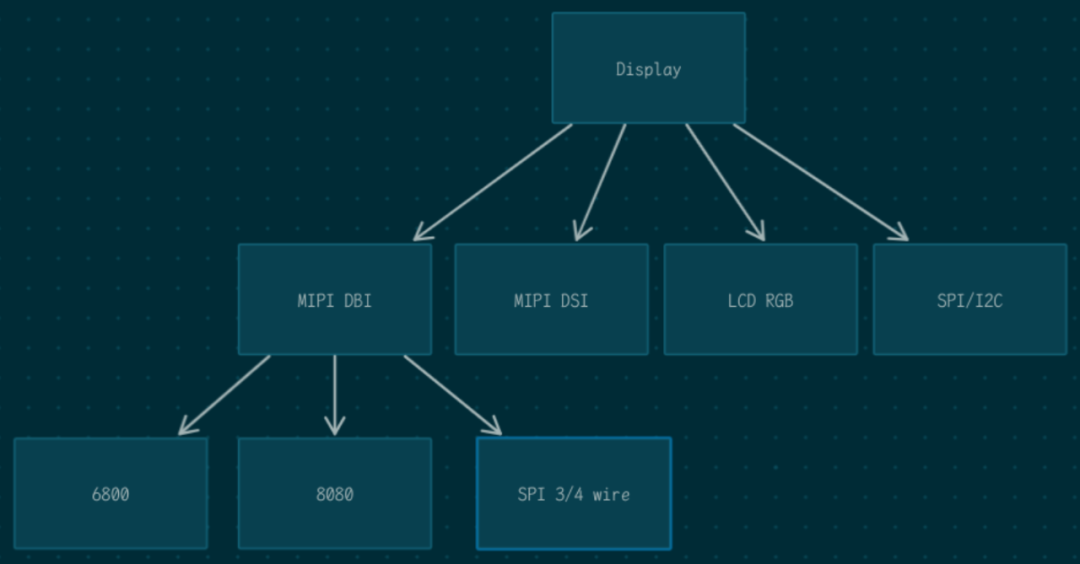
Structurally, the top layer is the Display driver of Zephyr, with different Display device drivers paired with different display interfaces.
Display Driver Interface
The Display driver interface provides a unified Display API, defined in zephyr/include/zephyr/drivers/display.h
static inline int display_write(const struct device *dev, const uint16_t x,
    const uint16_t y,
    const struct display_buffer_descriptor *desc,
    const void *buf);

static inline int display_read(const struct device *dev, const uint16_t x,
          const uint16_t y,
          const struct display_buffer_descriptor *desc,
          void *buf);

static inline int display_clear(const struct device *dev);

static inline void *display_get_framebuffer(const struct device *dev);

static inline int display_blanking_on(const struct device *dev);

static inline int display_blanking_off(const struct device *dev);

static inline int display_set_brightness(const struct device *dev,
      uint8_t brightness);

static inline void display_get_capabilities(const struct device *dev,
         struct display_capabilities *
         capabilities);

display_set_pixel_format(const struct device *dev,
    constenum display_pixel_format pixel_format);

static inline int display_set_orientation(const struct device *dev,
       const enum display_orientation
       orientation);
All of the above APIs are self-explanatory, so I will not elaborate on each one. In the implementation of the Display driver, it is sufficient to implement the functions in <span>struct display_driver_api</span>.
__subsystem struct display_driver_api {
 display_blanking_on_api blanking_on;
 display_blanking_off_api blanking_off;
 display_write_api write;
 display_read_api read;
 display_clear_api clear;
 display_get_framebuffer_api get_framebuffer;
 display_set_brightness_api set_brightness;
 display_set_contrast_api set_contrast;
 display_get_capabilities_api get_capabilities;
 display_set_pixel_format_api set_pixel_format;
 display_set_orientation_api set_orientation;
};
In practical operations, the Display driver only needs to implement <span>blanking_on</span>, <span>blanking_off</span>, <span>write</span>, <span>get_capabilities</span>, and <span>set_pixel_format</span> to function. The implementation of the Display driver will vary based on the device interface and display hardware.
Mainstream Display Interfaces Supported by Zephyr
Zephyr supports four mainstream display interfaces from a driver implementation perspective:
- MIPI DBI
- MIPI DSI
- Parallel RGB LCD
- SPI/I2C
MIPI DBI Interface
The MIPI DBI driver class in Zephyr supports MIPI DBI-compliant display controllers, primarily consisting of three types of interfaces:
- Type A: Motorola 6800 parallel bus (commonly used for parallel interfaces)
- Type B: Intel 8080 parallel bus
- Type C: SPI serial interface
- OP1: Three-wire (CLK, CS, SDA) 9bit: The first 8 bits are data, the last 1 bit is command/data selection
- OP2: Three-wire (CLK, CS, SDA) 18bit: The first 7 bits are invalid, the 8th bit is command/data selection, followed by 8 bits of data. Currently, Zephyr’s API does not support this mode
- OP3: Four-wire (CLK, CS, SDA, DC) 8bit: 8-bit data, with command/data selection via the DC line
The MIPI DBI driver code path in Zephyr is located at ‘zephyr/drivers/mipi_dbi’, primarily including the following files:
- mipi_dbi_bitbang.c: MIPI DBI Type A and B driver implemented using standard GPIO. Supports 8-bit, 9-bit, and 16-bit data bus widths.
- mipi_dbi_nxp_flexio_lcdif.c: MIPI DBI Type A and B driver implemented using NXP FlexIO. Supports 8-bit and 16-bit data bus widths.
- mipi_dbi_nxp_dcnano_lcdif.c: MIPI DBI Type A and B driver implemented using the NXP DCNANO LCDIF controller. Supports 8-bit, 9-bit, and 16-bit data bus widths.
- mipi_dbi_nxp_lcdic.c: MIPI DBI Type A/B driver implemented using the NXP LCDIC controller. Supports 8-bit, 9-bit, and 16-bit data bus widths. Supports TYPE C OP1 and OP3 modes.
- mipi_dbi_stm32_fmc.c: MIPI DBI Type B driver implemented using STM32 FMC. Supports 16-bit data bus width.
- mipi_dbi_spi.c: MIPI DBI Type C driver implemented using Zephyr’s standard SPI driver. Supports OP1 and OP3 modes.
Zephyr provides a unified API for MIPI DBI, defined in <span>zephyr/include/zephyr/drivers/mipi_dbi.h</span>.
static inline int mipi_dbi_command_write(const struct device *dev,
      const struct mipi_dbi_config *config,
      uint8_t cmd, const uint8_t *data,
      size_t len);
static inline int mipi_dbi_command_read(const struct device *dev,
     const struct mipi_dbi_config *config,
     uint8_t *cmds, size_t num_cmd,
     uint8_t *response, size_t len);
static inline int mipi_dbi_write_display(const struct device *dev,
      const struct mipi_dbi_config *config,
      const uint8_t *framebuf,
      struct display_buffer_descriptor *desc,
      enum display_pixel_format pixfmt);
static inline int mipi_dbi_reset(const struct device *dev, uint32_t delay_ms);

static inline int mipi_dbi_release(const struct device *dev,
       const struct mipi_dbi_config *config);

static inline int mipi_dbi_configure_te(const struct device *dev,
     uint8_t edge,
     uint32_t delay_us);
In the Display driver, wherever MIPI DBI is needed, these unified MIPI APIs are used, and the specific choice of which DBI driver to use is determined by the device tree, which the Display driver implementation code does not need to concern itself with. In the device tree, this is reflected as the display device being connected to the MIPI DBI bus.
For example: This is the device tree for the st7789v connected to the stm32 fmc bus via the MIPI DBI Type B 16bit driver.
&fmc {
 pinctrl-0 = <&fmc_a0_pf0 &fmc_ne1_pc7 &fmc_nwe_pd5 &fmc_noe_pd4
       &fmc_d0_pd14 &fmc_d1_pd15 &fmc_d2_pd0 &fmc_d3_pd1
       &fmc_d4_pe7 &fmc_d5_pe8 &fmc_d6_pe9 &fmc_d7_pe10
       &fmc_d8_pe11 &fmc_d9_pe12 &fmc_d10_pe13 &fmc_d11_pe14
       &fmc_d12_pe15 &fmc_d13_pd8 &fmc_d14_pd9 &fmc_d15_pd10>;
 pinctrl-names = "default";
 status = "okay";

 sram {
  compatible = "st,stm32-fmc-nor-psram";

#address-cells = <1>;
#size-cells = <0>;

  bank@0 {
   reg = <0x0>;
   st,control = <STM32_FMC_DATA_ADDRESS_MUX_DISABLE
    STM32_FMC_MEMORY_TYPE_SRAM
    STM32_FMC_NORSRAM_MEM_BUS_WIDTH_16
    STM32_FMC_BURST_ACCESS_MODE_DISABLE
    STM32_FMC_WAIT_SIGNAL_POLARITY_LOW
    STM32_FMC_WAIT_TIMING_BEFORE_WS
    STM32_FMC_WRITE_OPERATION_ENABLE
    STM32_FMC_WAIT_SIGNAL_DISABLE
    STM32_FMC_EXTENDED_MODE_DISABLE
    STM32_FMC_ASYNCHRONOUS_WAIT_DISABLE
    STM32_FMC_WRITE_BURST_DISABLE
    STM32_FMC_CONTINUOUS_CLOCK_SYNC_ONLY
    STM32_FMC_WRITE_FIFO_DISABLE
    STM32_FMC_PAGE_SIZE_NONE>;
   st,timing = <1 1 32 0 2 2 STM32_FMC_ACCESS_MODE_A>;

   fmc-mipi-dbi {
    compatible = "st,stm32-fmc-mipi-dbi";
    reset-gpios = <&gpioh 13 GPIO_ACTIVE_LOW>;
    power-gpios = <&gpioc 6 GPIO_ACTIVE_LOW>;
    register-select-pin = <0>;
    #address-cells = <1>;
    #size-cells = <0>;

    st7789v: lcd-panel@0 {
     compatible = "sitronix,st7789v";
     reg = <0>;
     mipi-mode = "MIPI_DBI_MODE_8080_BUS_16_BIT";
     /* A write cycle should be 68ns */
     mipi-max-frequency = <14705882>;
     width = <240>;
     height = <240>;
     x-offset = <0>;
     y-offset = <0>;
     vcom = <0x1F>;
     gctrl = <0x35>;
     vdvs = <0x20>;
     mdac = <0x00>;
     gamma = <0x01>;
     colmod = <0x05>;
     lcm = <0x2c>;
     porch-param = [0c 0c 00 33 33];
     cmd2en-param = [5a 69 02 00];
     pwctrl1-param = [a4 a1];
     pvgam-param = [D0 08 11 08 0C 15 39 33 50 36 13 14 29 2D];
     nvgam-param = [D0 08 10 08 06 06 39 44 51 0B 16 14 2F 31];
     ram-param = [00 F0];
     rgb-param = [40 02 14];
    };
   };
  };
 };
For example: This is the device tree for the st7789v connected to the esp32 SPI bus via the MIPI DBI Type C 4-wire driver.
&mipi_dbi {
    compatible = "zephyr,mipi-dbi-spi";
    spi-dev = <&spi2>;
    dc-gpios = <&gpio1 1 GPIO_ACTIVE_HIGH>;      /* G33 */
    reset-gpios = <&gpio1 2 GPIO_ACTIVE_LOW>;    /* G34 */
    write-only;
    #address-cells = <1>;
    #size-cells = <0>;

    st7789v: st7789v@0 {
        compatible = "sitronix,st7789v";
        reg = <0>;
        mipi-max-frequency = <27000000>;

        width = <128>;
        height = <128>;
        x-offset = <2>;
        y-offset = <1>;

        vcom = <0x28>;
        gctrl = <0x35>;
        vrhs = <0x10>;
        vdvs = <0x20>;
        mdac = <0x00>;
        gamma = <0x01>;
        colmod = <0x55>;
        lcm = <0x0c>;
        porch-param = [0c 0c 00 33 33];
        cmd2en-param = [5a 69 02 00];
        pwctrl1-param = [a4 a1];
        pvgam-param = [d0 00 02 07 0a 28 32 44 42 06 0e 12 14 17];
        nvgam-param = [d0 00 02 07 0a 28 31 54 47 0e 1c 17 1b 1e];
        ram-param = [00 E0];
        rgb-param = [40 02 14];
    };

};
MIPI DSI Interface
MIPI DSI (Display Serial Interface) is a high-speed serial display interface standard established by the MIPI Alliance, designed primarily for mobile devices (such as smartphones and tablets), and has now expanded to automotive displays, AR/VR, and other fields. The MIPI DSI driver code path in Zephyr is located at ‘zephyr/drivers/mipi_dbi’, primarily including the following files:
- dsi_stm32.c: STM32 DSI controller driver
- dsi_renesas_ra.c: Renesas RA DSI controller driver
- dsi_mcux.c: NXP MCUX DSI controller driver
- dsi_mcux_2l.c: Enhanced driver for the NXP MCUX DSI controller targeting the next generation of NXP chips, focusing on improving hardware acceleration capabilities (DMA/LCDIF), power control, and clock flexibility
Zephyr provides a unified API for MIPI DSI, defined in <span>zephyr/include/zephyr/drivers/mipi_dsi.h</span>.
static inline int mipi_dsi_attach(const struct device *dev,
      uint8_t channel,
      const struct mipi_dsi_device *mdev);

static inline ssize_t mipi_dsi_transfer(const struct device *dev,
     uint8_t channel,
     struct mipi_dsi_msg *msg);

ssize_t mipi_dsi_generic_read(const struct device *dev, uint8_t channel,
         const void *params, size_t nparams,
         void *buf, size_t len);

ssize_t mipi_dsi_generic_write(const struct device *dev, uint8_t channel,
          const void *buf, size_t len);

ssize_t mipi_dsi_dcs_read(const struct device *dev, uint8_t channel,
     uint8_t cmd, void *buf, size_t len);

ssize_t mipi_dsi_dcs_write(const struct device *dev, uint8_t channel,
      uint8_t cmd, const void *buf, size_t len);

static inline int mipi_dsi_detach(const struct device *dev,
      uint8_t channel,
      const struct mipi_dsi_device *mdev);
In the Display driver, wherever MIPI DSI is needed, these unified MIPI APIs are used, and the specific choice of which DBI driver to use is determined by the device tree, which the Display driver implementation code does not need to concern itself with. In the device tree, this is reflected as the display device being connected to the MIPI DSI bus.
For example: This is the device tree for the st7701 connected to the rt1160 MIPI DSI.
zephyr_mipi_dsi: &mipi_dsi {
    dphy-ref-frequency = <24000000>;
 st7701: st7701@0 {
  status = "okay";
  compatible = "sitronix,st7701";
  reg = <0x0>;
  height = <800>;
  width = <480>;
  data-lanes = <2>;
  pixel-format = <MIPI_DSI_PIXFMT_RGB565>;
  rotation = <0>;
  gip-e0 = [E0 00 00 02];
  gip-e1 = [E1 08 00 0A 00 07 00 09 00 00 33 33];
  gip-e2 = [E2 00 00 00 00 00 00 00 00 00 00 00 00 00];
  gip-e3 = [E3 00 00 33 33];
  gip-e4 = [E4 44 44];
  gip-e5 = [E5 0E 60 A0 A0 10 60 A0 A0 0A 60 A0 A0 0C 60 A0 A0];
  gip-e6 = [E6 00 00 33 33];
  gip-e7 = [E7 44 44];
  gip-e8 = [E8 0D 60 A0 A0 0F 60 A0 A0 09 60 A0 A0 0B 60 A0 A0];
  gip-eb = [EB 02 01 E4 E4 44 00 40];
  gip-ec = [EC 02 01];
  gip-ed = [ED AB 89 76 54 01 FF FF FF FF FF FF 10 45 67 98 BA];
  pvgamctrl = [B0 40 C9 91 0D 12 07 02 09 09 1F 04 50 0F E4 29 DF];
  nvgamctrl = [B1 40 CB D0 11 92 07 00 08 07 1C 06 53 12 63 EB DF];

  display-timings {
   compatible = "zephyr,panel-timing";
   hsync-active = <1>;
   vsync-active = <0>;
   de-active = <0>;
   pixelclk-active = <0>;
   hback-porch = <40>;
   hsync-len = <32>;
   hfront-porch = <8>;
   vback-porch = <6>;
   vsync-len = <8>;
   vfront-porch = <9>;
  };
 };
};
LCD RGB
Zephyr does not abstract the LCD RGB interface; the Display driver directly calls the HAL interfaces provided by the SoC vendor. For example, <span>display_mcux_elcdif.c</span>, <span>display_renesas_ra.c</span>, etc. This is typically paired with general-purpose LCD RGB parallel screens, where the screen parameters are set in the device tree.
For example, below is the device tree for an external LCD RGB interface screen connected to the rt1062, where <span>display-timings</span> describes the screen parameters of the external screen.
&lcdif {
 status = "okay";
 width = <480>;
 height = <480>;
 display-timings {
  compatible = "zephyr,panel-timing";
  hsync-len = <41>;
  hfront-porch = <4>;
  hback-porch = <8>;
  vsync-len = <10>;
  vfront-porch = <4>;
  vback-porch = <2>;
  de-active= <1>;
  pixelclk-active = <1>;
  hsync-active = <0>;
  vsync-active = <0>;
  clock-frequency = <9210240>;
 };
 pixel-format = <PANEL_PIXEL_FORMAT_ARGB_8888>;
 data-bus-width = "24-bit";
 pinctrl-0 = <&pinmux_lcdif>;
 pinctrl-names = "default";
 backlight-gpios = <&gpio2 31 GPIO_ACTIVE_HIGH>;
};
SPI/I2C
There are also some small display devices that do not use the three standard display interfaces mentioned above, but instead have their own protocols, transmitting data via SPI or I2C, such as <span>ssd1306.c</span>, <span>display_max7219.c</span>, etc. These require the display driver to call the standard SPI or I2C APIs provided by Zephyr according to the hardware characteristics of the screen. In the device tree, this is reflected as the display device being connected to the SPI/I2C bus.
For example, below is the device tree for the ssd1306 connected to the esp32’s I2C bus.
&i2c0 {
 status = "okay";
 clock-frequency = <I2C_BITRATE_STANDARD>;
 sda-gpios = <&gpio0 21 GPIO_OPEN_DRAIN>;
 scl-gpios = <&gpio0 22 GPIO_OPEN_DRAIN>;
 pinctrl-0 = <&i2c0_default>;
 pinctrl-names = "default";
 ssd1306_128x64: ssd1306@3c {
  compatible = "solomon,ssd1306fb";
  reg = <0x3c>;
  width = <128>;
  height = <64>;
  segment-offset = <0>;
  page-offset = <0>;
  display-offset = <0>;
  multiplex-ratio = <63>;
  segment-remap;
  com-invdir;
  prechargep = <0x22>;
 };
};
For example, below is the device tree for the max7219 connected to the esp32’s SPI bus.
&spi3 {
 #address-cells = <1>;
#size-cells = <0>;
 status = "okay";
 pinctrl-0 = <&spim3_default>;
 pinctrl-names = "default";
 cs-gpios = <&gpio0 18 GPIO_ACTIVE_LOW>;

 max7219_max7219_8x8: max7219@0 {
  compatible = "maxim,max7219";
  reg = <0>;
  spi-max-frequency = <1000000>;
  num-cascading = <1>;
  intensity = <0>;
  scan-limit = <7>;
 };
};
References
https://docs.zephyrproject.org/latest/hardware/peripherals/display/index.html https://docs.zephyrproject.org/latest/hardware/peripherals/mipi_dbi.html https://docs.zephyrproject.org/latest/hardware/peripherals/mipi_dsi.html
This article is reprinted from HalfCoder. Click here to read the original article for more information.

Contact Linux Foundation APAC
The Linux Foundation is a non-profit organization and an important part of the technology ecosystem.
The Linux Foundation supports the creation of a sustainable open-source ecosystem by providing financial and intellectual resources, infrastructure, services, events, and training. Through collaborative efforts in the creation of shared technologies, the Linux Foundation and its projects have formed extraordinarily successful investments. Please follow the LFAPAC (Linux Foundation APAC) WeChat public account.