The ELF 2 development board, designed based on the RK3588, has the following limitations regarding file system support for TF cards when running the Desktop 22.04 system:
-
exFAT format is not supported;
-
NTFS format is supported but requires manual mounting;
To address the compatibility issues mentioned above, this article will introduce how to enable support for these two file systems through system configuration and set up automatic mounting.
Formatting Storage Devices in Windows
Before using the TF card, it must be formatted to the desired file system (exFAT or NTFS) using the built-in tools in Windows. The steps are as follows:
1. Insert the USB drive into the computer’s USB port and ensure the system recognizes the device;
2. Open “This PC”;
3. Right-click on the USB drive icon and select “Format”;
4. In the pop-up format window, select the desired file system format (exFAT or NTFS);
5. Click “Start” to complete the formatting operation for the storage device;
Adding File System Support in the Kernel
To add support for exFAT and NTFS formats through kernel configuration, the following steps must be completed:
Open the Graphical Configuration Interface
1. Navigate to the source code directory and launch the configuration tool
Execute the following command in the Ubuntu terminal:
elf@ubuntu:~/work/ELF2-linux-source$ ./build.sh kconfig2. Configure the file system support options
In the pop-up kernel configuration interface, navigate to the DOS/FAT/EXFAT/NT Filesystems menu and check the following options:
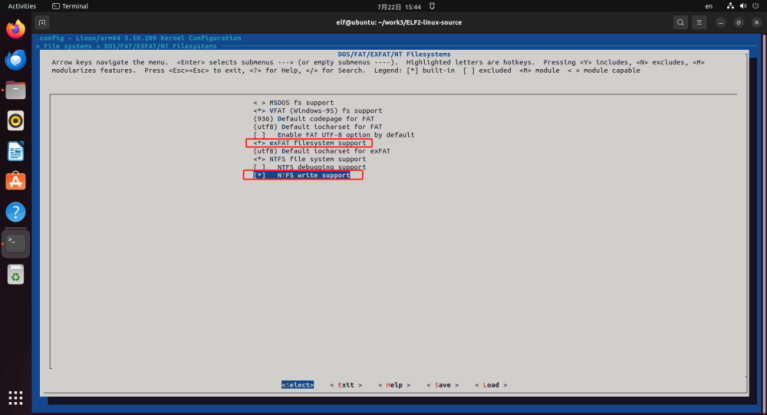
Save the configuration and exit.
Compile the File System Image
1. Execute the compile command
After saving the configuration, run the following command in the terminal:
elf@ubuntu:~/work/ELF2-linux-source$ ./build.sh kernel2. Obtain the output file
After compilation, the generated file system image will be stored in the output/firmware directory, where boot.img is the image that needs to be flashed to the development board.
Update the System on the Development Board
Refer to the detailed steps in the “5.3 Update Kernel” section of the “ELF 2 Development Board Compilation Manual” to flash the generated boot.img image to the ELF 2 development board and complete the system update.
Testing and Verification
Manually Mounting exFAT
1. Check the file system mount points
Execute the df -h command, and there is no TF card mount information:
root@elf2-desktop:~# df -hFilesystem Size Used Avail Use% Mounted on/dev/root 14G 4.6G 8.6G 35% /tmpfs 7.8G 0 7.8G 0% /dev/shmtmpfs 3.2G 2.5M 3.2G 1% /runtmpfs 5.0M 4.0K 5.0M 1% /run/locktmpfs 7.8G 12K 7.8G 1% /tmp/dev/mmcblk0p7 123M 12M 108M 10% /oem/dev/mmcblk0p8 96G 284M 92G 1% /userdatatmpfs 1.6G 84K 1.6G 1% /run/user/1000tmpfs 1.6G 56K 1.6G 1% /run/user/02. Confirm the device node
Execute the fdisk -l command to view the TF card partition information and confirm that the TF card device node is /dev/mmcblk1:
root@elf2-desktop:~# fdisk -lDisk /dev/ram0: 4 MiB, 4194304 bytes, 8192 sectorsUnits: sectors of 1 * 512 = 512 bytesSector size (logical/physical): 512 bytes / 4096 bytesI/O size (minimum/optimal): 4096 bytes / 4096 bytesDisk /dev/mmcblk0: 115.23 GiB, 123731968000 bytes, 241664000 sectorsUnits: sectors of 1 * 512 = 512 bytesSector size (logical/physical): 512 bytes / 512 bytesI/O size (minimum/optimal): 512 bytes / 512 bytesDisklabel type: gptDisk identifier: 83480000-0000-4658-8000-52E4000055BADevice Start End Sectors Size Type/dev/mmcblk0p1 16384 24575 8192 4M unknown/dev/mmcblk0p2 24576 32767 8192 4M unknown/dev/mmcblk0p3 32768 163839 131072 64M unknown/dev/mmcblk0p4 163840 425983 262144 128M unknown/dev/mmcblk0p5 425984 491519 65536 32M unknown/dev/mmcblk0p6 491520 29851647 29360128 14G unknown/dev/mmcblk0p7 29851648 30113791 262144 128M unknown/dev/mmcblk0p8 30113792 241663966 211550175 100.9G unknownDisk /dev/mmcblk1: 59.48 GiB, 63864569856 bytes, 124735488 sectorsUnits: sectors of 1 * 512 = 512 bytesSector size (logical/physical): 512 bytes / 512 bytesI/O size (minimum/optimal): 512 bytes / 512 bytesDisklabel type: dosDisk identifier: 0x00000000Device Boot Start End Sectors Size Id Type/dev/mmcblk1p1 4294967295 8589934589 4294967295 2T ff BBT/dev/mmcblk1p2 4294967295 8589934589 4294967295 2T ff BBT/dev/mmcblk1p3 4294967295 8589934589 4294967295 2T ff BBT/dev/mmcblk1p4 4294967295 6854241533 2559274239 1.2T ff BBT3. Manually mount
Create the exfat_fs directory as the mount point for the exFAT formatted TF card, using -t exfat to specify the file system type as exFAT, and mount /dev/mmcblk1 to exfat_fs/.
root@elf2-desktop:~# mkdir exfat_fsroot@elf2-desktop:~# mount -t exfat /dev/mmcblk1 exfat_fs/4. Check the file system mount point
Check the mount status again to confirm that /dev/mmcblk1 has been mounted to exfat_fs/ (verify successful mounting).
root@elf2-desktop:~# df -hFilesystem Size Used Avail Use% Mounted on/dev/root 14G 4.6G 8.6G 35% /tmpfs 7.8G 0 7.8G 0% /dev/shmtmpfs 3.2G 2.5M 3.2G 1% /runtmpfs 5.0M 4.0K 5.0M 1% /run/locktmpfs 7.8G 12K 7.8G 1% /tmp/dev/mmcblk0p7 123M 12M 108M 10% /oem/dev/mmcblk0p8 96G 284M 92G 1% /userdatatmpfs 1.6G 84K 1.6G 1% /run/user/1000tmpfs 1.6G 56K 1.6G 1% /run/user/0/dev/mmcblk1 60G 896K 60G 1% /root/exfat_fs5. Read and write verification
root@elf2-desktop:~# echo 1 > exfat_fs/test.txtroot@elf2-desktop:~# syncroot@elf2-desktop:~# cat exfat_fs/test.txt16. Unmount the TF card
After using the TF card, it is necessary to unmount it using the umount command before removing it:
root@elf2-desktop:~# umount exfat_fsManually Mounting NTFS
1. Check the file system mount points
Execute the df -h command, and there is no TF card mount information:
root@elf2-desktop:~# df -hFilesystem Size Used Avail Use% Mounted on/dev/root 14G 4.6G 8.5G 36% /tmpfs 7.8G 0 7.8G 0% /dev/shmtmpfs 3.2G 2.5M 3.2G 1% /runtmpfs 5.0M 4.0K 5.0M 1% /run/locktmpfs 7.8G 12K 7.8G 1% /tmp/dev/mmcblk0p7 123M 12M 108M 10% /oem/dev/mmcblk0p8 96G 284M 92G 1% /userdatatmpfs 1.6G 88K 1.6G 1% /run/user/1000tmpfs 1.6G 56K 1.6G 1% /run/user/02. Confirm the device node
Execute the fdisk -l command to view the TF card partition information and confirm that the TF card device node is /dev/mmcblk1:
root@elf2-desktop:~# fdisk -lDisk /dev/ram0: 4 MiB, 4194304 bytes, 8192 sectorsUnits: sectors of 1 * 512 = 512 bytesSector size (logical/physical): 512 bytes / 4096 bytesI/O size (minimum/optimal): 4096 bytes / 4096 bytesDisk /dev/mmcblk0: 115.23 GiB, 123731968000 bytes, 241664000 sectorsUnits: sectors of 1 * 512 = 512 bytesSector size (logical/physical): 512 bytes / 512 bytesI/O size (minimum/optimal): 512 bytes / 512 bytesDisklabel type: gptDisk identifier: 50530000-0000-4F1D-8000-4315000064BFDevice Start End Sectors Size Type/dev/mmcblk0p1 16384 24575 8192 4M unknown/dev/mmcblk0p2 24576 32767 8192 4M unknown/dev/mmcblk0p3 32768 163839 131072 64M unknown/dev/mmcblk0p4 163840 425983 262144 128M unknown/dev/mmcblk0p5 425984 491519 65536 32M unknown/dev/mmcblk0p6 491520 29851647 29360128 14G unknown/dev/mmcblk0p7 29851648 30113791 262144 128M unknown/dev/mmcblk0p8 30113792 241663966 211550175 100.9G unknownDisk /dev/mmcblk1: 59.48 GiB, 63864569856 bytes, 124735488 sectorsUnits: sectors of 1 * 512 = 512 bytesSector size (logical/physical): 512 bytes / 512 bytesI/O size (minimum/optimal): 512 bytes / 512 bytesDisklabel type: dosDisk identifier: 0x73736572Device Boot Start End Sectors Size Id Type/dev/mmcblk1p1 1920221984 3736432267 1816210284 866G 72 unknown/dev/mmcblk1p2 1936028192 3889681299 1953653108 931.6G 6c unknown/dev/mmcblk1p3 0 0 0 0B 0 Empty/dev/mmcblk1p4 27722122 27722568 447 223.5K 0 EmptyPartition table entries are not in disk order.3. Manually mount
Create the ntfs_fs directory as the mount point for the NTFS formatted TF card, using -t ntfs-3g to specify the use of the ntfs-3g driver to mount NTFS format (a common driver for NTFS read and write in Linux), and mount /dev/mmcblk1 to ntfs_fs/.
root@elf2-desktop:~# mkdir ntfs_fsroot@elf2-desktop:~# mount -t ntfs-3g /dev/mmcblk1 ntfs_fs/4. Check the file system mount point
root@elf2-desktop:~# df -hFilesystem Size Used Avail Use% Mounted on/dev/root 14G 4.6G 8.5G 36% /tmpfs 7.8G 0 7.8G 0% /dev/shmtmpfs 3.2G 2.5M 3.2G 1% /runtmpfs 5.0M 4.0K 5.0M 1% /run/locktmpfs 7.8G 12K 7.8G 1% /tmp/dev/mmcblk0p7 123M 12M 108M 10% /oem/dev/mmcblk0p8 96G 284M 92G 1% /userdatatmpfs 1.6G 88K 1.6G 1% /run/user/1000tmpfs 1.6G 56K 1.6G 1% /run/user/0/dev/mmcblk1 60G 88M 60G 1% /root/ntfs_fs5. Read and write verification
root@elf2-desktop:~# echo 1 > ntfs_fs/test.txtroot@elf2-desktop:~# syncroot@elf2-desktop:~# cat ntfs_fs/test.txt16. Unmount the TF card
After using the TF card, it is necessary to unmount it using the umount command before removing it:
root@elf2-desktop:~# umount ntfs_fsAutomatic Mounting of exFAT
1. Confirm the device node
Execute the fdisk -l command to view the TF card partition information and confirm that the TF card device node is /dev/mmcblk1:
root@elf2-desktop:~# fdisk -lDisk /dev/ram0: 4 MiB, 4194304 bytes, 8192 sectorsUnits: sectors of 1 * 512 = 512 bytesSector size (logical/physical): 512 bytes / 4096 bytesI/O size (minimum/optimal): 4096 bytes / 4096 bytesDisk /dev/mmcblk0: 115.23 GiB, 123731968000 bytes, 241664000 sectorsUnits: sectors of 1 * 512 = 512 bytesSector size (logical/physical): 512 bytes / 512 bytesI/O size (minimum/optimal): 512 bytes / 512 bytesDisklabel type: gptDisk identifier: D06F0000-0000-4C4B-8000-216D000071A3Device Start End Sectors Size Type/dev/mmcblk0p1 16384 24575 8192 4M unknown/dev/mmcblk0p2 24576 32767 8192 4M unknown/dev/mmcblk0p3 32768 163839 131072 64M unknown/dev/mmcblk0p4 163840 425983 262144 128M unknown/dev/mmcblk0p5 425984 491519 65536 32M unknown/dev/mmcblk0p6 491520 29851647 29360128 14G unknown/dev/mmcblk0p7 29851648 30113791 262144 128M unknown/dev/mmcblk0p8 30113792 241663966 211550175 100.9G unknownDisk /dev/mmcblk1: 59.48 GiB, 63864569856 bytes, 124735488 sectorsUnits: sectors of 1 * 512 = 512 bytesSector size (logical/physical): 512 bytes / 512 bytesI/O size (minimum/optimal): 512 bytes / 512 bytesDisklabel type: dosDisk identifier: 0x00000000Device Boot Start End Sectors Size Id Type/dev/mmcblk1p1 4294967295 8589934589 4294967295 2T ff BBT/dev/mmcblk1p2 4294967295 8589934589 4294967295 2T ff BBT/dev/mmcblk1p3 4294967295 8589934589 4294967295 2T ff BBT/dev/mmcblk1p4 4294967295 6854241533 2559274239 1.2T ff BBT2. Check the UUID or device name of the TF card
root@elf2-desktop:~# blkid/dev/mmcblk0p7: LABEL="oem" UUID="5fce90f2-82c7-401e-8ccd-b265d1d1a04e" BLOCK_SIZE="4096" TYPE="ext4" PARTLABEL="oem" PARTUUID="a9390000-0000-4339-8000-737c00004c7d"/dev/mmcblk0p5: PARTLABEL="backup" PARTUUID="0b7f0000-0000-484e-8000-37da00004385"/dev/mmcblk0p3: PARTLABEL="boot" PARTUUID="7a3f0000-0000-446a-8000-702f00006273"/dev/mmcblk0p1: PARTLABEL="uboot" PARTUUID="fa0f0000-0000-4829-8000-6e9700004422"/dev/mmcblk0p8: LABEL="userdata" UUID="0ab8136a-151e-4ecb-8c4e-bcba85a0ef17" BLOCK_SIZE="4096" TYPE="ext4" PARTLABEL="userdata" PARTUUID="59490000-0000-4b30-8000-47ea00003767"/dev/mmcblk0p6: UUID="4d1b5f8b-020c-499a-bac9-269c5104f9e7" BLOCK_SIZE="4096" TYPE="ext4" PARTLABEL="rootfs" PARTUUID="614e0000-0000-4b53-8000-1d28000054a9"/dev/mmcblk0p4: PARTLABEL="recovery" PARTUUID="8e500000-0000-4554-8000-7a1500002ce6"/dev/mmcblk0p2: PARTLABEL="misc" PARTUUID="4d2e0000-0000-4d59-8000-14bb00003cfd"/dev/mmcblk1: LABEL="M-fM-^VM-0M-eM-^JM- M-eM-^MM-7" UUID="24BD-6CCA" BLOCK_SIZE="512" TYPE="exfat"3. Create the mount point directory
root@elf2-desktop:~# mkdir -p /mnt/sdcard4. Edit the /etc/fstab file
root@elf2-desktop:~# vi /etc/fstabThe file content is as follows:
# <file system> <mount pt> <type> <options> <dump> <pass>/dev/root / ext4 rw,noauto 0 1proc /proc proc defaults 0 0devpts /dev/pts devpts defaults,gid=5,mode=620 0 0tmpfs /dev/shm tmpfs mode=0777 0 0tmpfs /tmp tmpfs mode=1777 0 0tmpfs /run tmpfs mode=0755,nosuid,nodev 0 0sysfs /sys sysfs defaults 0 0debug /sys/kernel/debug debugfs defaults 0 0pstore /sys/fs/pstore pstore defaults 0 0/dev/mmcblk0p7 /oem ext4 defaults 0 0/dev/mmcblk0p8 /userdata ext4 defaults 0 0/dev/mmcblk1 /mnt/sdcard exfat defaults,nofail 0 0The meaning is as follows: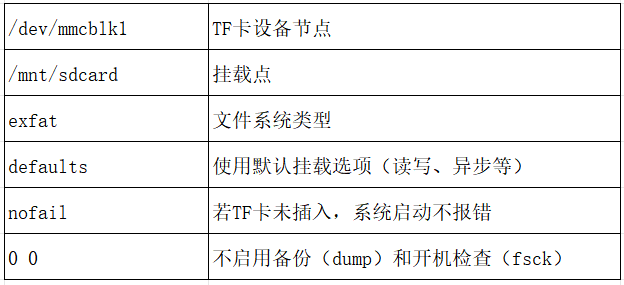
5. Save and reboot
root@elf2-desktop:~# syncroot@elf2-desktop:~# reboot6. Check the file system mount point
After rebooting, the TF card will automatically mount to /mnt/sdcard (automatic mounting successful):
root@elf2-desktop:~# df -hFilesystem Size Used Avail Use% Mounted on/dev/root 14G 4.6G 8.6G 35% /tmpfs 7.8G 0 7.8G 0% /dev/shmtmpfs 3.2G 2.5M 3.2G 1% /runtmpfs 5.0M 4.0K 5.0M 1% /run/locktmpfs 7.8G 12K 7.8G 1% /tmp/dev/mmcblk0p7 123M 12M 108M 10% /oem/dev/mmcblk0p8 96G 284M 92G 1% /userdata/dev/mmcblk1 60G 88M 60G 1% /mnt/sdcardtmpfs 1.6G 88K 1.6G 1% /run/user/1000tmpfs 1.6G 56K 1.6G 1% /run/user/07. Read and write verification
root@elf2-desktop:~# echo 1 > /mnt/sdcard/test.txtroot@elf2-desktop:~# syncroot@elf2-desktop:~# cat /mnt/sdcard/test.txt1Automatic Mounting of NTFS
1. Confirm the device node
Execute the fdisk -l command to view the TF card partition information and confirm that the TF card device node is /dev/mmcblk1:
root@elf2-desktop:~# fdisk -lDisk /dev/ram0: 4 MiB, 4194304 bytes, 8192 sectorsUnits: sectors of 1 * 512 = 512 bytesSector size (logical/physical): 512 bytes / 4096 bytesI/O size (minimum/optimal): 4096 bytes / 4096 bytesDisk /dev/mmcblk0: 115.23 GiB, 123731968000 bytes, 241664000 sectorsUnits: sectors of 1 * 512 = 512 bytesSector size (logical/physical): 512 bytes / 512 bytesI/O size (minimum/optimal): 512 bytes / 512 bytesDisklabel type: gptDisk identifier: 50530000-0000-4F1D-8000-4315000064BFDevice Start End Sectors Size Type/dev/mmcblk0p1 16384 24575 8192 4M unknown/dev/mmcblk0p2 24576 32767 8192 4M unknown/dev/mmcblk0p3 32768 163839 131072 64M unknown/dev/mmcblk0p4 163840 425983 262144 128M unknown/dev/mmcblk0p5 425984 491519 65536 32M unknown/dev/mmcblk0p6 491520 29851647 29360128 14G unknown/dev/mmcblk0p7 29851648 30113791 262144 128M unknown/dev/mmcblk0p8 30113792 241663966 211550175 100.9G unknownDisk /dev/mmcblk1: 59.48 GiB, 63864569856 bytes, 124735488 sectorsUnits: sectors of 1 * 512 = 512 bytesSector size (logical/physical): 512 bytes / 512 bytesI/O size (minimum/optimal): 512 bytes / 512 bytesDisklabel type: dosDisk identifier: 0x73736572Device Boot Start End Sectors Size Id Type/dev/mmcblk1p1 1920221984 3736432267 1816210284 866G 72 unknown/dev/mmcblk1p2 1936028192 3889681299 1953653108 931.6G 6c unknown/dev/mmcblk1p3 0 0 0 0B 0 Empty/dev/mmcblk1p4 27722122 27722568 447 223.5K 0 EmptyPartition table entries are not in disk order.2. Check the UUID or device name of the TF card
root@elf2-desktop:~# blkid/dev/mmcblk0p7: LABEL="oem" UUID="5fce90f2-82c7-401e-8ccd-b265d1d1a04e" BLOCK_SIZE="4096" TYPE="ext4" PARTLABEL="oem" PARTUUID="a9390000-0000-4339-8000-737c00004c7d"/dev/mmcblk0p5: PARTLABEL="backup" PARTUUID="0b7f0000-0000-484e-8000-37da00004385"/dev/mmcblk0p3: PARTLABEL="boot" PARTUUID="7a3f0000-0000-446a-8000-702f00006273"/dev/mmcblk0p1: PARTLABEL="uboot" PARTUUID="fa0f0000-0000-4829-8000-6e9700004422"/dev/mmcblk0p8: LABEL="userdata" UUID="0ab8136a-151e-4ecb-8c4e-bcba85a0ef17" BLOCK_SIZE="4096" TYPE="ext4" PARTLABEL="userdata" PARTUUID="59490000-0000-4b30-8000-47ea00003767"/dev/mmcblk0p6: UUID="4d1b5f8b-020c-499a-bac9-269c5104f9e7" BLOCK_SIZE="4096" TYPE="ext4" PARTLABEL="rootfs" PARTUUID="614e0000-0000-4b53-8000-1d28000054a9"/dev/mmcblk0p4: PARTLABEL="recovery" PARTUUID="8e500000-0000-4554-8000-7a1500002ce6"/dev/mmcblk0p2: PARTLABEL="misc" PARTUUID="4d2e0000-0000-4d59-8000-14bb00003cfd"/dev/mmcblk1: LABEL="M-fM-^VM-0M-eM-^JM- M-eM-^MM-7" UUID="14B26844B2682C84" BLOCK_SIZE="512" TYPE="ntfs"3. Create the mount point directory
root@elf2-desktop:~# mkdir -p /mnt/sdcard4. Edit the /etc/fstab file
root@elf2-desktop:~# vi /etc/fstabThe file content is as follows:
# <file system> <mount pt> <type> <options> <dump> <pass>/dev/root / ext4 rw,noauto 0 1proc /proc proc defaults 0 0devpts /dev/pts devpts defaults,gid=5,mode=620 0 0tmpfs /dev/shm tmpfs mode=0777 0 0tmpfs /tmp tmpfs mode=1777 0 0tmpfs /run tmpfs mode=0755,nosuid,nodev 0 0sysfs /sys sysfs defaults 0 0debug /sys/kernel/debug debugfs defaults 0 0pstore /sys/fs/pstore pstore defaults 0 0/dev/mmcblk0p7 /oem ext4 defaults 0 0/dev/mmcblk0p8 /userdata ext4 defaults 0 0/dev/mmcblk1 /mnt/sdcard ntfs-3g defaults,nofail 0 0The meaning is as follows:
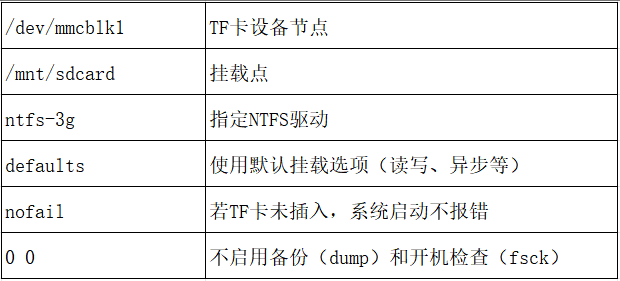
5. Save and reboot
root@elf2-desktop:~# syncroot@elf2-desktop:~# reboot6. Check the file system mount point
After rebooting, the TF card will automatically mount to /mnt/sdcard (automatic mounting successful):
root@elf2-desktop:~# df -hFilesystem Size Used Avail Use% Mounted on/dev/root 14G 4.6G 8.6G 35% /tmpfs 7.8G 0 7.8G 0% /dev/shmtmpfs 3.2G 2.5M 3.2G 1% /runtmpfs 5.0M 4.0K 5.0M 1% /run/locktmpfs 7.8G 12K 7.8G 1% /tmp/dev/mmcblk0p7 123M 12M 108M 10% /oem/dev/mmcblk0p8 96G 284M 92G 1% /userdata/dev/mmcblk1 60G 88M 60G 1% /mnt/sdcardtmpfs 1.6G 88K 1.6G 1% /run/user/1000tmpfs 1.6G 56K 1.6G 1% /run/user/07. Read and write verification
root@elf2-desktop:~# echo 1 > /mnt/sdcard/test.txtroot@elf2-desktop:~# syncroot@elf2-desktop:~# cat /mnt/sdcard/test.txt1