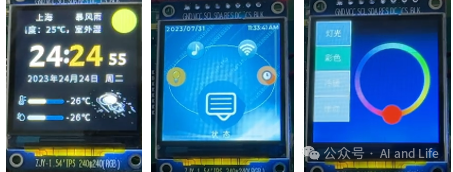
For those engaged in embedded GUI development, have you ever encountered the confusion of needing to rely on global variables to remember the state after writing three or four pages? As you add more pages, the code becomes increasingly chaotic, and you might even experience “page stuttering” during transitions?
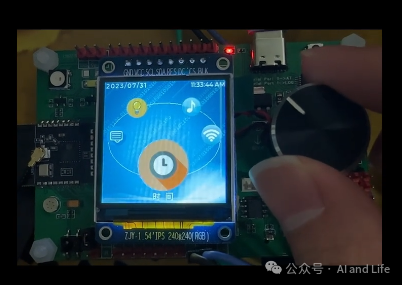
Here, I share a method from a colleague that solves these issues with less than 200 lines of code — the core idea relies on the “linked list page number” approach. It also demonstrates how to read the rotary key to switch screen pages.
1. Let’s Discuss the Pain Points: Why is Page Switching Prone to Errors?
When we develop embedded GUIs (for example, using LVGL), the core requirements for page switching boil down to two:
-
Ability to “jump to the next page” (for instance, entering the settings page from the main page);
-
Ability to “return to the previous page” (for instance, going back to the main page from the settings page).
However, many beginners implement this using “global variables + if-else” statements: for example, using <span><span>cur_page</span></span><span><span>=</span></span><span><span>1</span></span> to represent the main page, and <span><span>cur_page</span></span><span><span>=</span></span><span><span>2</span></span> to represent the settings page. When switching, they modify this variable. But as the number of pages increases (for example, 5+), global variables can become a mess, and to return to the previous page, they need to remember an additional <span><span>last_page</span></span>, which can easily lead to bugs.
Using a linked list structure to manage pages allows each page to “remember the address of the previous page,” completely eliminating the need for global variables.
2. Core Principle: Achieving Clear Page Switching in 3 Steps
The essence of this solution is to “manage page relationships using data structures.” The core consists of three designs, which we will discuss one by one:
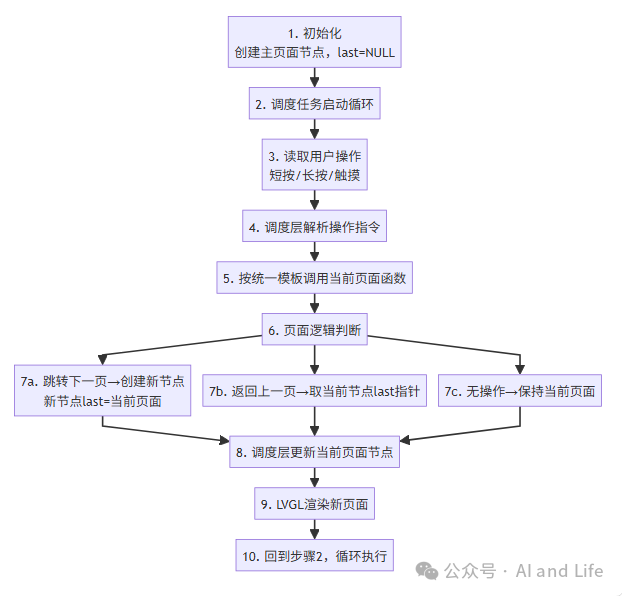
1. First Step: Use “Linked List Nodes” as “Page Account Books”
The article defines a <span><span>ui_show_t</span></span> structure, akin to a “page number record book,” where each page has its own entry:
typedef struct ui_show_t { struct ui_show_t *last; // Record the address of the "previous page" (key to the linked list) uint32_t *ui; // Pointer to the "display function" of the current page} ui_show_t;For example, the <span><span>last</span></span> of the main page is <span><span>NULL</span></span> (indicating no previous page);
-
When entering the settings page from the main page, the
<span><span>last</span></span>of the settings page points to the main page; -
When wanting to return, you can directly find the previous page through
<span><span>current_page-></span></span><span><span>last</span></span>, without needing to remember additional variables.
In simple terms: just like each book has the “previous page number” written next to each page, you can directly refer to it when flipping back.
2. Second Step: Standardize the “Page Function Template” to Avoid Code Chaos
Each page needs to display and handle inputs (such as button presses or touch), and the article establishes a unified “function template” for all pages:
// Page function type: takes "current page" and "user operation", returns "new page"typedef struct ui_show_t * (*ui_show_fun)(ui_show_t * ui_show, ui_opera_t ui_opera);-
<span><span>ui_show</span></span>: The “account book” of the current page (including the address of the previous page); -
<span><span>ui_opera</span></span>: User operation (such as the direction of the rotary button, whether the button press is short or long); -
Return value: the “account book” of the new page after switching.
This way, whether it’s the main page, settings page, or data page, all functions are written according to this template, and when adding new pages, the scheduling logic does not need to be modified, keeping the code neat.
3. Third Step: A “Scheduling Task” Manages All Switches
The article opens a separate thread ( <span><span>ui_show_scheduler</span></span>), acting like a “conductor”:
-
Continuously read user operations (such as the direction of the rotary button, button states);
-
Call the function of the current page, generating a new page based on the operation;
-
Update the “current page” to the new page, completing the switch.
The key code logic is quite simple:
// Initialization: main page's last is NULL, page function isln_lvgl_mainwindowmy_start_ui.last = NULL;my_start_ui.ui = (uint32_t*)ln_lvgl_mainwindow;my_show_ui = &my_start_ui; // Set current page to main pagewhile(1) { // 1. Read user operations (such as rotary button, button) my_ui_opera.dir_cnt = read_rotary_direction(); my_ui_opera.btn_sta = read_button_state(); // 2. Call the current page function to get the new page my_show_ui = (ui_show_t *)(*((ui_show_fun)(my_show_ui->ui)))(my_show_ui, my_ui_opera); // 3. Run LVGL tasks (refresh interface) lv_timer_handler(); OS_MsDelay(1);}3. Practical Breakdown: How to Trigger Page Switching?
Taking the example of “short press to enter the next page, long press to return to the previous page,” let’s see how to write a single page (for instance, the main page):
// Main page function: implemented according to the templateui_show_t* ln_lvgl_mainwindow(ui_show_t* ui_show, ui_opera_t ui_opera) { static ui_show_t my_main_ui; // Main page's "account book" // 1. Short press: enter settings page if(ui_opera.btn_sta == short_press) { my_main_ui.last = ui_show; // New page (settings page) last points to current page (main page) my_main_ui.ui = (uint32_t*)ln_lvgl_setwindow; // New page function is settings page return &my_main_ui; // Return new page } // 2. Long press: return to previous page (if there is one) if(ui_opera.btn_sta == long_press && ui_show->last != NULL) { return ui_show->last; // Directly return the "account book" of the previous page } // 3. No operation: keep current page return ui_show;}The logic is straightforward: a short press generates a new page (and remembers the previous page), while a long press returns through <span><span>last</span></span>, without using any global variables!
4. Conclusion: What’s Good About This Solution?
-
Lightweight: Just two structures + one scheduling task, even small MCU memory can handle it;
-
Flexible: Adding a new page only requires writing a function, without modifying existing code;
-
Easy to Maintain: The return logic relies on the linked list, eliminating the need to remember global variables, making future bug fixes much easier.
If your embedded GUI is still struggling with page switching, this “linked list accounting method” is worth a try — the principle is simple, the code volume is small, and it can directly interface with libraries like LVGL and TouchGFX, making it easy for beginners to get started.
—–👇 Recommended Selections from Previous Issues 👇—–
▶️ A Free and Modern GUI Design Accelerator
▶️ An Open Source Low-Cost Positioning System
▶️ Technical People Playing with Embedded Product AI Series
▶️ Must-Read DIY Open Source E-Book
▶️ DIY an Open Source Fully Autonomous Weather Station, Practicing IoT Technology
▶️ A Long-Term Earning Guide for Tech Guys
▶️ New Choice for Open Source Quadcopters: Flix
▶️ How Interns Quickly Grow into Embedded STM32 Experts
▶️ A Ready-to-Use Monochrome Screen GUI Solution
▶️ An LVGL Developed Smart Watch
▶️ Embedded GUI Dark Horse — HoneyGUI
▶️ An Embedded Operating System JxOS, A Practical Guide to Boost Embedded Development Efficiency
▶️ A Free and Modern GUI Design Accelerator▶️ An Open Source Low-Cost Positioning System▶️ Technical People Playing with Embedded Product AI Series▶️ Must-Read DIY Open Source E-Book▶️ DIY an Open Source Fully Autonomous Weather Station, Practicing IoT Technology▶️ A Long-Term Earning Guide for Tech Guys▶️ New Choice for Open Source Quadcopters: Flix▶️ How Interns Quickly Grow into Embedded STM32 Experts▶️ A Ready-to-Use Monochrome Screen GUI Solution▶️ An LVGL Developed Smart Watch▶️ Embedded GUI Dark Horse — HoneyGUI▶️ An Embedded Operating System JxOS, A Practical Guide to Boost Embedded Development Efficiency#GUI #Rotary Key #LVGL #Embedded Page Management #Linked List #Pointer Function