1. Server Hardware Information Queries
1.1 CPU Information Queries
| Command | Function Description | Example |
|---|---|---|
<span>lscpu</span> |
Displays CPU architecture, number of cores, number of threads, etc. | <span>lscpu</span> |
<span>cat /proc/cpuinfo</span> |
Detailed CPU information (model, cache, frequency) | <span>cat /proc/cpuinfo</span> |
<span>lshw -C cpu</span> |
View detailed CPU information (vendor, number of cores, instruction set) | <span>sudo lshw -C cpu</span> |
<span>nproc</span> |
View the number of logical CPU cores | <span>nproc</span> |
<span>mpstat</span> |
Monitor CPU usage (requires installation of <span>sysstat</span>) |
<span>mpstat 1 5</span> |
1.2 Memory Information Queries
| Command | Function Description | Example |
|---|---|---|
<span>free -h</span> |
View memory usage (in GB/MB) | <span>free -h</span> |
<span>vmstat</span> |
View memory, swap, IO, etc. | <span>vmstat 1 5</span> |
<span>dmidecode -t memory</span> |
View physical memory slot information | <span>sudo dmidecode -t memory</span> |
<span>lshw -C memory</span> |
View detailed memory configuration | <span>sudo lshw -C memory</span> |
<span>top</span> / <span>htop</span> |
Real-time monitoring of memory usage | <span>htop</span> |
1.3 Disk and Storage Information
| Command | Function Description | Example |
|---|---|---|
<span>lsblk</span> |
View disk partitions and mount points | <span>lsblk -o NAME,SIZE,FSTYPE,MOUNTPOINT</span> |
<span>df -h</span> |
View disk space usage | <span>df -h</span> |
<span>fdisk -l</span> |
View all disk partitions | <span>sudo fdisk -l</span> |
<span>lshw -C disk</span> |
View detailed disk information (vendor, capacity) | <span>sudo lshw -C disk</span> |
<span>smartctl</span> |
Check hard disk health status (requires installation of <span>smartmontools</span>) |
<span>sudo smartctl -a /dev/sda</span> |
<span>iostat</span> |
Monitor disk IO performance | <span>iostat -x 1 5</span> |
1.4 Network Information Queries
| Command | Function Description | Example |
|---|---|---|
<span>ip a</span> / <span>ifconfig</span> |
View network card IP and MAC addresses | <span>ip a</span> |
<span>ethtool</span> |
View network card speed and duplex mode | <span>ethtool eth0</span> |
<span>lshw -C network</span> |
View network card hardware information | <span>sudo lshw -C network</span> |
<span>ss -tulnp</span> |
View open ports and processes | <span>ss -tulnp</span> |
<span>netstat -tulnp</span> |
View network connection status | <span>netstat -tulnp</span> |
<span>ping</span> / <span>traceroute</span> |
Test network connectivity | <span>ping google.com</span> |
1.5 Motherboard and BIOS Information
| Command | Function Description | Example |
|---|---|---|
<span>dmidecode -t system</span> |
View server vendor, model, serial number | <span>sudo dmidecode -t system</span> |
<span>dmidecode -t bios</span> |
View BIOS version and date | <span>sudo dmidecode -t bios</span> |
<span>lshw -C system</span> |
View motherboard information | <span>sudo lshw -C system</span> |
2. Installed Software Queries and Management
2.1 Query Installed Software
| Command | Function Description | Example |
|---|---|---|
<span>dpkg -l</span> (Debian/Ubuntu) |
View all installed software | <span>dpkg -l</span> |
<span>rpm -qa</span> (RHEL/CentOS) |
View all installed RPM packages | <span>rpm -qa</span> |
<span>apt list --installed</span> |
View software managed by APT | <span>apt list --installed</span> |
<span>yum list installed</span> |
View software managed by YUM | <span>yum list installed</span> |
<span>snap list</span> |
View installed Snap software | <span>snap list</span> |
2.2 Package Management
| Command | Function Description | Example |
|---|---|---|
<span>apt install</span> (Debian/Ubuntu) |
Install software | <span>sudo apt install nginx</span> |
<span>yum install</span> (RHEL/CentOS) |
Install software | <span>sudo yum install nginx</span> |
<span>apt remove</span> |
Uninstall software | <span>sudo apt remove nginx</span> |
<span>yum remove</span> |
Uninstall software | <span>sudo yum remove nginx</span> |
<span>apt update</span> |
Update software sources | <span>sudo apt update</span> |
<span>yum update</span> |
Update software | <span>sudo yum update</span> |
3. Common Commands for Daily Maintenance
3.1 System Monitoring
| Command | Function Description | Example |
|---|---|---|
<span>top</span> / <span>htop</span> |
Real-time monitoring of CPU, memory, processes | <span>htop</span> |
<span>uptime</span> |
View system uptime | <span>uptime</span> |
<span>dmesg</span> |
View kernel logs | `dmesg |
<span>journalctl</span> |
View systemd logs | <span>journalctl -u nginx</span> |
<span>sar</span> |
System performance history (requires installation of <span>sysstat</span>) |
<span>sar -u 1 5</span> |
3.2 Process Management
| Command | Function Description | Example |
|---|---|---|
<span>ps aux</span> |
View all processes | ps aux |
<span>kill</span> / <span>pkill</span> |
Terminate processes | <span>kill -9 1234</span> |
<span>systemctl</span> |
Manage system services | <span>systemctl restart nginx</span> |
<span>crontab -l</span> |
View scheduled tasks | <span>crontab -l</span> |
3.3 File and Log Management
| Command | Function Description | Example |
|---|---|---|
<span>find</span> |
Find files | <span>find / -name "nginx.conf"</span> |
<span>grep</span> |
Search file contents | <span>grep "error" /var/log/nginx/error.log</span> |
<span>tail -f</span> |
Real-time view of logs | <span>tail -f /var/log/nginx/access.log</span> |
<span>du -sh</span> |
View directory size | <span>du -sh /var/log/</span> |
<span>rsync</span> |
Remote file synchronization | <span>rsync -avz /backup/ user@remote:/backup/</span> |
4. Summary
4.1 Hardware Information Queries
- CPU:
<span>lscpu</span>、<span>lshw -C cpu</span> - Memory:
<span>free -h</span>、<span>dmidecode -t memory</span> - Disk:
<span>lsblk</span>、<span>smartctl</span> - Network:
<span>ip a</span>、<span>ethtool</span> - Motherboard:
<span>dmidecode -t system</span>
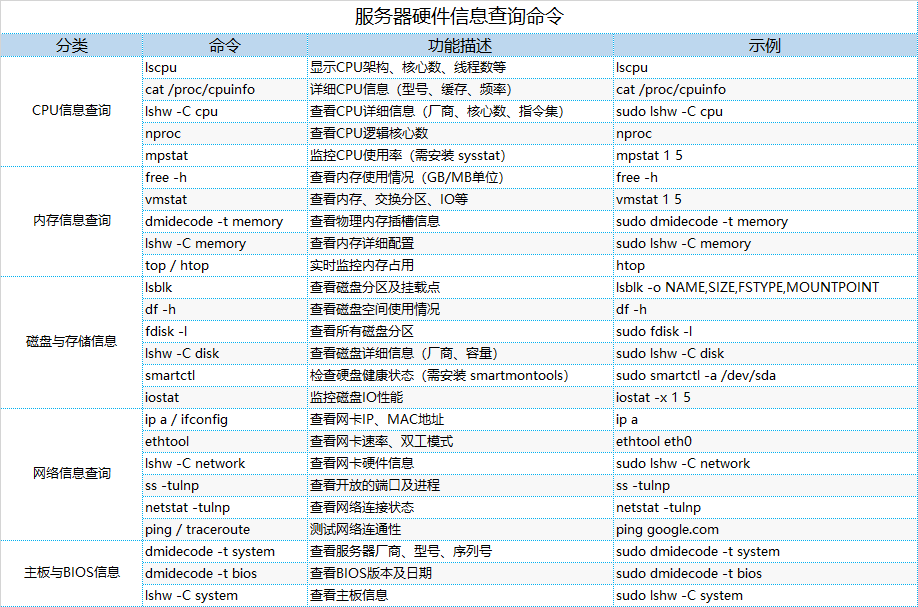
The table is as follows:
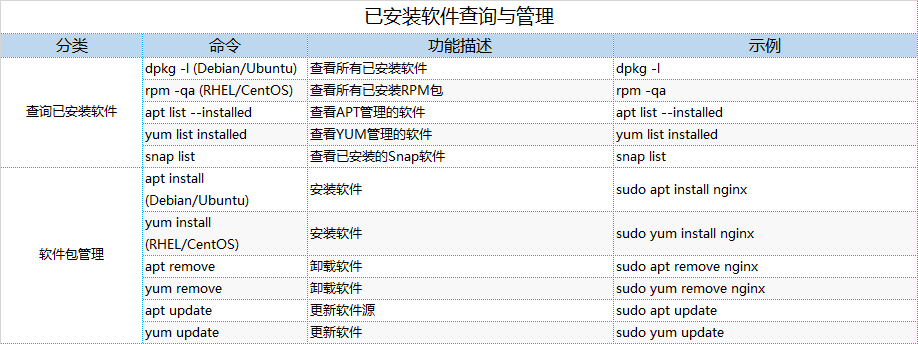
4.2 Software Management
- Query:
<span>dpkg -l</span>、<span>rpm -qa</span> - Install/Uninstall:
<span>apt install</span>、<span>yum remove</span>
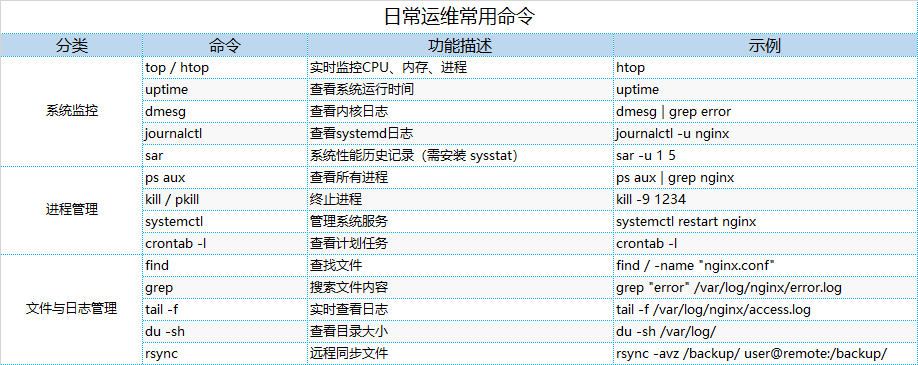
4.3 Daily Maintenance
- Monitoring:
<span>htop</span>、<span>sar</span> - Processes:
<span>ps aux</span>、<span>systemctl</span> - Logs:
<span>journalctl</span>、<span>tail -f</span>
Mastering these commands can efficiently manage Linux servers and quickly troubleshoot hardware and software issues!