Small object detection, SIMD dataset, YOLO format. The SIMD dataset has most images measured at 1024 × 768 pixels. SIMD (Haroon et al., 2020) is a target detection dataset proposed by the National University of Sciences and Technology in Pakistan, primarily for vehicle detection, containing 5000 remote sensing images (image size: 1024×768) and 45096 instances. The images in the SIMD dataset are all in JPG format with a resolution of 1024×768. The SIMD dataset is a multi-class, open-source, high-resolution remote sensing object detection dataset, containing a total of 15 categories, as shown in Figure 4. Additionally, there is a significant distribution of small to medium-sized objects in the SIMD dataset (w < 0.4, h < 0.4).Dataset details:train:3000val:1000test:1000Categories:cartruckvanlongvehiclebusairlinerpropellertrainercharteredfighterotherstairtruckpushbacktruckhelicopterboat
How to train deep learning object detection using the small object detection dataset_ Build a small object detection system based on the SIMD dataset, using YOLOv5 as the model framework
Training deep learning object detection using the small object detection dataset_ Build a small object detection system based on the SIMD dataset, using YOLOv5 as the model framework
The detection training and application of the small object detection dataset, SIMD dataset, 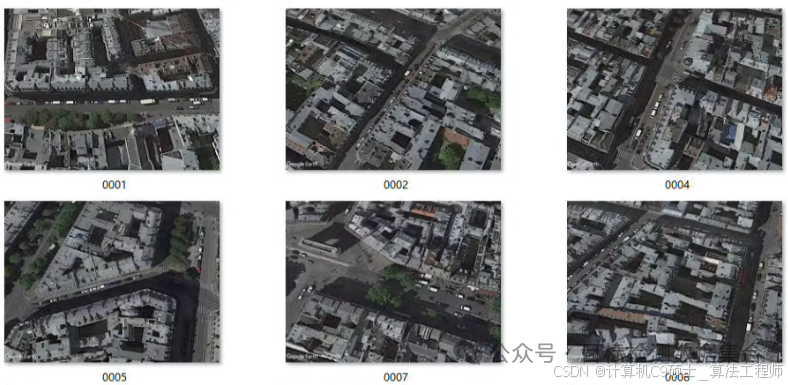 The SIMD dataset, part of the images measured at 1024 × 768 pixels. SIMD (Haroon et al., 2020) is a target detection dataset proposed by the National University of Sciences and Technology in Pakistan, primarily for vehicle detection, containing 5000 remote sensing images (image size: 1024×768) and 45096 instances. The images in the SIMD dataset are all in JPG format with a resolution of 1024×768. The SIMD dataset is a multi-class, open-source, high-resolution remote sensing object detection dataset, containing a total of 15 categories, as shown in the figure. Additionally, there is a significant distribution of small to medium-sized objects in the SIMD dataset (w < 0.4, h < 0.4).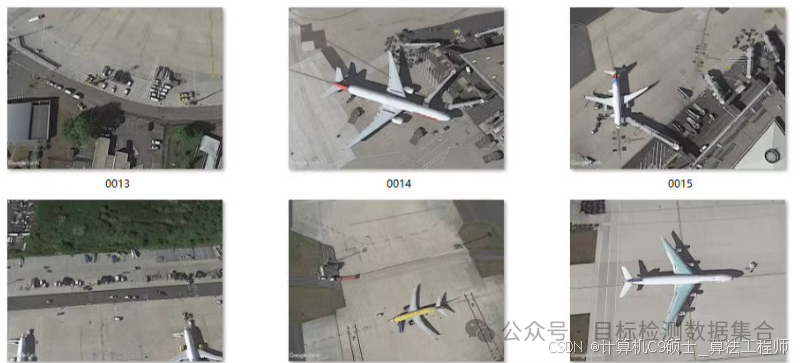
Dataset: YOLO formattrain:3000val:1000test:1000Categories:cartruckvanlongvehiclebusairlinerpropellertrainercharteredfighterotherstairtruckpushbacktruckhelicopterboat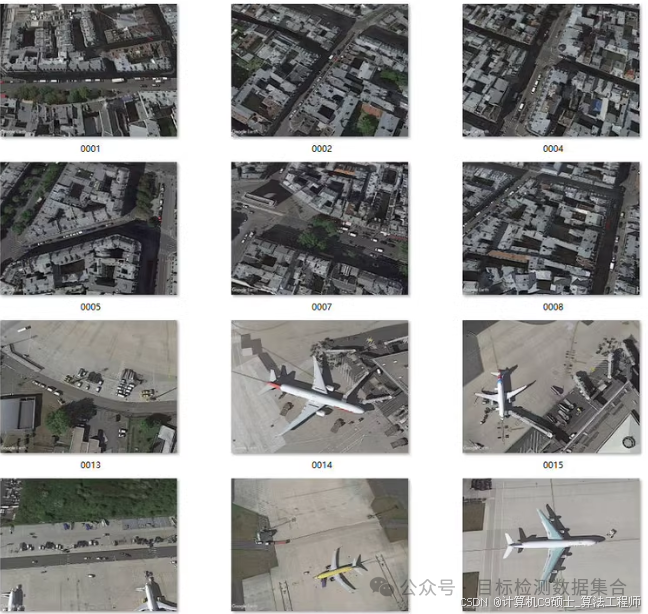 For the small object detection system based on the SIMD dataset, we will use YOLOv5 as our model framework. Below are detailed implementation steps, including environment setup, data preparation, model training, optimization, and the creation of a visual interface.
1. Environment Configuration
First, ensure that the necessary dependencies are installed and clone the YOLOv5 repository.
# Clone the YOLOv5 repository
git clone https://github.com/ultralytics/yolov5.git
cd yolov5

# Install dependencies
pip install -r requirements.txt
2. Data Preparation
Create a<span>simd.yaml</span>file to describe your dataset path and category information. Assuming your dataset structure is as follows:
/path/to/simd/
├── images
│   ├── train
│   ├── val
│   └── test
└── labels
    ├── train
    ├── val
    └── test
<span>simd.yaml</span>example content is as follows:
train: /path/to/simd/images/train/
val: /path/to/simd/images/val/

nc: 15  # Number of categories
names: ['car', 'truck', 'van', 'longvehicle', 'bus', 'airliner', 'propeller', 'trainer',
        'chartered', 'fighter', 'other', 'stairtruck', 'pushbacktruck', 'helicopter', 'boat']  # Category names
3. Model Training
Once the data is prepared, you can start training the YOLOv5 model. We use pre-trained weights to fine-tune the training process and improve performance.
Training Command
# Training command
python train.py --img 1024 --batch 8 --epochs 100 --data simd.yaml --weights yolov5s.pt --cache
Parameter explanations:
<span>--img 1024</span>: Set the input image size to 1024×768 (or adjust according to actual conditions).<span>--batch 8</span>: Set the batch size to 8 (adjust according to your GPU memory).<span>--epochs 100</span>: Set the number of training epochs to 100.<span>--data simd.yaml</span>: Specify the dataset configuration file.<span>--weights yolov5s.pt</span>: Use the small version of YOLOv5 as pre-trained weights.<span>--cache</span>: Cache images to speed up the training process.
4. Model Evaluation
After training is complete, use the following command to evaluate the validation set and check the model’s performance.
# Evaluation command
python val.py --weights runs/train/exp/weights/best.pt --data simd.yaml --img 1024 --task val
This will output a series of metrics, such as [email protected], [email protected]:0.95, etc., helping you understand the model’s performance on the validation set.
5. Result Visualization
To better understand the model’s performance, run the following command to predict some images in the validation set and save the result images.
# Detection command
python detect.py --weights runs/train/exp/weights/best.pt --img 1024 --conf 0.25 --source /path/to/simd/images/val/ --save-txt --save-conf
This command will generate prediction images with bounding boxes and confidence scores in the<span>runs/detect/exp</span>directory.
6. Model Optimization
For small object detection tasks, further optimization of the model may be necessary to improve performance:
-
Data Augmentation: Adding more data augmentation strategies, such as random cropping, rotation, color jittering, etc., helps the model learn small object features better.
Add or modify data augmentation options in
<span>train.py</span>:hyp = { 'degrees': 0.0, # image rotation (+/- deg) 'translate': 0.1, # image translation (+/- fraction) 'scale': 0.5, # image scale (+/- gain) 'shear': 0.0, # image shear (+/- deg) 'perspective': 0.0, # image perspective (+/- fraction), range 0-0.001 'flipud': 0.0, # image flip up-down (probability) 'fliplr': 0.5, # image flip left-right (probability) 'mosaic': 1.0, # image mosaic (probability) 'mixup': 0.0, # image mixup (probability) } -
Hyperparameter Tuning: Try different combinations of learning rates, batch sizes, and other hyperparameters to find the optimal configuration.
-
Model Architecture Improvement: Consider using larger YOLOv5 models (like yolov5m, yolov5l, yolov5x), or try other advanced object detection models, such as YOLOv7 or EfficientDet.
7. Visualization Interface
To create a simple visualization interface, you can use tools like Flask or Streamlit to display the model’s prediction results.
Create Visualization Interface Using Streamlit
First, install Streamlit:
pip install streamlit
Then, create a file named<span>app.py</span>:
import streamlit as st
from PIL import Image
import torch

# Load the trained model
model = torch.hub.load('ultralytics/yolov5', 'custom', path='runs/train/exp/weights/best.pt')

st.title("SIMD Dataset Object Detection")

uploaded_file = st.file_uploader("Choose an image...", type=["jpg", "jpeg", "png"])
if uploaded_file is not None:
    image = Image.open(uploaded_file)
    st.image(image, caption='Uploaded Image.', use_column_width=True)
    st.write("")
    st.write("Detecting...")

    # Perform inference
    results = model(image)

    # Display results
    st.image(results.render(), caption='Detected Image.', use_column_width=True)
Run the Streamlit application:
streamlit run app.py
Summary
This process involves the complete workflow from data preparation to model training, evaluation, optimization, and result visualization using the SIMD dataset for small object detection tasks. Depending on specific application requirements, the model and training strategies can be further adjusted and optimized to achieve the best results. Additionally, regularly checking training logs and evaluation results can help you identify and resolve potential issues promptly, thereby continuously improving model performance. It is particularly important to pay attention to the distribution of small to medium-sized objects in the SIMD dataset when performing data augmentation, model selection, and hyperparameter tuning to improve detection accuracy for small objects.