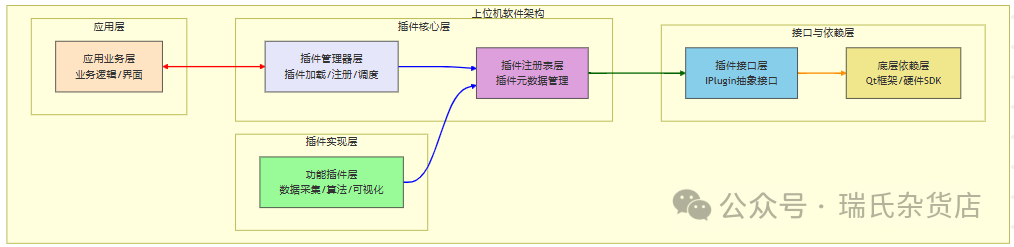
Designing a generalized plugin management system is crucial for large software. Below, we will combine code structure, design patterns, and architecture diagrams to provide line-by-line comments and functional interpretations of each core component, helping to understand how the system achieves high cohesion and low coupling in plugin management through code.
1. Plugin Interface Definition (<span>IPlugin.h</span>) — The “Contract” of the Plugin
#ifndef IPLUGIN_H
#define IPLUGIN_H
#include <QObject>
#include <QString>
#include <QVariant>
#include <QVariantMap>
// Abstract product interface - Base class for all plugins (Abstract Factory Pattern)
class IPlugin : public QObject {
    Q_OBJECT  // Enable Qt meta-object system (signals and slots, reflection)
public:
    virtual ~IPlugin() = default;  // Virtual destructor ensures polymorphic destruction
    // ------------------------------ Metadata Interface ------------------------------
    // Plugin name (unique identifier, e.g., "ExampleDevicePlugin")
    virtual QString name() const = 0;
    // Version number (e.g., "1.0.0")
    virtual QString version() const = 0;
    // Function description (e.g., "Example device plugin")
    virtual QString description() const = 0;
    // Category (e.g., "Device", for grouping management)
    virtual QString category() const = 0;
    // ------------------------------ Lifecycle Interface ------------------------------
    // Initialize the plugin (load resources, connect signals, etc.)
    virtual bool initialize() = 0;
    // Deinitialize the plugin (release resources, disconnect, etc.)
    virtual void shutdown() = 0;
    // ------------------------------ Function Call Interface ------------------------------
    // Dynamically call plugin methods (method name + parameters)
    virtual QVariant invoke(const QString& method, const QVariantMap& params = QVariantMap()) = 0;
    // Declare supported method list (to prevent illegal calls)
    virtual QStringList supportedMethods() const = 0;
signals:
    // Observer pattern: Plugin actively notifies events (e.g., data updates, status changes)
    void pluginEvent(const QString& event, const QVariantMap& data);
};
// Declare interface unique identifier (for Qt meta-object system reflection)
#define IPlugin_iid "com.hostcomputer.IPlugin"
Q_DECLARE_INTERFACE(IPlugin, IPlugin_iid)  // Register interface to Qt meta-object system
#endif // IPLUGIN_H
Key Interpretations:
-
Interface Positioning:
<span>IPlugin</span>is the abstract base class for all plugins, defining the “minimum contract” for plugins to ensure uniform behavior. -
Metadata Interface: Provides basic information about the plugin (name, version, category) for manager identification and display.
-
Lifecycle Interface:
<span>initialize()</span>and<span>shutdown()</span>ensure correct allocation and release of plugin resources (e.g., timers, network connections). -
Function Call Interface:
<span>invoke()</span>supports dynamic invocation of plugin functions by method name (e.g.,<span>connect</span>,<span>readData</span>), while<span>supportedMethods()</span>declares supported methods to avoid illegal calls. -
Event Notification:
<span>pluginEvent</span>signal allows plugins to actively send events (e.g., data updates) to the main program, implementing the observer pattern and decoupling communication between plugins and the main program.
2. Plugin Registry (<span>PluginRegistry</span>) — The “Global Repository” of Plugins
// PluginRegistry.h
#ifndef PLUGINREGISTRY_H
#define PLUGINREGISTRY_H
#include "IPlugin.h"
#include <QObject>
#include <QMap>
#include <QList>
#include <QMutex>
// Registry pattern: Centralized management of plugin metadata and instances (Registry Pattern)
class PluginRegistry : public QObject {
    Q_OBJECT
public:
    // Singleton pattern: Globally unique instance (Singleton Pattern)
    static PluginRegistry* instance();
    // ------------------------------ Register/Unregister ------------------------------
    void registerPlugin(IPlugin* plugin);  // Register plugin
    void unregisterPlugin(const QString& pluginName);  // Unregister plugin
    // ------------------------------ Query ------------------------------
    IPlugin* getPlugin(const QString& pluginName) const;  // Query by name
    QList<IPlugin*> getAllPlugins() const;  // Get all plugins
    QStringList getPluginNames() const;      // Get all plugin names
    QList<IPlugin*> getPluginsByCategory(const QString& category) const;  // Query by category
    // ------------------------------ Status Check ------------------------------
    bool isPluginRegistered(const QString& pluginName) const;  // Check if registered
private:
    explicit PluginRegistry(QObject* parent = nullptr);
    ~PluginRegistry();
    static PluginRegistry* s_instance;  // Singleton instance pointer
    QMap<QString, IPlugin*> m_plugins;   // Mapping of plugin name → instance
    QMap<QString, QStringList> m_categoryMap;  // Mapping of category → list of plugin names
    mutable QMutex m_mutex;  // Mutex for thread safety
};
#endif // PLUGINREGISTRY_H
Key Interpretations:
-
Singleton Pattern:
<span>instance()</span>ensures there is only one<span>PluginRegistry</span>instance globally, avoiding duplicate management of plugin metadata. -
Metadata Storage:
-
<span>m_plugins</span>: Stores plugin instances (<span>IPlugin*</span>) with plugin names as keys, supporting fast lookups. -
<span>m_categoryMap</span>: Stores lists of plugin names belonging to each category, supporting filtering by category. -
Thread Safety: Uses
<span>QMutexLocker</span>to lock registration/query operations, avoiding race conditions in multi-threaded environments. -
Event Forwarding: In
<span>registerPlugin()</span>, listens to plugin event signals via<span>connect(plugin, &IPlugin::pluginEvent, ...)</span><code><span> to achieve global broadcasting of plugin events (other modules can subscribe to the </span><code><span>PluginRegistry</span>’s<span>pluginEvent</span>signal).
3. Plugin Manager (<span>PluginManager</span>) — The “Core Controller” of Plugins
// PluginManager.h
#ifndef PLUGINMANAGER_H
#define PLUGINMANAGER_H
#include "IPlugin.h"
#include <QObject>
#include <QMap>
#include <QPluginLoader>
#include <QDir>
#include <QStringList>
// Singleton pattern: Globally unique plugin manager (Singleton Pattern)
class PluginManager : public QObject {
    Q_OBJECT
public:
    static PluginManager* instance();
    // ------------------------------ Plugin Load/Unload ------------------------------
    bool loadPlugins(const QString& pluginPath);  // Load plugins from specified directory
    bool unloadPlugins();  // Unload all plugins
    // ------------------------------ Plugin Get/Invoke ------------------------------
    IPlugin* getPlugin(const QString& pluginName) const;  // Get plugin instance by name
    QStringList getPluginNames() const;  // Get all plugin names
    // Dynamically invoke plugin methods (encapsulate underlying interface)
    QVariant invokePlugin(const QString& pluginName, const QString& method,                          const QVariantMap& params = QVariantMap());
    // ------------------------------ Type Conversion ------------------------------
    // Template method: Convert plugin instance to specified type (e.g., specific plugin class)
    template<typename T>
    T* getPluginAs(const QString& pluginName) const {
        IPlugin* plugin = getPlugin(pluginName);
        return qobject_cast<T*>(plugin);  // Use Qt meta-object system for safe conversion
    }
private:
    explicit PluginManager(QObject* parent = nullptr);
    ~PluginManager();
    static PluginManager* s_instance;  // Singleton instance pointer
    QMap<QString, QPluginLoader*> m_loaders;  // Mapping of plugin name → loader (for unloading)
};
#endif // PLUGINMANAGER_H
Key Interpretations:
-
Singleton Pattern:
<span>instance()</span>ensures there is only one<span>PluginManager</span>instance globally, serving as the sole entry point for the plugin system. -
Dynamic Loading:
-
<span>loadPlugins()</span>: Scans the specified directory (e.g.,<span>./plugins</span>), using<span>QPluginLoader</span>to dynamically load DLL/so files, obtain plugin instances, and call<span>initialize()</span>to initialize, finally registering them to<span>PluginRegistry</span>. -
<span>QPluginLoader</span>: A dynamic library loading tool provided by Qt, supporting cross-platform (Windows DLL/Linux SO/macOS dylib). -
Lifecycle Management:
<span>unloadPlugins()</span>calls<span>shutdown()</span>on all plugins for deinitialization and uses<span>QPluginLoader::unload()</span><span> to unload dynamic libraries and release resources.</span> -
Convenient Invocation:
<span>invokePlugin()</span>encapsulates<span>getPlugin()</span>and<span>plugin->invoke()</span><span>, allowing the upper layer to simply provide the plugin name and method name to invoke functionality, hiding underlying details.</span>
4. Plugin Factory Interface (<span>IPluginFactory</span>) — The “Creation Factory” of Plugins
// IPluginFactory.h
#ifndef IPLUGINFACTORY_H
#define IPLUGINFACTORY_H
#include "IPlugin.h"
#include <QObject>
// Factory Method Pattern: Defines plugin creation interface (Factory Method Pattern)
class IPluginFactory : public QObject {
    Q_OBJECT
public:
    virtual ~IPluginFactory() = default;
    // Create plugin instance (specific factory implementation)
    virtual IPlugin* createPlugin() = 0;
    // Return plugin type identifier (e.g., "Device")
    virtual QString pluginType() const = 0;
};
// Declare interface unique identifier
#define IPluginFactory_iid "com.hostcomputer.IPluginFactory"
Q_DECLARE_INTERFACE(IPluginFactory, IPluginFactory_iid)
#endif // IPLUGINFACTORY_H
Key Interpretations:
-
Factory Method Pattern:
<span>IPluginFactory</span>defines the interface for creating plugin instances, with specific plugin factories (e.g.,<span>DevicePluginFactory</span>) implementing the<span>createPlugin()</span>method responsible for creating specific plugin objects. -
Extensibility: Different factory implementations can create different types of plugins (e.g., device plugins, algorithm plugins), without the main program needing to care about the specific creation logic.
5. Example Plugin Implementation (<span>ExampleDevicePlugin</span>) — The “Functional Carrier” of the Plugin
// ExampleDevicePlugin.h
#ifndef EXAMPLEDEVICEPLUGIN_H
#define EXAMPLEDEVICEPLUGIN_H
#include "IPlugin.h"
#include <QObject>
#include <QTimer>
// Concrete product: Device plugin (Concrete Product)
class ExampleDevicePlugin : public IPlugin {
    Q_OBJECT
    Q_PLUGIN_METADATA(IID "com.hostcomputer.IPlugin")  // Declare plugin metadata (IID must match interface)
    Q_INTERFACES(IPlugin)  // Declare implementation of IPlugin interface (needed for Qt reflection)
public:
    ExampleDevicePlugin();
    ~ExampleDevicePlugin();
    // IPlugin interface implementation ------------------------------
    QString name() const override { return "ExampleDevicePlugin"; }  // Plugin name
    QString version() const override { return "1.0.0"; }  // Version number
    QString description() const override { return "Example device plugin"; }  // Description
    QString category() const override { return "Device"; }  // Category
    bool initialize() override;  // Initialization (start timer)
    void shutdown() override;    // Deinitialization (stop timer)
    QStringList supportedMethods() const override;  // Declare supported methods
    QVariant invoke(const QString& method, const QVariantMap& params) override;  // Function invocation
private:
    // Specific functional methods ------------------------------
    QVariant connectDevice(const QVariantMap& params);    // Connect device
    QVariant disconnectDevice(const QVariantMap& params);  // Disconnect device
    QVariant readData(const QVariantMap& params);          // Read data
    QVariant writeData(const QVariantMap& params);         // Write data
    bool m_initialized;  // Initialization status flag
    QTimer* m_timer;     // Timer (simulate data updates)
};
#endif // EXAMPLEDEVICEPLUGIN_H
// ExampleDevicePlugin.cpp
#include "ExampleDevicePlugin.h"
#include <QDebug>
#include <QDateTime>
ExampleDevicePlugin::ExampleDevicePlugin() : m_initialized(false), m_timer(nullptr) {}
ExampleDevicePlugin::~ExampleDevicePlugin() {
if (m_timer) delete m_timer; // Release timer resources
}
bool ExampleDevicePlugin::initialize() {
if (m_initialized) return true; // Avoid duplicate initialization
m_timer = new QTimer(this); // Timer triggers data update event (every 1 second)
connect(m_timer, &QTimer::timeout, [this]() {
QVariantMap data;
data["timestamp"] = QDateTime::currentDateTime().toString(); // Timestamp
data["value"] = qrand() % 100; // Simulated data (0-99)
emit pluginEvent("dataReceived", data); // Send event to registry
}); m_timer->start(1000); // Start timer
m_initialized = true;
qDebug() << "ExampleDevicePlugin initialized";
return true;
}
void ExampleDevicePlugin::shutdown() {
if (m_timer) {
m_timer->stop(); // Stop timer
delete m_timer;
m_timer = nullptr;
}
m_initialized = false;
qDebug() << "ExampleDevicePlugin shutdown";
}
QStringList ExampleDevicePlugin::supportedMethods() const {
return {"connect", "disconnect", "readData", "writeData"}; // Declare supported methods
}
QVariant ExampleDevicePlugin::invoke(const QString& method, const QVariantMap& params) {
if (method == "connect") {
return connectDevice(params);
} else if (method == "disconnect") {
return disconnectDevice(params);
} else if (method == "readData") {
return readData(params);
} else if (method == "writeData") {
return writeData(params);
}
return QVariant(); // Unknown method returns empty
}
// Specific functional implementations (examples) ------------------------------
QVariant ExampleDevicePlugin::connectDevice(const QVariantMap& params) {
Q_UNUSED(params); // No parameters needed in this example
QVariantMap result;
result["success"] = true;
result["message"] = "Device connected";
return result;
}
QVariant ExampleDevicePlugin::disconnectDevice(const QVariantMap& params) {
Q_UNUSED(params);
QVariantMap result;
result["success"] = true;
result["message"] = "Device disconnected";
return result;
}
QVariant ExampleDevicePlugin::readData(const QVariantMap& params) {
Q_UNUSED(params);
QVariantMap result;
result["data"] = qrand() % 1000; // Simulate reading data (0-999)
result["timestamp"] = QDateTime::currentDateTime().toString();
return result;
}
QVariant ExampleDevicePlugin::writeData(const QVariantMap& params) {
QString data = params.value("data").toString(); // Get data to write from parameters
qDebug() << "Writing data:" << data;
QVariantMap result;
result["success"] = true;
result["message"] = "Data written successfully";
return result;
}Key Interpretations:
-
Interface Implementation:
<span>ExampleDevicePlugin</span>inherits from<span>IPlugin</span>and implements all pure virtual methods, fulfilling the plugin interface’s “contract”. -
Lifecycle Management:
<span>initialize()</span>starts the timer to simulate data updates, while<span>shutdown()</span>stops the timer and releases resources, ensuring resource safety. -
Function Invocation:
<span>invoke()</span>dispatches to specific functions based on method names (e.g.,<span>connect</span>,<span>readData</span>) and returns results (<span>QVariant</span>type supports any data). -
Event Triggering: When the timer triggers, it sends a data update event via the
<span>pluginEvent</span>signal, which will be broadcasted by<span>PluginRegistry</span>, allowing the main program to subscribe and handle it.
6. Application Layer Usage Example (<span>main.cpp</span>) — The “Final Caller” of the Plugin
// main.cpp
#include <QApplication>
#include <QDebug>
#include "PluginManager.h"
#include "IPlugin.h"
int main(int argc, char *argv[]) {
    QApplication app(argc, argv);  // Initialize Qt application
    // 1. Get the singleton instance of the plugin manager
    PluginManager* pluginManager = PluginManager::instance();
    // 2. Load plugins (specifying the plugin directory as the "plugins" folder at the same level as the application)
    QString pluginPath = QApplication::applicationDirPath() + "/plugins";
    if (!pluginManager->loadPlugins(pluginPath)) {
        qWarning() << "Failed to load plugins";  // Load failure prompt
        return -1;
    }
    // 3. Get all loaded plugin names and print them
    QStringList pluginNames = pluginManager->getPluginNames();
    qDebug() << "Loaded plugins:" << pluginNames;  // Output: Loaded plugins: ("ExampleDevicePlugin")
    // 4. Get specific plugin instance and invoke functionality
    IPlugin* devicePlugin = pluginManager->getPlugin("ExampleDevicePlugin");
    if (devicePlugin) {
        qDebug() << "Using plugin:" << devicePlugin->name();  // Output: Using plugin: "ExampleDevicePlugin"
        // Call connect method (no parameters)
        QVariantMap connectParams;
        QVariant connectResult = pluginManager->invokePlugin("ExampleDevicePlugin", "connect", connectParams);
        qDebug() << "Connect result:" << connectResult.toMap();  // Output: Connect result: QMap(("message", "Device connected") ("success", true))
        // Call readData method (no parameters)
        QVariantMap readParams;
        QVariant readResult = pluginManager->invokePlugin("ExampleDevicePlugin", "readData", readParams);
        qDebug() << "Read data:" << readResult.toMap();  // Output similar: Read data: QMap(("data", 42) ("timestamp", "2024-05-20 12:00:00"))
    }
    return app.exec();  // Enter event loop
}
Key Interpretations:
-
Loading Plugins:
<span>pluginManager->loadPlugins(pluginPath)</span><span> scans the </span><code><span>./plugins</span>directory, dynamically loading<span>ExampleDevicePlugin.dll</span>(Windows) or<span>libExampleDevicePlugin.so</span>(Linux), and completing initialization. -
Function Invocation: Through the
<span>invokePlugin()</span>method, the upper layer only needs to provide the plugin name and method name to invoke plugin functionality (e.g.,<span>connect</span>,<span>readData</span>), without needing to care about the internal implementation of the plugin. -
Event Listening: If the main program needs to listen to the plugin’s
<span>dataReceived</span>event, it can connect to the<span>PluginRegistry</span>’s<span>pluginEvent</span>signal (e.g.,<span>connect(PluginRegistry::instance(), &PluginRegistry::pluginEvent, this, &MainWindow::onPluginEvent)</span>).
7. Summary of Design Pattern Applications
The system implements high cohesion and low coupling in plugin management through the following design patterns:
|
Pattern |
Applied Component/Code |
Function |
|---|---|---|
|
Singleton Pattern |
|
Ensures a globally unique instance, avoiding resource reinitialization |
|
Registry Pattern |
|
Centralized management of plugin metadata and instances, providing efficient query and registration interfaces |
|
Factory Method Pattern |
|
Supports differentiated creation logic for different types of plugins (e.g., plugins requiring parameter configuration) |
|
Observer Pattern |
|
Plugins actively notify the main program of events (e.g., data updates), achieving loosely coupled communication |
|
Strategy Pattern |
|
Supports plugin loading across different platforms (DLL/SO/dylib), adapting to multiple environments |
|
Abstract Factory Pattern |
|
Defines common behaviors for plugins, with specific plugins implementing the interface, achieving separation of interface and implementation |
8. Conclusion:
This plugin management system achieves flexible expansion of large upper computer software through interface standardization, dynamic loading, registry management, and event-driven four core mechanisms. The code strictly follows a layered architecture, reducing coupling through design patterns, supporting cross-platform and multi-scenario adaptation, making it an ideal choice for complex system development in industrial automation, medical devices, and more.