Click the blue text above to follow “Yu Mo Zhi Yuan”
Recommended Reading:
【Open Source】Green and Free Decompression Software! Check it out! – PeaZip
Have you ever experienced this in your daily routine? Still using JMeter to painstakingly configure various parameters for testing interface performance? Looking at the complex graphical interface, don’t you feel exhausted? Stop torturing yourself! Today, I want to introduce you to a truly powerful performance testing tool – oha! With it, you can enjoy testing like a pro!
Introduction to oha
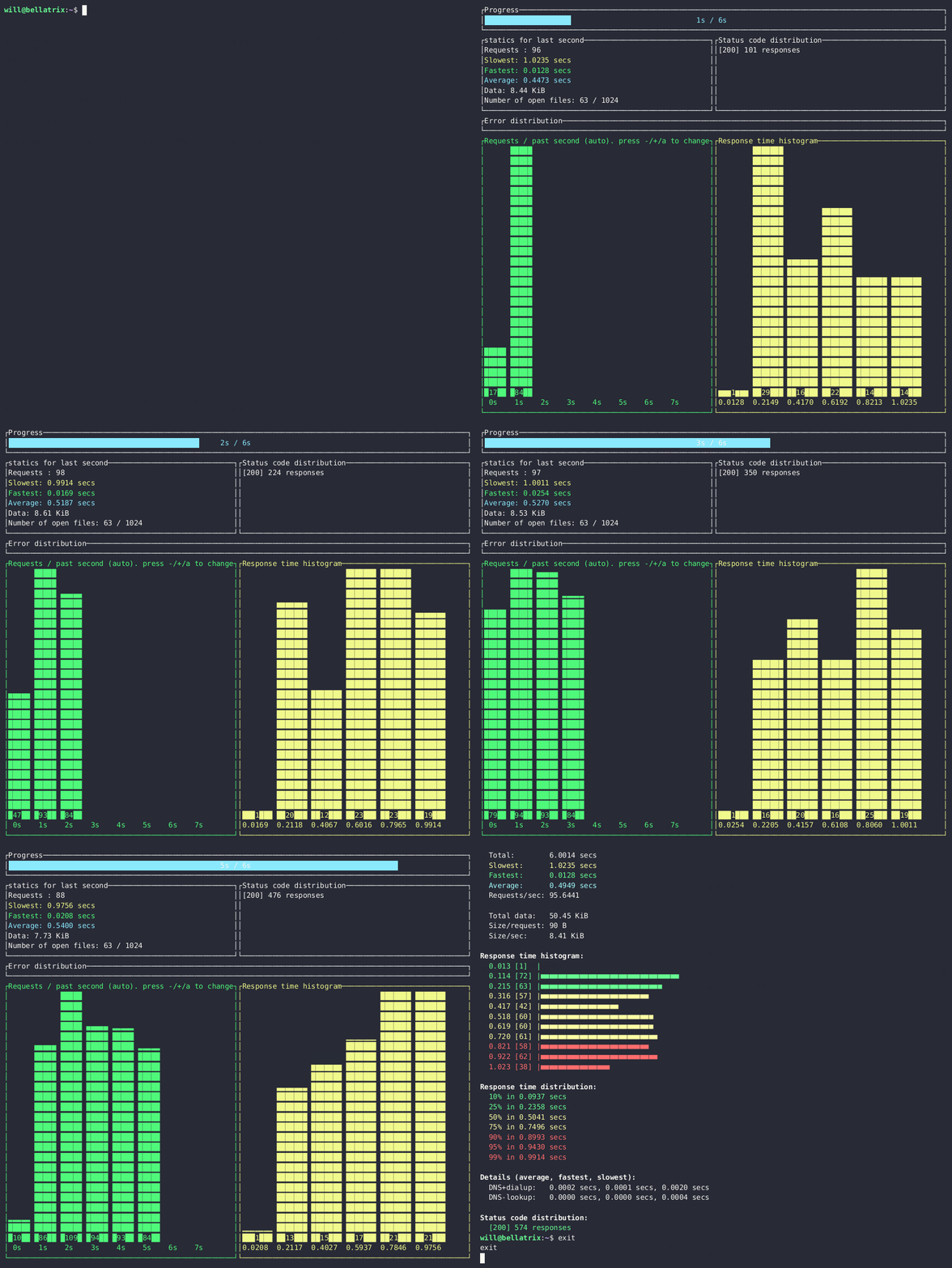
Oha is a lightweight HTTP load generator written in Rust. It is inspired by rakyll/hey but adds TUI (Text User Interface) animations to make the test results more intuitive and vivid. Oha utilizes the tokio and ratatui libraries, maintaining excellent performance in high-concurrency scenarios. It also supports multiple HTTP protocols (HTTP/1.1, HTTP/2, and HTTP/3) to meet different testing needs.
Features and Characteristics
1. Real-time TUI Display:
-
Oha displays test results in real-time during the testing process, including key metrics such as request count, concurrency, and response time.
-
The TUI interface is beautiful and intuitive, making it easier to view and analyze test results.
2. Flexible Configuration Options:
-
Oha provides rich configuration options, allowing users to customize according to testing needs.
-
Users can specify parameters such as request count, concurrency, HTTP version, request method, and custom HTTP headers.
3. Support for HTTP/1 and HTTP/2:
-
Oha supports HTTP/1 and HTTP/2 protocols, meeting the testing needs of different web applications.
-
Under HTTP/2, oha can handle concurrent requests more efficiently, improving testing performance.
4. Dynamic URL Generation:
-
Oha supports dynamic URL generation using regular expressions, making testing scenarios more diverse, for example: oha –rand-regex-url http://127.0.0.1/[a-z][a-z][0-9]
-
Users can limit the maximum number of repetitions for generated URLs through configuration options to avoid invalid test requests.
5. Performance Optimization and Result Analysis:
-
Oha improves testing performance by optimizing query scheduling and reducing resource usage.
-
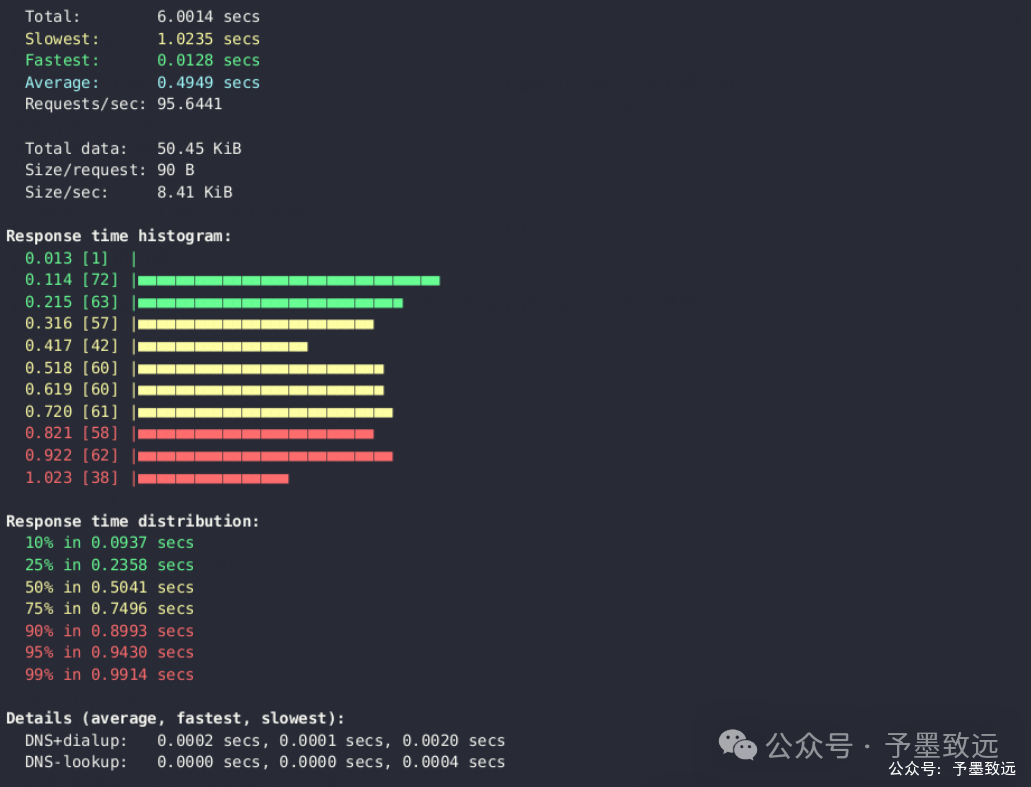
After testing, oha generates a detailed test result report, including response time distribution, success rate, and other information, facilitating user result analysis.
6. Cross-Platform Support:
-
Oha supports multiple operating systems including Linux, Windows, and macOS, making it convenient for users to test on different platforms.
Project Advantages
-
High Performance: Based on Rust and tokio, oha can efficiently handle a large number of concurrent requests, outperforming similar tools.
-
Real-time TUI: Oha provides an intuitive real-time TUI interface through the ratatui library, allowing users to monitor request status in real-time.
-
Multi-Platform Support: Supports Linux, Windows, and macOS, and offers various installation methods, making it easy for users to use in different environments.
-
Flexible Configuration: Oha provides rich command-line options, allowing users to customize request parameters such as concurrent connections, request rate, HTTP version, etc.
-
Containerization Support: Users can easily deploy oha in a container environment through Docker, achieving cross-platform load generation.
Usage Guide
Using oha is very simple; just enter oha <URL> [OPTIONS] in the command line. Here are some common examples:
1. Basic Load Testing
oha https://example.comThis command will send 200 requests to https://example.com using 50 concurrent connections.
2. Specify Request Count and Concurrency
oha -n 1000 -c 100 https://example.comThis command will send 1000 requests to https://example.com using 100 concurrent connections.
3. Specify Load Testing Duration
oha -z 10s https://example.comThis command will continuously send requests to https://example.com for 10 seconds.
4. QPS Rate Limiting
oha -q 100 https://example.comThis command will send requests to https://example.com at a rate of 100 requests per second.
5. Dynamic URL
oha --rand-regex-url http://127.0.0.1/[a-z][a-z][0-9]This command will generate random URLs like http://127.0.0.1/ab1 for load testing.
6. More Realistic Load Testing Scenarios
oha -z 10s -c 100 -q 100 --latency-correction --disable-keepalive https://example.comThis command will perform a 10-second load test using 100 concurrent connections at a rate of 100 requests per second, enabling latency correction and disabling keep-alive connections.
Conclusion
As an open-source HTTP load generation tool, oha, with its high performance, real-time TUI, and multi-platform support, has become an ideal choice for developers conducting performance testing and load generation. Whether in development, testing, or production environments, oha can help users quickly assess and optimize application performance, enhancing user experience.
Source Code Address:https://github.com/hatoo/oha
Recommended Hot Articles【Open Source】Green and Free Decompression Software! Check it out! – PeaZip【Open Source】Mobile-First Game and Interactive Application Online Creation Platform! – Galacean Engine【Open Source】A Powerful, Beautiful, and Practical Terminal Resource Monitoring Tool! – Bpytop【Open Source】Explore the New Terminal World on Android Devices! – Termux【Open Source】The World’s First Open Source Financial Platform, Turning Financial Analysis into Personal Skills! – OpenBB【Open Source】The Ultimate Open Source Tool for Enhancing Windows System Performance Developed in .Net! – Optimizer【Open Source】A New Star in Path Detection, the Network Troubleshooting Tool! – NextTrace【Open Source】A Small Tool Expert for Easy Deployment and Experience! – OmniTools【Open Source】A Powerful Cross-Platform Media Transfer Tool, Say Goodbye to Paid Services! – OpenMTP【Open Source】The Explosive Open Source MCP Automation Engine for Windows, Revolutionizing Your Smart Desktop Experience! – Windows-MCP【Open Source】Have You Tried It? An Open Source Download Tool Comparable to IDM! – Ghost-Downloader-3