1. Create roles directory
mkdir -p ansible_nginx/group_vars
mkdir -p ansible_nginx/roles
cd ansible_nginx/roles
mkdir common nginx
mkdir {common,nginx}/tasks
mkdir nginx/{files,handlers}
mkdir nginx/templates
2. Basic Configuration of Roles
cd ansible_nginx
2.1. Hosts Configuration
cat hosts
[webservers]
192.168.52.16
2.2. site.yml Configuration
cat site.yml
---- name: Install nginx hosts: webservers remote_user: root roles: - role: common - role: nginx tags: ["nginx"]2.3. group_vars Configuration
cat group_vars/all
—
# ssh
ansible_ssh_user: root
ansible_ssh_pass: cjm@168
2.4. Common Configuration
cat roles/common/tasks/main.yml
---- name: Install deps yum: name={{ item }} state=present with_items: - gcc - make - zlib-devel - openssl-devel - pcre-devel2.5. Nginx Configuration
cat roles/nginx/files/nginx.conf
user nobody;worker_processes 8; error_log logs/error.log info; pid /var/run/nginx.pid; events { worker_connections 2048;} http { include mime.types; include vhost/*.conf; default_type application/octet-stream; log_format main '$remote_addr - $remote_user [$time_local] "$request" ' '$status $body_bytes_sent "$http_referer" ' '"$http_user_agent" "$http_x_forwarded_for"'; sendfile on; tcp_nopush on; keepalive_timeout 65;}cat roles/nginx/files/nginx.service
[Unit]Description=The NGINX HTTP and reverse proxy serverAfter=syslog.target network.target remote-fs.target nss-lookup.target [Service]Type=forkingPIDFile=/var/run/nginx.pidExecStartPre=/usr/local/nginx/sbin/nginx -tExecStart=/usr/local/nginx/sbin/nginxExecReload=/usr/local/nginx/sbin/nginx -s reloadExecStop=/bin/kill -s QUIT $MAINPIDPrivateTmp=true [Install]WantedBy=multi-user.targetcat roles/nginx/handlers/main.yml
—
– name: reload nginx
service: name=nginx state=reloaded enabled=yes
cat roles/nginx/tasks/main.yml
---- name: Copy nginx source pkg #get_url: url=http://nginx.org/download/nginx-{{ nginx_version }}.tar.gz dest=/tmp/nginx-{{ nginx_version }}.tar.gz copy: src=nginx-{{ nginx_version }}.tar.gz dest=/tmp - name: Install nginx shell: cd /tmp && tar zxf nginx-{{ nginx_version }}.tar.gz && cd nginx-{{ nginx_version }} && ./configure --prefix=/usr/local/nginx --user=nobody --group=nobody --with-http_ssl_module --with-http_stub_status_module --with-stream=dynamic && make && make install - name: Mkdir /usr/local/nginx/conf/vhost file: dest=/usr/local/nginx/conf/vhost state=directory - name: Copy nginx master configuration file copy: src=nginx.conf dest=/usr/local/nginx/conf notify: reload nginx - name: Copy nginx configuration template: src=default.conf dest=/usr/local/nginx/conf/vhost/ notify: reload nginx - name: Copy nginx systemctl service copy: src=nginx.service dest=/usr/lib/systemd/system/ - name: systemctl start service service: name=nginx state=started enabled=yescat roles/nginx/templates/default.conf
server { listen 80; server_name localhost; location / { root /var/www/html; index index.html index.htm; }}3. Deploying Nginx Server
ansible-playbook site.yml –syntax-check # Syntax check
ansible-playbook -i hosts site.yml
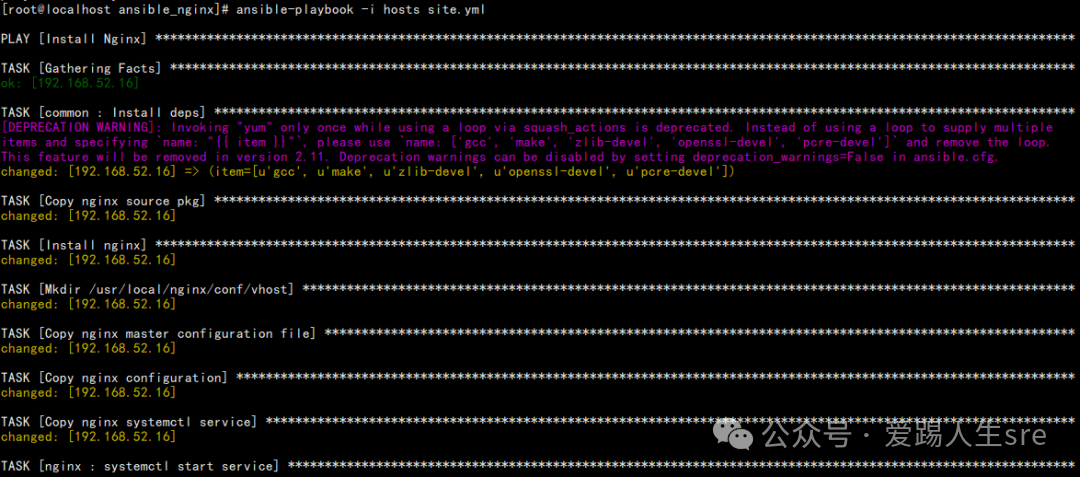
4. Nginx Login Verification
mkdir /var/www/html -p
echo ‘hello to my site’ > /var/www/html/index.html
/usr/local/nginx/sbin/nginx -s reload
Access in browser: http://192.168.52.16