Multithreaded Programming in Embedded Linux
1. What is a Thread?
1.1 Essence of Threads A thread is the smallest execution unit scheduled by the operating system, sharing the resources of a process (memory, files, etc.), but possessing independent:
- Stack space (for storing local variables)
- Register state (program counter, etc.)
- Thread ID and priority
1.2 Comparison of Threads vs Processes
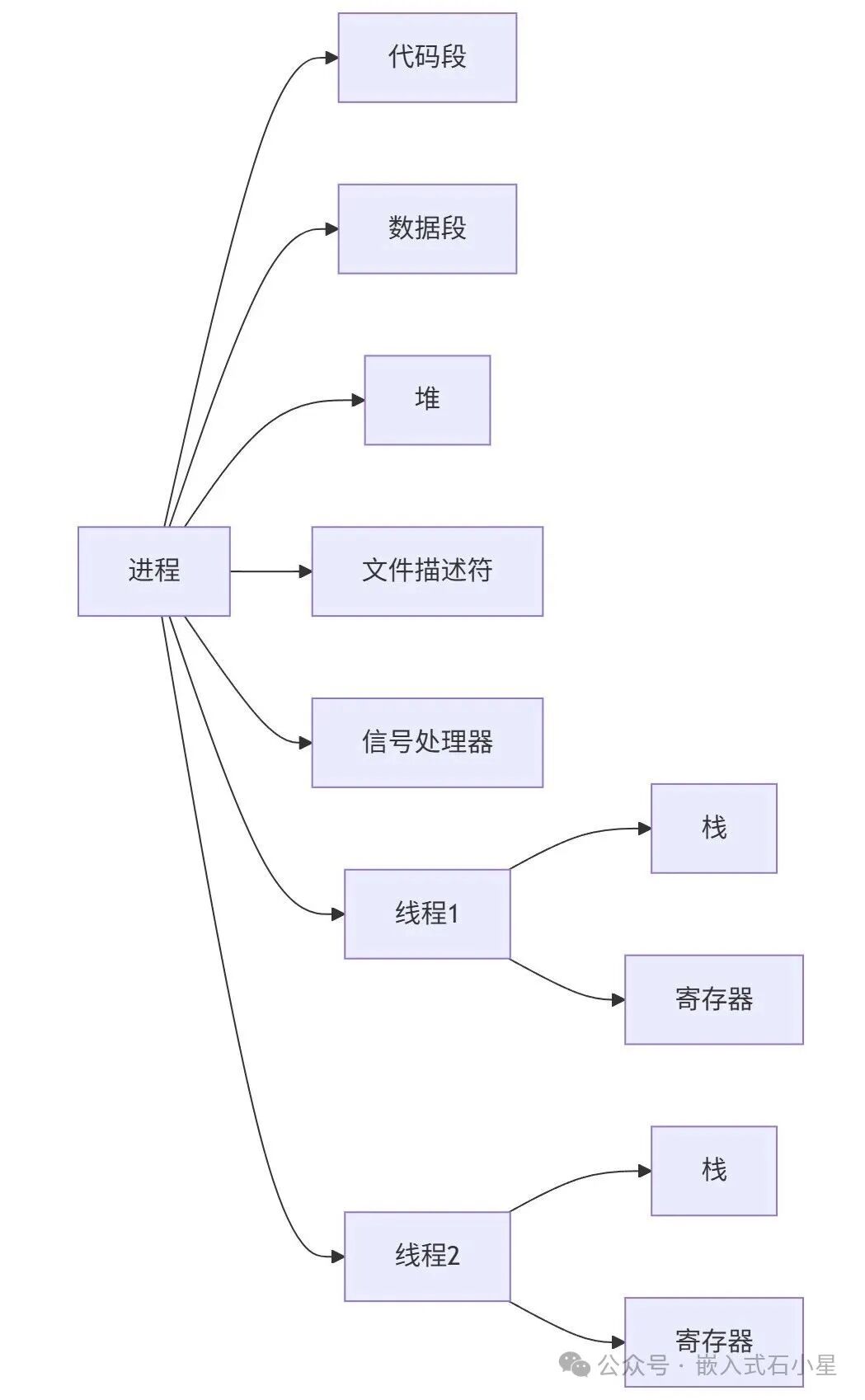
1.3 Linux Thread Implementation Principles Linux implements threads through lightweight processes (LWP), with key system calls:
clone(CLONE_VM | CLONE_FS | CLONE_FILES | CLONE_SIGHAND, 0);
<span>CLONE_VM</span>: Shared memory space<span>CLONE_FS</span>: Shared file system information<span>CLONE_FILES</span>: Shared file descriptor table
2. Why Do We Need Multithreading?
| Scenario Type | Advantages | Embedded Case |
|---|---|---|
| Response Optimization | Separating blocking operations | Separating serial communication and UI response |
| Performance Improvement | Parallel computing on multi-core CPUs | Image processing pipeline |
| Resource Reuse | Shared memory reduces copy overhead | Multi-sensor data fusion |
| Module Decoupling | Functional isolation reduces complexity | Layered implementation of network protocol stack |
3. Basic Multithreaded Programming
3.1 POSIX Thread Library (C Language)
#include <stdio.h>
#include <stdlib.h>
#include <pthread.h>

void *thread_function(void *arg) {
    printf("Thread start\n");
    sleep(1);
    printf("Thread end\n");
    pthread_exit(NULL);
}

int main(int argc, char *argv[]) {
    pthread_t thread;
    pthread_create(&thread, NULL, thread_function, NULL);
    pthread_join(thread, NULL); // The created thread must be joined, otherwise the main thread may end first, and the child thread will become a zombie thread, leading to memory leaks.
    // If you want the thread to automatically release resources after it ends, you can call pthread_detach, but detached threads cannot be joined.
    // pthread_detach(thread);
    // sleep(1);
    printf("Thread joined\n");
    return 0;
}
3.2 C++11 Thread Library
#include <thread>
#include <iostream>

void thread_function() {
    std::cout << "Thread started" << std::endl;
    std::this_thread::sleep_for(std::chrono::seconds(1));
    std::cout << "Thread finished" << std::endl;
}

int main(int argc, char *argv[]) {
    std::thread t1(thread_function);
    t1.join(); // The created thread must be joined, otherwise the main thread may end first, and the child thread will become a zombie thread, leading to memory leaks.
    // detach separates the thread, and the child thread will automatically release resources after it ends, and will not become a zombie thread, but detached threads cannot be joined.
    // t1.detach();
    // sleep(1);
    std::cout << "Main thread finished" << std::endl;
    return 0;
}
4. Advanced Multithreading: The Birth of Thread Pools
4.1 Why Do We Need Thread Pools?
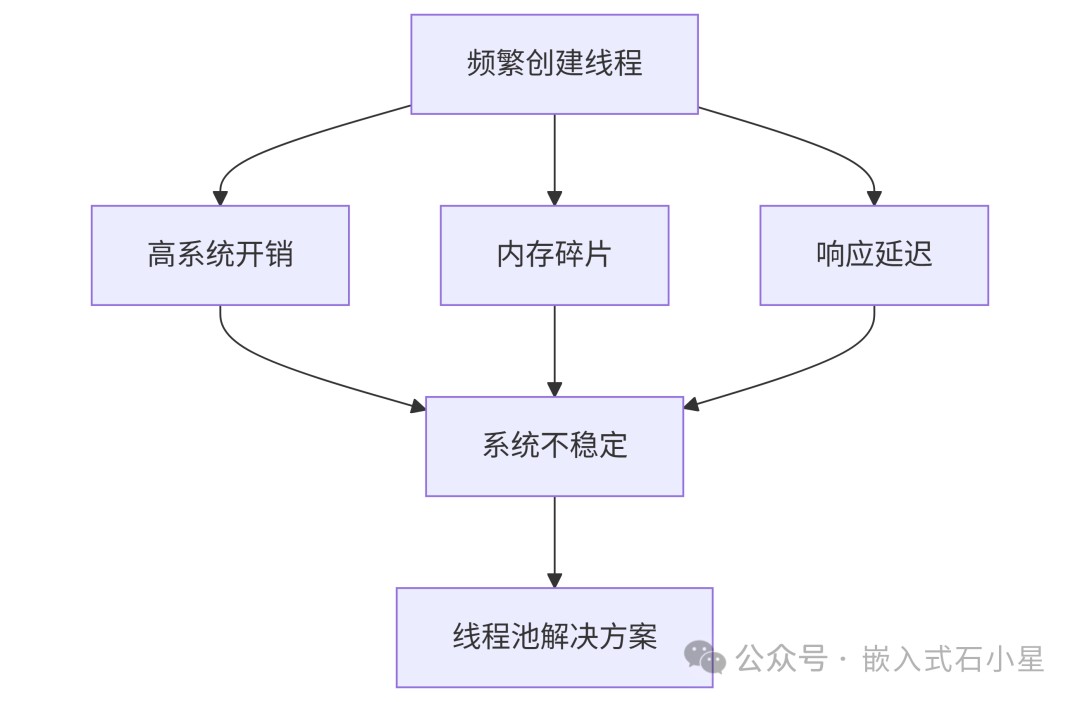
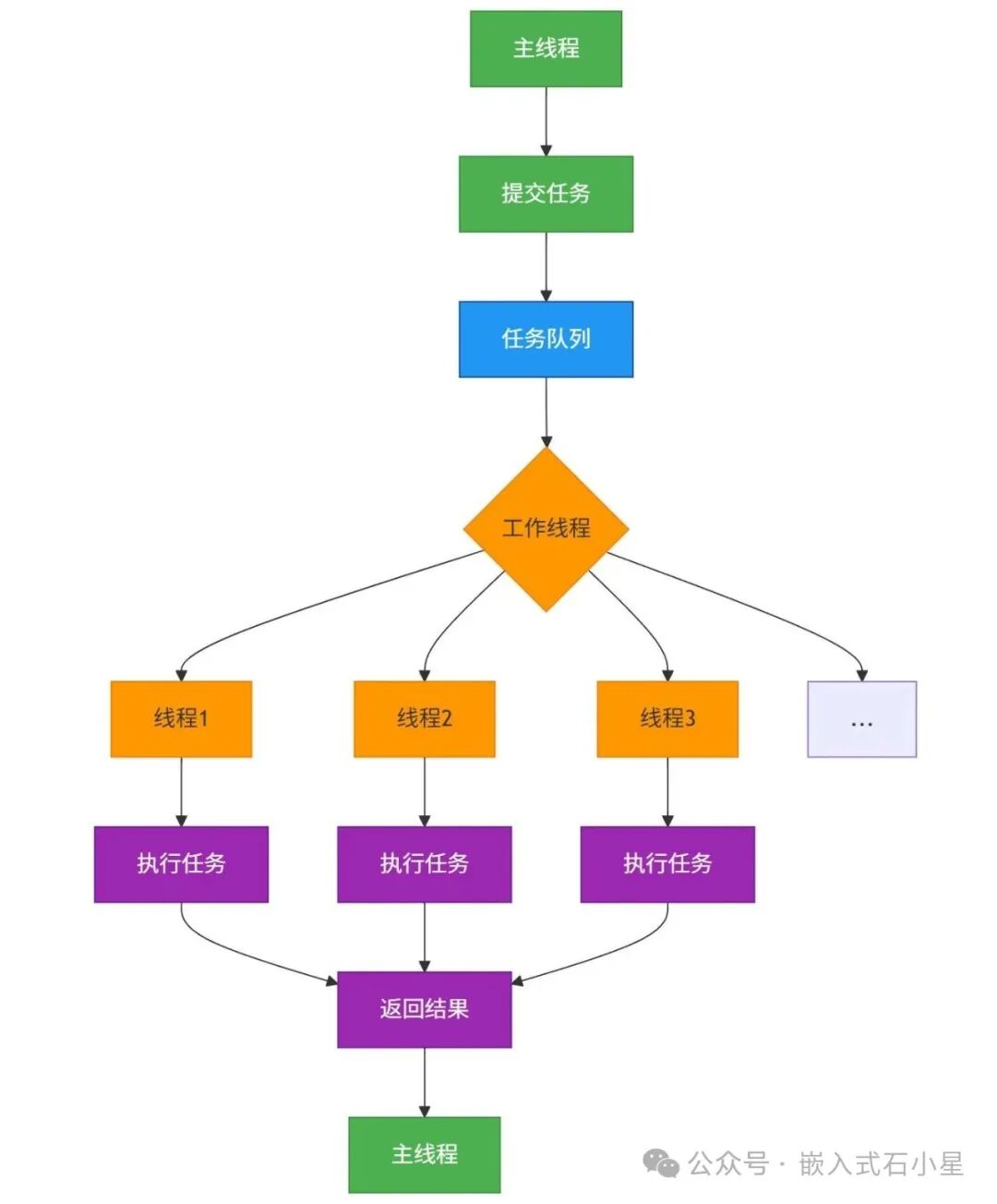
4.2 Core Principles of Thread Pools A thread pool is a collection of threads that are created in advance, all threads block waiting for a queue. When a user submits a task, one thread is awakened to execute the task. This process repeats.
-
Task Submission Phase
- The main thread creates a task object (function/callable object)
- The task is placed into a thread-safe task queue (typical implementation: circular buffer + mutex)
Task Allocation Phase
std::unique_lock<std::mutex> lock(queue_mutex);
condition.wait(lock, [this]{ return !tasks.empty() || stop; });
- When the queue is not empty, a thread is awakened and retrieves the task
- Worker Thread waits for tasks through a condition variable
Task Execution Phase
- The thread retrieves a task from the queue (FIFO or priority strategy)
- Executes user-defined business logic
- A timeout mechanism can be set to prevent thread blocking
Result Processing Phase
auto future = pool.enqueue([] { return "Result"; });
std::cout << future.get(); // Blocking to get the result
- Returns the result through a callback function
- Or uses
<span>std::future</span>to get asynchronous results
Thread Management Mechanism
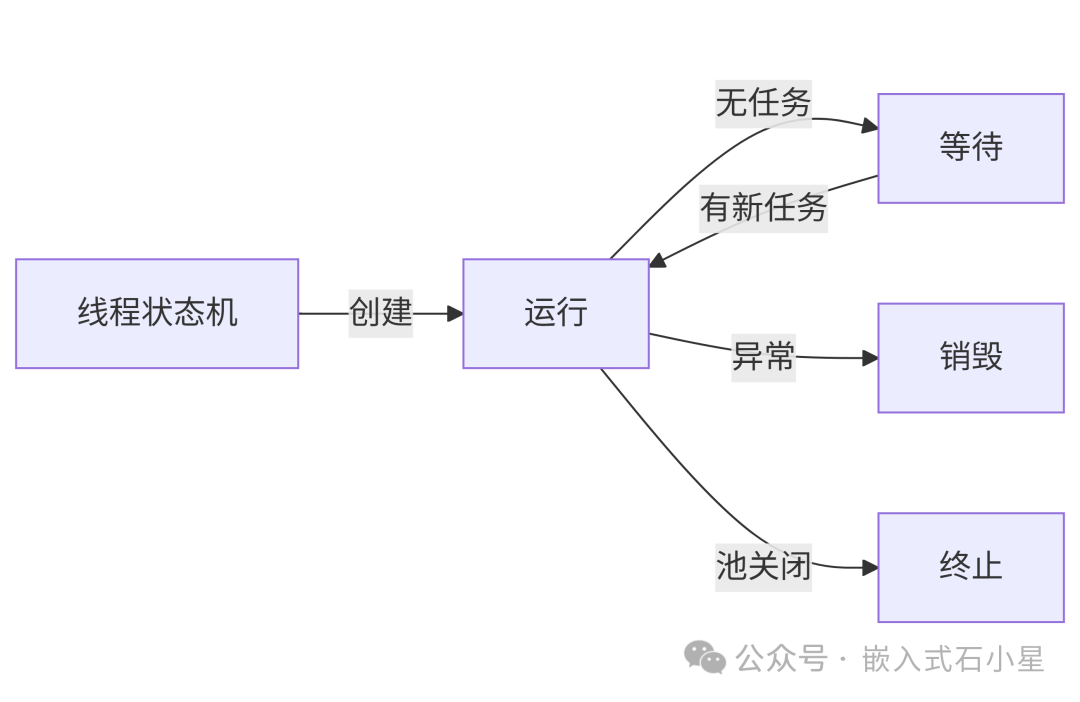
- Dynamic Scaling: Automatically increases or decreases the number of threads based on load
- Keep-Alive Mechanism: Automatically recycles idle threads after a timeout
- Error Handling: Automatically restarts threads after a crash
5. Implementation and Use of Thread Pools
5.1 Embedded-Friendly C++11 Thread Pool The C++ standard library does not have a thread pool; the thread pool itself is very simple, just a few dozen lines of code. The challenge lies in creating a general and efficient asynchronous scheduling model. Here is a simple C++ thread pool demo.
#include <thread>
#include <iostream>
#include <mutex>
#include <condition_variable>
#include <queue>
#include <functional>
#include <vector>
#include <chrono>

// ThreadPool: Used to manage a group of worker threads, uniformly scheduling and executing tasks, avoiding the overhead of frequently creating/destroying threads
class ThreadPool {
public:
    // Constructor, initializes the thread pool and starts a specified number of worker threads
    ThreadPool(size_t threads) : stop(false) {
        for(size_t i=0; i<threads; ++i) {
            // Each worker thread loops waiting for tasks in the task queue
            workers.emplace_back([this] {
                while(1) {
                    std::function<void()> task;
                    {
                        std::unique_lock<std::mutex> lock(this->queue_mutex);
                        // Condition variable wait: task arrival or thread pool stop
                        this->condition.wait(lock, [this]{
                            return this->stop || !this->tasks.empty();
                        });
                        // If the thread pool stops and the task queue is empty, exit the thread
                        if(stop && tasks.empty()) return;
                        // Retrieve a task
                        task = std::move(this->tasks.front());
                        this->tasks.pop();
                    }
                    // Execute the task
                    task();
                }
            });
        }
    }

    // Submit a task to the thread pool, task type is a callable object (like lambda, function, etc.)
    // Return value: true indicates successful enqueue, false indicates the queue is full
    template<class F>
    bool enqueue(F&& f) {
        {
            std::unique_lock<std::mutex> lock(queue_mutex);
            if(tasks.size() >= max_queue) return false; // Reject new tasks when the queue is full
            tasks.emplace(std::forward<F>(f)); // Enqueue
        }
        condition.notify_one(); // Notify one worker thread
        return true;
    }

    // Destructor: Responsible for safely shutting down the thread pool and releasing resources (code omitted here)
    ~ThreadPool() { /* Cleanup code omitted */ }

private:
    std::vector<std::thread> workers; // Worker thread container
    std::queue<std::function<void()>> tasks; // Task queue, stores tasks to be executed
    std::mutex queue_mutex; // Mutex to protect the task queue
    std::condition_variable condition; // Condition variable for thread synchronization
    bool stop; // Thread pool stop flag
    const size_t max_queue = 1000; // Maximum length of the task queue to prevent overflow
};

void thread_function(int i) {
    std::cout << "Thread " << i << " started" << std::endl;
    std::this_thread::sleep_for(std::chrono::seconds(1));
    std::cout << "Thread " << i << " finished" << std::endl;
}

int main(int argc, char *argv[]) {
    ThreadPool pool(4);
    for(int i=0; i<5; ++i) {
        pool.enqueue(std::bind(thread_function, i));
    }
    std::this_thread::sleep_for(std::chrono::seconds(10));
    return 0;
}
6. Debugging and Monitoring Toolchain
6.1 GDB Multithreaded Debugging
$ gdb -p <PID>
(gdb) info threads    # View thread list
(gdb) thread 2        # Switch to thread 2
(gdb) bt full         # View full call stack
(gdb) p var@main      # View main thread variable
6.2 Performance Analysis Tools
- perf: CPU usage analysis
perf record -g -p <PID> # Sampling perf report # Generate report - Flame Graph: Visualizing performance bottlenecks
perf script | FlameGraph/stackcollapse-perf.pl | FlameGraph/flamegraph.pl > out.svg
6.3 Real-time Monitoring Commands
top -H -p <PID>        # Thread-level CPU monitoring
cat /proc/<PID>/status # View thread count/memory
strace -f -p <PID>     # Trace system calls
7. Common Interview Questions
-
What is the difference between processes and threads? Answer:
- Process: The smallest unit of resource allocation, has an independent address space (code, data, stack), with high switching overhead.
- Thread: The smallest unit of CPU scheduling, shares process resources (memory, file descriptors), with low switching overhead and efficient communication. Key Point: Threads are lighter and suitable for resource-constrained embedded scenarios.
-
What is the difference between mutex and semaphore? Answer::
-
What is priority inversion? How to solve it? Answer::
- Priority Inheritance (default in Linux): The thread holding the lock temporarily inherits the highest priority of the waiting threads.
- Priority Ceiling: The lock is bound to a priority, and the thread holding the lock is automatically elevated to that priority.
- Phenomenon: A low-priority thread holds the lock, a medium-priority thread preempts, and a high-priority thread is blocked waiting for the lock.
- Solution::
// Set priority inheritance in pthread_mutexattr_t pthread_mutexattr_t attr; pthread_mutexattr_init(&attr); pthread_mutexattr_setprotocol(&attr, PTHREAD_PRIO_INHERIT); -
How to avoid deadlocks? Answer::
- Lock Order: All threads acquire locks in a fixed order (e.g., lock A → lock B).
- Timeout Mechanism: Use
<span>pthread_mutex_timedlock()</span>to avoid indefinite waiting. - Deadlock Detection: Tools like Valgrind’s Helgrind plugin.
-
When to use spinlocks vs mutexes? Answer::
- Spinlocks: Busy waiting, suitable for critical sections with very short execution times (e.g., <2 time slices) and multi-core environments.
- Mutexes: Sleep waiting, suitable for longer critical sections or single-core systems. Note: Use spinlocks cautiously in embedded real-time systems (RTOS), as they may disrupt real-time performance.
-
Possible reasons for pthread_create() failure? Answer::
- Resource exhaustion (number of threads exceeds
<span>ulimit -u</span>limit) - Insufficient memory (unable to allocate thread stack, default about 8MB)
- Permission issues (embedded systems may restrict thread creation)
-
How to set thread stack size? Answer::
pthread_attr_t attr; pthread_attr_init(&attr); pthread_attr_setstacksize(&attr, 1024*128); // Set to 128KB pthread_create(&tid, &attr, thread_func, NULL); -
How to set thread priority? Answer::
struct sched_param param; param.sched_priority = 90; // Priority value (1~99, higher means higher priority) pthread_attr_setschedpolicy(&attr, SCHED_FIFO); // Real-time scheduling policy pthread_attr_setschedparam(&attr, ¶m);Note: Requires root privileges or
<span>CAP_SYS_NICE</span>capability. -
How to locate multithreading issues? Answer::
<span>gdb</span>:<span>thread apply all bt</span>to view all thread stacks.<span>strace -f</span>: Trace thread system calls.- Valgrind: Detect memory contention (
<span>--tool=helgrind</span>). - Log Tracking: Add thread ID printing (
<span>pthread_self()</span><code><span>).</span> - Tools:
| Feature | Mutex | Semaphore |
|---|---|---|
| Usage | Protect shared resources | Control the number of concurrent accesses |
| Ownership | The holder of the lock must release it | Any thread can release it |
| Initial Value | 1 (locked/unlocked) | Can be set to N (resource count) |
| Embedded Consideration | Avoid priority inversion | Suitable for producer-consumer model |