Warm Reminder
Reading on WeChat public account may result in poor code formatting, incorrect formatting after code copying, delayed content updates, and advertisement issues. It is strongly recommended to click on the “Read the Original” at the bottom left of the article for viewing.
Tips
Initialization Scripts for Rocky, AlmaLinux, CentOS, Ubuntu, Debian, openEuler, AnolisOS, OpenCloudOS, openSUSE, Kylin Server, and UOS Server
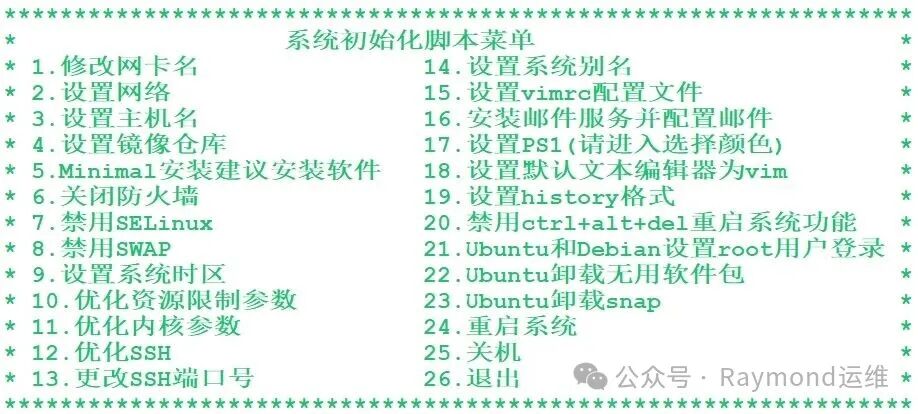
Source code address for the shell script:
Gitee:https://gitee.com/raymond9/shell
Github:https://github.com/raymond999999/shell
You can pull the script from the above Gitee or Github code repositories.
Supported Features and Systems:
| Supported Features | Supported Systems |
|---|---|
| Modify network card names, set up networks (including setting IP addresses, subnet masks, gateway addresses, and DNS addresses, including single and dual network cards), set hostnames, configure mirror repositories, suggest software for minimal installation, disable firewalls, disable SELinux, disable SWAP, set system time zones, optimize resource limit parameters, optimize kernel parameters, optimize SSH, change SSH port numbers, set system aliases, configure vimrc files, install and configure mail services, set PS1, set default text editor to vim, set history format, disable ctrl+alt+del reboot functionality, enable root user login for Ubuntu and Debian, uninstall unnecessary packages in Ubuntu, and uninstall snap in Ubuntu. | Supported systems for version 10: Rocky Linux 8, 9, and 10, AlmaLinux 8, 9, and 10, CentOS 7, CentOS Stream 8, 9, and 10, Ubuntu Server 18.04/20.04/22.04/24.04 LTS, Debian 11, 12, and 13; supported systems for openEuler version: openEuler 22.03/24.03 LTS; supported systems for Anolis OS version: AnolisOS 8 and 23; supported systems for OpenCloudOS version: OpenCloudOS 8 and 9; supported systems for openSUSE version: openSUSE 15; supported systems for Kylin Server version: Kylin Server V10; supported systems for UOS Server version: UOS Server V20. |
Version Update Log:
| Version | Features |
|---|---|
| Version 10 updates | 1. Added functionality to change network card naming to traditional naming conventions like <span>eth0</span>, <span>eth1</span>, etc. for Rocky Linux 9, AlmaLinux 9, CentOS Stream 9 and 10; |
| 2. Due to changes in network card naming rules in Rocky Linux 9, AlmaLinux 9, CentOS Stream 9 and 10, the method of modifying IP addresses using the nmcli command is no longer applicable. Therefore, we adopted a method of setting IP addresses through configuration files. Additionally, configurations for single and dual network cards have been unified to automatically recognize whether the current environment is single or dual network card and configure accordingly; | |
| 3. In UEFI boot systems, when changing network card names by modifying the GRUB configuration file, note that the location of the “grub.cfg” file has changed, and relevant functionality has been added to accommodate this change; | |
| 4. Optimized the method for changing IP addresses in Ubuntu and Debian systems; | |
| 5. Fixed the issue where the IP address reset after rebooting the system in Ubuntu Server 22.04 LTS; | |
| 6. Fixed the bug in changing network card names; | |
| 7. Added support for Rocky Linux 10 and AlmaLinux 10 systems; | |
| 8. Added support for Debian 13 system; | |
| 9. Fixed certain bugs; | |
| 10. Reset_v10 script address:https://gitee.com/raymond9/shell/tree/main/reset/reset_v10 | |
| UOS Server version updates | 1. Added support for UOS Server V20 system; |
| 2. When changing network card names by modifying the GRUB configuration file in UEFI boot systems, the location of the “grub.cfg” file has changed, and relevant functionality has been added; | |
| 3. Fixed the bug in changing network card names; | |
| 4. Fixed certain bugs; | |
| 5. Reset_uos_server script address:https://gitee.com/raymond9/shell/tree/main/reset/reset_uos_server | |
| Kylin Server version updates | 1. Added support for Kylin Server V10 system; |
| 2. When changing network card names by modifying the GRUB configuration file in UEFI boot systems, the location of the “grub.cfg” file has changed, and relevant functionality has been added; | |
| 3. Fixed the bug in changing network card names; | |
| 4. Fixed certain bugs; | |
| 5. Reset_kylin_server script address:https://gitee.com/raymond9/shell/tree/main/reset/reset_kylin_server | |
| openSUSE version updates | 1. Added support for openSUSE 15 system; |
| 2. Fixed the issue where “disable SWAP” did not take effect; | |
| 3. Fixed the issue where “disable ctrl+alt+del reboot system functionality” did not take effect; | |
| 4. Fixed the issue where “set PS1” did not take effect; | |
| 5. The package name for pcre installation in openSUSE 15 has been changed to pcre-tools, and the package name for openssl-devel has been changed to libopenssl-devel; | |
| 6. Unified the configuration for single and dual network cards, allowing automatic recognition of whether the current environment is single or dual network card and configuring accordingly; | |
| 7. Fixed the issue where DNS settings did not take effect when setting up the network; | |
| 8. Fixed certain bugs; | |
| 9. Reset_opensuse script address:https://gitee.com/raymond9/shell/tree/main/reset/reset_opensuse | |
| OpenCloudOS version updates | 1. Added support for OpenCloudOS 8 and 9 systems; |
| 2. Fixed the issue where “disable SWAP” did not take effect; | |
| 3. Fixed the issue where “disable ctrl+alt+del reboot system functionality” did not take effect; | |
4. Added functionality to change network card naming to traditional naming conventions like <span>eth0</span>, <span>eth1</span>, etc. for OpenCloudOS 9; |
|
| 5. Due to changes in network card naming rules in OpenCloudOS 9, the method of modifying IP addresses using the nmcli command is no longer applicable. Therefore, we adopted a method of setting IP addresses through configuration files. Additionally, configurations for single and dual network cards have been unified to automatically recognize whether the current environment is single or dual network card and configure accordingly; | |
| 6. In UEFI boot systems, when changing network card names by modifying the GRUB configuration file, the location of the “grub.cfg” file has changed, and relevant functionality has been added; | |
| 7. Fixed the bug in changing network card names; | |
| 8. Added functionality to enable the OpenCloudOS 8 PowerTools repository; | |
| 9. Fixed certain bugs; | |
| 10. Reset_opencloudos script address:https://gitee.com/raymond9/shell/tree/main/reset/reset_opencloudos | |
| AnolisOS version updates | 1. Added support for AnolisOS 8 and 23 systems; |
| 2. Fixed the issue where “disable SWAP” did not take effect; | |
| 3. Fixed the issue where “disable ctrl+alt+del reboot system functionality” did not take effect; | |
4. Added functionality to change network card naming to traditional naming conventions like <span>eth0</span>, <span>eth1</span>, etc. for AnolisOS 8 and 23; |
|
| 5. Due to changes in network card naming rules in AnolisOS 23, the method of modifying IP addresses using the nmcli command is no longer applicable. Therefore, we adopted a method of setting IP addresses through configuration files. Additionally, configurations for single and dual network cards have been unified to automatically recognize whether the current environment is single or dual network card and configure accordingly; | |
| 6. In UEFI boot systems, when changing network card names by modifying the GRUB configuration file, the location of the “grub.cfg” file has changed, and relevant functionality has been added; | |
| 7. Fixed the bug in changing network card names; | |
| 8. Fixed certain bugs; | |
| 9. Reset_anolisos script address:https://gitee.com/raymond9/shell/tree/main/reset/reset_anolisos | |
| openEuler version updates | 1. Added support for openEuler 22.03/24.03 LTS systems; |
| 2. Fixed the issue where “disable SWAP” did not take effect; | |
| 3. Fixed the issue where “disable ctrl+alt+del reboot system functionality” did not take effect; | |
| 4. Unified the configuration for single and dual network cards, allowing automatic recognition of whether the current environment is single or dual network card and configuring accordingly; | |
| 5. In UEFI boot systems, when changing network card names by modifying the GRUB configuration file, the location of the “grub.cfg” file has changed, and relevant functionality has been added; | |
| 6. Fixed the bug in changing network card names; | |
| 7. Fixed certain bugs; | |
| 8. Reset_openeuler script address:https://gitee.com/raymond9/shell/tree/main/reset/reset_openeuler | |
| Version 9 updates | 1. Since CentOS Stream 8 expired on May 31, 2024, and CentOS Linux 7’s lifecycle ends on June 30, 2024, the mirror repositories for both CentOS Stream 8 and CentOS 7 have been changed to centos-vault repositories; the epel repository for CentOS 7 has been changed to epel-archive repository; |
| 2. Added support for Ubuntu 24.04 system; (Changes in Ubuntu 24.04: the network card configuration file has changed to “/etc/netplan/50-cloud-init.yaml”, the mirror repository format has changed to DEB822 format, and the service name for ssh has changed to ssh;) | |
| 3. Added support for Debian 11 and 12 systems; | |
| 4. Added the devel repository for AlmaLinux; | |
| 5. Fixed the issue where “disable ctrl+alt+del reboot system functionality” did not take effect; | |
| 6. Added support for CentOS Stream 10 system, fixed the issue where “disable SWAP” did not take effect, the package name for pcre installation in CentOS Stream 10 has been changed to pcre2, and the package name for pcre-devel has been changed to pcre2-devel; | |
| 7. Fixed certain bugs; | |
| 8. Reset_v9 script address:https://gitee.com/raymond9/shell/tree/main/reset/v9 | |
| Version 8 updates | 1. Added support for AlmaLinux 8 and 9 systems; |
| 2. Added functionality to uninstall snap in Ubuntu; | |
| 3. Fixed certain bugs. | |
| Version 7 updates | 1. Due to the rushed modifications in version 6, there were bugs in setting the mirror repository, which have been fixed, and the mirror repository can now be modified repeatedly; fixed the bug where setting the IP address could not succeed; optimized the bug in setting system aliases; fixed the bug in “optimizing kernel parameters”; |
| 2. There are reset_v7_1 version (using sed to directly replace the URL for the mirror repository; using nmcli command for modifying IP address) and reset_v7_2 version (using configuration files for both the mirror repository and modifying IP address). | |
| Version 6 updates | 1. Since CentOS 6 and 8 are no longer officially supported, their related content has been removed; |
| 2. There are reset_v6_1 version (using sed to directly replace the URL for the mirror repository; using nmcli command for modifying IP address) and reset_v6_2 version (using configuration files for both the mirror repository and modifying IP address); | |
| 3. Reset_v6_1 added a method to change the mirror source for CentOS Stream 9 using Perl, optimized certain bugs related to invalid mirror repositories, and fixed certain bugs. | |
| Version 5 updates | 1. Optimized certain bugs related to invalid mirror repositories; |
| 2. Modified the method for changing IP addresses in CentOS Stream 9 and Rocky 9 accordingly; | |
| 3. There are reset_v5_1 version (using sed to directly replace the URL for the mirror repository; using nmcli command for modifying IP address) and reset_v5_2 version (using configuration files for both the mirror repository and modifying IP address); | |
| 4. Separated the settings for PS1, default text editor to vim, and history format; | |
| 5. Fixed certain bugs. | |
| Version 4 updates | 1. Added support for CentOS Stream 9, Rocky 9, and Ubuntu 22.04 systems; |
| 2. Added functionality to modify IP addresses and gateway addresses in Ubuntu 22.04, and change IP addresses for dual network cards; | |
| 3. Added functionality to disable ctrl+alt+del reboot functionality; | |
| 4. Fixed certain bugs. | |
| Version 3 updates | 1. Added functionality to change IP addresses for dual network cards; |
| 2. Added functionality to set system time zones. | |
| Version 2 updates | 1. Added support for CentOS Stream 8 system, added CentOS Stream 8 mirror repository; |
| 2. Since CentOS 8 has been deprecated, changed to centos-vault historical mirror repository; | |
| 3. Optimized the issue where disabling swap in Ubuntu 20.04 did not take effect. | |
| Version 1 supported features | 1. Supports CentOS 6/7/8, Ubuntu 18.04/20.04, Rocky 8 systems; |
| 2. Supported features include disabling SELinux, disabling firewalls, optimizing SSH, setting system aliases, configuring vimrc files, setting software repositories, suggesting software for minimal installation, installing and configuring mail services, changing SSH port numbers, modifying network card names, modifying IP addresses and gateway addresses, setting hostnames, setting PS1 and system environment variables, disabling SWAP, optimizing kernel parameters, optimizing resource limit parameters, enabling root user login for Ubuntu, and uninstalling unnecessary packages in Ubuntu. |
Notes to consider when using the reset script:
-
First, the script must be used under the root user.
# Rocky, AlmaLinux, CentOS, openEuler, AnolisOS, OpenCloudOS, openSUSE, Kylin Server, and UOS Server can log in as root without setting it up, while Ubuntu and Debian must first set up root user login. # First install the lrzsz tool to transfer the script. raymond@ubuntu2404:~$ sudo apt -y install lrzsz raymond@ubuntu2404:~$ rz -E rz waiting to receive. raymond@ubuntu2404:~$ ls reset_v10.sh # Run the script using bash command raymond@ubuntu2404:~$ bash reset_v10.sh ***************************************************************** * System Initialization Script Menu * * 1. Modify network card name 14. Set system alias * * 2. Set network 15. Configure vimrc file * * 3. Set hostname 16. Install and configure mail service * * 4. Set mirror repository 17. Set PS1 (please choose color) * * 5. Suggest software for minimal installation 18. Set default text editor to vim * * 6. Disable firewall 19. Set history format * * 7. Disable SELinux 20. Disable ctrl+alt+del reboot system functionality * * 8. Disable SWAP 21. Enable root user login for Ubuntu and Debian * * 9. Set system time zone 22. Uninstall unnecessary packages in Ubuntu * * 10. Optimize resource limit parameters 23. Uninstall snap in Ubuntu * * 11. Optimize kernel parameters 24. Reboot system * * 12. Optimize SSH 25. Shutdown * * 13. Change SSH port number 26. Exit * ***************************************************************** Please select the corresponding number (1-26): 21 # Input 21, set root user login Please enter password: 123456 # Input password [sudo] password for raymond: New password: Retype new password: passwd: password updated successfully Root user login has been set up successfully for Ubuntu 24.04.2 LTS, please log in again to take effect! ***************************************************************** * System Initialization Script Menu * * 1. Modify network card name 14. Set system alias * * 2. Set network 15. Configure vimrc file * * 3. Set hostname 16. Install and configure mail service * * 4. Set mirror repository 17. Set PS1 (please choose color) * * 5. Suggest software for minimal installation 18. Set default text editor to vim * * 6. Disable firewall 19. Set history format * * 7. Disable SELinux 20. Disable ctrl+alt+del reboot system functionality * * 8. Disable SWAP 21. Enable root user login for Ubuntu and Debian * * 9. Set system time zone 22. Uninstall unnecessary packages in Ubuntu * * 10. Optimize resource limit parameters 23. Uninstall snap in Ubuntu * * 11. Optimize kernel parameters 24. Reboot system * * 12. Optimize SSH 25. Shutdown * * 13. Change SSH port number 26. Exit * ***************************************************************** Please select the corresponding number (1-26): 26 # Exit script # Then log in as root [C:\~]$ ssh root:[email protected] # Move the script from the normal user home directory to the root user home directory, and continue with the next steps. root@ubuntu2404:~# mv /home/raymond/reset_v10.sh . -
For CentOS Stream 9 and 10, note the following when modifying the mirror source.
# First install the lrzsz tool to transfer the script [root@centos10 ~]# dnf -y install lrzsz [root@centos10 ~]# rz -E rz waiting to receive. [root@centos10 ~]# ls anaconda-ks.cfg reset_v10.sh [root@centos10 ~]# bash reset_v10.sh ***************************************************************** * System Initialization Script Menu * * 1. Modify network card name 14. Set system alias * * 2. Set network 15. Configure vimrc file * * 3. Set hostname 16. Install and configure mail service * * 4. Set mirror repository 17. Set PS1 (please choose color) * * 5. Suggest software for minimal installation 18. Set default text editor to vim * * 6. Disable firewall 19. Set history format * * 7. Disable SELinux 20. Disable ctrl+alt+del reboot system functionality * * 8. Disable SWAP 21. Enable root user login for Ubuntu and Debian * * 9. Set system time zone 22. Uninstall unnecessary packages in Ubuntu * * 10. Optimize resource limit parameters 23. Uninstall snap in Ubuntu * * 11. Optimize kernel parameters 24. Reboot system * * 12. Optimize SSH 25. Shutdown * * 13. Change SSH port number 26. Exit * ***************************************************************** Please select the corresponding number (1-26): 4 # Input 4, set mirror repository 1) base repository 2) epel repository 3) Enable CentOS Stream 9 and 10 crb repository 4) Enable CentOS Stream 8 PowerTools repository 5) Exit Please enter the mirror source number (1-5): 1 # Input 1, select to set base repository Due to the CentOS Stream 10 operating system, the default mirror source is implemented in Perl. Before changing the mirror source, ensure that the 'update_mirror.pl' file and the reset script are in the same directory, otherwise the program will exit later. The default CentOS Stream 10 operating system is set to Aliyun, to modify the mirror source, please modify the url variable in the 'update_mirror.pl' file! Missing update_mirror.pl file! # Here it prompts "Missing update_mirror.pl file", the above prompt also clearly states that this file needs to be transferred to the system [root@centos10 ~]# rz -E rz waiting to receive. [root@centos10 ~]# ls anaconda-ks.cfg reset_v10.sh update_mirror.pl [root@centos10 ~]# bash reset_v10.sh ***************************************************************** * System Initialization Script Menu * * 1. Modify network card name 14. Set system alias * * 2. Set network 15. Configure vimrc file * * 3. Set hostname 16. Install and configure mail service * * 4. Set mirror repository 17. Set PS1 (please choose color) * * 5. Suggest software for minimal installation 18. Set default text editor to vim * * 6. Disable firewall 19. Set history format * * 7. Disable SELinux 20. Disable ctrl+alt+del reboot system functionality * * 8. Disable SWAP 21. Enable root user login for Ubuntu and Debian * * 9. Set system time zone 22. Uninstall unnecessary packages in Ubuntu * * 10. Optimize resource limit parameters 23. Uninstall snap in Ubuntu * * 11. Optimize kernel parameters 24. Reboot system * * 12. Optimize SSH 25. Shutdown * * 13. Change SSH port number 26. Exit * ***************************************************************** Please select the corresponding number (1-26): 4 # Input 4, set mirror repository 1) base repository 2) epel repository 3) Enable CentOS Stream 9 and 10 crb repository 4) Enable CentOS Stream 8 PowerTools repository 5) Exit Please enter the mirror source number (1-5): 1 # Input 1, select to set base repository Due to the CentOS Stream 10 operating system, the default mirror source is implemented in Perl. Before changing the mirror source, ensure that the 'update_mirror.pl' file and the reset script are in the same directory, otherwise the program will exit later. The default CentOS Stream 10 operating system is set to Aliyun, to modify the mirror source, please modify the url variable in the 'update_mirror.pl' file! The update_mirror.pl file is ready, continue with subsequent configuration! # Now it prompts "The update_mirror.pl file is ready, continue with subsequent configuration!". Installing perl tools, please wait... Updating mirror source, please wait...... CentOS Stream 10 operating system, mirror source has been set! 1) base repository 2) epel repository 3) Enable CentOS Stream 9 and 10 crb repository 4) Enable CentOS Stream 8 PowerTools repository 5) Exit Please enter the mirror source number (1-5): 5 # Exit the mirror repository setting menu ***************************************************************** * System Initialization Script Menu * * 1. Modify network card name 14. Set system alias * * 2. Set network 15. Configure vimrc file * * 3. Set hostname 16. Install and configure mail service * * 4. Set mirror repository 17. Set PS1 (please choose color) * * 5. Suggest software for minimal installation 18. Set default text editor to vim * * 6. Disable firewall 19. Set history format * * 7. Disable SELinux 20. Disable ctrl+alt+del reboot system functionality * * 8. Disable SWAP 21. Enable root user login for Ubuntu and Debian * * 9. Set system time zone 22. Uninstall unnecessary packages in Ubuntu * * 10. Optimize resource limit parameters 23. Uninstall snap in Ubuntu * * 11. Optimize kernel parameters 24. Reboot system * * 12. Optimize SSH 25. Shutdown * * 13. Change SSH port number 26. Exit * ***************************************************************** Please select the corresponding number (1-26): 26 # Exit script -
Other functions can be selected as needed, and if there are inputs required, just follow the prompts.
WeChat Group
To facilitate better communication regarding operation and maintenance and related technical issues, a WeChat group has been created. Friends who need to join the group can scan the QR code below to add me as a friend (please note: join group).

Blog
Visit the blog website for more quality original content.
CSDN: https://blog.csdn.net/qq_25599925
Juejin: https://juejin.cn/user/4262187909781751
Knowledge Planet: https://wx.zsxq.com/group/15555885545422
Aliyun Community: https://developer.aliyun.com/profile/snzh3xpxaf6sg
Tencent Cloud Community: https://cloud.tencent.com/developer/column/106063