Identifiers
In C++, an identifier is a name used to uniquely identify program elements such as variables, functions, classes, objects, and namespaces, making them easier to reference and manipulate in the code.
Rules for naming identifiers (must be followed):
1. Composition characters:
Identifiers can only consist of letters (A-Z, a-z), digits (0-9), and underscores (_), and cannot start with a digit.
For example: age, user_name, _count are valid; 2nd (starts with a digit), my-name (contains a hyphen) are invalid.
2. Case sensitivity:
C++ is case-sensitive, so Name and name are considered two different identifiers.
3. Cannot use keywords:
Identifiers cannot be C++ reserved keywords (such as int, if, class, for, etc.).
For example: int int; (error, int is a keyword).
4. Length limit:
The standard does not strictly limit length, but compilers may have their own limits (usually long enough, no need to worry), it is recommended to keep it concise and understandable.
Naming conventions for identifiers (recommended to follow for better readability):
1. Variables/functions: typically use lowercase letters, with multiple words connected by underscores (snake_case), for example, student_age, calculate_sum().
2. Classes/structures: typically start with uppercase letters, with multiple words capitalized (PascalCase), for example, Student, CircleArea.
3. Constants: typically use all uppercase letters, with multiple words connected by underscores, for example, MAX_SIZE, PI.
4. Avoid single-letter names: except for temporary variables (like i, j in loops), try to use meaningful names (like count is clearer than c).
For example:
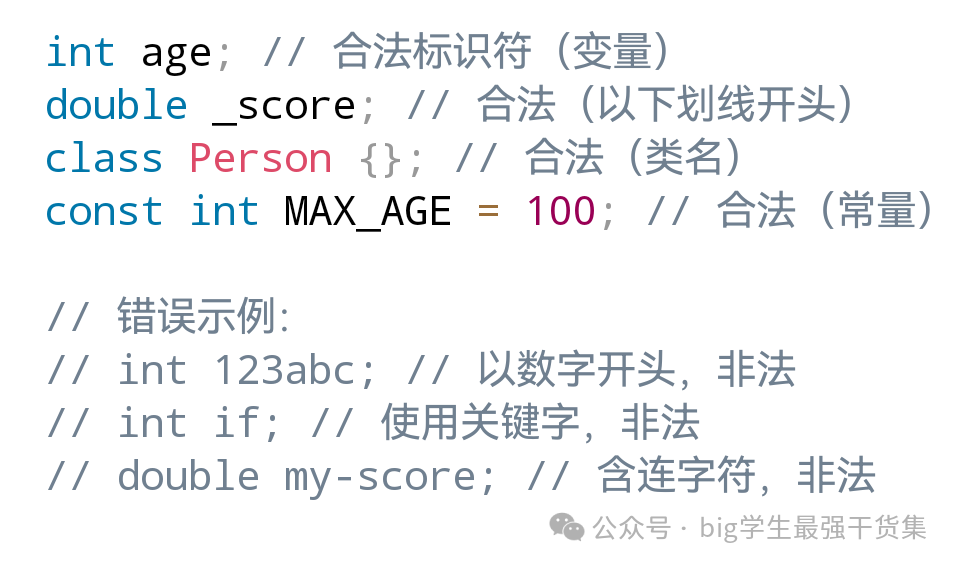
Definition conventions:
1. CamelCase: the first letter is lowercase, and the first letter of subsequent words is uppercase. For example: firstName, lastName, userAddress, etc.
2. Underscore naming: words are connected by underscores. For example: first_name, last_name, user_address, etc.
3. PascalCase: the first letter of each word is uppercase. For example: FirstName, LastName, UserAddress, etc.
4. Hungarian notation: prefixes indicate data types, followed by camel case naming. For example: iCount, fPrice, sName, etc.
In simple terms, an identifier is the “name of an element” in a program; following the rules allows the compiler to recognize it correctly, while following conventions makes the code easier for people to understand.
Keywords
Common keywords
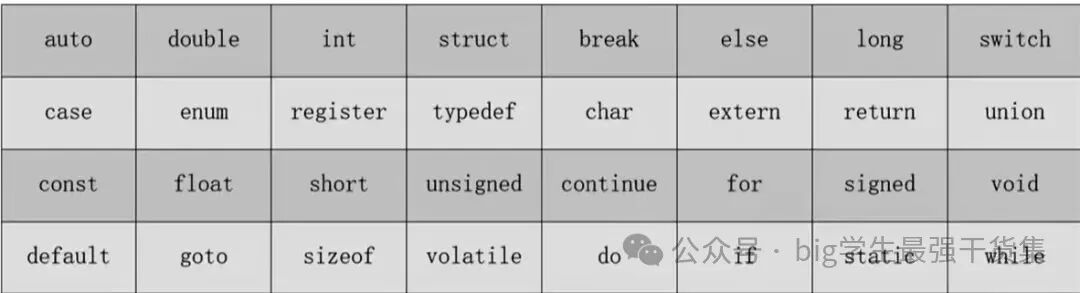
1. These keywords are all lowercase letters.
2. The meanings of keywords are fixed and cannot be modified or changed in behavior.
Operators
Operators in C++ are symbols used to perform various operations (such as arithmetic operations, logical operations, assignments, etc.). They can be categorized based on functionality, and below is a detailed explanation of the usage, precedence, and considerations for each type of operator.
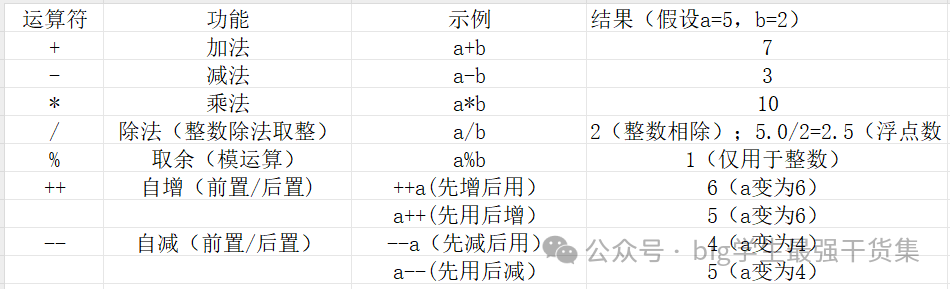
1. Arithmetic Operators
Used for basic mathematical operations, operands are usually numeric types (int, float, double, etc.).
Note:
☞ If all operands of / are integers, the function of / is to take the integer part, for example: 5/3==1, 5/2==2; if one operand is a floating-point type, the function of / is division, 5/2.0==2.5
☞ The result sign of the % operator is consistent with the dividend (for example, 5%(-2)=1, -5%2=-1).
☞ Increment/decrement operators only apply to variables (for example, ++5 is an error).
2. Assignment Operators
Used to assign values to variables, the basic operator is =, and there are also compound assignment operators (combined with arithmetic/bitwise operations).
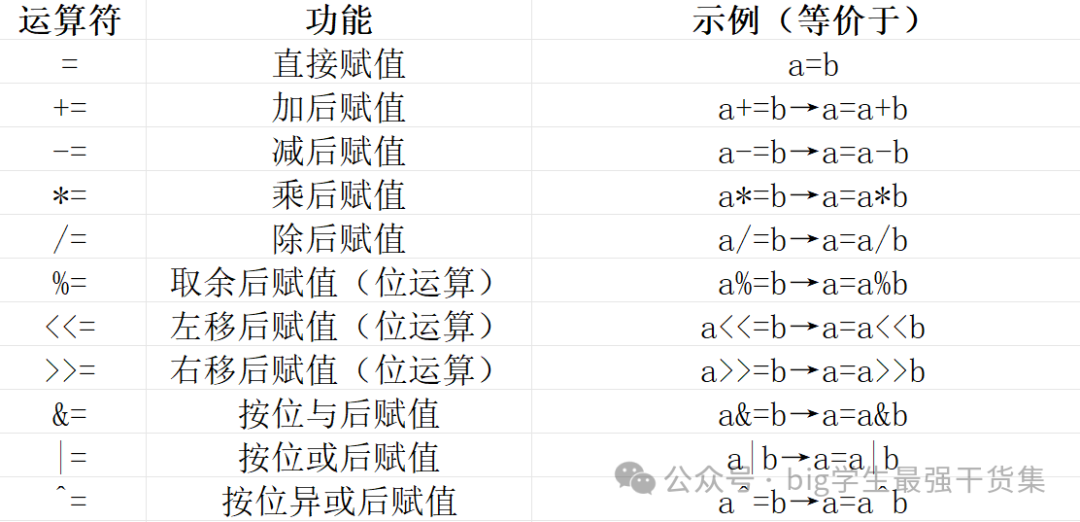
Note: Assignment operators are right associative, for example, a = b = c is equivalent to a = (b = c).
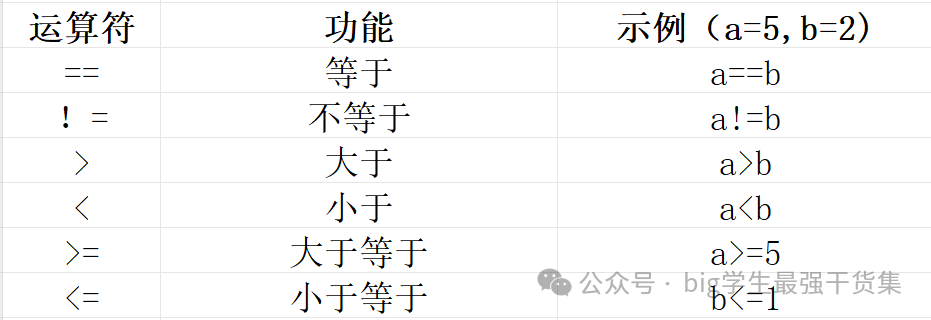
3. Comparison Operators (Relational Operators)
Used to compare two values, returning true (1) or false (0) (boolean values).
Note:
☞ Do not confuse == (comparison) and = (assignment), for example, if (a = 5) will assign 5 to a and evaluate to true (non-zero), which is a logical error.
☞ Be cautious with floating-point comparisons (due to precision issues, it is recommended to use a difference less than a certain threshold, such as fabs(a-b) < 1e-9).
4. Logical Operators
Used to combine boolean expressions, returning true or false.

☞ Logical AND: the entire expression is true only when both a and b are true; if either a or b is false, the entire expression is false; if a is false, the truth value of b does not affect the result of the entire expression, so b is not evaluated, which is called “short-circuiting”.
☞ Logical OR: the entire expression is true if either a or b is true; if both a and b are false, the entire expression is false; if a is true, the truth value of b does not affect the result of the entire expression, so b is not evaluated, which is called “short-circuiting”.
☞ !true == false, !false == true.
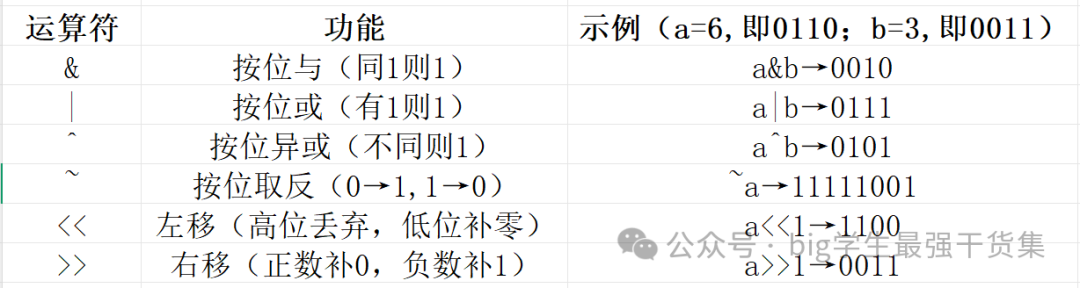
5. Bitwise Operators
Operate directly on binary bits, operands are integers (char, int, etc.).
6. Conditional Operator (Ternary Operator)
Format: condition ? expression1 : expression2
– Function: If the condition is true, return the value of expression1; otherwise, return the value of expression2.
– Example: int max = (a > b) ? a : b; (to get the maximum of a and b).
– Has lower precedence, it is recommended to use parentheses to clarify the scope.