Once a program is running, it becomes a process. Regardless of whether it is in kernel mode or user mode, the process sees a virtual memory space. When accessing specific data, the virtual memory address is first converted to a physical memory address, allowing access to the actual physical memory where this data is stored, thus retrieving the data.
So what exactly is a virtual memory address? Why use virtual memory addresses instead of directly using physical memory addresses? Let’s explain this in detail:
1. What is a Virtual Memory Address
The concept of an address was introduced to facilitate locating the real geographical position of a specific entity in the real world; it is a conceptual model used for positioning.
For example, when people send local specialties to friends and family, they fill in the recipient’s address and the sender’s address. Similarly, when shopping online, we fill in our delivery address in the respective e-commerce app.

Then the delivery person will find our actual residence based on the delivery address we provided and deliver the purchased goods to us.
The delivery address is the most effective way to locate our real geographical residence, while everything in the real world, such as cities and landscapes, truly exists. However, the delivery address is a conceptual model that does not exist in reality; it is merely a virtual concept proposed by people, mapping it to the real addresses of cities, neighborhoods, streets, etc. in the real world, allowing us to find specific locations through this virtual concept.
In summary: The delivery address is a virtual address, defined by humans, while our cities, neighborhoods, and streets exist in reality, and their address locations are physical addresses.
Now, let’s switch to the world of computers. In the computer world, memory addresses are used to define the storage locations of data in memory, which are divided into virtual memory addresses and physical memory addresses. The virtual memory address is also a concept designed by humans, analogous to our delivery address in the real world, while the physical address is the actual storage location of data in physical memory, analogous to the real address locations of cities, streets, and neighborhoods in the real world.
So what does a virtual memory address look like?
We can use the familiar format of a delivery address as an analogy: province, city, district, street, neighborhood, room, which progresses hierarchically by region. Similarly, in the computer world, virtual memory addresses also have such a hierarchical relationship.
Here, we take the most common 4-level page table as an example. The format of a 64-bit virtual address is: global page directory entry (9 bits) + upper-level page directory entry (9 bits) + middle-level page directory entry (9 bits) + page table entry (9 bits) + page offset (12 bits). This makes up a virtual memory address of 48 bits.
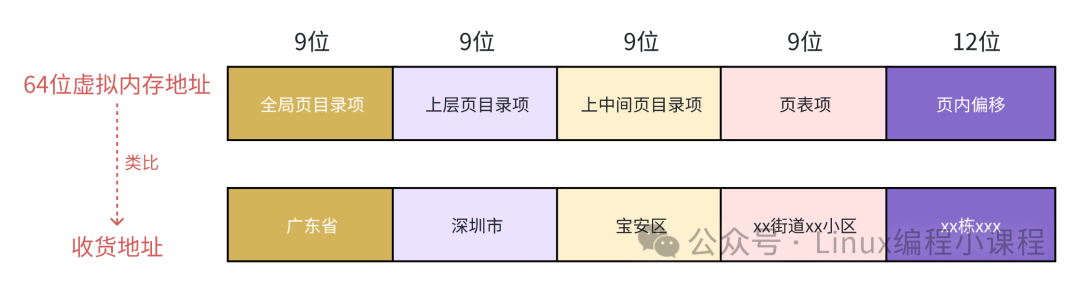
The global page directory entry in the virtual memory address is analogous to the province in our delivery address, the upper-level page directory entry is analogous to the city, the middle-level page directory entry is analogous to the district, the page table entry is analogous to the street neighborhood, and the page offset is analogous to the building and floor number.
2. Why Use Virtual Addresses
Before answering this question, let’s first look at what would happen if we directly used physical memory addresses in a program.
Assuming there are no virtual memory addresses, and all memory operations in the program use physical memory addresses, in this case, the programmer would need to know the exact location of each variable in memory. We would need to manually layout the physical memory, clarifying which data is stored at which locations in memory. Additionally, we would need to consider how much memory to allocate for each process, what to do when memory is tight, how to avoid address conflicts between processes, and a series of other complex and tedious details.
If we are developing applications in a single-process system, such as an embedded device, where there is only one process that exclusively uses all physical resources, including memory resources, the aforementioned issues of directly using physical memory may be somewhat manageable, but still present a high development threshold.
However, modern operating systems often support multiple processes, requiring handling of coordination issues between processes. In a multi-process system, directly using physical memory addresses to operate memory becomes very complex due to the aforementioned issues.
Here, I will provide a simple example to illustrate the complexity of directly using physical memory addresses in a multi-process system.
int main(int argc, char argv[])
{
    int i = 0;
    ...
    printf("value :%d", i);
}
With the same program code, if we start three processes simultaneously, we temporarily name the processes <span>a</span>, <span>b</span>, and <span>c</span>. These three processes use the same code, which we have written in advance and can be run multiple times. Assuming variable i is stored at the physical address 0x396. When these three processes run, they will simultaneously operate on this physical address 0x396, leading to confusion in the value of variable i. The three processes will encounter address conflicts.
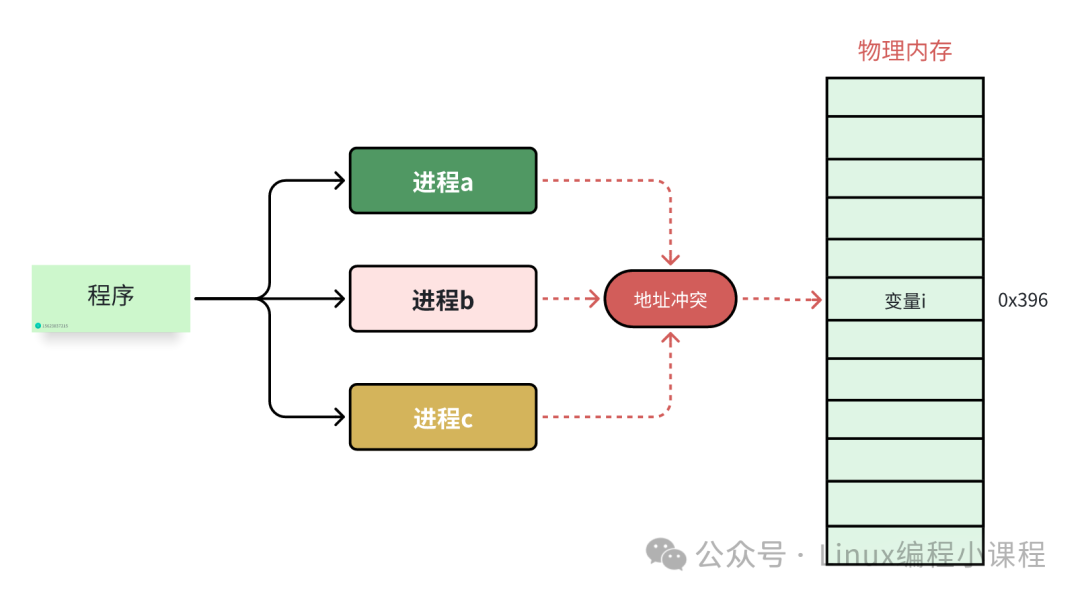
Therefore, when directly operating physical memory, we need to know where each variable is located, and we must ensure that multiple processes do not share the same address when running simultaneously, or else address conflicts will occur.
In reality, a program will have many variables and functions, which means we need to calculate a reasonable position for all of them without conflicting with other processes, making it very complex.
The introduction of virtual memory is precisely to solve the above problems. After the introduction of virtual memory, the perspective of processes becomes very broad; each process has its own independent virtual address space, and the virtual memory address spaces of different processes are isolated from each other, without interference. Each process believes it exclusively owns all memory space and can do whatever it wants.
What other processes are running on the system is of no concern to me. This way, we can delegate all the complex details of coordination between multiple processes to the memory management module in the kernel, greatly relieving the mental burden on programmers. This is all because virtual memory can provide isolation of memory address spaces, significantly expanding the available space.
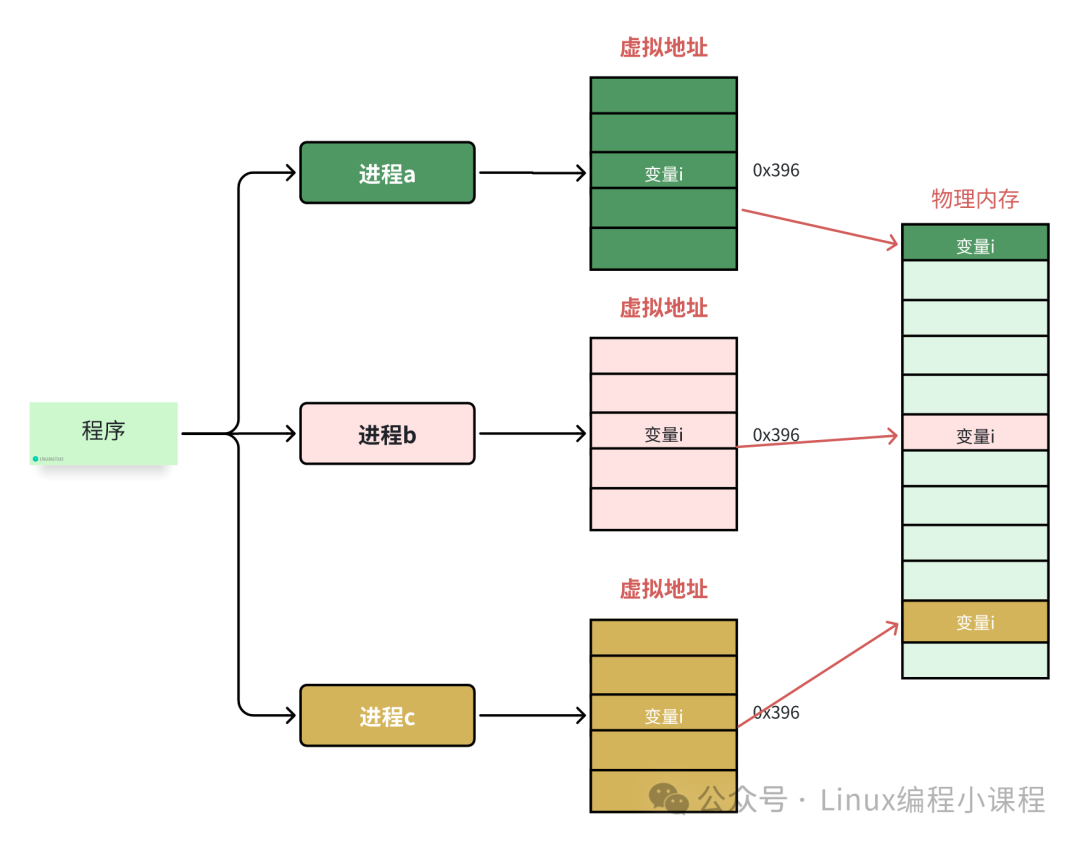
Thus, processes believe they exclusively occupy the entire memory space, creating the illusion that all memory resources belong to them. This is essentially a trick used by the CPU and the operating system. Any data stored in a virtual memory is fundamentally still stored in the actual physical memory. The kernel helps us perform the mapping from virtual memory to physical memory, linking the virtual addresses of different processes to different physical addresses in memory.
When the CPU accesses a process’s virtual address, the address translation hardware converts the virtual address into different physical addresses. This way, when different processes run, although they operate on the same virtual address, they are actually writing to different physical addresses behind the scenes, thus avoiding conflicts.
3. Overall Layout of Virtual Address Space
The previous two sections have provided some understanding of virtual addresses. In this section, let’s look at how the virtual address space is laid out on a 64-bit machine. We know that on a 64-bit machine, the addressing range of pointers is 2^64, and the virtual memory space that can be expressed is 16 EB. The range of virtual memory addresses is: 0x0000 0000 0000 0000 0000 – 0xFFFF FFFF FFFF FFFF.
In fact, in current 64-bit systems, only 48 bits are used to describe the virtual memory space, with an addressing range of 2^48, allowing for a virtual memory space of 256 TB.
Among them, the lower 128 T represents the user-mode virtual memory space, with a virtual memory address range of: 0x0000 0000 0000 0000 – 0x0000 7FFF FFFF F000.
The upper 128 T represents the kernel-mode virtual memory space, with a virtual memory address range of: 0xFFFF 8000 0000 0000 – 0xFFFF FFFF FFFF FFFF.
This creates a gap between the user-mode virtual memory space and the kernel-mode virtual memory space, ranging from 0x0000 7FFF FFFF FFFF to 0xFFFF 7FFF FFFF FFFF, which we call the canonical address gap.
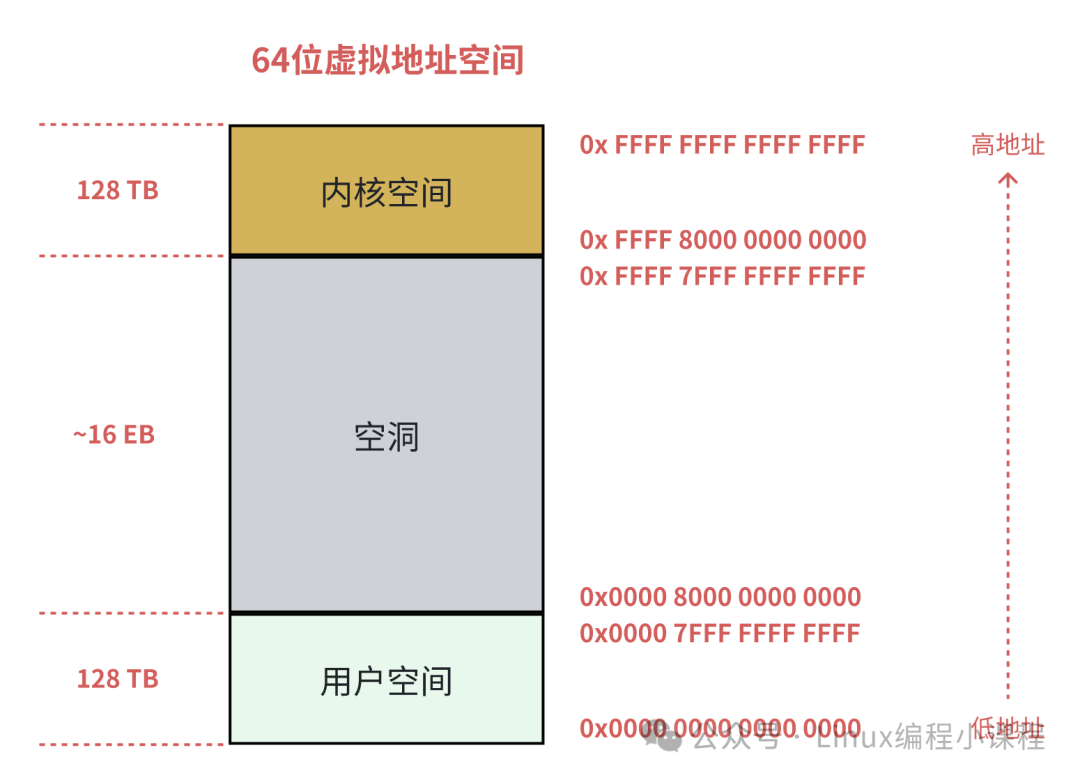
Note that in the lower 128T user-mode address space: 0x0000 0000 0000 0000 – 0x0000 7FFF FFFF FFFF, the high 16 bits of the virtual memory address are all 0. If the high 16 bits of a virtual memory address are all 0, we can directly determine that this is a user-space virtual memory address.
Similarly, in the upper 128T kernel-mode virtual memory space: 0xFFFF 8000 0000 0000 – 0xFFFF FFFF FFFF FFFF, the high 16 bits of the virtual memory address are all 1. This means that if a virtual address attempting to access the kernel does not have all high 16 bits as 1, we can quickly determine that this access is illegal.
Addresses falling within the canonical address gap: 0x0000 8000 0000 0000 – 0xFFFF 7FFFF FFFF FFFF have high 16 bits that are neither all 0 nor all 1. If a virtual address falls within this canonical address gap, it is neither in user space nor in kernel space, and is certainly an illegal access.
In the future, we can utilize this canonical address gap to expand the range of virtual memory addresses, for example, extending it to 56 bits.
4. Conclusion
This article has detailed the core issues of what virtual memory addresses are and why virtual memory addresses are introduced. Understanding these two key issues can lay the groundwork for further learning and also provide some interesting points to discuss with interviewers, adding some highlights to the interview.
Finally, using a 64-bit machine as an example, we have described the overall layout of virtual memory addresses in detail. Here, everyone just needs to have a general impression; in the future, we will provide detailed explanations of kernel virtual memory space and user virtual address space. Interested readers can continue to follow along.
Technical developers focused on sharing Linux knowledge, follow me to learn programming together.
Some content in this article is referenced from: “Step by Step to Deeply Understand Linux Virtual Memory Management”; the author has a series of excellent articles.