In brain image analysis, different ROI files or brain atlas files may have different spatial resolutions and matrix sizes. If they are not unified to the same space or resolution, subsequent registration or atlas mapping and analysis may encounter issues. Therefore, it is necessary to resample the ROI or atlas to standardize it to the required standard space. Here are two specific operational steps:
1. SPM12 InterfaceSingle Image Resampling
2. MATLAB Code for Batch Resampling of Images
1. SPM12 InterfaceSingle Image Resampling
Example Objective:
Resample the AAL ROI atlas to the space of the Yeo 7 network atlas.
Two files are used here, namely the image to be resampled and the reference image:
“D:\demo\AAL_61x73x61_YCG.nii”
“D:\demo\Yeo2011_7Networks_MNI152_FreeSurferConformed1mm_LiberalMask.nii”
Specific Steps:
1. Open SPM12 → fMRI → Coregister → Reslice.
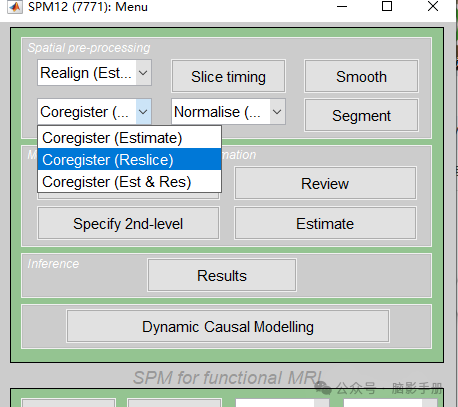
A window will pop up as follows:
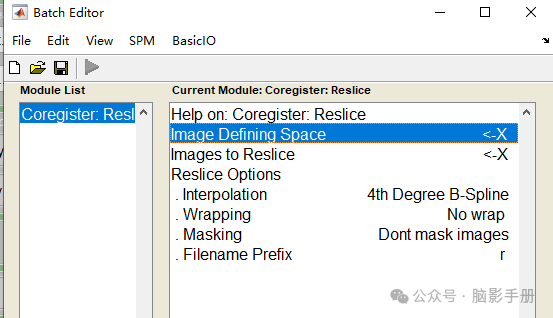
Parameter Explanation:
① Image Defining Space (Defining Space / Reference Image)
-
This is the image used as the target space, similar to a “reference template.” All images will be resampled to match the spatial characteristics of this reference image. The image to be processed must first be coregistered to the reference image; otherwise, the resampling may be inaccurate.
-
Resampling only changes the voxel grid but does not automatically align the brain region positions. For brain region masks or atlases, if the atlas is already in the same space (e.g., MNI), it can be directly resampled as long as the matrix size or voxel resolution is different, without needing to worry about registration. Since the ROI is already in standard space, resampling only adjusts the grid and does not change the correspondence of brain regions.
-
However, if the ROI is in a custom space (such as individual T1 space) and needs to be mapped to the standard template (MNI space), it must be coregistered first; otherwise, the ROI will “drift” after resampling, misaligning the brain region positions. In this case, the ROI’s individual space (T1) should be aligned to the MNI template space first through coregistration. This step will adjust the ROI’s position, orientation, and rotation, ensuring that the brain regions are consistent with the standard template. After coregistration, the ROI can be resampled to match the voxel size and matrix size of the MNI template.
② Images to Reslice (Images to be Resampled)These images are resampled to ensure their size, voxel size, direction, etc., are consistent with the defining space image.
③ Interpolation
Using nearest neighbor interpolation (Nearest Neighbour) can maintain the discrete values of the ROI/partition, avoiding decimal values. For continuous images, the default 4th Degree B-Spline or Trilinear can be used.
2. Double-click the first row Image Defining Space, and the following window will pop up:
① Enter the file storage address in Dir, I placed it under D:\demo, and press the enter key.② Then select the reference image Yeo2011_7Networks… to highlight it.③ After clicking, the file will appear in the Frame below (if you want to reselect, click the file in the Frame to remove it, then click reset to reset).④ Finally, click done to close the window.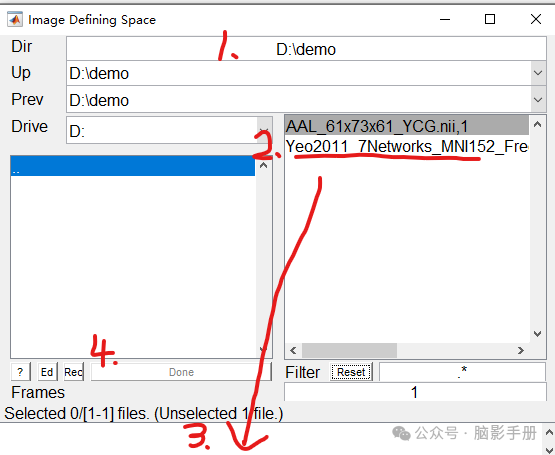
3. Double-click the second rowImages to Reslice, and follow the same steps to select the image to be resampledAAL_61x73x61….
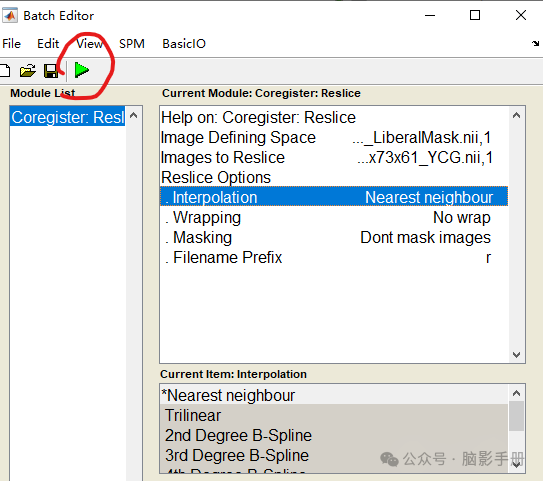
4. Interpolation: Use nearest neighbor interpolation (Nearest Neighbour)
Keep other settings unchanged, select Run to output the resampled image file, which will generate a new image with the prefix “r” in the storage directory.
“D:\demo\rAAL_61x73x61_YCG.nii”
2. MATLAB Script for Batch Resampling of Images
%% ===========================% Batch ROI Resampling Example% Function: Resample ROI images to reference space (MNI152_T1_2mm_brain)% Description: Call rest_ResliceImage to implement nearest neighbor resampling, keeping ROI as 0/1%% ===========================% Input and Output File PathsInputFile = "D:\demo\AAL_61x73x61_YCG.nii"; % Original ROI fileOutputFile = "D:\demo\AAL_61x73x61_YCG_chongcaiyang.nii"; % Resampled ROI fileTargetSpace = "D:\demo\Yeo2011_7Networks_MNI152_FreeSurferConformed1mm_LiberalMask.nii"; % Reference space% Read original ROI and reference image information[roi1, VoxelSize1, FileList1, Header1] = y_ReadAll(InputFile);[roi2, VoxelSize2, FileList2, Header2] = y_ReadAll(TargetSpace);% Set resampling parametersNewVoxSize = VoxelSize2; % Use the voxel size of the reference imagehld = 0; % Interpolation method: 0=nearest neighbor (suitable for discrete ROI)% Execute resampling[OutVolume] = rest_ResliceImage(InputFile, OutputFile, NewVoxSize, hld, TargetSpace);% ---------------- Check Results ----------------[rawroi, VoxelSizeRaw, FileListRaw, HeaderRaw] = y_ReadAll(OutputFile);% Output matrix size and voxel sizedisp('=== Resampling Result Check ===')disp(['Matrix Size: ', num2str(size(rawroi))]); disp(['Voxel Size: ', num2str(VoxelSizeRaw)]); % Check ROI value range and voxel countdisp(['ROI Values: ', num2str(unique(rawroi)')]); % Expected only [0 1]disp(['ROI Voxel Count: ', num2str(sum(rawroi(:)))]); % ==================================================% Note: Place the above code in a loop to batch process multiple ROI files% ==================================================