Copyright belongs to the author. If reprinted, please indicate the source of the article: https://cyrus-studio.github.io/blog/
Why Use a Release Key
The test-key is a public and well-known development test key widely used during the testing phase. This means anyone can obtain this key and use it to sign their modified APKs or system files.
System images signed with the test-key typically cannot pass Google’s CTS (Compatibility Test Suite) certification, and applications such as the Google Play Store and Google Services Framework may not function properly. Certain third-party applications (e.g., banking apps or digital rights management apps) may also refuse to run on devices.
OTA update packages must be signed with a Release Key. Signed update packages are verified, and only devices with the same Release Key can receive and install the updates.
Generating a Release Key
Execute nano make_keys.sh to create the script with the following content:
subject='/C=US/ST=California/L=Mountain View/O=Android/OU=Android/CN=Android/[email protected]'

# Create keys directory (if it does not exist)
mkdir -p keys

for cert in bluetooth cyngn-app media networkstack nfc platform releasekey sdk_sandbox shared testcert testkey verity; do
    ./development/tools/make_key keys/$cert "$subject";
done
Create the keys directory through the script and use the make_key command to generate your own keys.
Run the script to generate the key files.
# Add execution permission
chmod +x make_keys.sh
# Run the script
./make_keys.sh
To avoid the complexity of password decryption, generate an unencrypted private key to prevent prompts for a password during the signing process.
Enter password for 'keys/bluetooth' (blank for none; password will be visible):
creating keys/bluetooth.pk8 with no password


Enter password for 'keys/cyngn-app' (blank for none; password will be visible):
creating keys/cyngn-app.pk8 with no password

Enter password for 'keys/media' (blank for none; password will be visible):
creating keys/media.pk8 with no password

Enter password for 'keys/networkstack' (blank for none; password will be visible):
creating keys/networkstack.pk8 with no password

Enter password for 'keys/nfc' (blank for none; password will be visible):
creating keys/nfc.pk8 with no password

Enter password for 'keys/platform' (blank for none; password will be visible):
creating keys/platform.pk8 with no password

Enter password for 'keys/releasekey' (blank for none; password will be visible):
creating keys/releasekey.pk8 with no password

Enter password for 'keys/sdk_sandbox' (blank for none; password will be visible):
creating keys/sdk_sandbox.pk8 with no password

Enter password for 'keys/shared' (blank for none; password will be visible):
creating keys/shared.pk8 with no password

Enter password for 'keys/testcert' (blank for none; password will be visible):
creating keys/testcert.pk8 with no password

Enter password for 'keys/testkey' (blank for none; password will be visible):
creating keys/testkey.pk8 with no password

Enter password for 'keys/verity' (blank for none; password will be visible):
creating keys/verity.pk8 with no password
The generated keys are located in the keys directory. Each command will generate two files: a .x509.pem public key certificate file and a .pk8 private key file:
- • releasekey: primarily used to sign all APK files in the system, ensuring these APKs come from a trusted source.
- • platform: signs system frameworks and other core components, ensuring these components have not been tampered with.
- • shared: used to sign APKs that require UID sharing across applications, such as applications with the same signature sharing data.
- • media: specifically used to sign APK files related to multimedia.
- • networkstack: used to sign components and applications related to the network stack, ensuring the security of network functions.
- • testkey: this is the default key in the Android system, primarily used for signing in development and testing environments, but should not be used in production environments.
- • cyngn-priv-app: possibly related to signing private applications specific to CyanogenMod or LineageOS.
- • bluetooth: used to sign Bluetooth services or related APK files.
- • sdk_sandbox: signs applications or components related to the SDK sandbox, ensuring the security of the development environment.
- • verity: used to sign components related to Verified Boot, ensuring the security of the device during boot.
ls keys

bluetooth.pk8       media.pk8              nfc.pk8            releasekey.pk8        shared.pk8         testkey.pk8
bluetooth.x509.pem  media.x509.pem         nfc.x509.pem       releasekey.x509.pem   shared.x509.pem    testkey.x509.pem
cyngn-app.pk8       networkstack.pk8       platform.pk8       sdk_sandbox.pk8       testcert.pk8       verity.pk8
cyngn-app.x509.pem  networkstack.x509.pem  platform.x509.pem  sdk_sandbox.x509.pem  testcert.x509.pem  verity.x509.pem
Generating Target Files
# Initialize the build environment
source build/envsetup.sh

# Set the build target
breakfast wayne

# Start compiling
mka target-files-package otatools
Signing Target Files
Signing process for LineageOS 18.1 and below
sign_target_files_apks -o -d keys \
    $OUT/obj/PACKAGING/target_files_intermediates/*-target_files-*.zip \
    signed-target_files.zip
Note: For LineageOS versions earlier than 18.1, you must prepend ./build/tools/releasetools/ to the sign_target_files_apks command.
./build/tools/releasetools/sign_target_files_apks -o -d keys \
    $OUT/obj/PACKAGING/target_files_intermediates/*-target_files-*.zip \
    signed-target_files.zip
Signing process for LineageOS 19.1 and above
sign_target_files_apks -o -d keys \
    --extra_apks AdServicesApk.apk=keys/releasekey \
    --extra_apks FederatedCompute.apk=keys/releasekey \
    --extra_apks HalfSheetUX.apk=keys/releasekey \
    --extra_apks HealthConnectBackupRestore.apk=keys/releasekey \
    --extra_apks HealthConnectController.apk=keys/releasekey \
    --extra_apks OsuLogin.apk=keys/releasekey \
    --extra_apks SafetyCenterResources.apk=keys/releasekey \
    --extra_apks ServiceConnectivityResources.apk=keys/releasekey \
    --extra_apks ServiceUwbResources.apk=keys/releasekey \
    --extra_apks ServiceWifiResources.apk=keys/releasekey \
    --extra_apks WifiDialog.apk=keys/releasekey \
    --extra_apks com.android.adbd.apex=keys/com.android.adbd \
    --extra_apks com.android.adservices.apex=keys/com.android.adservices \
    --extra_apks com.android.adservices.api.apex=keys/com.android.adservices.api \
    --extra_apks com.android.appsearch.apex=keys/com.android.appsearch \
    --extra_apks com.android.art.apex=keys/com.android.art \
    --extra_apks com.android.bluetooth.apex=keys/com.android.bluetooth \
    --extra_apks com.android.btservices.apex=keys/com.android.btservices \
    --extra_apks com.android.cellbroadcast.apex=keys/com.android.cellbroadcast \
    --extra_apks com.android.compos.apex=keys/com.android.compos \
    --extra_apks com.android.configinfrastructure.apex=keys/com.android.configinfrastructure \
    --extra_apks com.android.connectivity.resources.apex=keys/com.android.connectivity.resources \
    --extra_apks com.android.conscrypt.apex=keys/com.android.conscrypt \
    --extra_apks com.android.devicelock.apex=keys/com.android.devicelock \
    --extra_apks com.android.extservices.apex=keys/com.android.extservices \
    --extra_apks com.android.graphics.pdf.apex=keys/com.android.graphics.pdf \
    --extra_apks com.android.hardware.biometrics.face.virtual.apex=keys/com.android.hardware.biometrics.face.virtual \
    --extra_apks com.android.hardware.biometrics.fingerprint.virtual.apex=keys/com.android.hardware.biometrics.fingerprint.virtual \
    --extra_apks com.android.hardware.boot.apex=keys/com.android.hardware.boot \
    --extra_apks com.android.hardware.cas.apex=keys/com.android.hardware.cas \
    --extra_apks com.android.hardware.wifi.apex=keys/com.android.hardware.wifi \
    --extra_apks com.android.healthfitness.apex=keys/com.android.healthfitness \
    --extra_apks com.android.hotspot2.osulogin.apex=keys/com.android.hotspot2.osulogin \
    --extra_apks com.android.i18n.apex=keys/com.android.i18n \
    --extra_apks com.android.ipsec.apex=keys/com.android.ipsec \
    --extra_apks com.android.media.apex=keys/com.android.media \
    --extra_apks com.android.media.swcodec.apex=keys/com.android.media.swcodec \
    --extra_apks com.android.mediaprovider.apex=keys/com.android.mediaprovider \
    --extra_apks com.android.nearby.halfsheet.apex=keys/com.android.nearby.halfsheet \
    --extra_apks com.android.networkstack.tethering.apex=keys/com.android.networkstack.tethering \
    --extra_apks com.android.neuralnetworks.apex=keys/com.android.neuralnetworks \
    --extra_apks com.android.ondevicepersonalization.apex=keys/com.android.ondevicepersonalization \
    --extra_apks com.android.os.statsd.apex=keys/com.android.os.statsd \
    --extra_apks com.android.permission.apex=keys/com.android.permission \
    --extra_apks com.android.resolv.apex=keys/com.android.resolv \
    --extra_apks com.android.rkpd.apex=keys/com.android.rkpd \
    --extra_apks com.android.runtime.apex=keys/com.android.runtime \
    --extra_apks com.android.safetycenter.resources.apex=keys/com.android.safetycenter.resources \
    --extra_apks com.android.scheduling.apex=keys/com.android.scheduling \
    --extra_apks com.android.sdkext.apex=keys/com.android.sdkext \
    --extra_apks com.android.support.apexer.apex=keys/com.android.support.apexer \
    --extra_apks com.android.telephony.apex=keys/com.android.telephony \
    --extra_apks com.android.telephonymodules.apex=keys/com.android.telephonymodules \
    --extra_apks com.android.tethering.apex=keys/com.android.tethering \
    --extra_apks com.android.tzdata.apex=keys/com.android.tzdata \
    --extra_apks com.android.uwb.apex=keys/com.android.uwb \
    --extra_apks com.android.uwb.resources.apex=keys/com.android.uwb.resources \
    --extra_apks com.android.virt.apex=keys/com.android.virt \
    --extra_apks com.android.vndk.current.apex=keys/com.android.vndk.current \
    --extra_apks com.android.vndk.current.on_vendor.apex=keys/com.android.vndk.current.on_vendor \
    --extra_apks com.android.wifi.apex=keys/com.android.wifi \
    --extra_apks com.android.wifi.dialog.apex=keys/com.android.wifi.dialog \
    --extra_apks com.android.wifi.resources.apex=keys/com.android.wifi.resources \
    --extra_apks com.google.pixel.camera.hal.apex=keys/com.google.pixel.camera.hal \
    --extra_apks com.google.pixel.vibrator.hal.apex=keys/com.google.pixel.vibrator.hal \
    --extra_apks com.qorvo.uwb.apex=keys/com.qorvo.uwb \
    --extra_apex_payload_key com.android.adbd.apex=keys/com.android.adbd.pem \
    --extra_apex_payload_key com.android.adservices.apex=keys/com.android.adservices.pem \
    --extra_apex_payload_key com.android.adservices.api.apex=keys/com.android.adservices.api.pem \
    --extra_apex_payload_key com.android.appsearch.apex=keys/com.android.appsearch.pem \
    --extra_apex_payload_key com.android.art.apex=keys/com.android.art.pem \
    --extra_apex_payload_key com.android.bluetooth.apex=keys/com.android.bluetooth.pem \
    --extra_apex_payload_key com.android.btservices.apex=keys/com.android.btservices.pem \
    --extra_apex_payload_key com.android.cellbroadcast.apex=keys/com.android.cellbroadcast.pem \
    --extra_apex_payload_key com.android.compos.apex=keys/com.android.compos.pem \
    --extra_apex_payload_key com.android.configinfrastructure.apex=keys/com.android.configinfrastructure.pem \
    --extra_apex_payload_key com.android.connectivity.resources.apex=keys/com.android.connectivity.resources.pem \
    --extra_apex_payload_key com.android.conscrypt.apex=keys/com.android.conscrypt.pem \
    --extra_apex_payload_key com.android.devicelock.apex=keys/com.android.devicelock.pem \
    --extra_apex_payload_key com.android.extservices.apex=keys/com.android.extservices.pem \
    --extra_apex_payload_key com.android.graphics.pdf.apex=keys/com.android.graphics.pdf.pem \
    --extra_apex_payload_key com.android.hardware.biometrics.face.virtual.apex=keys/com.android.hardware.biometrics.face.virtual.pem \
    --extra_apex_payload_key com.android.hardware.biometrics.fingerprint.virtual.apex=keys/com.android.hardware.biometrics.fingerprint.virtual.pem \
    --extra_apex_payload_key com.android.hardware.boot.apex=keys/com.android.hardware.boot.pem \
    --extra_apex_payload_key com.android.hardware.cas.apex=keys/com.android.hardware.cas.pem \
    --extra_apex_payload_key com.android.hardware.wifi.apex=keys/com.android.hardware.wifi.pem \
    --extra_apex_payload_key com.android.healthfitness.apex=keys/com.android.healthfitness.pem \
    --extra_apex_payload_key com.android.hotspot2.osulogin.apex=keys/com.android.hotspot2.osulogin.pem \
    --extra_apex_payload_key com.android.i18n.apex=keys/com.android.i18n.pem \
    --extra_apex_payload_key com.android.ipsec.apex=keys/com.android.ipsec.pem \
    --extra_apex_payload_key com.android.media.apex=keys/com.android.media.pem \
    --extra_apex_payload_key com.android.media.swcodec.apex=keys/com.android.media.swcodec.pem \
    --extra_apex_payload_key com.android.mediaprovider.apex=keys/com.android.mediaprovider.pem \
    --extra_apex_payload_key com.android.nearby.halfsheet.apex=keys/com.android.nearby.halfsheet.pem \
    --extra_apex_payload_key com.android.networkstack.tethering.apex=keys/com.android.networkstack.tethering.pem \
    --extra_apex_payload_key com.android.neuralnetworks.apex=keys/com.android.neuralnetworks.pem \
    --extra_apex_payload_key com.android.ondevicepersonalization.apex=keys/com.android.ondevicepersonalization.pem \
    --extra_apex_payload_key com.android.os.statsd.apex=keys/com.android.os.statsd.pem \
    --extra_apex_payload_key com.android.permission.apex=keys/com.android.permission.pem \
    --extra_apex_payload_key com.android.resolv.apex=keys/com.android.resolv.pem \
    --extra_apex_payload_key com.android.rkpd.apex=keys/com.android.rkpd.pem \
    --extra_apex_payload_key com.android.runtime.apex=keys/com.android.runtime.pem \
    --extra_apex_payload_key com.android.safetycenter.resources.apex=keys/com.android.safetycenter.resources.pem \
    --extra_apex_payload_key com.android.scheduling.apex=keys/com.android.scheduling.pem \
    --extra_apex_payload_key com.android.sdkext.apex=keys/com.android.sdkext.pem \
    --extra_apex_payload_key com.android.support.apexer.apex=keys/com.android.support.apexer.pem \
    --extra_apex_payload_key com.android.telephony.apex=keys/com.android.telephony.pem \
    --extra_apex_payload_key com.android.telephonymodules.apex=keys/com.android.telephonymodules.pem \
    --extra_apex_payload_key com.android.tethering.apex=keys/com.android.tethering.pem \
    --extra_apex_payload_key com.android.tzdata.apex=keys/com.android.tzdata.pem \
    --extra_apex_payload_key com.android.uwb.apex=keys/com.android.uwb.pem \
    --extra_apex_payload_key com.android.uwb.resources.apex=keys/com.android.uwb.resources.pem \
    --extra_apex_payload_key com.android.virt.apex=keys/com.android.virt.pem \
    --extra_apex_payload_key com.android.vndk.current.apex=keys/com.android.vndk.current.pem \
    --extra_apex_payload_key com.android.vndk.current.on_vendor.apex=keys/com.android.vndk.current.on_vendor.pem \
    --extra_apex_payload_key com.android.wifi.apex=keys/com.android.wifi.pem \
    --extra_apex_payload_key com.android.wifi.dialog.apex=keys/com.android.wifi.dialog.pem \
    --extra_apex_payload_key com.android.wifi.resources.apex=keys/com.android.wifi.resources.pem \
    --extra_apex_payload_key com.google.pixel.camera.hal.apex=keys/com.google.pixel.camera.hal.pem \
    --extra_apex_payload_key com.google.pixel.vibrator.hal.apex=keys/com.google.pixel.vibrator.hal.pem \
    --extra_apex_payload_key com.qorvo.uwb.apex=keys/com.qorvo.uwb.pem \
    $OUT/obj/PACKAGING/target_files_intermediates/*-target_files*.zip \
    signed-target_files.zip
Generating Installation Package
ota_from_target_files -k keys/releasekey \
    --block --backup=true \
    signed-target_files.zip \
    signed-ota_update.zip
Note: For LineageOS versions earlier than 18.1, you must prepend ./build/tools/releasetools/ to the ota_from_target_files command.
./build/tools/releasetools/ota_from_target_files -k keys/releasekey \
    --block --backup=true \
    signed-target_files.zip \
    signed-ota_update.zip
After execution, the signed-ota_update.zip generated in the current directory is the signed flashing package.
Android.bp    android.ipr~    build        external    libnativehelper  pdk                    signed-target_files.zip
Makefile      android.iws     cts          frameworks  lineage          platform_testing       system
android       art             dalvik       hardware    lineage-sdk      prebuilts              test
android.iml   bionic          developers   kernel      make_keys.sh     sdk                    toolchain
android.iml~  bootable        development  keys        out              sign_ota_wayne.sh      tools
android.ipr   bootstrap.bash  device       libcore     packages         signed-ota_update.zip  vendor
Automation Script
Taking LineageOS 17.1 (wayne) as an example, create the script nano sign_ota_wayne.sh with the following content:
source build/envsetup.sh

# Set the build target
breakfast wayne

# target files
mka target-files-package otatools


# sign target files
./build/tools/releasetools/sign_target_files_apks -o -d keys \
    $OUT/obj/PACKAGING/target_files_intermediates/*-target_files-*.zip \
    signed-target_files.zip


# sign ota package
./build/tools/releasetools/ota_from_target_files -k keys/releasekey \
    --block --backup=true \
    signed-target_files.zip \
    signed-ota_update.zip
Automate the process of generating a custom signed installation package through the script.
# Add execution permission
chmod +x signing_ota_wayne.sh
# Execute the script
./sign_ota_wayne.sh
Flashing
Enter recovery mode (or press and hold both 【Volume +】 and 【Power button】)
fastboot reboot recoveryNote: If the currently installed package signature is different from the package being flashed, the system partition needs to be formatted. Formatting process: 【Factory reset】【Format system partition】.
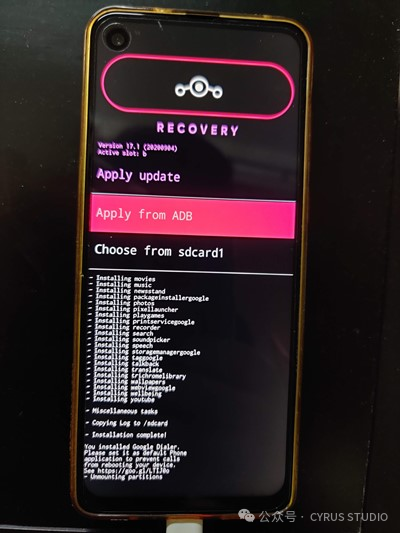
【Apply update】【Apply from adb】 to enable adb sideload
Start flashing
adb sideload E:\lineageos\signed-ota_update.zipWait for the flashing to complete and reboot the system.
Related Links:Signing Builds[1]
Reference Links
<span>[1]</span> Signing Builds: https://wiki.lineageos.org/signing_builds