When working on embedded development, many of you may have encountered the frustration of the standard library’s printf function being too “heavy”—it consumes too much memory and has complex functionality, making it inflexible for resource-constrained microcontrollers.
Today, we will break down a lightweight printf library specifically designed for embedded systems—lwprintf—and see how it addresses these issues.
What is lwprintf?
lwprintf (Lightweight printf) is a lightweight stdio management library designed specifically for embedded systems. Its author, Tilen MAJERLE, is a highly skilled embedded developer, and this library has been updated to version 1.0.6, gaining considerable attention on GitHub.
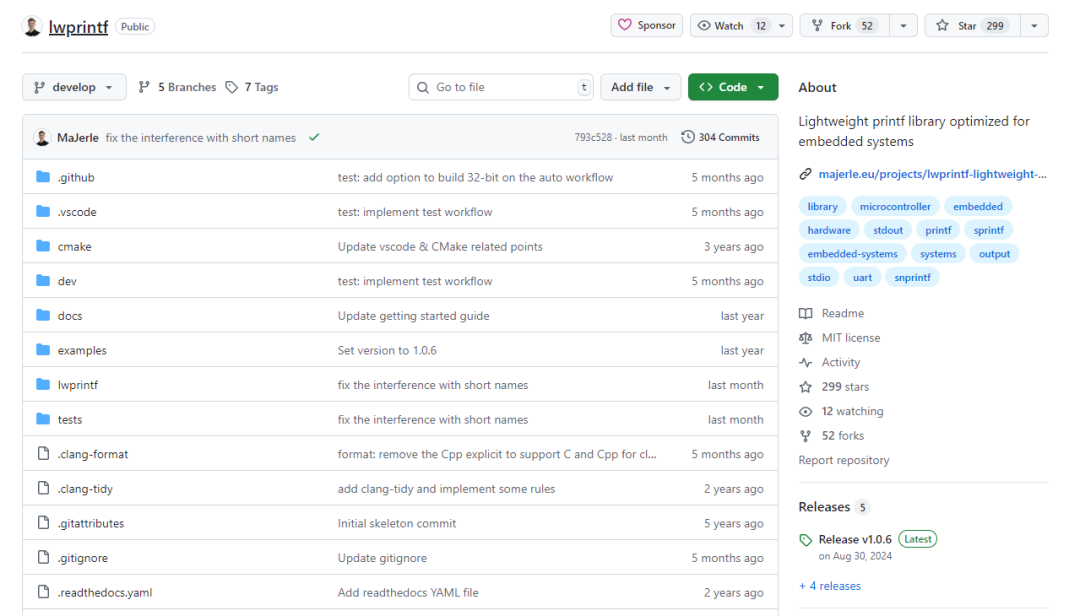
https://github.com/MaJerle/lwprintf
Core Features
lwprintf has a rich set of features; let’s take a look at its highlights:
Memory Friendly
- Written in C11 standard, compatible with
<span>size_t</span>and<span>uintmax_t</span>types - Extremely low memory usage, especially suitable for resource-constrained embedded systems
- Supports reentrant access; all API functions are thread-safe
Complete Functionality
- Implements functions compatible with the standard library, such as
<span>printf</span>,<span>vprintf</span>,<span>snprintf</span>,<span>sprintf</span>, and<span>vsnprintf</span> - Supports operating system environments and provides multi-thread protection mechanisms
- Allows multiple output stream functions to coexist (much stronger than standard printf)
Extended Features
- Introduced binary format output (%b/%B)
- Supports hexadecimal output of byte arrays (%k/%K)
- Provides engineering mode floating-point output
Overall Architecture of lwprintf
The design philosophy of lwprintf is very clear; let’s first understand its working principle from the overall architecture:
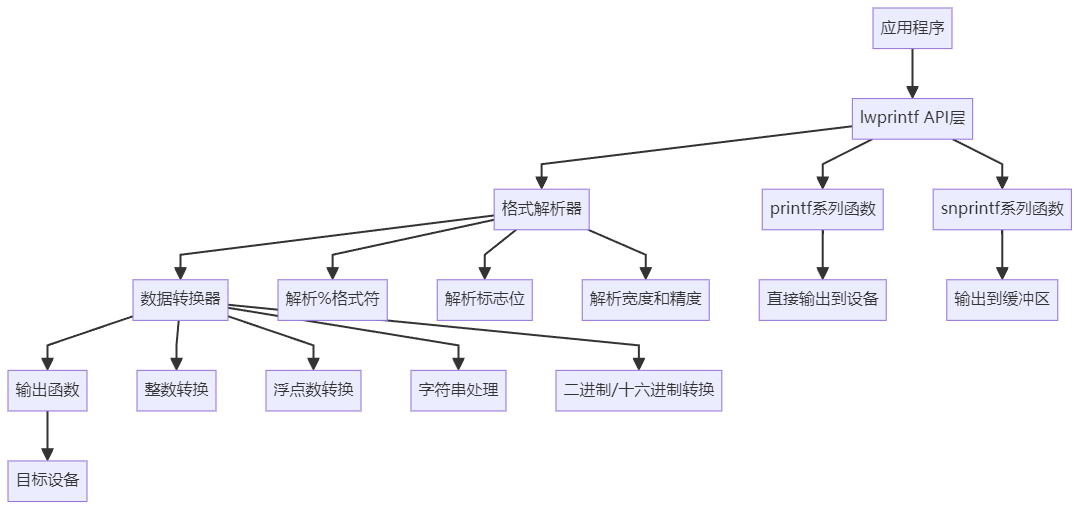
From this architecture diagram, we can see that lwprintf adopts a classic layered design. The application program calls functions through the API layer, the format parser is responsible for understanding the printf format string, the data converter converts various data types into strings, and finally, the output function sends them to the target device.
Advantages and Disadvantages Analysis
Advantages
- Low Memory Usage: Compared to the standard library’s printf, lwprintf’s memory usage is significantly lower, which is crucial for microcontrollers with only a few KB of RAM
- Configurable Functionality: Features such as floating-point support and long long integer support can be selectively enabled/disabled through macro definitions, further reducing code size
- Thread Safety: Built-in multi-thread protection mechanism makes it safer to use in RTOS environments
- Extended Formats: Supports binary output and byte array output, which is particularly useful in embedded debugging
- Multi-instance Support: Multiple lwprintf instances can be created, each with different output functions
Disadvantages
- Limited Floating-point Precision: To reduce code size, the precision of floating-point handling may not be as good as the standard library
- Learning Curve: Requires understanding its configuration system and API design
Application Scenarios
lwprintf is particularly suitable for the following scenarios:
- Resource-constrained embedded systems: Such as STM32, ESP32, and other microcontroller projects
- Real-time systems: Situations requiring deterministic output times
- Multi-threaded environments: RTOS projects where multiple tasks need to log output simultaneously
- Debugging and Logging: Scenarios requiring output of binary data or byte arrays for debugging
- Custom Output Devices: Such as LCD displays, network transmission, file systems, etc.
Usage in Linux Environment
To help everyone better understand how to use lwprintf, we will create a demo that runs in a PC Linux environment. This demo showcases the main features of lwprintf, including basic formatting, extended format specifiers, and buffer operations.
Demo Code Analysis
#include <stdio.h>
#include <stdint.h>
#include <unistd.h>
#include <sys/types.h>
#include "lwprintf/lwprintf.h"

/* Output function - outputs characters to standard output */
static int my_output_func(int ch, lwprintf_t* lwobj) {
    return write(STDOUT_FILENO, &ch, 1) == 1 ? ch : 0;
}

int main(void) {
    lwprintf_t lwobj;
    char buffer[256];
    unsigned char data[] = {0xDE, 0xAD, 0xBE, 0xEF, 0xCA, 0xFE};

    /* Initialize lwprintf instance */
    if (!lwprintf_init_ex(&lwobj, my_output_func)) {
        printf("Failed to initialize lwprintf\n");
        return -1;
    }

    /* Basic printf functionality */
    lwprintf_printf_ex(&lwobj, "Hello from lwprintf! Number: %d\n", 12345);

    /* Extended binary format */
    lwprintf_printf_ex(&lwobj, "Binary of 42: %b\n", 42);
    lwprintf_printf_ex(&lwobj, "Binary with padding: %016b\n", 42);

    /* Byte array format */
    lwprintf_printf_ex(&lwobj, "Hex array: %6K\n", data);
    lwprintf_printf_ex(&lwobj, "Hex with spaces: % 6K\n", data);

    /* Buffer operations */
    lwprintf_snprintf_ex(&lwobj, buffer, sizeof(buffer),
                        "To buffer: %d, %s", 255, "test");

    return 0;
}
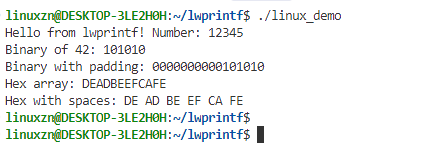
The key points of this demo are:
- Output Function Definition:
<span>my_output_func</span>is the core of lwprintf, defining how characters are output - Instance Initialization: Creates and initializes the lwprintf instance through
<span>lwprintf_init_ex</span> - Function Demonstration: Showcases basic formatting, binary output, byte array output, and other special features
Demo Execution Flow
The following timing diagram illustrates the execution flow of the demo program, helping everyone understand the working mechanism of lwprintf:
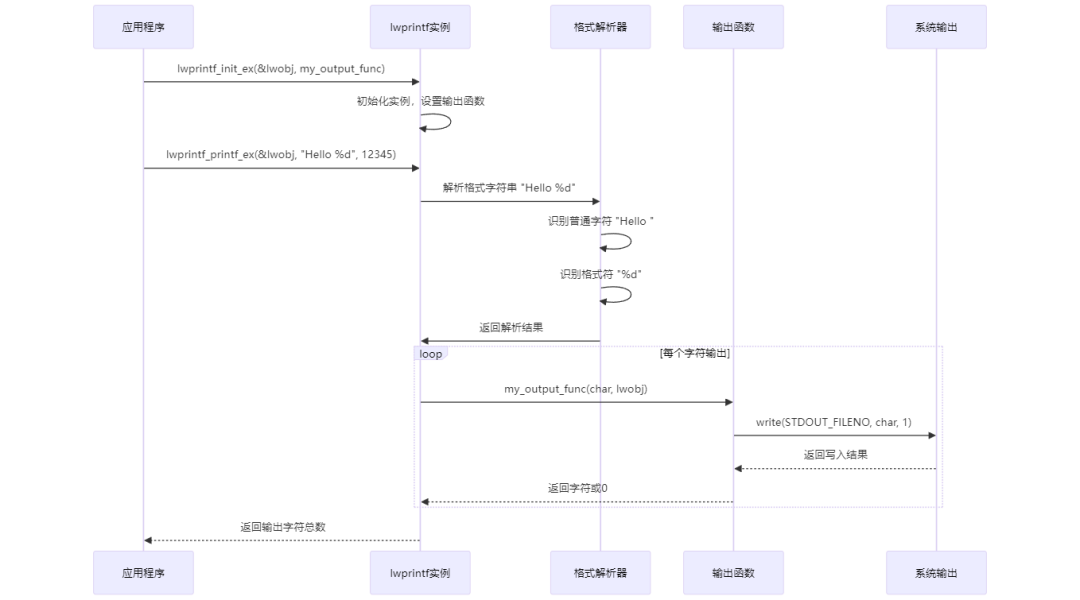
From this timing diagram, we can see that the workflow of lwprintf is very clear: initialization → format parsing → character-by-character output → return result. The benefit of this design is that each character is output immediately, without needing a large buffer, making it very suitable for memory-constrained embedded systems.
STM32F429 Application Example
To help everyone better understand the application of lwprintf in actual microcontroller projects, we will take STM32F429 as an example to demonstrate how to implement output to serial and LCD.
Serial Output Implementation
In STM32 projects, the most common debugging output is through serial communication. Below is a complete implementation:
#include "stm32f4xx_hal.h"
#include "lwprintf/lwprintf.h"

extern UART_HandleTypeDef huart1;

/* Serial output function */
static int uart_output_func(int ch, lwprintf_t* lwobj) {
    uint8_t data = (uint8_t)ch;

    /* Send a single character using HAL library */
    if (HAL_UART_Transmit(&huart1, &data, 1, HAL_MAX_DELAY) == HAL_OK) {
        return ch;
    }
    return 0;
}

/* Initialize lwprintf instance for serial output */
void debug_uart_init(void) {
    static lwprintf_t uart_lwobj;

    /* Initialize lwprintf instance */
    if (lwprintf_init_ex(&uart_lwobj, uart_output_func)) {
        /* Set as default instance, allowing direct use of lwprintf_printf */
        lwprintf_set_default(&uart_lwobj);

        lwprintf_printf("STM32F429 UART Debug initialized!\r\n");
    }
}

int main(void) {
    HAL_Init();
    SystemClock_Config();
    MX_USART1_UART_Init();

    /* Initialize debug serial */
    debug_uart_init();

    while (1) {
        HAL_Delay(1000);
    }
}
LCD Output Implementation
For scenarios requiring information to be displayed on an LCD, we can create another lwprintf instance:
#include "lcd.h"

/* LCD output function */
static int lcd_output_func(int ch, lwprintf_t* lwobj) {

}

/* Initialize lwprintf instance for LCD output */
void debug_lcd_init(void) {
    static lwprintf_t lcd_lwobj;

    /* Initialize LCD hardware */
    LCD_Init();
    LCD_Clear(LCD_COLOR_BLACK);
    LCD_SetFont(&Font12);

    /* Initialize lwprintf instance */
    if (lwprintf_init_ex(&lcd_lwobj, lcd_output_func)) {
        lwprintf_printf_ex(&lcd_lwobj, "STM32F429 LCD Debug\n");
    }
}
Simultaneous Use of Multiple Instances
A powerful feature of lwprintf is the ability to use multiple instances simultaneously, such as outputting to both serial and LCD:
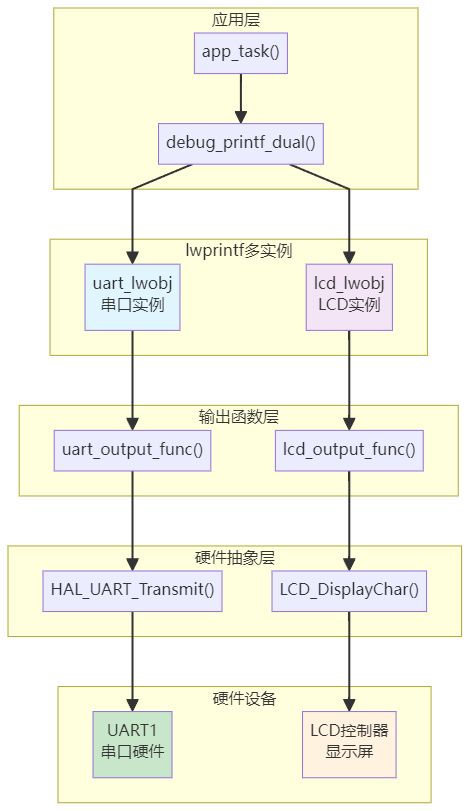
From this architecture diagram, we can see that the multi-instance design of lwprintf allows us to elegantly implement the “one code, multiple outputs” functionality. Each instance has its own output function but shares the same format parsing logic, ensuring code reusability while providing output flexibility.
/* Global instances */
static lwprintf_t uart_lwobj;
static lwprintf_t lcd_lwobj;

/* Convenient function to output to both serial and LCD */
void debug_printf_dual(const char* format, ...) {
    va_list args;

    /* Output to serial */
    va_start(args, format);
    lwprintf_vprintf_ex(&uart_lwobj, format, args);
    va_end(args);

    /* Output to LCD */
    va_start(args, format);
    lwprintf_vprintf_ex(&lcd_lwobj, format, args);
    va_end(args);
}

/* Usage in application */
void app_task(void) {
    /* Output to both serial and LCD */
    debug_printf_dual("debug printf dual test\n");
}
Configuration File Example
To use lwprintf in STM32 projects, a configuration file <span>lwprintf_opts.h</span> is also needed:
#ifndef LWPRINTF_OPTS_H
#define LWPRINTF_OPTS_H

/* Basic configuration */
#define LWPRINTF_CFG_SUPPORT_TYPE_INT           1
#define LWPRINTF_CFG_SUPPORT_TYPE_FLOAT         1
#define LWPRINTF_CFG_SUPPORT_TYPE_STRING        1
#define LWPRINTF_CFG_SUPPORT_TYPE_POINTER       1

#endif /* LWPRINTF_OPTS_H */
These examples demonstrate the powerful functionality of lwprintf in actual STM32 projects: easily outputting debugging information to multiple devices simultaneously, using extended format specifiers to output binary data and MAC addresses, with concise code and low memory usage.
Source Code Analysis
Now let’s delve into the source code to see how lwprintf implements these features. The core source code of lwprintf is mainly concentrated in the <span>lwprintf.c</span> file, which contains about 1200 lines of code and has a clear structure.
Core Data Structures
The design of lwprintf revolves around two core data structures:
1. lwprintf_t – User Instance Structure
typedef struct lwprintf_s {
    lwprintf_output_fn out_fn; /*!< Output function pointer */
    void* arg;                 /*!< User-defined parameter */
    LWPRINTF_CFG_OS_MUTEX_HANDLE mutex; /*!< Mutex handle */
} lwprintf_t;
This structure is simple; it stores the user-provided output function and some configuration information.
2. lwprintf_int_t – Internal Working Structure
typedef struct lwprintf_int {
    lwprintf_t* lwobj;          /*!< Instance handle */
    const char* fmt;            /*!< Format string */
    char* const buff;           /*!< Buffer pointer */
    const size_t buff_size;     /*!< Buffer size */
    size_t n_len;               /*!< Length of formatted text */
    prv_output_fn out_fn;       /*!< Internal output function */
    uint8_t is_print_cancelled; /*!< Print cancellation flag */

    struct {
        struct {
            uint8_t left_align : 1;  /*!< Left alignment flag */
            uint8_t plus       : 1;  /*!< Plus flag */
            uint8_t space      : 1;  /*!< Space flag */
            uint8_t zero       : 1;  /*!< Zero padding flag */
            uint8_t thousands  : 1;  /*!< Thousands separator flag */
            uint8_t alt        : 1;  /*!< Alternative form flag */
            uint8_t precision  : 1;  /*!< Precision flag */
            // ... more flags
        } flags;

        int precision;  /*!< Precision value */
        int width;      /*!< Width value */
        uint8_t base;   /*!< Base radix */
        char type;      /*!< Format type */
    } m;
} lwprintf_int_t;
This structure is the brain of lwprintf, storing all state information for the current formatting operation. Note that it uses bit fields to save memory, which is a good practice in embedded development.
Core Algorithm for Format Parsing
The core of lwprintf is the <span>prv_format</span> function, which is responsible for parsing the format string and calling the corresponding processing functions. The following flowchart illustrates the complete process of format parsing:
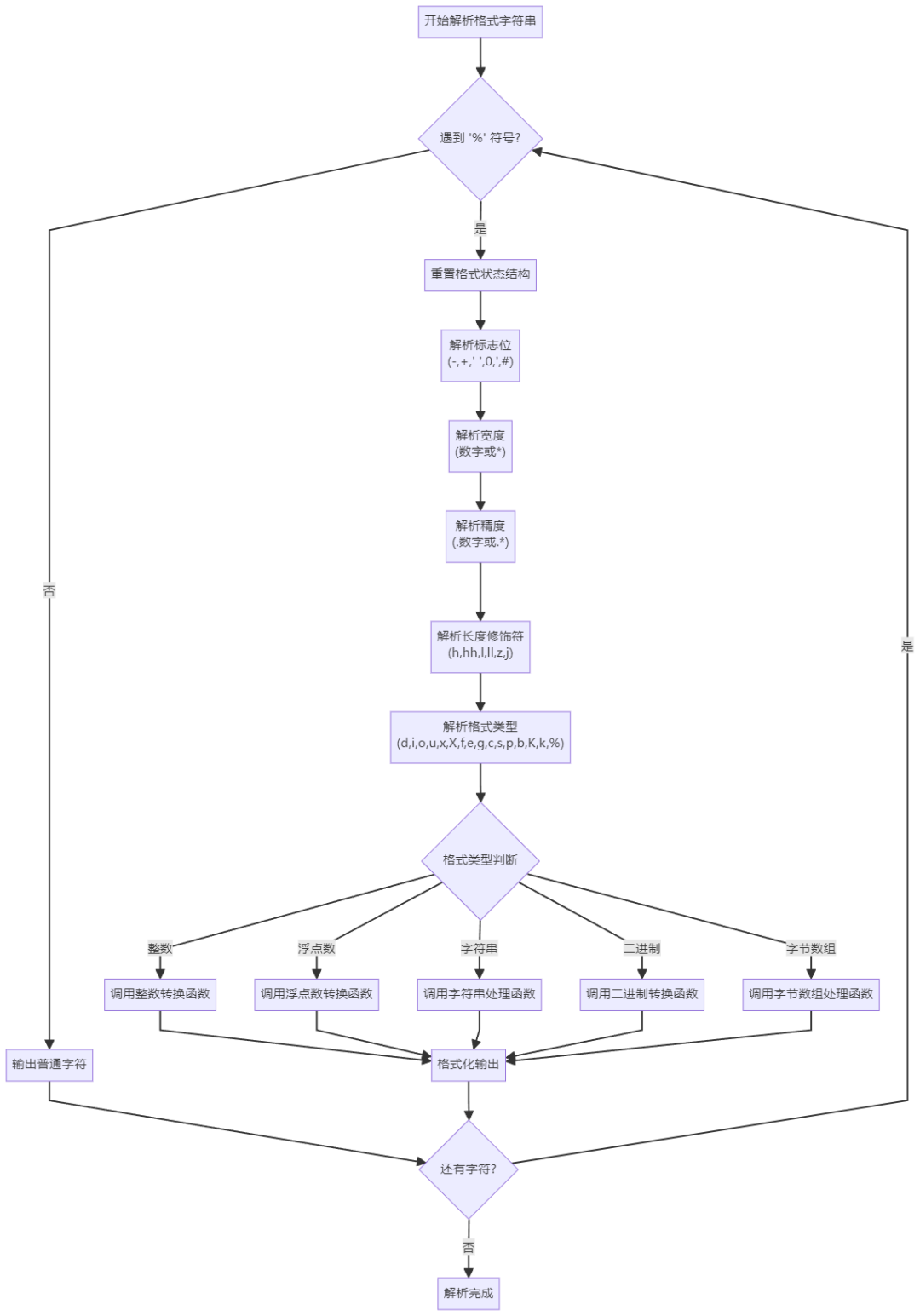
This parsing process strictly follows the standard format of printf:<span>%[flags][width][.precision][length]type</span>. Each part has dedicated parsing logic, and after parsing, the corresponding conversion function is called based on the type.
Key Source Code Implementation Analysis
1. Core Code for Format Parsing
static uint8_t prv_format(lwprintf_int_t* lwi, va_list arg) {
    const char* fmt = lwi->fmt;

    while (fmt != NULL && *fmt != '\0') {
        if (*fmt != '%') {
            lwi->out_fn(lwi, *fmt);  // Directly output normal characters
            ++fmt;
            continue;
        }

        ++fmt;
        memset(&lwi->m, 0x00, sizeof(lwi->m));  // Reset format state

        // Parse flags [-+' '0'#]
        do {
            switch (*fmt) {
                case '-': lwi->m.flags.left_align = 1; break;
                case '+': lwi->m.flags.plus = 1; break;
                case ' ': lwi->m.flags.space = 1; break;
                case '0': lwi->m.flags.zero = 1; break;
                case '#': lwi->m.flags.alt = 1; break;
                default: detected = 0; break;
            }
            if (detected) ++fmt;
        } while (detected);

        // Parse width and precision...
        // Parse format type and call corresponding processing function...
    }
}
This code showcases the essence of lwprintf parsing: scanning character by character, and when encountering <span>%</span>, it begins parsing the format specifier; otherwise, it outputs directly.
2. Ingenious Implementation of Integer Conversion
static int prv_longest_unsigned_int_to_str(lwprintf_int_t* lwi, uintmax_t num) {
    char num_buf[33], *num_buf_ptr = &num_buf[sizeof(num_buf)];
    char adder_ch = (lwi->m.flags.uc ? 'A' : 'a') - 10;

    *--num_buf_ptr = '\0';
    do {
        int digit = num % lwi->m.base;
        num /= lwi->m.base;
        *--num_buf_ptr = (char)digit + (char)(digit >= 10 ? adder_ch : '0');
    } while (num > 0);

    // Output the converted string
    for (; *num_buf_ptr;) {
        lwi->out_fn(lwi, *num_buf_ptr++);
    }
}
This function is clever; it fills the number characters from the end of the buffer towards the front, avoiding the overhead of string reversal. It supports conversions for bases 2, 8, 10, and 16, with good code reusability.
3. Extended Binary Output lwprintf adds binary output functionality that standard printf does not have:
case 'b':
case 'B':
    lwi->m.base = 2;  // Set to binary
    // Then reuse integer conversion logic
4. Innovative Byte Array Output
case 'k':
case 'K': {
    unsigned char* ptr = (void*)va_arg(arg, unsigned char*);
    int len = lwi->m.width;  // Array length passed through width parameter

    for (int i = 0; i < len; ++i, ++ptr) {
        uint8_t d;
        d = (*ptr >> 0x04) && 0x0F;  // High 4 bits
        lwi->out_fn(lwi, (char)(d) + (char)(d >= 10 ? ((lwi->m.flags.uc ? 'A' : 'a') - 10) : '0'));
        d = *ptr && 0x0F;  // Low 4 bits
        lwi->out_fn(lwi, (char)(d) + (char)(d >= 10 ? ((lwi->m.flags.uc ? 'A' : 'a') - 10) : '0'));

        if (is_space && i < (len - 1)) {
            lwi->out_fn(lwi, ' ');  // Optional space separator
        }
    }
}
This feature is particularly useful for debugging, allowing direct output of the hexadecimal representation of memory data.
Memory Management Strategy
The memory management strategy of lwprintf is key to its lightweight characteristics. The following diagram illustrates its memory usage pattern:
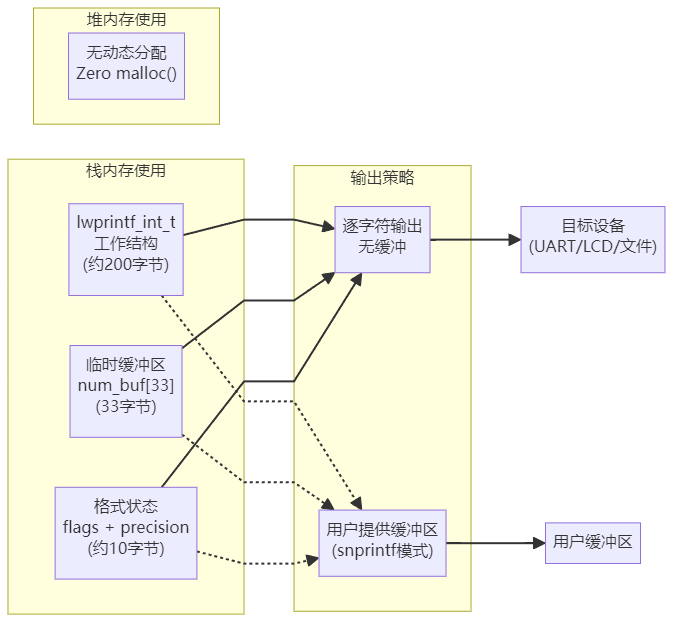
From this diagram, we can see several characteristics of lwprintf’s memory usage:
- No Heap Memory Allocation: Completely avoids malloc/free; all memory is on the stack
- Fixed Memory Usage: The largest temporary buffer is only 33 bytes, used for number conversion
- Immediate Output: Characters are output immediately after conversion, without needing a large buffer
- User Control: In snprintf mode, it uses user-provided buffers, and the library itself does not manage memory
This design allows lwprintf to perform excellently in resource-constrained embedded systems, with predictable and minimal memory usage.
Conclusion
Through a deep dissection of lwprintf, we can see that the design of this library is indeed thoughtful. It does not simply replicate the functionality of the standard library’s printf but has made many optimizations tailored to the characteristics of embedded systems:
Design Highlights
- Memory Friendly: Zero heap memory allocation, controllable stack memory usage
- Functional Extensions: Binary output and byte array output are very practical
- Clear Architecture: Layered design, easy to understand code structure
- Flexible Configuration: Features can be trimmed through macro definitions to adapt to different needs
Applicable Scenarios
- If you are working on microcontroller projects like STM32 or ESP32 and need debugging output but do not want to use the standard library
- If your project requires multiple output channels (such as outputting to both serial and LCD simultaneously)
- If you need to output binary data or memory dumps, the extended format specifiers of lwprintf will be very useful
- If you are working on RTOS projects and need a thread-safe printf implementation
Usage Recommendations: For embedded beginners, lwprintf is a great learning object. Its code size is moderate, functionality is complete, and design philosophy is clear. By studying its source code, you can learn many embedded programming techniques, such as the use of bit fields, memory management strategies, and configurable designs.
If you are looking for a lightweight alternative to printf, lwprintf is definitely worth a try. Its MIT license is also friendly, allowing for safe use in commercial projects.
If you have used lwprintf in your projects, feel free to share your experiences in the comments section.
You Might Also Like:
Lightweight Circular Buffer Management Library for Embedded Systems!
Git Interactive Rebase to Modify Commit Descriptions
Singleton Pattern: The Guardian of Global State Consistency in Embedded Systems
Embedded Field: The Ultimate Showdown Between Linux and RTOS!
Embedded Software Advancement Guide, Let’s Advance Together!