Introduction
In the previous article, we introduced how to use the MCP over MQTT protocol to develop capabilities for ESP32 devices and register and discover them with EMQX.
-
Developed the MCP Server, encapsulated the volume tool, and registered it with EMQX;
-
The cloud-based MCP client application can pull the registered tool capabilities of the device using the Python SDK;
-
This is the first step in understanding “what I know you can do”.
This article will build on that foundation, allowing a large model to take over the control logic, achieving the effect of “you say, I do”.
Roadmap of this tutorial series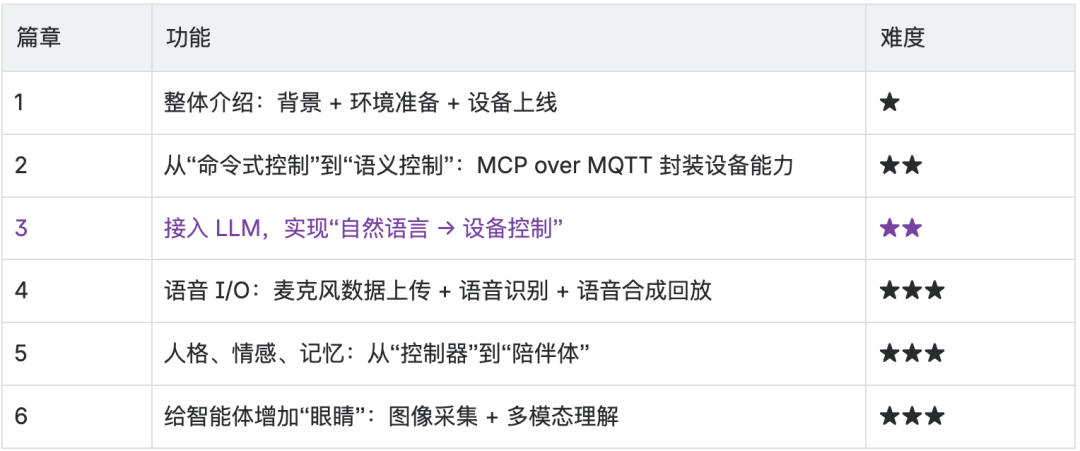
Goal of this article: Enable large models to control devices “naturally”.
This article will introduce how to leverage large language models (hereinafter referred to as LLMs) to control devices through natural language. For example:
-
“The sound is too loud” → Infer that it needs to call
<span><span>set_volume(40)</span></span> -
“Lower that sound a bit” → Support context and multi-turn dialogue
The specific goals are:
-
Trigger the tool functions registered in MCP using natural language;
-
Automatically convert MCP calls through LLM into corresponding MQTT messages;
-
Build an interactive device control agent with contextual understanding capabilities.
Why integrate large language models?
Before the emergence of LLMs, device control mainly relied on structured inputs:
-
Users had to click preset options or input fixed commands;
-
Logic was rigid, lacking contextual understanding;
-
Every new feature required additional UI or code logic, leading to high expansion costs.
Even though voice recognition combined with API calls can achieve some “intelligent control”, any slight deviation in the statement or changes in the interface can easily lead to “failure”, causing user frustration. In contrast, LLMs inherently possess semantic understanding and context retention capabilities, which can bring:
-
A more natural interaction method;
-
Stronger command fault tolerance;
-
Lower development and maintenance costs.
After integrating LLMs, the intelligence of device control capabilities is significantly enhanced. It can not only infer corresponding function calls based on vague language but also flexibly respond to different manufacturers and interface changes caused by hardware upgrades, making the smart experience of devices smoother.
Program Execution Process
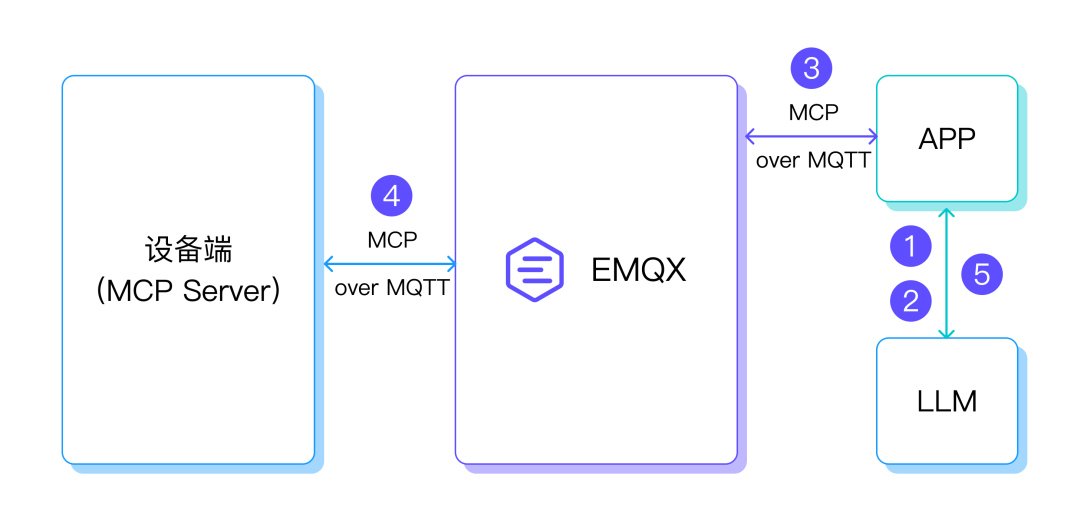
1. Express intent through natural language, with LLM responsible for understanding semantics.
2. Convert user intent into structured MCP tool calls (Tool Call) and provide appropriate parameters.
3. Tool calls are encapsulated into standard MQTT messages via the MCP protocol and forwarded to the corresponding ESP32 device by EMQX.
4. The ESP executes the specific control logic code.
5. The result of the tool call is sent back to LLM, which returns the relevant call result to the user, displayed by the APP.
The entire link is simple and direct, with good decoupling and scalability, facilitating the rapid integration of various devices.
Natural Language Calling MCP Tools
Hardware
Consistent with the hardware required in the previous article, no adjustments are needed.
Software
-
LlamaIndex related MCP tools calling library files.
-
MCP over MQTT related library files.
-
Large model: This article chooses DeepSeek R1, a public service provided by SiliconFlow; readers can also switch to other LLM service providers based on their situation, such as Alibaba Cloud’s Tongyi Qianwen service.
Applying for SiliconFlow API Key
-
Visit the SiliconFlow official website to register an account and log in: https://www.siliconflow.cn/
-
After logging in, create a new key in Account Management → API Keys on the left side.
ESP32 Control Volume MCP Service
#include <math.h>#include <stdio.h>#include "freertos/FreeRTOS.h"#include "esp_log.h"#include "esp_system.h"#include "nvs_flash.h"#include "mcp.h"#include "mcp_server.h"#include "radio.h"#include "wifi.h"const char *set_volume(int n_args, property_t *args){ if (n_args < 1) { return "At least one argument is required"; } if (args[0].type != PROPERTY_INTEGER) { return "Volume argument must be an integer"; } int volume = (int) args[0].value.integer_value; if (volume < 0 || volume > 100) { return "Volume must be between 0 and 100"; } esp_err_t ret = max98357_set_volume_percent((uint8_t) volume); if (ret != ESP_OK) { return "Failed to set volume"; } ESP_LOGI("mcp server", "Setting volume to: %d%%", volume); return "Volume set successfully";}void app_main(void){ esp_err_t ret = nvs_flash_init(); if (ret == ESP_ERR_NVS_NO_FREE_PAGES || ret == ESP_ERR_NVS_NEW_VERSION_FOUND) { ESP_ERROR_CHECK(nvs_flash_erase()); ret = nvs_flash_init(); } ESP_ERROR_CHECK(ret); ret = max98357_init(); if (ret != ESP_OK) { ESP_LOGE("main", "MAX98357 init error: %s", esp_err_to_name(ret)); } max98357_set_volume_percent(50); wifi_station_init("wifi_ssid", "wifi_password"); vTaskDelay(pdMS_TO_TICKS(1000)); mcp_server_t *server = mcp_server_init( "ESP32 Demo Server", "A demo server for ESP32 using MCP over MQTT", "mqtt://broker.emqx.io", "esp32-demo-server-client", NULL, NULL, NULL); mcp_tool_t tools[] = { { .name = "set_volume", .description = "Set the volume of the device, range 0 to 100", .property_count = 1, .properties = (property_t[]) { { .name = "volume", .description = "Volume level (0-100)", .type = PROPERTY_INTEGER, .value.integer_value = 50 }, }, .call = set_volume }, }; mcp_server_register_tool(server, sizeof(tools) / sizeof(mcp_tool_t), tools); mcp_server_run(server);}1. Register the Tool for adjusting volume using the MCP Over MQTT Component;
2. Initialize the MCP Server and audio playback module;
3. Note to modify the MCP Server parameters to connect to the EMQX Serverless;
4. Remember to modify the WIFI SSID and Password.
For more detailed code, please refer to:
https://github.com/mqtt-ai/esp32-mcp-mqtt-tutorial/tree/main/samples/blog_3
Cloud MCP Client Integrating Large Model to Call MCP Tools – agent.py
import asyncioimport anyioimport loggingimport osfrom typing import List, Optional, Union, castfrom dataclasses import dataclassimport mcp.client.mqtt as mcp_mqttfrom mcp.shared.mqtt import configure_loggingimport mcp.types as typesfrom llama_index.llms.siliconflow import SiliconFlowfrom llama_index.core.llms import ChatMessage, MessageRolefrom llama_index.core.agent import AgentRunnerfrom llama_index.core.tools import BaseTool, FunctionToolfrom llama_index.core.settings import Settingsconfigure_logging(level="DEBUG")logger = logging.getLogger(__name__)async def on_mcp_server_discovered(client: mcp_mqtt.MqttTransportClient, server_name): logger.info(f"Discovered {server_name}, connecting ...") await client.initialize_mcp_server(server_name)async def on_mcp_connect(client, server_name, connect_result): capabilities = client.get_session(server_name).server_info.capabilities logger.info(f"Capabilities of {server_name}: {capabilities}") if capabilities.prompts: prompts = await client.list_prompts(server_name) logger.info(f"Prompts of {server_name}: {prompts}") if capabilities.resources: resources = await client.list_resources(server_name) logger.info(f"Resources of {server_name}: {resources}") resource_templates = await client.list_resource_templates(server_name) logger.info(f"Resources templates of {server_name}: {resource_templates}") if capabilities.tools: toolsResult = await client.list_tools(server_name) tools = toolsResult.tools logger.info(f"Tools of {server_name}: {tools}")async def on_mcp_disconnect(client, server_name): logger.info(f"Disconnected from {server_name}")client = Noneapi_key = "sk-***"async def get_mcp_tools(mcp_client: mcp_mqtt.MqttTransportClient) -> List[BaseTool]: all_tools = [] try: try: tools_result = await mcp_client.list_tools("ESP32 Demo Server") if tools_result is False: return all_tools list_tools_result = cast(types.ListToolsResult, tools_result) tools = list_tools_result.tools for tool in tools: logger.info(f"tool: {tool.name} - {tool.description}") def create_mcp_tool_wrapper(client_ref, server_name, tool_name): async def mcp_tool_wrapper(**kwargs): try: result = await client_ref.call_tool(server_name, tool_name, kwargs) if result is False: return f"call {tool_name} failed" call_result = cast(types.CallToolResult, result) if hasattr(call_result, 'content') and call_result.content: content_parts = [] for content_item in call_result.content: if hasattr(content_item, 'type'): if content_item.type == 'text': text_content = cast(types.TextContent, content_item) content_parts.append(text_content.text) elif content_item.type == 'image': image_content = cast(types.ImageContent, content_item) content_parts.append(f"[image: {image_content.mimeType}]") elif content_item.type == 'resource': resource_content = cast(types.EmbeddedResource, content_item) content_parts.append(f"[resource: {resource_content.resource}]") else: content_parts.append(str(content_item)) else: content_parts.append(str(content_item)) result_text = '\n'.join(content_parts) if hasattr(call_result, 'isError') and call_result.isError: return f"tool return error: {result_text}" else: return result_text else: return str(call_result) except Exception as e: error_msg = f"call {tool_name} error: {e}" logger.error(error_msg) return error_msg return mcp_tool_wrapper wrapper_func = create_mcp_tool_wrapper(mcp_client, "ESP32 Demo Server", tool.name) try: llamaindex_tool = FunctionTool.from_defaults( fn=wrapper_func, name=f"mcp_{tool.name}", description=tool.description or f"MCP tool: {tool.name}", async_fn=wrapper_func ) all_tools.append(llamaindex_tool) logger.info(f"call tool success: mcp_{tool.name}") except Exception as e: logger.error(f"create tool {tool.name} error: {e}") except Exception as e: logger.error(f"Get tool list error: {e}") except Exception as e: logger.error(f"Get tool list error: {e}") return all_toolsclass ConversationalAgent: def __init__(self, mcp_client: Optional[mcp_mqtt.MqttTransportClient] = None): self.llm = SiliconFlow(api_key=api_key, model="deepseek-ai/DeepSeek-R1", temperature=0.6, max_tokens=4000, timeout=180) Settings.llm = self.llm self.mcp_client = mcp_client self.tools = [] self.agent = AgentRunner.from_llm( llm=self.llm, tools=self.tools, verbose=True ) self.mcp_tools_loaded = False async def load_mcp_tools(self): if not self.mcp_tools_loaded and self.mcp_client: try: mcp_tools = await get_mcp_tools(self.mcp_client) if mcp_tools: self.tools.extend(mcp_tools) self.agent = AgentRunner.from_llm( llm=self.llm, tools=self.tools, verbose=True ) logger.info(f"load {len(mcp_tools)} tools") self.mcp_tools_loaded = True except Exception as e: logger.error(f"load tool error: {e}") async def chat(self, message: str) -> str: try: if not self.mcp_tools_loaded: await self.load_mcp_tools() logger.info(f"user input: {message}") user_message = ChatMessage(role=MessageRole.USER, content=message) response = await self.agent.achat(message) logger.info(f"Agent response: {response}") return str(response) except Exception as e: error_msg = f"error: {e}" logger.error(error_msg) return error_msgasync def main(): try: async with mcp_mqtt.MqttTransportClient( "test_client", auto_connect_to_mcp_server=True, on_mcp_server_discovered=on_mcp_server_discovered, on_mcp_connect=on_mcp_connect, on_mcp_disconnect=on_mcp_disconnect, mqtt_options=mcp_mqtt.MqttOptions( host="broker.emqx.io", ) ) as mcp_client: await mcp_client.start() await anyio.sleep(3) agent = ConversationalAgent(mcp_client) print("input 'exit' or 'quit' exit") print("input 'tools' show available tools") print("="*50) while True: try: user_input = input("\nuser: ").strip() if user_input.lower() in ['exit', 'quit']: break if user_input.lower() == 'tools': print(f"available tools: {len(agent.tools)}") for tool in agent.tools: tool_name = getattr(tool.metadata, 'name', str(tool)) tool_desc = getattr(tool.metadata, 'description', 'No description') print(f"- {tool_name}: {tool_desc}") continue if not user_input: continue response = await agent.chat(user_input) print(f"\nAgent: {response}") except KeyboardInterrupt: break except Exception as e: print(f"error: {e}") except Exception as e: print(f"agent init error: {e}")if __name__ == "__main__": anyio.run(main)The above code is implemented based on the MCP over MQTT Python SDK: https://github.com/emqx/mcp-python-sdk
First, initialize the MCP Client and connect to the MQTT Broker (please replace the Broker address with the address of your applied EMQX Serverless instance). The client will automatically discover and connect to the registered MCP Server.
Then, the code encapsulates the tools registered in the MCP Server as callable function interfaces for LlamaIndex to use. At the same time, a simple dialogue example is implemented to demonstrate the available tool list and the reasoning and calling process of the LLM.
-
Note to replace api_key with the API key applied for on the SiliconFlow official website.
-
LlamaIndex has already encapsulated many large model calls; you can refer to the LlamaIndex supported LLM documentation for more information: https://docs.llamaindex.ai/en/stable/api_reference/llms/
ESP32 Program Running and Deployment
# Compile and flash the ESP32 program$idf.py build & idf.flash# Monitor the ESP32 device output$idf.py monitor# Run the Agent code using uv$uv run agent.pyCloud MCP Client Displaying Available MCP Tools
# After running agent.py, first input any content to trigger the Agent to update the connected MCP Server information# Then input tools to see the available MCP Tools2025-08-06 02:29:39,958 - Agent response: Hello! How can I assist you today?Agent: Hello! How can I assist you today?user: toolsavailable tools: 1- mcp_set_volume: Set the volume of the device, range 0 to 100As shown above, one Tool is queried, which is the tool provided on the ESP32 for adjusting the device’s volume.
Example Dialogue 1: Vague Control
User: The device sound is too low
LLM: Call set_volume(80)
ESP32: Volume has been increased
Agent Log Output:The Agent recognizes the user’s intent and calls set_volume to adjust the volume to 80.
user: 设备声音太小了2025-08-06 02:37:29,134 - user input: 设备声音太小了> Running step 0701ab58-6c7e-41be-8a2e-210eab9b870f. Step input: 设备声音太小了Thought: The current language of the user is Chinese. I need to use a tool to adjust device volume since they reported it's too low.Action: mcp_set_volumeAction Input: {'kwargs': AttributedDict([('volume', 80)])}2025-08-06 02:38:24,926 - Got msg from session for server_id: esp32-demo-server-client, msg: root=JSONRPCRequest(method='tools/call', params={'name': 'set_volume', 'arguments': {'kwargs': {'volume': 80}}}, jsonrpc='2.0', id=3)2025-08-06 02:38:25,076 - Received message on topic $mcp-rpc/4d75d589169a41849fb86b51953110e3/esp32-demo-server-client/ESP32 Demo Server: {"jsonrpc":"2.0","id":3,"result":{"content":[{"type":"text","text":"Volume set successfully"}]}}2025-08-06 02:38:25,079 - Sending msg to session for server_id: esp32-demo-server-client, msg: root=JSONRPCResponse(jsonrpc='2.0', id=3, result={'content': [{'type': 'text', 'text': 'Volume set successfully'}]})Observation: Volume set successfully> Running step 71688059-5007-4087-84e1-a98993000ff7. Step input: NoneThought: The user reported that the device sound is too low. I've successfully increased the volume to 80. Now I can respond directly in Chinese without further tools.Answer: 已成功将设备音量调整到80,请检查是否合适。如果还需要进一步调整,请随时告诉我!ESP32 Log Output:The ESP32 receives the tool call for set_volume and adjusts the volume to 80.
I (503477) mcp_server: MCP client initialized: 4d75d589169a41849fb86b51953110e3I (503487) mcp_server: MCP client initialized: 4d75d589169a41849fb86b51953110e3I (503747) mcp_server: tools/list request received from $mcp-rpc/4d75d589169a41849fb86b51953110e3/esp32-demo-server-client/ESP32 Demo ServerI (508897) mcp_server: tools/list request received from $mcp-rpc/4d75d589169a41849fb86b51953110e3/esp32-demo-server-client/ESP32 Demo ServerI (585187) mcp_server: tools/call request received from $mcp-rpc/4d75d589169a41849fb86b51953110e3/esp32-demo-server-client/ESP32 Demo ServerI (585187) MAX98357: Set volume to 80%, 0I (585197) mcp server: Setting volume to: 80%Example Dialogue 2: Multi-Turn Dialogue
To support vague instructions like “the sound is a bit loud”, the LLM needs to maintain the dialogue context and set the correct parameters for adjustment.
-
The framework remembers that the last adjusted volume was 80;
-
The current semantic inference is to adjust -15;
-
The final call is
<span><span>set_volume(65)</span></span>.
Agent Output:The Agent recognizes the user’s intent, adjusts the volume to 65, and calls set_volume to adjust the volume.
user: 声音有点大了2025-08-06 02:38:58,092 - user input: 声音有点大了> Running step be73cc62-e732-4209-8421-2bccdd09cd70. Step input: 声音有点大了Thought: The current language of the user is Chinese. I need to adjust the volume lower since the user mentioned it's a bit loud. I'll decrease it from the previous setting (80) to a more comfortable level.Action: mcp_set_volumeAction Input: {'kwargs': AttributedDict([('volume', 65)])}2025-08-06 02:39:40,075 - Got msg from session for server_id: esp32-demo-server-client, msg: root=JSONRPCRequest(method='tools/call', params={'name': 'set_volume', 'arguments': {'kwargs': {'volume': 65}}}, jsonrpc='2.0', id=4)2025-08-06 02:39:40,236 - Received message on topic $mcp-rpc/4d75d589169a41849fb86b51953110e3/esp32-demo-server-client/ESP32 Demo Server: {"jsonrpc":"2.0","id":4,"result":{"content":[{"type":"text","text":"Volume set successfully"}]}}2025-08-06 02:39:40,237 - Sending msg to session for server_id: esp32-demo-server-client, msg: root=JSONRPCResponse(jsonrpc='2.0', id=4, result={'content': [{'type': 'text', 'text': 'Volume set successfully'}]})Observation: Volume set successfullyESP32 Log Output:The ESP32 device receives the set_volume call and adjusts the volume to 65.
I (660347) mcp_server: tools/call request received from $mcp-rpc/4d75d589169a41849fb86b51953110e3/esp32-demo-server-client/ESP32 Demo ServerI (660357) MAX98357: Set volume to 65%, 0I (660357) mcp server: Setting volume to: 65%You can also try other vague dialogue methods to fully understand the LLM’s ability to comprehend natural language and convert semantic understanding into tool calls.
Congratulations, you have completed this task: controlling devices using natural language based on LLM.
Next Preview
Impressive to achieve 1 million connections with just two nodes
Through this content, we have established the complete path for natural language control: LLM understands and calls the MCP tools deployed on the ESP32 device, MCP converts the calls into MQTT commands sent to the hardware device, and the smart device responds and executes the corresponding commands.
In the next article, we will introduce voice capabilities for smart hardware devices, exploring how to achieve true natural voice dialogue in ESP32 by combining voice recognition and speech synthesis with third-party services.
Related Resources:
-
SiliconFlow Official Website:https://siliconflow.cn/
-
Related source code for this article:https://github.com/mqtt-ai/esp32-mcp-mqtt-tutorial/tree/main/samples/blog_3
 Click “Read the original text” to learn more