链接:https://blog.csdn.net/Lemon__ing/article/details/147575650?spm=1001.2014.3001.5502


☞The course is completely sold out!☜
Currently, many embedded devices need to connect to the network through networking to achieve remote control, data transmission, and other functions.
Next, we will delve into the relevant knowledge of embedded device networking.
1. Analysis of Popular Networking Solutions
There are various networking methods, commonly including:
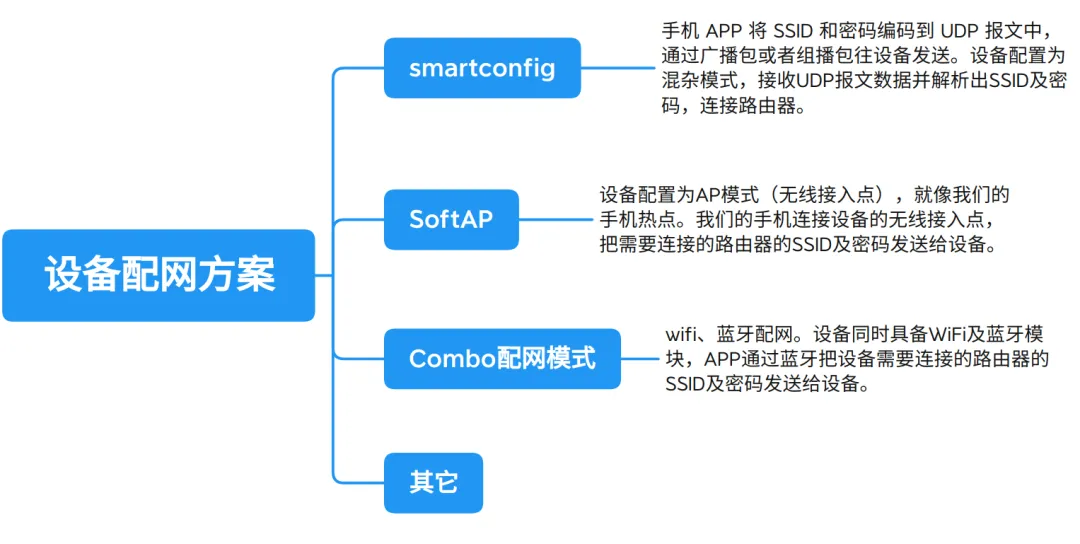
1. SmartConfig
The principle of SmartConfig networking is to use mobile phones or other terminal devices to broadcast network information (such as SSID and password) so that embedded devices can listen to surrounding wireless signals and parse the network information to achieve networking.
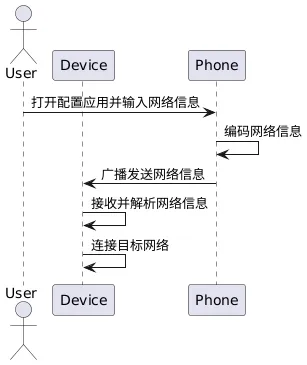
SmartConfig networking devices create hotspots, allowing the device to directly obtain network information from the surrounding wireless environment, making the operation simpler.
- • Advantages: Simple operation, good user experience; suitable for various complex network environments.
- • Disadvantages: High requirements for the device’s wireless reception capability, and there may be cases of information parsing failure.
- • Applicable scenarios: Widely used in various smart devices, such as smart cameras, smart speakers, etc.
2. SoftAP
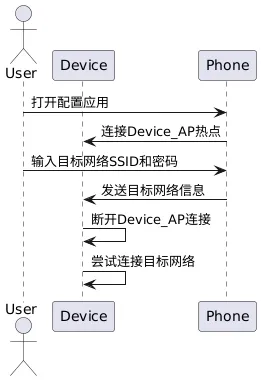
The AP (Access Point) mode networking, also known as hotspot mode networking, works by having the embedded device create a wireless hotspot. Users connect to this hotspot using their mobile phones or other terminal devices, then input the target network (such as home WiFi) information on the terminal device. The device will attempt to connect to the target network upon receiving this information.
- • Advantages: Simple and direct, does not require additional network environment support.
- • Disadvantages: Each networking requires the device to enter AP mode, which is relatively cumbersome; the coverage of the hotspot created by the device is limited.
- • Applicable scenarios: Suitable for small, simple embedded devices, such as smart plugs, smart bulbs, etc.
3. Combo Networking Mode
The Combo networking mode combines the advantages of various networking methods, where WiFi and Bluetooth networking methods provide users with an efficient and stable networking experience. The core is that the device is equipped with both WiFi and Bluetooth modules, and the app uses Bluetooth to send the router SSID and password required for connection to the device.
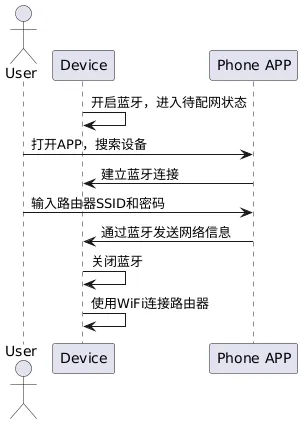
- • Advantages: Bluetooth technology has high stability and low power consumption for short-distance communication, effectively avoiding wireless signal interference and ensuring accurate transmission of network information; WiFi is responsible for the subsequent high-speed network connection of the device, ensuring data transmission efficiency. The combination of both not only improves the success rate of networking but also reduces the error rate of user manual input, simplifying the operation steps.
- • Disadvantages: The device needs to integrate two communication modules, increasing hardware costs and device power consumption, while also raising higher requirements for software compatibility and stability.
- • Applicable scenarios: Suitable for mid-to-high-end embedded devices that require high stability and user experience in networking, such as smart home hubs, smart wearable devices, etc.
4. Others
NFC Networking: Utilizes NFC (Near Field Communication) technology to transmit network information through close contact. Users only need to bring an NFC-enabled phone close to the embedded device, and the phone will transmit the network information to the device, achieving quick networking. For example, some smart locks support NFC networking, allowing users to easily complete networking during installation by using the NFC function of their phones.
Sound Wave Recognition Networking: Encodes network information into sound waves of specific frequencies, which are played by devices such as mobile phones. The embedded device receives the sound waves through its microphone and parses the network information. This method has certain advantages in environments sensitive to wireless signals, such as hospitals and factories.
2. WiFi Related Knowledge
The origin of WiFi can be traced back to the 1990s, based on the IEEE 802.11 standard for wireless local area network technology.
1. 802.11 Protocol Standards
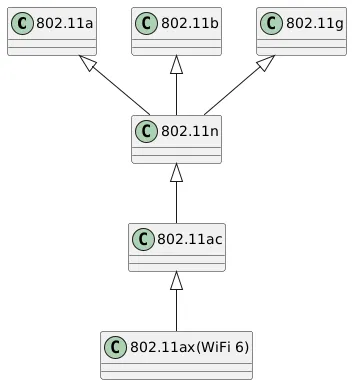
The 802.11 protocol family includes several members, such as 802.11a, 802.11b, 802.11g, 802.11n, 802.11ac, and 802.11ax (WiFi 6).
Different suffix standards have differences in working frequency bands and transmission rates. For example, 802.11a operates in the 5G band with a maximum transmission rate of 54Mbps; 802.11b operates in the 2.4G band with a maximum transmission rate of 11Mbps.
Some member relationships of the 802.11 protocol family:
2. WiFi Related Terms
There are many WiFi-related terms that are interrelated to form a complete system.
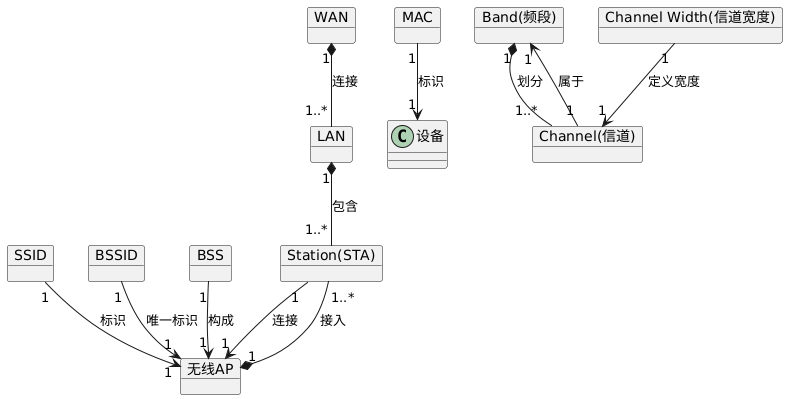
- • LAN (Local Area Network): A local area network is a computer network established within a limited range (such as an office or a building) to enable communication and resource sharing between devices.
- • WAN (Wide Area Network): A wide area network covers a larger area and is typically used to connect different local area networks for broader network communication.
- • Band (Frequency Band): Refers to the frequency range in which WiFi operates, commonly including the 2.4G band and the 5G band.
- • Channel: Different frequency ranges divided within a band for wireless signal transmission.
- • Channel Width: Refers to the frequency bandwidth occupied by a channel; different 802.11 standards support different channel widths, such as 20MHz, 40MHz, 80MHz, etc.
- • Wireless AP (Access Point): A wireless access point is a wireless network device used to connect wireless clients to a wired network, acting as a bridge.
- • Station (STA): A wireless client, such as a mobile phone or laptop, that connects to a wireless AP wirelessly.
- • SSID (Service Set Identifier): The service set identifier is the name of the wireless network, which users search for to find and connect to the corresponding wireless network.
- • BSSID (Basic Service Set Identifier): The basic service set identifier is the MAC address of the wireless AP, used to uniquely identify a wireless AP.
- • BSS (Basic Service Set): A basic service set is a network consisting of one wireless AP and all wireless clients connected to it.
- • MAC (Media Access Control): Media access control is the physical address of network devices used for device identification at the data link layer.
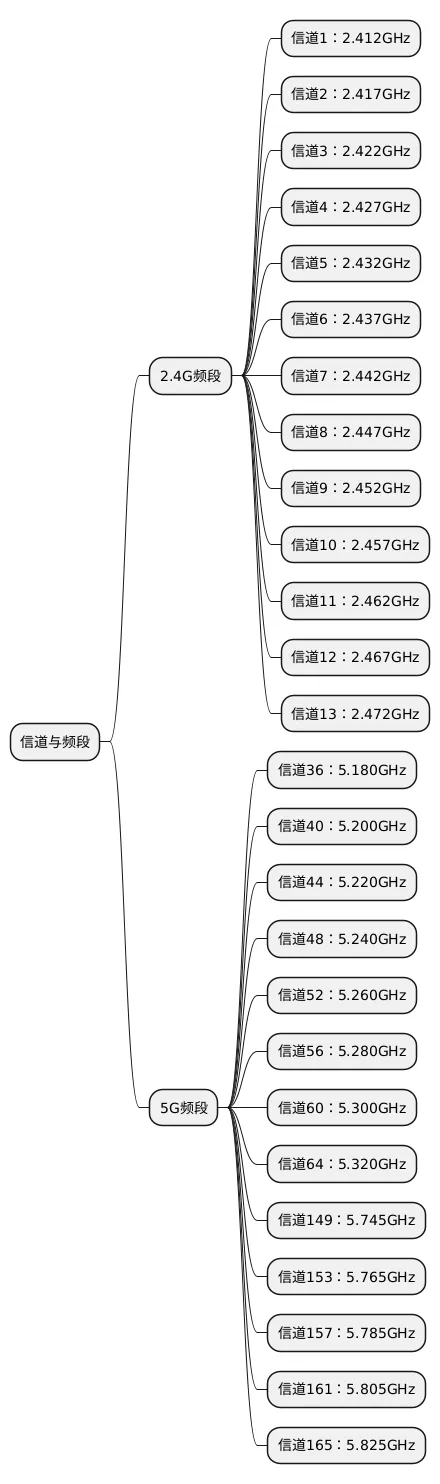
3. WiFi Channels and Frequency Bands
3. Networking Practice
SmartLink is an implementation of SmartConfig under Linux. The mobile phone sends UDP broadcast packets, and the networking device scans all available wireless channels to find the packets sent by SmartConfig and locks onto that channel to start receiving data.
Repository link:
https://github.com/jolin90/smartconfig
1. Related Knowledge Supplement
(1) Network Card Operating Modes
- • Broadcast Mode: Frames with a physical address (MAC) of 0Xffffff are broadcast frames; network cards operating in broadcast mode receive broadcast frames.
- • Multicast Mode: If the network card is set to multicast mode, it can receive all multicast transmission frames, regardless of whether it is a member of the group.
- • Direct Mode: Only receives frames with a destination address that is its own MAC address.
- • Promiscuous Mode: Network cards operating in promiscuous mode receive all frames passing through the network card.
Commands to view, set, and cancel promiscuous mode include:
ifconfig wlan0 # View if wlan0 is in promiscuous mode
ifconfig wlan0 promisc # Set wlan0 to promiscuous mode
ifconfig wlan0 -promisc # Cancel wlan0 promiscuous mode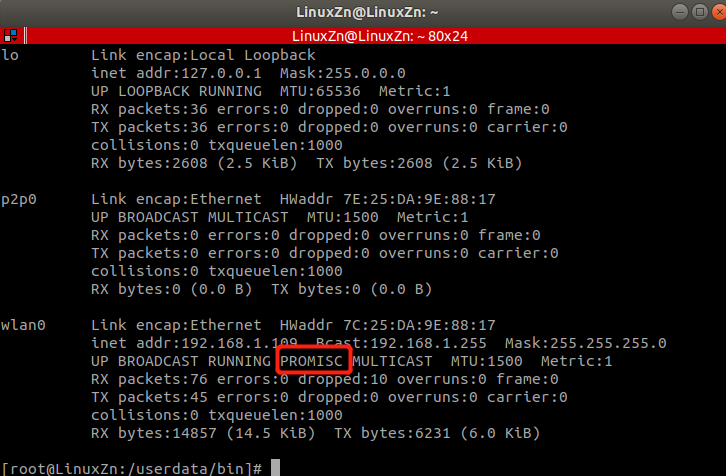
(2) Communication Methods
Classification of communication methods:
- • Unicast: Communication between a single host and a single host;
- • Broadcast: Communication between a single host and all hosts in the network;
- • Multicast: Communication between a single host and a selected group of hosts;
IP network multicast is generally achieved through multicast IP addresses, which are Class D IP addresses, i.e., IP addresses between 224.0.0.0 and 239.255.255.255.
2. Using SmartLink
Download it from:
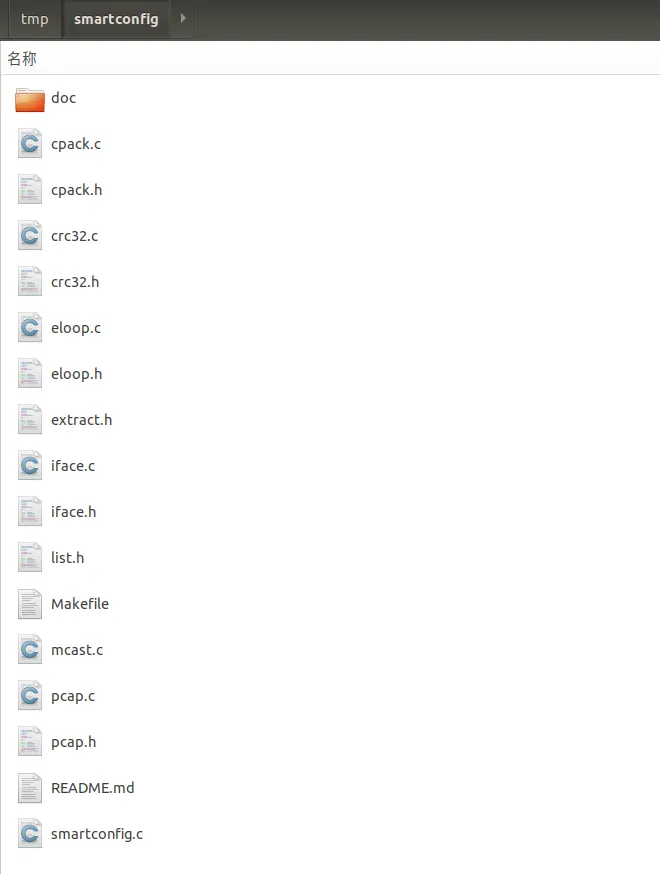
We use an ARM board for experiments. First, cross-compile and execute the command:
make CC=arm-linux-gnueabihf-gccTransfer the compiled SmartLink executable to the board. When running, it needs to be followed by the interface name. For example:
./smartlink wlan0Then execute the following commands to recompile:
make clean
make
The generated mcast_app executable runs on the PC to simulate the mobile app sending. When running, it needs to pass in the WiFi name and password. For example:
./mcast_app Tenda_552F18 0987654321During testing, mcast_app needs to be run first, followed by smartlink. Smartlink will print out the WiFi name and password when received.
The running result is as follows:
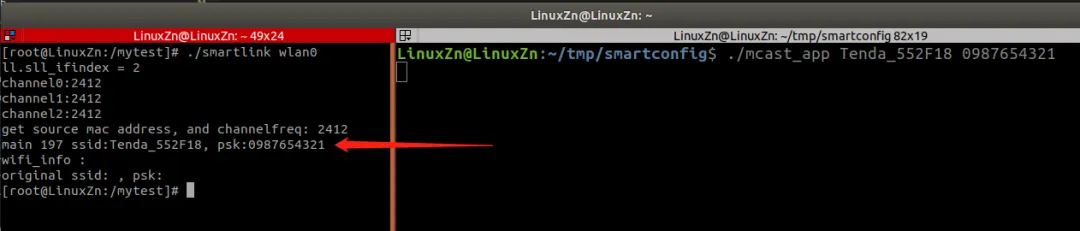
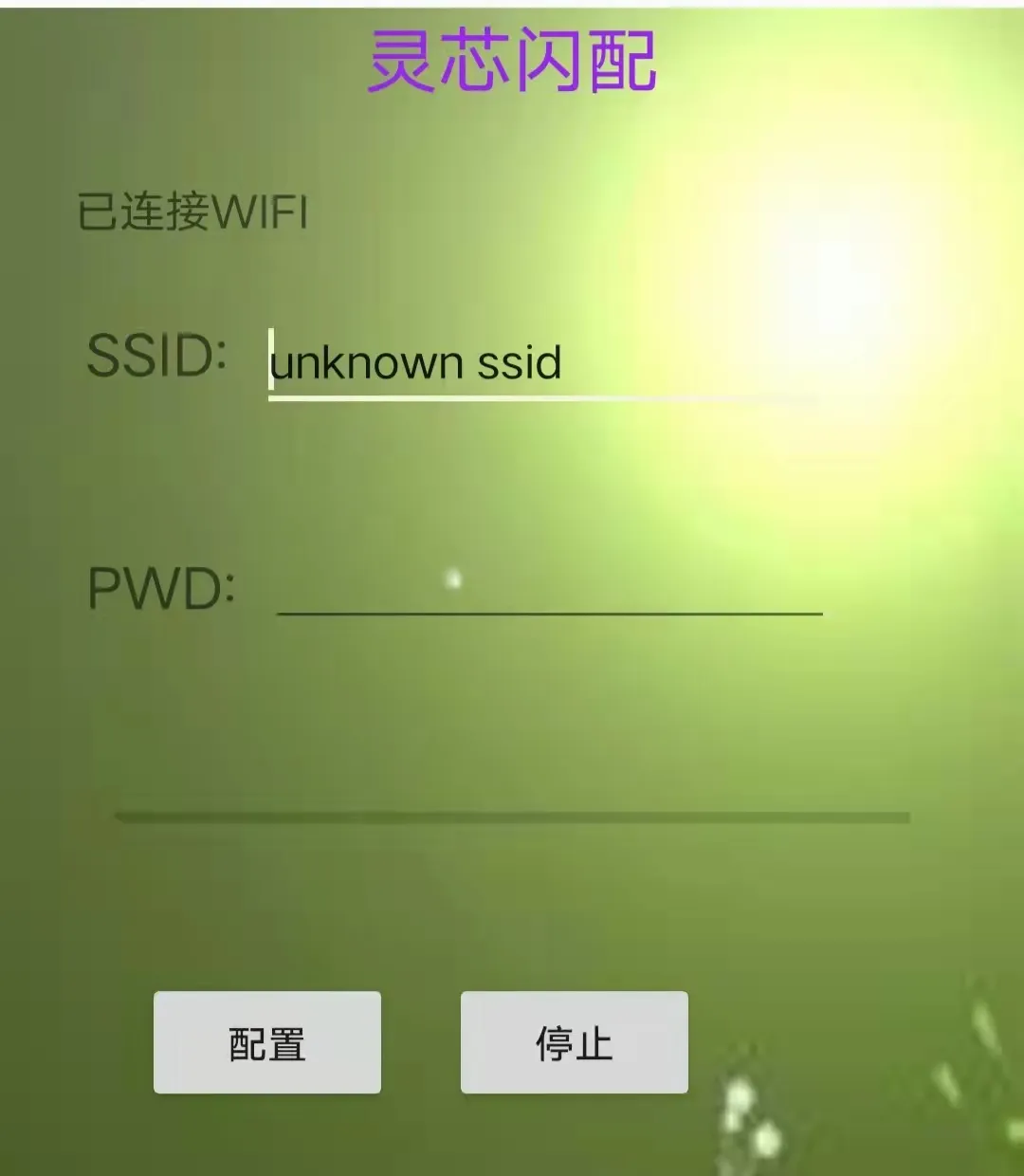
Here, mcast_app is used to simulate the mobile app. Smartlink also provides a simple Android app that can be used for testing:
3. Analysis of SmartLink Multicast Packet Protocol
The above demonstrated the use of SmartLink; below is a brief introduction to some SmartLink multicast packet protocols.
The app sends multicast packet data of a specific protocol to the device, which parses the router SSID and password upon receipt. The protocol is as follows:
Each data packet consists of 6 bytes,
- • Bytes 1-3: Multicast packet address, fixed value 0x01 0x00 0x5e.
- • Byte 4: Packet sequence number.
- • Byte 5: Designated data.
- • Byte 6: Designated data.
Each transmission consists of several bytes. For example:
SSID is “TP-LINK_hys”, PSW is “12345678”, the multicast address sent is as follows:
0x01 0x00 0x5e 0x00  0x48  0x35
0x01 0x00 0x5e 0x01  0x68  0x2b
0x01 0x00 0x5e 0x02  0x5c  0x31
0x01 0x00 0x5e 0x03  0x0b  0x08
0x01 0x00 0x5e 0x04  'T'  '1'
0x01 0x00 0x5e 0x05  'P'  '2'
0x01 0x00 0x5e 0x06  '-'  '3'
0x01 0x00 0x5e 0x07  'L'  '4'
0x01 0x00 0x5e 0x08  'I'  '5'
0x01 0x00 0x5e 0x09  'N'  '6'
0x01 0x00 0x5e 0x0a  'K'  '7'
0x01 0x00 0x5e 0x0b  '_'  '8'
0x01 0x00 0x5e 0x0c  'h'  0x00
0x01 0x00 0x5e 0x0d  'y'  0x00
0x01 0x00 0x5e 0x0e  's'  0x00
0x01 0x00 0x5e 0x40  0x1c  0x03
Where:
(1) The first three packets of data are feature code packets, and the last three bytes are mapped from the multicast IP to the multicast MAC. The last 23 bits of the multicast IP are taken as the MAC, as shown in the mapping diagram:
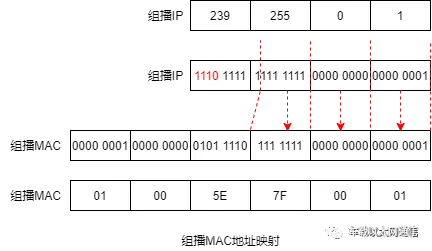
For more information on multicast addresses, you can read the blog:
https://blog.csdn.net/wjz110201/article/details/114628203
Here, the multicast IP set by the mobile app is fixed as:
#define IPADDR_KEY0 "224.0.72.53"   /*key0:01:00:5e:00:48:35 */
#define IPADDR_KEY1 "224.1.104.43"  /*key1:01:00:5e:01:68:2b */
#define IPADDR_KEY2 "224.2.92.49"   /*key2:01:00:5e:02:5c:31 */
The multicast IP is mapped to multicast MAC, resulting in:
Taking the last 23 bits gives 0.72.53 corresponding to hexadecimal 00:48:35
Taking the last 23 bits gives 1.104.43 corresponding to hexadecimal 01:68:2b
Taking the last 23 bits gives 2.92.49 corresponding to hexadecimal 02:5c:31
(2) The fourth packet of data contains the length of the SSID and PSW.
(3) Packets 5-15 contain the SSID and PSW.
(4) The 16th packet of data is a checksum, using a continuous XOR checksum method:
Crc=Crc^0x01^(byte)0x5e^0x40
The spring recruitment has already started, and if everyone does not prepare adequately, it will be difficult to find a good job during the spring recruitment.
Here’s a job package for everyone, so you can prepare for the spring recruitment and find a good job!