In a relatively underperforming Linux system, using gdb to print a C++ list does not yield effective display of data members: 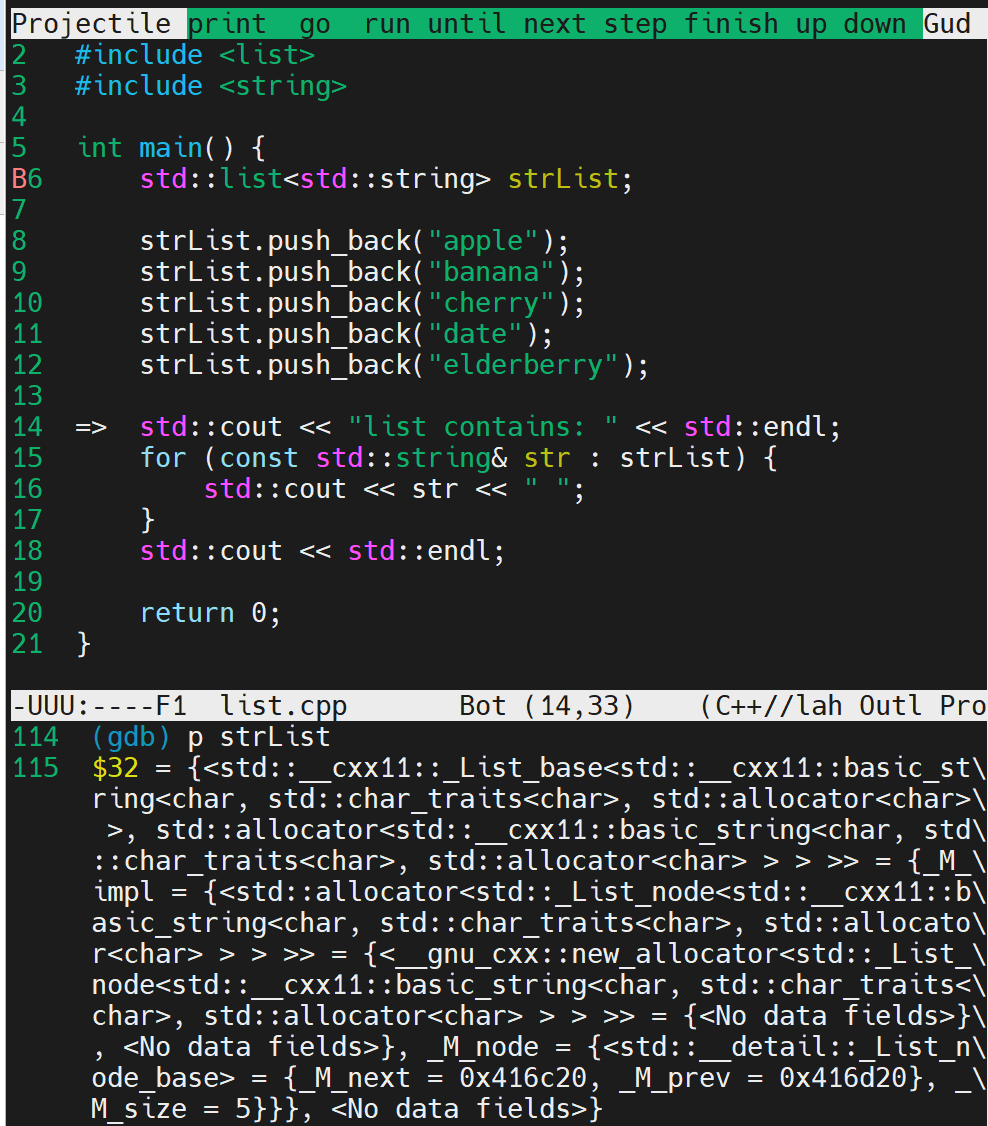
The gdb wiki mentions:
https://sourceware.org/gdb/wiki/STLSupport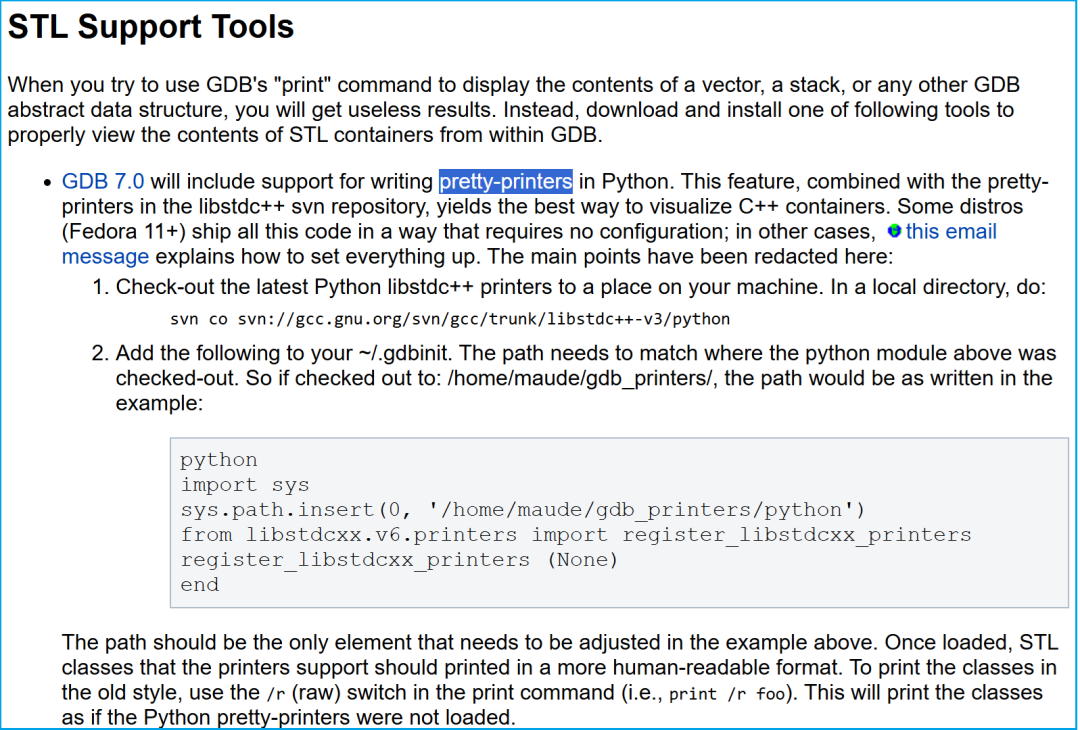
This means that starting from gdb 7.0, support for pretty-printers implemented in Python has been added. There is an implementation of pretty-printers in libstdc++, and some distributions have integrated these well, so no configuration is necessary. The email content mentioned here is as follows:
List: kdevelopSubject: Pretty-printing improvements, GDB requirementsFrom: Vladimir Prus <ghost () cs ! msu ! su>Date: 2009-09-18 8:57:01Message-ID: 200909181257.01302.ghost () cs ! msu ! su[Download RAW message or body]As you have probably know, some work to finish pretty-printing support in KDevelop/GDB was going on recently. The changes are now merged to GDB CVS, and KDevelop is adjusted accordingly. You need GDB CVS state as of 2009-09-18 to take advantage of this. The primary changes here are:- KDevelop will notice when children are added and removed. So, if you step over push_back call on std::vector, KDevelop will notice- We use incremental fetch of variable children. It means that if you point KDevelop on std::vector that is not initialized, it will fetch 5 children, as opposed to trying to fetch all 2^32 or other random value (and not getting back to you in reasonable time).Here's a quick recap of what you need to visualize STL structures:1. SVN HEAD of kdevelop.2. CVS HEAD of GDB. Make sure this gdb in first in PATH.3. In some directory, do: svn co svn://gcc.gnu.org/svn/gcc/trunk/libstdc++-v3/python4. Add the following to your ~/.gdbinit: python import sys sys.path.insert(0, '/home/ghost/Build/python') from libstdcxx.v6.printers import register_libstdcxx_printers register_libstdcxx_printers (None) endAdjust the path to point at the 'python' directory created in '3'. This is still very early functionality, so I'd appreciate as much testing as possible. Should there be bugs, report them to me either via this mailing list, or on IRC.HTH,VolodyaThe basic configuration is to add content in .gdbinit:
pythonimport syssys.path.insert(0, '/home/ghost/Build/python')from libstdcxx.v6.printers import register_libstdcxx_printersregister_libstdcxx_printers (None)endReplace the content of the third line, which points to the implementation of pretty-printers in libstdc++.
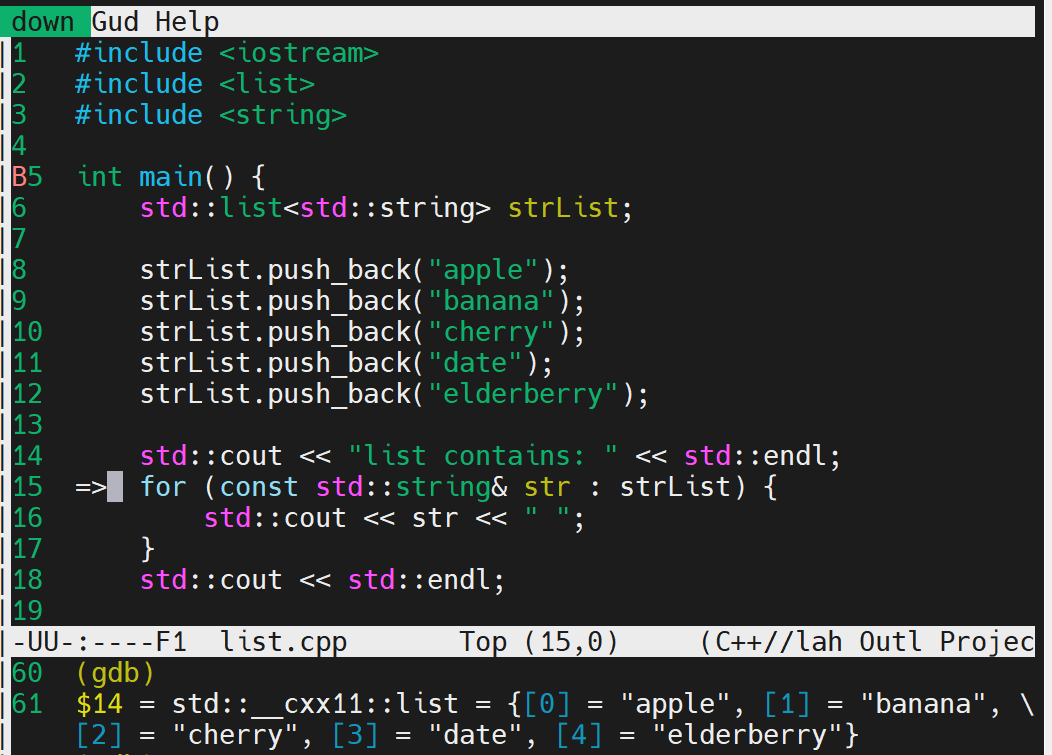
However, in Ubuntu 22.04, no configuration is needed, and it seems that pretty-printers work well:
Detailed pretty-printers information can be displayed using the info command:
(gdb) info pretty-printersglobal pretty-printers: builtin mpx_bound128objfile /lib/x86_64-linux-gnu/libstdc++.so.6 pretty-printers: libstdc++-v6 __gnu_cxx::_Slist_iterator __gnu_cxx::__8::_Slist_iterator __gnu_cxx::__8::__normal_iterator __gnu_cxx::__8::slist __gnu_cxx::__normal_iterator __gnu_cxx::slist __gnu_debug::_Safe_iterator std::_Bit_const_iterator std::_Bit_iterator std::_Bit_reference std::_Deque_const_iterator std::_Deque_iterator std::_Fwd_list_const_iteratorIn Ubuntu, when debugging the above list with gdb, this pretty-printers is not initially activated, as shown in the following experiment:
/tmp$ gdb listReading symbols from list...(gdb) info pretty-printerglobal pretty-printers: builtin mpx_bound128《《《There are no STL printers(gdb) b mainBreakpoint 1 at 0x2516: file list.cpp, line 5.(gdb) info pretty-printerglobal pretty-printers: builtin mpx_bound128(gdb) rStarting program: /tmp/list[Thread debugging using libthread_db enabled]Using host libthread_db library "/lib/x86_64-linux-gnu/libthread_db.so.1".Breakpoint 1, main () at list.cpp:55 int main() {《《《After starting execution, the STL printers are loaded(gdb) info pretty-printersglobal pretty-printers: builtin mpx_bound128objfile /lib/x86_64-linux-gnu/libstdc++.so.6 pretty-printers: libstdc++-v6 __gnu_cxx::_Slist_iterator __gnu_cxx::__8::_Slist_iterator __gnu_cxx::__8::__normal_iterator __gnu_cxx::__8::slist __gnu_cxx::__normal_iterator __gnu_cxx::slist __gnu_debug::_Safe_iterator std::_Bit_const_iterator std::_Bit_iterator std::_Bit_reference std::_Deque_const_iterator std::_Deque_iterator std::_Fwd_list_const_iterator std::_Fwd_list_iterator std::_List_const_iterator std::_List_iterator ..........--Type <RET> for more, q to quit, c to continue without paging--qQuit(gdb) show auto-loadauto-load gdb-scripts: Auto-loading of canned sequences of commands scripts is on.auto-load libthread-db: Auto-loading of inferior specific libthread_db is on.auto-load local-gdbinit: Auto-loading of .gdbinit script from current directory is on.auto-load python-scripts: Auto-loading of Python scripts is on.auto-load safe-path: List of directories from which it is safe to auto-load files is $debugdir:$datadir/auto-load.auto-load scripts-directory: List of directories from which to load auto-loaded scripts is $debugdir:$datadir/auto-load.(gdb) info auto-loadgdb-scripts: No auto-load scripts.libthread-db: No auto-loaded libthread-db.local-gdbinit: Local .gdbinit file was not found.python-scripts:Loaded ScriptYes /usr/share/gdb/auto-load/usr/lib/x86_64-linux-gnu/libstdc++.so.6.0.30-gdb.pyIt can be seen that when the list actually starts executing, that is, when libstdc++.so is loaded, usinginfo pretty-printers will show the STL printing Python support. Therefore, it can be concluded that this pretty-printers is automatically imported during the loading process of libstdc++.so.
<span>libstdc<span>++</span><span>6</span>:amd64 includes the following files:</span>
$dpkg -L libstdc++6:amd64/./usr/usr/lib/usr/lib/x86_64-linux-gnu/usr/lib/x86_64-linux-gnu/libstdc++.so.6.0.30/usr/share/usr/share/doc/usr/share/gcc/usr/share/gcc/python/usr/share/gcc/python/libstdcxx/usr/share/gcc/python/libstdcxx/__init__.py/usr/share/gcc/python/libstdcxx/v6/usr/share/gcc/python/libstdcxx/v6/__init__.py/usr/share/gcc/python/libstdcxx/v6/printers.py/usr/share/gcc/python/libstdcxx/v6/xmethods.py/usr/share/gdb/usr/share/gdb/auto-load/usr/share/gdb/auto-load/usr/usr/share/gdb/auto-load/usr/lib/usr/share/gdb/auto-load/usr/lib/x86_64-linux-gnu/usr/share/gdb/auto-load/usr/lib/x86_64-linux-gnu/libstdc++.so.6.0.30-gdb.py/usr/lib/x86_64-linux-gnu/libstdc++.so.6/usr/share/doc/libstdc++6<span>It can be seen that in addition to the so library, there are also the following important Python files:</span>
/usr/share/gcc/python/libstdcxx/v6/__init__.py/usr/share/gcc/python/libstdcxx/v6/printers.py/usr/share/gdb/auto-load/usr/lib/x86_64-linux-gnu/libstdc++.so.6.0.30-gdb.pyThe previous printers.py is the specific implementation of STL printing, and the last one is provided to gdb for auto-loading. The auto-load script path is also displayed through the info auto-load command. The content of this file is as follows:
import sysimport gdbimport osimport os.pathpythondir = '/usr/share/gcc/python'libdir = '/usr/lib/x86_64-linux-gnu'# This file might be loaded when there is no current objfile. This# can happen if the user loads it manually. In this case we don't# update sys.path; instead we just hope the user managed to do that# beforehand.if gdb.current_objfile () is not None: # Update module path. We want to find the relative path from libdir # to pythondir, and then we want to apply that relative path to the # directory holding the objfile with which this file is associated. # This preserves relocatability of the gcc tree. # Do a simple normalization that removes duplicate separators. pythondir = os.path.normpath (pythondir) libdir = os.path.normpath (libdir) prefix = os.path.commonprefix ([libdir, pythondir]) # In some bizarre configuration we might have found a match in the # middle of a directory name. if prefix[-1] != '/': prefix = os.path.dirname (prefix) + '/' # Strip off the prefix. pythondir = pythondir[len (prefix):] libdir = libdir[len (prefix):] # Compute the ".."s needed to get from libdir to the prefix. dotdots = ('..' + os.sep) * len (libdir.split (os.sep)) objfile = gdb.current_objfile ().filename dir_ = os.path.join (os.path.dirname (objfile), dotdots, pythondir) if not dir_ in sys.path: sys.path.insert(0, dir_)# Call a function as a plain import would not execute body of the included file# on repeated reloads of this object file.from libstdcxx.v6 import register_libstdcxx_printersregister_libstdcxx_printers(gdb.current_objfile())It can be seen that lines 44 and 45 call the register_libstdcxx_printers defined in libstdcxx/v6. This API is defined in __init__.py
def register_libstdcxx_printers(obj): # Load the pretty-printers. from .printers import register_libstdcxx_printers register_libstdcxx_printers(obj) if gdb_has_xmethods(): from .xmethods import register_libstdcxx_xmethods register_libstdcxx_xmethods(obj)The actual definition of STL printing is in printers.py, roughly as follows:
class StdSlistPrinter: "Print a __gnu_cxx::slist" class _iterator(Iterator): def __init__(self, nodetype, head): self.nodetype = nodetype self.base = head['_M_head']['_M_next'] self.count = 0 def __iter__(self): return self .......class StdVectorPrinter: "Print a std::vector" class _iterator(Iterator): def __init__ (self, start, finish, bitvec): self.bitvec = bitvec if bitvec: self.item = start['_M_p'] self.so = 0 self.finish = finish['_M_p'] self.fo = finish['_M_offset'] itype = self.item.dereference().type self.isize = 8 * itype.sizeof else: self.item = start self.finish = finish self.count = 0 def __iter__(self): return self ......The GDB installation package also includes a simple implementation of pretty_printers.py, so when the list is not running initially, info pretty_printers shows limited content.
$ dpkg -L gdb/./etc/etc/gdb/etc/gdb/gdbinit/etc/gdb/gdbinit.d/usr/usr/bin/usr/bin/gcore/usr/bin/gdb/usr/bin/gdb-add-index/usr/bin/gdbtui/usr/include/usr/include/gdb/usr/include/gdb/jit-reader.h/usr/share/usr/share/gdb/usr/share/gdb/python/usr/share/gdb/python/gdb/usr/share/gdb/python/gdb/FrameDecorator.py/usr/share/gdb/python/gdb/FrameIterator.py/usr/share/gdb/python/gdb/__init__.py/usr/share/gdb/python/gdb/command/usr/share/gdb/python/gdb/command/__init__.py/usr/share/gdb/python/gdb/command/explore.py/usr/share/gdb/python/gdb/command/frame_filters.py/usr/share/gdb/python/gdb/command/pretty_printers.py/usr/share/gdb/python/gdb/command/prompt.py/usr/share/gdb/python/gdb/command/type_printers.py/usr/share/gdb/python/gdb/command/unwinders.py/usr/share/gdb/python/gdb/command/xmethods.py/usr/share/gdb/python/gdb/frames.py/usr/share/gdb/python/gdb/function/usr/share/gdb/python/gdb/function/__init__.py/usr/share/gdb/python/gdb/function/as_string.py/usr/share/gdb/python/gdb/function/caller_is.py/usr/share/gdb/python/gdb/function/strfns.py/usr/share/gdb/python/gdb/printer/usr/share/gdb/python/gdb/printer/__init__.py/usr/share/gdb/python/gdb/printer/bound_registers.py/usr/share/gdb/python/gdb/printing.py/usr/share/gdb/python/gdb/prompt.py/usr/share/gdb/python/gdb/styling.py/usr/share/gdb/python/gdb/types.py/usr/share/gdb/python/gdb/unwinder.py/usr/share/gdb/python/gdb/xmethod.pyNow let’s analyze the STL printing process of the list. It can be seen that STL depends on libstdc++:
$ ldd /tmp/list linux-vdso.so.1 (0x00007fff9b37a000) libstdc++.so.6 => /lib/x86_64-linux-gnu/libstdc++.so.6 (0x00007f5f15a00000) libgcc_s.so.1 => /lib/x86_64-linux-gnu/libgcc_s.so.1 (0x00007f5f15d0e000) libc.so.6 => /lib/x86_64-linux-gnu/libc.so.6 (0x00007f5f15600000) libm.so.6 => /lib/x86_64-linux-gnu/libm.so.6 (0x00007f5f15919000) /lib64/ld-linux-x86-64.so.2 (0x00007f5f15d58000)$ ls -l /lib/x86_64-linux-gnu/libstdc++.so.6lrwxrwxrwx 1 root root 19 5月 13 2023 /lib/x86_64-linux-gnu/libstdc++.so.6 -> libstdc++.so.6.0.30Roughly listing the relationships as follows: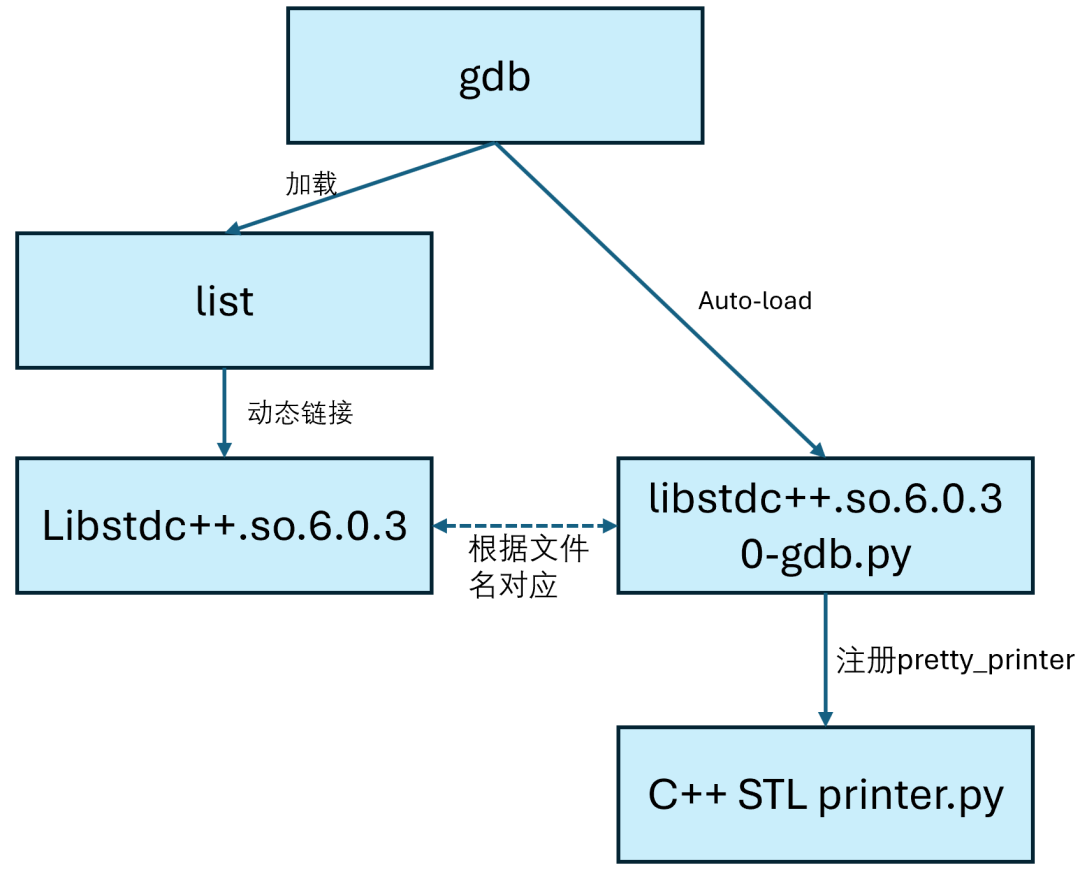 From the above figure, it can be inferred that if auto-load does not find the correspondinglibstdc++.so.6.0.30-gdb.py, then the STL printing may not work. This could be the reason why the relatively underperforming Linux system does not display STL information.The GDB’s auto-load mechanism is a mechanism that automatically executes certain scripts (such as Python scripts, command scripts) during the debugging process. It is used to automatically register pretty printers, load custom debugger configurations, etc.
When GDB loads a binary file, shared library, or symbol, it automatically looks for corresponding script files, such as:
-
*.gdb.py (Python scripts)
-
*.gdb (command scripts)
These scripts follow a set of rules – GDB will look for files with fixed paths or specific names and automatically execute them, provided that auto-load is enabled.
When GDB loads a shared library (such as libstdc++.so), it will look for a script with the same name in the relevant path (auto-load path, or the same directory, etc.), such as the one shown in the figure:libstdc++.so.6.0.30-gdb.py.
GCC and GDB support embedding .debug_gdb_scripts sections in the target file, specifying the scripts to be loaded. For example:
__attribute__((section(".debug_gdb_scripts")))static const char script[] = "my_script.py";Auto-load search methods and locations:
| Location | Description |
|---|---|
<span>*.so Same directory</span> |
Look for <span><library-name>-gdb.py</span> |
<span>/usr/share/gdb/auto-load/...</span> |
System scripts that map actual paths |
ELF’s <span>.debug_gdb_scripts</span> |
Embedded auto-load script paths |
| User-specified paths | Added safe-path through <span>.gdbinit</span> |
To solve the initial issue of the relatively underperforming Linux system not displaying STL information, you can add the following to .gdbinit:
pythonimport sysimport ossys.path.insert(0, '/libstdc++.so corresponding pretty_printers implementation')from libstdcxx.v6.printers import register_libstdcxx_printersregister_libstdcxx_printers (None)endThe above .gdbinit actually configures auto-load. Since the pretty-printers for libstdc++.so have been supported since 2009, the implementation should be available in the system, and finding the corresponding path should suffice.