sizeof() is an operator used to compute the size of data types, constants, and variables. It is a compile-time operator because it returns the size of a variable or constant at compile time.
The size calculated by the sizeof() operator is the amount of RAM space occupied in the computer.
The syntax of the sizeof() operator is as follows:
sizeof(data_type);In the above syntax, data_type can be a data type, variable, constant, union, structure, or any other user-defined data type.
👇Click to receive👇
👉C Language Knowledge Resource Collection
The sizeof() operator can be applied to the following operand types:
-
When the operand is a data type
If the parameter of the sizeof() operator contains a variable’s data type, the sizeof() operator will return the size of that data type.
Let’s understand this with an example.
#include <iostream>
using namespace std;
int main(){ // Determine the number of bytes occupied by each data type.
  std::cout << "Size of int data type: " << sizeof(int) << std::endl;
  std::cout << "Size of float data type: " << sizeof(float) << std::endl;
  std::cout << "Size of double data type: " << sizeof(double) << std::endl;
  std::cout << "Size of char data type: " << sizeof(char) << std::endl;
  return 0;
}
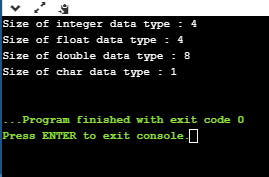
In the above program, we used the sizeof() operator to calculate the size of built-in data types. We know that int occupies 4 bytes, float occupies 4 bytes, double occupies 8 bytes, and char occupies 1 byte. The result of the sizeof() operator matches the output we observe.
Output
-
When the operand is a class type
#include <iostream>
using namespace std;
class Base{
    int a;
};
int main(){
    Base b;
    std::cout << "Size of class Base: " << sizeof(b) << std::endl;
    return 0;
}
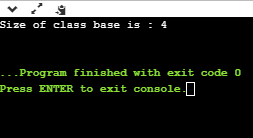
In the above program, we calculated the size of a class that contains only one integer variable. The output is 4 bytes because the int variable occupies 4 bytes.
Output
If we add another integer variable to the class, the code is as follows:
#include <iostream>
using namespace std;
class Base{
    int a;
    int d;
};
int main(){
   Base b;
   std::cout << "Size of class Base: " << sizeof(b) << std::endl;
   return 0;
}
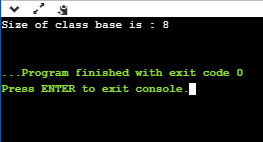
In the above code, we added another integer variable. In this case, the size of the class will be 8 bytes because two integer variables occupy 8 bytes (4 bytes each).
If we add a character variable to the above code, the code is as follows:
#include <iostream>
using namespace std;
class Base{
  int a;
  int d;
  char ch;
};
int main(){
  Base b;
  std::cout << "Size of class Base: " << sizeof(b) << std::endl;
  return 0;
}
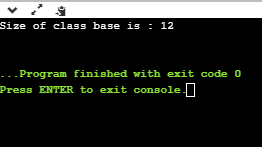
In the above code, the class contains two integer variables and one character variable. Based on our calculations, the size of the class should be 9 bytes (int + int + char), but this is incorrect due to the concept of structure padding.
-
When the operand is an array type
#include <iostream>
using namespace std;
int main(){
  int arr[]={10,20,30,40,50};
  std::cout << "Size of array 'arr': " << sizeof(arr) << std::endl;
  return 0;
}
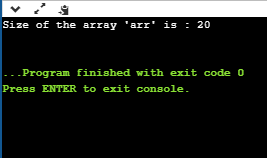
In the above program, we declared an integer array containing five elements. We used the sizeof() operator to calculate the size of the array. According to our calculation, the size of the array should be 20 bytes (4 bytes for each int data type, and 5 elements total), and the sizeof() operator gives the same result as we observe.
Output
Let’s consider another case of arrays.
#include <iostream>
using namespace std;
void fun(int arr[]){
   std::cout << "Size of array: " << sizeof(arr) << std::endl;
}
int main(){
   int arr[]={10,20,30,40,50};
   fun(arr);
   return 0;
}
In the above program, we attempted to print the size of the array using a function. In this case, we created an integer array and passed ‘arr’ to the function fun(). The fun() will return the size of an integer pointer, which is 8 bytes on a 64-bit operating system.
Output

-
When the operand is a pointer type
#include <iostream>
using namespace std;
int main(){
   int *ptr1=new int(10);
   std::cout << "Size of ptr1: " << sizeof(ptr1) << std::endl;
   std::cout << "Size of *ptr1: " << sizeof(*ptr1) << std::endl;
   char *ptr2=new char('a');
   std::cout << "Size of ptr2: " << sizeof(ptr2) << std::endl;
   std::cout << "Size of *ptr2: " << sizeof(*ptr2) << std::endl;
   double *ptr3=new double(12.78);
   std::cout << "Size of ptr3: " << sizeof(ptr3) << std::endl;
   std::cout << "Size of *ptr3: " << sizeof(*ptr3) << std::endl;
   return 0;
}
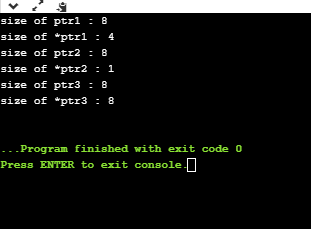
In the above program, we determined the size of pointers. The size of pointers is the same for all data types. If the computer is a 32-bit operating system, the size of pointers is 4 bytes. If the computer is a 64-bit operating system, the size of pointers is 8 bytes. I ran this program on a 64-bit operating system, so the output will be 8 bytes. Now, if we prefix the pointer with the ‘*’ symbol, the output depends on the data type. For instance, the data type of ptr1 is integer, so the sizeof() operator will return 4 bytes, as int occupies 4 bytes.
Output
-
When the operand is an expression
#include <iostream>
using namespace std;
int main() {
    int num1;
    double num2;
    cout << sizeof(num1 + num2);
    return 0;
}
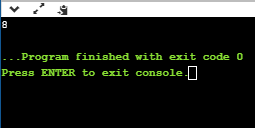
In the above program, we declared two variables, num1 and num2, of types int and double respectively. The size of int is 4 bytes, and the size of double is 8 bytes. The result will be the size of variable num2, which is 8 bytes for the double type.
Output

Popular Recommendations
-
CLion Tutorial – Installing Plugins from Command Line in CLion
-
C Language Algorithm – “Rotate Linked List” Algorithm Problem
-
C++ Tutorial – Detailed Explanation of C++ Pointers