Understanding C++ Memory Alignment

This article is authored by: Wang Fanghao, edited by: Apollo.

The following article is provided by Community Evangelist – Wang Fanghao, and it mainly introduces C++ Memory Alignment.

Understanding C++ Memory Alignment
About the Author
Wang Fanghao, a community evangelist, graduated from Wuhan University with a degree in Electronic Information. He has worked at Huawei and Alibaba on firmware, drivers, operating systems, and backend development. Currently, he focuses on L4-level autonomous driving development. He enjoys researching technology, analyzing source code, and solving problems. He is active in the Apollo open-source autonomous driving community and enjoys outdoor sports. While he is concerned about the future of autonomous driving, he is also full of passion. “Do not worry about not having friends on the road ahead; who in the world does not recognize you?” He hopes more people can join him!
ENJOY THE FOLLOWING
This article will mainly introduce the following aspects:
  • Why memory alignment?
  • Side effects of memory alignment
    • Space waste
    • Compilation ABI issues
  • How to align memory
    • Stack memory
    • Heap memory
  • Conclusion
I believe many have encountered memory alignment issues when using the Eigen library.
When using X86 SSE, AVX instruction sets, or ARM neon instruction sets to accelerate calculations, memory alignment is required. If memory is not aligned, it can cause hardware exceptions and interrupts.

Why Memory Alignment?

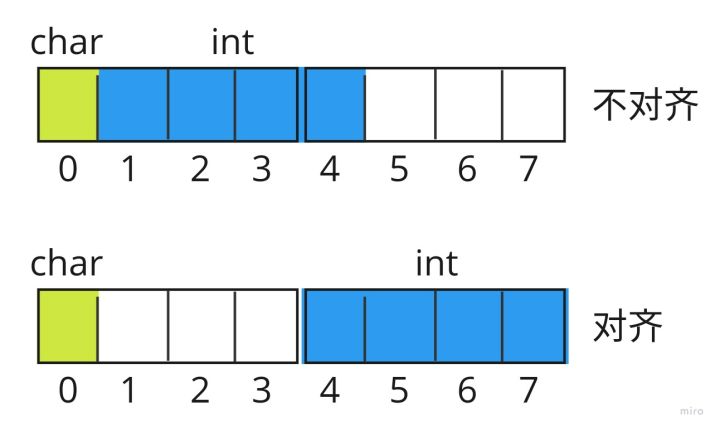
Taking the int type data as an example, suppose we have the following data structure:
struct example {      char a;      int b;};

Understanding C++ Memory Alignment

If memory is not aligned, since the CPU reads 4 bytes from memory at a time and requires memory alignment, this is determined by the address bus addressing mechanism. If the data is not aligned, reading int type data requires two reads, while if the memory is aligned, it only requires one read. Since memory reads are relatively time-consuming compared to the CPU, a strategy of trading space for time is adopted, wasting some space to improve read and write efficiency. If memory is not aligned, it can cause exceptions and interrupts.

Side Effects of Memory Alignment

The benefit of memory alignment is to speed up memory read efficiency, but it is not without drawbacks; it brings two side effects.
1. Space Waste
Memory alignment can lead to space waste. In the above example, it originally requires only 5 bytes, but due to memory alignment, it requires 8 bytes. The compiler will add 3 bytes of padding between char and int to ensure memory alignment. Therefore, the order of variables may affect the size of the structure. For example:
// size 12struct one {char a;int b;short c;};// size 8struct two {int b;char a;short c;};

Thus, maintaining a good variable declaration order can save space, but it also brings additional issues. The initialization of the class is done in the order of variable declaration, so changing the declaration order of variables also requires attention to whether the initialization order is affected.

2. Compilation ABI Issues

Using the gcc compilation option -march=native can enable the X86 SSE, AVX instruction sets, or ARM neon instruction sets. If a dynamic library enables the above options, but the caller does not enable them, or vice versa, it will lead to errors. The gcc compiler cannot check the compilation options of the dynamic library at that time, leading to binary incompatibility issues. The solution is simple: recompile both sides to either support memory alignment or not support it.

How to Align Memory

Regarding memory alignment, we must return to the essence of memory. Memory in a program is divided into stack and heap. Stack memory is allocated by the system, while heap memory is actively requested by the user and is the user’s responsibility to allocate and release.
Memory alignment fundamentally considers how to align memory, rather than which macros to use, or why to add these macros. Not deeply understanding the principles behind these macros can lead to many misunderstandings. This also teaches us that when encountering problems we do not understand, we must understand the underlying principles to thoroughly grasp the concepts.
1. Stack Memory
C++11 provides the keywords alignas and alignof to specify memory alignment. For example:
// Specify 16-byte alignmentstruct alignas(16) example {  char a;    int b;} A;

Stack memory is specified by the compiler. Through pre-compilation options, we can inform the compiler of the required alignment in bytes. In other words, for stack memory, we only need to specify the required alignment in bytes using keywords, and the compiler will automatically align it. For built-in types in C++, such as char, int, float, double, etc., there is no need to specify the alignment in bytes; the compiler will align based on the type by default.

Function Parameters

However, function parameters are an exception. If function parameters require memory alignment, do not pass them by value; instead, use references or pointers.

// Wrongvoid func(A a, int b) {}// Correctvoid func(const A* a, int b) {}void func(const A& a, int b) {}

Function parameters can actually be considered as stack memory. Why can’t we pass by value? In fact, function parameter passing can be understood as making a copy of the parameters before passing them and then calling the function. The entry address of the function is fixed, so if the entry address is not aligned, it can lead to misalignment of parameters, resulting in exceptions.

void func() {      A a = a;      int b = b;}

C++20 introduced assume_aligned to solve the above problems.

2. Heap Memory

Stack memory is aligned using the keywords alignas and alignof, while heap memory is relatively more complicated because heap memory is returned by malloc. Let’s look at the following example.

struct bar {      A a;      int b;} BAR;BAR b;  // Memory alignmentBAR* b = new BAR(); // Memory error

A is aligned to 16 bytes, so declaring the variable allocates stack memory, and the compiler will automatically align it to 16 bytes. However, if the object is created with new, it is not allocated by the compiler but dynamically allocated by new, and ordinary alloc does not guarantee byte alignment. If alignment is needed, we can only reconstruct the new method of BAR to use aligned_alloc to allocate aligned memory.

In fact, C++17 provides aligned_alloc for aligned memory allocation, so if you are using C++17 or later, you don’t need to worry about the above issues.

Conclusion

This means that compilers and syntax are becoming increasingly convenient, allowing users to think less about memory alignment issues, thus becoming more efficient.
The above content is the sharing of C++ Memory Alignment by Teacher Fanghao. For more articles related to autonomous driving systems, please continue to follow the Apollo Developer Community official WeChat account and website!
Understanding C++ Memory Alignment
For more discussions, please scan the QR code to add “Apollo” as a friend, join the group to speak freely, developers are welcome to actively contribute articles, exchange technologies, and progress together. We will present Apollo exclusive surprise gifts to those who love technical exchanges and contribute insights, looking forward to exploring and journeying together with developers!
Understanding C++ Memory Alignment

Leave a Comment