
Introduction
In the previous series of blogs, we learned a lot about the practical techniques of calling C++ from C#. In the interoperability development between C# and C++ (P/Invoke, mixed programming, DllImport, etc.), struct alignment is one of the most common pitfalls. Today, we will continue to explore a common pitfall that many encounter when first engaging in C# and C++ interoperability development:
Why does the memory layout of the same struct differ between C# and C++?
Today, we will delve into the essential reasons behind this phenomenon and provide best practice solutions.
1. Fundamental Reasons
1. Different Default Alignment Rules of Languages
- • C++ compilers follow the CPU alignment rules, inserting padding in structs to ensure that member variables are stored on natural boundaries, improving memory access efficiency.
- • C# defaults to Sequential Layout, but the CLR may insert additional padding in certain cases; if not specified with
<span>[StructLayout]</span>, it may lead to inconsistencies with C++.
2. Managed vs Unmanaged Differences
- • C++ struct is purely memory-mapped, with size determined by the compiler and alignment rules.
- • C# struct runs in a CLR managed environment, where JIT may optimize the layout. The default Auto Layout does not guarantee predictability and cannot be directly mapped to the unmanaged world.
2. Case Analysis
C++ Code
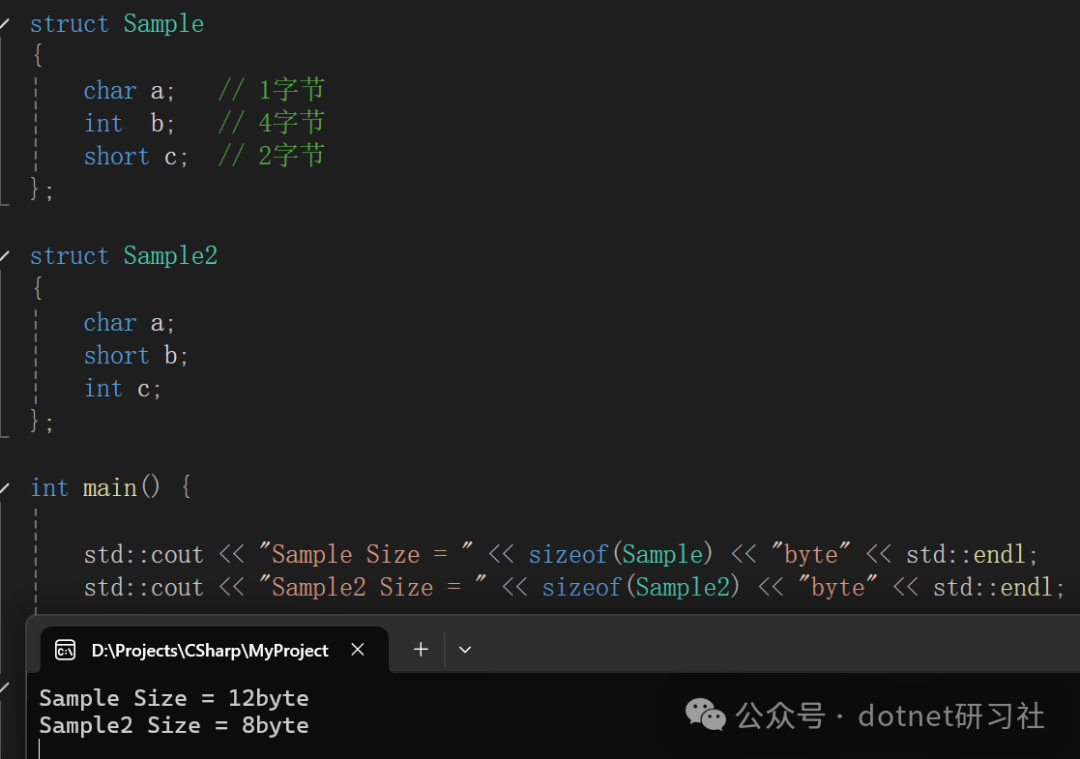
struct Sample
{
    char a;   // 1 byte
    int  b;   // 4 bytes
    short c;  // 2 bytes
};
struct Sample2
{
    char a;
    short b;
    int c;
};
C# Code
public struct Sample
{
    public byte a;
    public int  b;
    public short c;
}
public struct Sample2
{
    public byte a;
    public short b;
    public int  c;
}
Memory Layout Comparison
Sample in C++
Most mainstream compilers (MSVC, GCC, Clang) follow the following rules under default alignment:
The starting address of each member must be a multiple of the size of that member type (natural alignment).
- 1.
<span>a</span>occupies 1 byte, but<span>b</span>requires 4-byte alignment → insert 3 bytes of padding - 2.
<span>b</span>occupies 4 bytes - 3.
<span>c</span>occupies 2 bytes, the overall needs to be padded to the maximum alignment (4) → add 2 bytes👉 Total size = 12 bytes
Sample2 in C++
- 1.
<span>a</span>occupies 1 byte, but<span>b</span>requires 2-byte alignment → insert 1 byte of padding - 2.
<span>b</span>occupies 2 bytes - 3.
<span>c</span>occupies 4 bytes, overall aligned to 4 bytes → no additional padding needed👉 Total size = 8 bytes
Sample in C#
- • If using
<span>[StructLayout(LayoutKind.Sequential)]</span>, the result usually remains consistent with C++ (8 or 12 bytes). - • If using the default
<span>Auto</span>, the CLR may rearrange fields (reducing padding), leading to cases of same definition but different results.
I tested this on Windows + MSVC, and I wonder if anyone has run
<span>sizeof</span>on Linux + GCC/Clang or ARM architecture and got the same results? Feel free to share your test results in the comments!
3. Solutions
1. Use <span>[StructLayout]</span> to Control Layout
Explicitly declare in C#:
[StructLayout(LayoutKind.Sequential, Pack = 1)]
public struct Sample
{
    public byte a;
    public int  b;
    public short c;
}
This enforces 1-byte alignment, avoiding additional padding inserted by the CLR.
2. Synchronize Alignment in C++
Use <span>#pragma pack</span> in C++ to ensure consistency:
#pragma pack(push, 1)
struct Sample
{
    char a;
    int  b;
    short c;
};
#pragma pack(pop)
At this point, the <span>sizeof(Sample)</span> in C++ will match C# (7 bytes).
4. Differences Regarding <span>bool</span>
- • C#:
- • Default
<span>bool</span>occupies 1 byte (8 bits), fixed at the .NET CLR level. - • When using
<span>[StructLayout(LayoutKind.Sequential)]</span>, it is indeed 1 byte, but padding may occur during alignment. - • C++:
- • The standard specifies that
<span>bool</span>only guarantees the minimum storage unit that can hold true/false. - • In different compilers:
- • MSVC generally uses 1-byte alignment (thus
<span>sizeof(bool) == 1</span>). - • GCC/Clang typically also use 1 byte, but may introduce extra padding due to struct alignment.
- • Some compilers may even compress
<span>bool</span>into a bitfield (which is completely incompatible).
Recommended Practices:
- 1. Avoid using
<span>bool</span>directly in cross-language structs
- • When crossing boundaries, C++’s
<span>bool</span>may not behave as you expect. - • The safest approach is to use
<span>int</span>or<span>byte</span>(<span>uint8_t</span>/<span>unsigned char</span>) instead.
[StructLayout(LayoutKind.Sequential)]
public struct Sample
{
    [MarshalAs(UnmanagedType.I1)]  // Explicitly declare as 1 byte
    public bool flag;
    public int value;
}
struct Sample {
uint8_t flag; // Ensure consistency
int value;
};- • On the C++ side, define it as
<span>uint8_t</span>or<span>int32_t</span>, using only<span>0 / 1</span>to represent true/false. - • On the C# side, use
<span>[MarshalAs(UnmanagedType.I1)]</span>(1 byte) or<span>[MarshalAs(UnmanagedType.Bool)]</span>(4 bytes) to explicitly constrain.
I once encountered a bug: a struct in C++ was
<span>bool + int</span>, resulting in MSVC compiling it to<span>sizeof(struct) == 8</span>; C# thought it was 5 bytes, leading to a crash during<span>Marshal.PtrToStructure</span>. The only solution was to change<span>bool → byte</span>to avoid this.
5. Best Practices
- 1. Always explicitly declare layout in C# using
<span>[StructLayout(LayoutKind.Sequential, Pack = N)]</span>. - 2. Keep both sides synchronized using
<span>#pragma pack</span>in C++, ensuring consistent alignment. - 3. Avoid relying on default behavior as default alignment strategies may differ across platforms (x86/x64/ARM) and compilers.
- 4. Use serialization protocols for complex structs If a struct contains STL containers, C# reference types, or other non-blittable members, it is recommended to use cross-language protocols like Protobuf / FlatBuffers instead of directly passing structs.
6. Conclusion
The fundamental reason for the differences in memory layout between C# and C++ structs is that: the default alignment rules of the two languages differ, and the CLR may perform JIT optimizations. When interacting across languages, manual control of alignment is essential, or else pitfalls are easily encountered.
👉 The best practices are:
- • C#:
<span>[StructLayout(LayoutKind.Sequential, Pack = N)]</span> - • C++:
<span>#pragma pack(N)</span>This way, the structs in C# and C++ can remain strictly consistent.
7. References
- • Mastering C# Structures
- • LayoutKind Enum
- • Struct layout in C#
If this article has been helpful to you, I would be very honored.
If you have any other opinions on this article, feel free to leave a comment for discussion.
If you like my articles, thank you for your support, likes, follows, and shares!!!