In C language, file operations are very important functions, mainly implemented through the functions provided by the standard library’s<span>stdio.h</span> header file. Below is a detailed introduction to file read and write operations in C language:
1. File Pointer
All file operations need to be performed through thefile pointer, defined as follows:
FILE *fp; // Declare a file pointerThe file pointer is used to point to the relevant information of the file (such as file name, status, current position, etc.).
2. Opening a File (fopen function)
Use the<span>fopen()</span> function to open a file, with the prototype:
FILE *fopen(const char *filename, const char *mode);<span>filename</span>File name (can include path)
<span>mode: Open mode, commonly used modes:</span>
<span>"r": Read-only, the file must exist</span>
<span> "w": Write-only, creates the file if it does not exist, clears it if it exists</span><span> "a": Append, adds content at the end of the file</span><span> "r+": Read and write, the file must exist</span><span> "w+": Read and write, creates the file if it does not exist, clears it if it exists</span><span> "a+": Read and write, adds content at the end of the file</span>Return value: Returns the file pointer on success, returns<span>NULL</span> on failure.Demo:
FILE *fp = fopen("test.txt", "r");if (fp == NULL) { printf("Cannot open file\n"); return 1;}3. Closing a File (fclose function)
After the operation is completed, the file must be closed, with the prototype:
int fclose(FILE *stream);Return value: Returns 0 on success, non-zero on failure.Demo:
fclose(fp);4. File Read and Write Operations
1. Character Read and Write
<span>fgetc()</span>: Reads a character from the file
int fgetc(FILE *stream); // Returns character ASCII code on success, EOF on failure or end of file<span>fputc()</span>: Writes a character to the file
int fputc(int char, FILE *stream); // Returns the written character on success, EOF on failure2. String Read and Write
<span>fgets()</span>: Reads a string from the file
char *fgets(char *str, int n, FILE *stream); // Reads up to n-1 characters, automatically adds '\0'<span>fputs()</span>: Writes a string to the file
int fputs(const char *str, FILE *stream); // Returns a non-negative integer on success, EOF on failure3. Formatted Read and Write
<span>fscanf()</span>: Reads formatted data from the file
int fscanf(FILE *stream, const char *format, ...);<span>fprintf()</span>: Writes formatted data to the file
int fprintf(FILE *stream, const char *format, ...);4. Block Read and Write (commonly used for binary files)
<span>fread()</span>: Reads a block of data from the file
size_t fread(void *ptr, size_t size, size_t nmemb, FILE *stream);<span>fwrite()</span>: Writes a block of data to the file
size_t fwrite(const void *ptr, size_t size, size_t nmemb, FILE *stream);5. File Positioning
<span>fseek()</span>: Moves the file pointer
int fseek(FILE *stream, long int offset, int whence);<span>whence</span>Reference position<span>SEEK_SET</span>Beginning of the file<span>SEEK_CUR</span>Current position<span>SEEK_END</span>End of the file
<span>ftell()</span>: Gets the current file pointer position
long int ftell(FILE *stream);<span>rewind()</span>: Moves the file pointer to the beginning
void rewind(FILE *stream);6. Example Code
1. Example of Writing to a File
#include <stdio.h>
int main() {    //FILE* fp = fopen("output.txt", "w");    FILE* fp;    fopen_s(&fp,"output.txt", "w");    if (fp == NULL) {        printf("Cannot open file\n");        return 1;    }
    // Write character    fputc('A', fp);
    // Write string    fputs("Hello World\n", fp);
    // Formatted write    int num = 100;    fprintf(fp, "Number: %d\n", num);
    fclose(fp);    return 0;}
2. Example of Reading from a File
#include <stdlib.h>#include <stdio.h>
int main() {    //FILE* fp = fopen("output.txt", "r");    FILE* fp;    fopen_s(&fp,"output.txt", "r");    if (fp == NULL) {        printf("Cannot open file\n");        return 1;    }
    char buffer[100];
    // Read character    char c = fgetc(fp);    printf("Read character: %c\n", c);
    // Read string    fgets(buffer, 100, fp);    printf("Read string: %s", buffer);
    // Formatted read    int num;    //fscanf(fp, "Number: %d", &num);    fscanf_s(fp, "Number: %d", &num);    printf("Read number: %d\n", num);
    fclose(fp);    return 0;}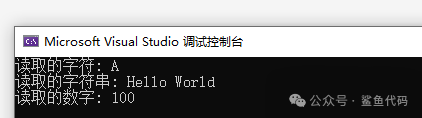
7. Precautions
- Check if the file is successfully opened before operating on it
- Must close the file after the operation is completed, otherwise it may lead to data loss
- The operation methods for text files and binary files are different, binary files use
<span>fread()</span>and<span>fwrite()</span>for more efficiency - Using
<span>feof()</span>function can determine if the end of the file has been reached
8. Unsafe Usage Tips
Comparison of fopen_s and fopen usage
    FILE* fp = fopen("output.txt", "r");
    FILE* fp;    fopen_s(&fp,"output.txt", "r");
Comparison of fscanf_s and fscanf usage
int num; fscanf(fp, "Number: %d", &num); fscanf_s(fp, "Number: %d", &num);