 Click the blue text to follow, grateful for your support
Welcome to all friends to follow“Hao Xushua Electronic Design Team” public account, this account will regularly update relevant technical materials, software, etc. Friends who are interested can browse other“modules”, hoping that all friends can gain something they want from this public account“things”.
This article mainly discusses the detailed explanation of the COE file format in Xilinx FPGA
COE (Coefficient) files are plain text files used to initialize block RAM (BRAM) in Xilinx design tools (such as Vivado and ISE) or to configure coefficients for digital signal processors (DSP48). Its core function is to provide a simple way to pre-set a large amount of initial data or coefficient values into the FPGA’s hardware resources.
Basic StructureA COE file consists of two main parts:Header Information: Defines the directive lines for the data format.Data Section: The actual data values.The file consists of comment lines starting with a semicolon (;) and valid directive/data lines. Comments can help understand and maintain the file.Syntax Explanation a) Header Directives The header information consists of two key directives: memory_initialization_radix Meaning: Specifies the base (radix) of the numbers in the data section. Optional values: 2: Binary 10: Decimal – Most commonly used 16: Hexadecimal Example: memory_initialization_radix = 10;memory_initialization_vectorMeaning: This marks the beginning of the data section. The actual data follows immediately. Example: memory_initialization_vector = Data Section Format: Data follows immediately after the memory_initialization_vector =. Representation: Data must be written according to the base specified by the radix directive. radix=10: 0, 1, 255, 1024, radix=16: 0A, 3FF, ABCD, (Note: Hexadecimal digits A-F are case insensitive) radix=2: 0011, 1100, 10101010, Delimiter: Data is separated by commas (it is recommended to use commas). Terminator: The last data must also have a comma after it, or can be terminated with a semicolon (;) (but usually a comma is used).An Example of a Complete COE File Example:Initialize an 8×8-bit ROM (decimal format) This ROM has 8 locations, each storing an 8-bit wide (0-255) decimal number.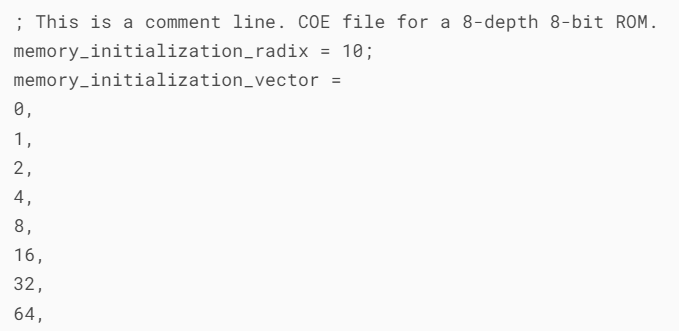 Explanation: The first address (0) of the memory is initialized to 0, the second address (1) is initialized to 1, …, the eighth address (7) is initialized to 64.Key Considerations and Common Errors Base Consistency: Ensure that the values in the data section match the base defined by the radix directive. Writing FF under radix=10 will cause an error. Data Width: The bit width of the data values must match the port width set in your IP core configuration. For example, if you configure BRAM to be 32 bits wide, each data item should be 8 hexadecimal digits (32/4=8), such as 12345678. If the bit width of the data value is less than the configured port width, the tool will usually automatically pad with zeros in front. For example, writing FF (radix=16) in a 32-bit width will be read as 000000FF. Data Quantity (Depth): The total number of data items can be less than or equal to the memory depth set in your IP core configuration. If less, the remaining memory locations will be initialized to 0. Delimiter: Each data item should be separated by a comma (it is recommended to use commas), including the last data. Although sometimes the last data can also be terminated with a semicolon, it is recommended to use commas for good practice. File Path: Do not include Chinese or special characters in the file path and filename; it is best to use only letters, numbers, and underscores to avoid unnecessary parsing errors by the tools.The standard COE file format itself does not support non-continuous initialization or initialization with address labelsIts operation is: The first data value corresponds to address 0. The second data value corresponds to address 1. And so on, until the last data value. COE files do not have syntax to allow you to specify commands like ADDR 0x100: 0x1234. Its initialization is entirely sequential and index-based.For large memories, it is strongly recommended to use scripts (Python, MATLAB, etc.) to generate COE files to avoid manual errors and improve efficiency.
Some resources in this article are sourced from the internet. If there is any infringement, please contact the author.
If you think this public account is good, please recommend it to your friends. Thank you and best wishes!