Table instructions include the Add to Table instruction (AD_T_TBL), First In First Out instruction (FIFO), Last In First Out instruction (LIFO), Table Find instruction (TBL_FIND), and Fill instruction (FILL_N). They enable dynamic data storage, orderly extraction, precise searching, and bulk filling through standardized parameter configurations and corresponding logical triggers, significantly simplifying the programming process for complex data handling. These instructions are widely used in scenarios such as material counting on production lines, equipment status recording, and batch parameter configuration.

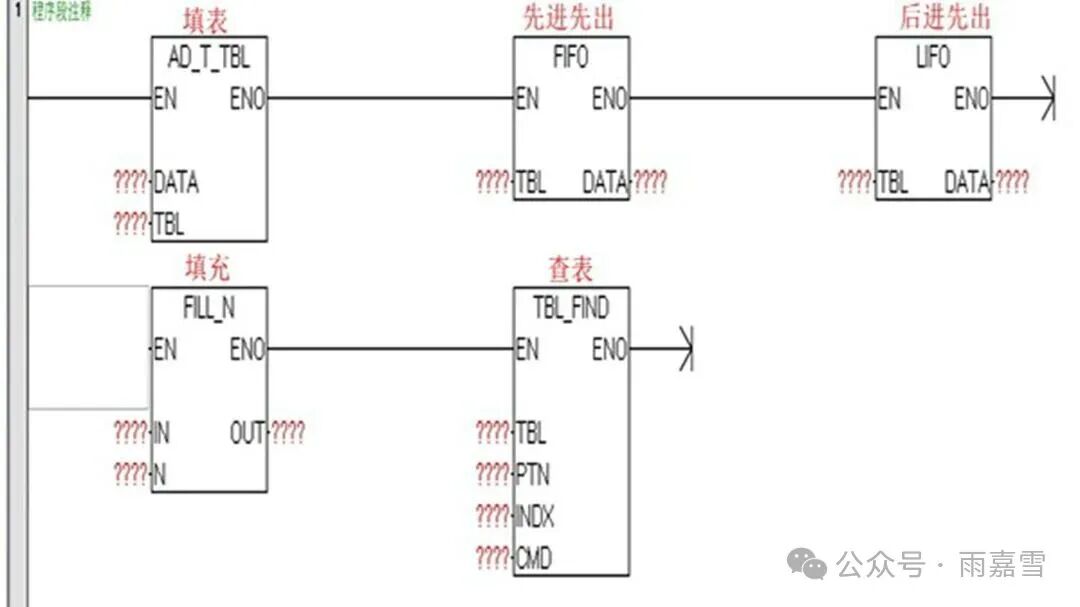

1. Add to Table Instruction (AD_T_TBL)
The Add to Table instruction (AD_T_TBL) is the fundamental instruction for “data entry into a table”. Its core function is to append specified data (DATA) to the end of the data table, achieving dynamic accumulation of data. The functional principle mainly includes three parts: entry detection, data writing, and entry updating.
1. Entry Detection: When the instruction is triggered, it first reads the “current actual entry count (EC)” and “maximum entry count (TL)” of the data table to determine if the table is not full (actual entry count < maximum entry count);
2. Data Writing: If the table is not full, the data from the “data source address (DATA)” is copied to the “current end position” of the data table (i.e., the memory address corresponding to “data table starting address + current length”);
3. Entry Updating: After data writing is completed, the “current actual entry count (EC)” of the data table is automatically incremented by 1, and the “operation successful” flag is set. If the table is full, the writing operation is not executed, and the “table overflow” error flag (e.g., SM1.0) is set to alert the program for exception handling.
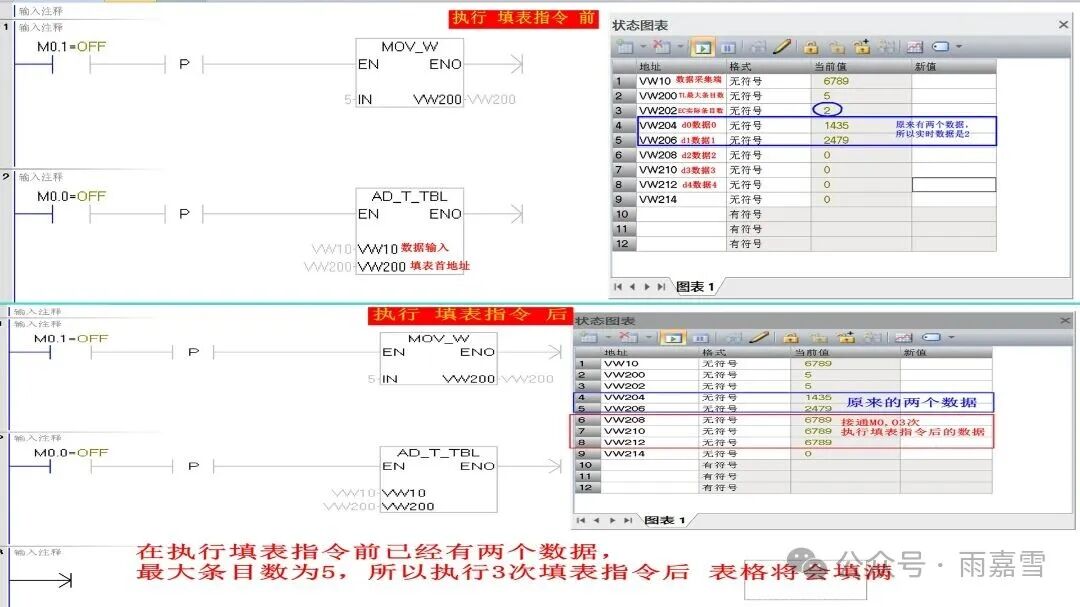
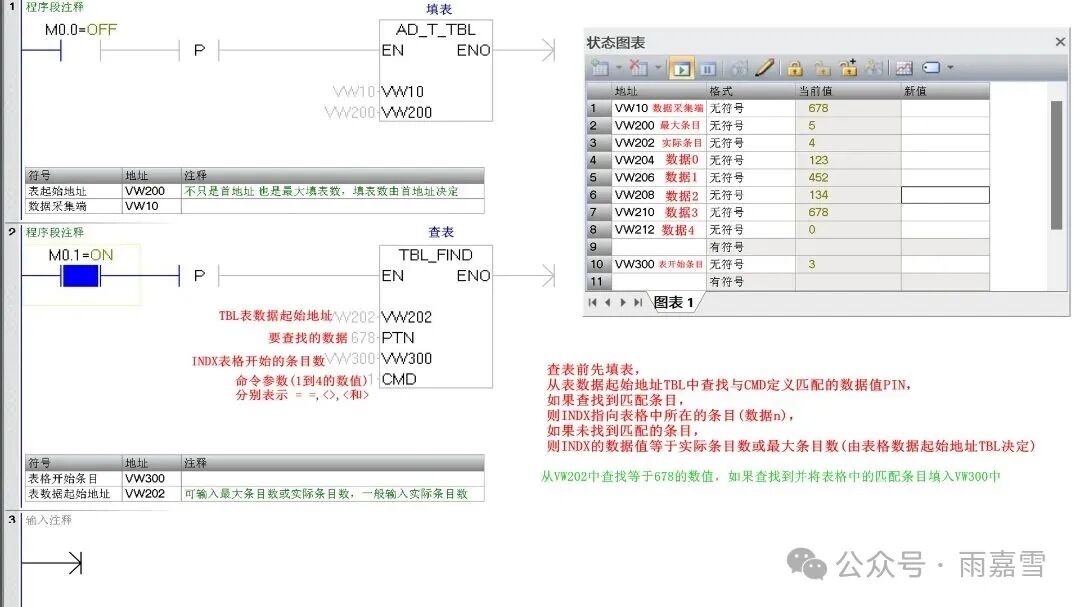
As shown in the figure, the first value in the table (TBL) is the maximum entry count (TL), which is not only the starting address but also the maximum number of entries that can be filled. The second value is the current actual entry count (EC), which indicates the number of entries in the specified table. Each time data is filled, the actual entry count increases by 1. When the actual entry count equals the maximum entry count, it indicates that the table is full. The subsequent values are the data to be filled in the table, sorted starting from 0. The table can contain a maximum of 100 entries, excluding the parameters for maximum entry count (TC) and current actual entry count (EC).
2. First In First Out Instruction (FIFO)
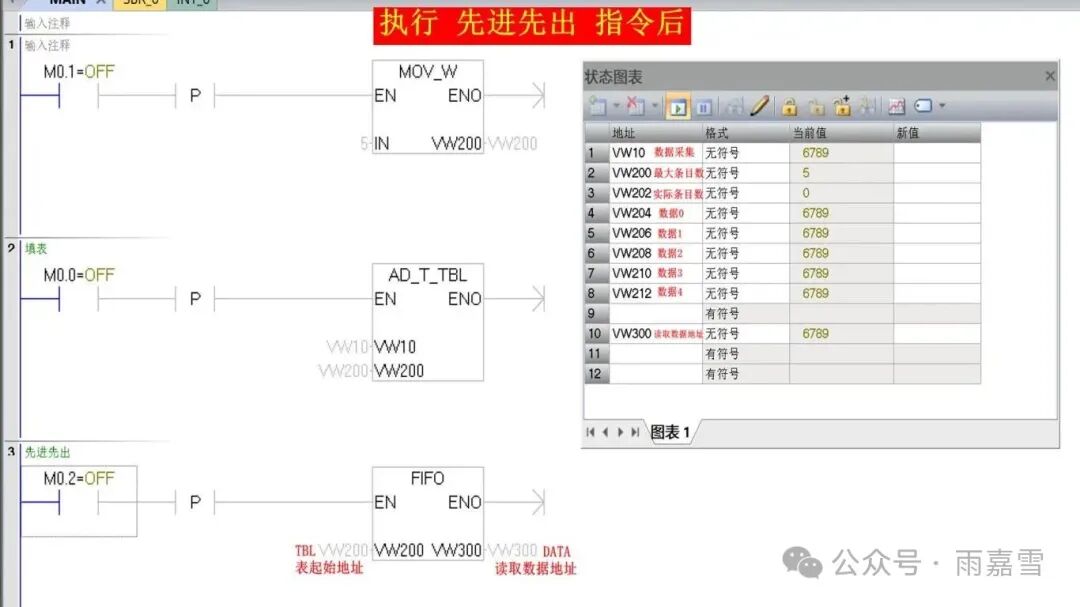
The First In First Out instruction (FIFO) follows the principle of “the first data stored is the first to be retrieved”. Before executing the FIFO instruction, the table must be filled. TBL is the starting address of the Add to Table instruction, and the retrieved data is assigned to DATA. The first data entered (0) is retrieved, and after the search is complete, the actual entry count (EC) is decremented by 1. The next retrieval will still look for data 0, and the retrieved data will be discarded, causing the subsequent data to move up one position. The empty storage area below will copy the last data entered into the table to fill it. After each retrieval, the actual entry count will decrease by 1. When the actual entry count (EC) reaches 0, it indicates that the table retrieval is complete, and new data can be filled in.


3. Last In First Out Instruction (LIFO)
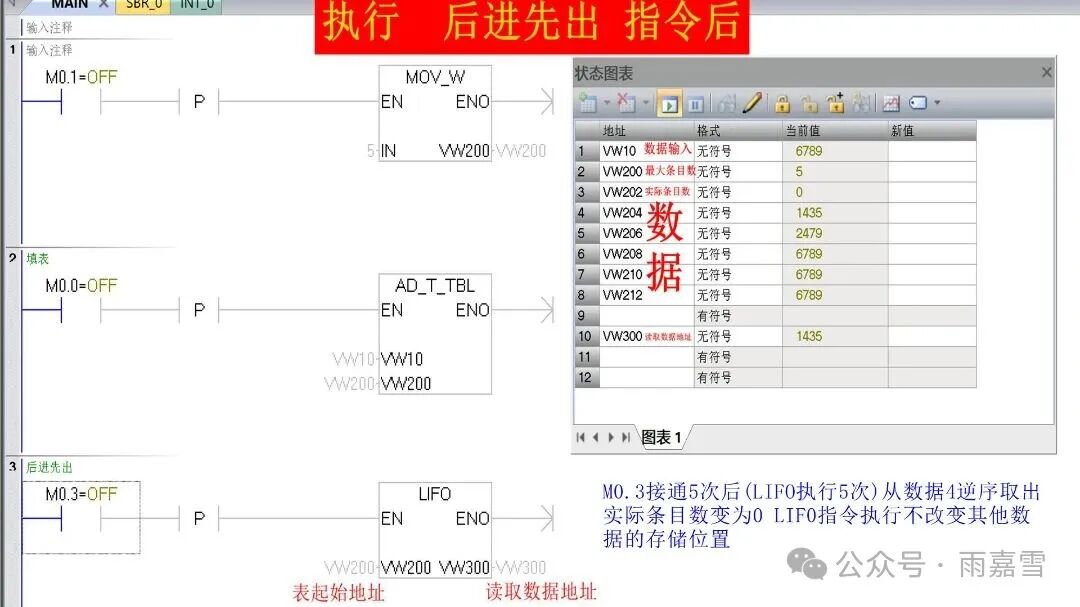
The Last In First Out instruction (LIFO) follows the principle of “the last data stored is the first to be retrieved”. It corresponds to the “stack” data structure and complements the FIFO instruction’s “sequential extraction”.
The workflow of the LIFO instruction is simpler than that of FIFO, requiring only three steps: “locate the latest data – retrieve data – update length”:
1. Locate Latest Data: When the instruction is triggered, it checks if the table is not empty (actual entry count > 0). If it is not empty, it finds the storage address of the latest (or last) data.
2. Retrieve Data: The value from the latest data address is copied to the “data output address”;
3. Length Update: After the data is retrieved, the “current actual entry count” of the table is directly decremented by 1 without changing the storage positions of other data, and the “operation successful” flag is set. If the table is empty, the “table empty” error flag (SM1.1) is set.
4. Table Find Instruction (TBL_FIND)
The Table Find instruction (TBL_FIND) searches for data matching the search criteria in the table (TBL). The Table Find instruction starts with the table entry (INDX) and searches for data matching the CMD definition (PTN) in the table (TBL). If a matching entry is found, INDX points to the matching entry in the table; if you want to find the next matching entry, you must increment INDX by 1 before reactivating the table search instruction. If no matching entry is found, the value of INDX equals the entry count.
5. Fill Instruction (FILL_N)
The Fill instruction (FILL_N) is an efficient instruction for “bulk data writing”. Its core function is to perform a full overwrite of a continuous memory area with specified “filling data”, quickly achieving area initialization, uniform parameter configuration, or data clearing. The “filling length” of this instruction is determined by the “filling data type”: if the filling data is a “word (2 bytes)”, then the “filling length” indicates the “number of words”. Additionally, it is important to note that if there is data in the target area, this instruction will overwrite all existing data in the target area. Therefore, it is necessary to confirm that there is no important unbacked data in the target area before use to avoid data loss.
The working logic of the FILL_N instruction is based on the three-step process of “area positioning – bulk writing – counting completion”, as follows:
1. Area Positioning: When the instruction is triggered, it first confirms the legality of the “target filling area”—that is, the “starting address of the target area” (DATA) and the terminating address calculated from the “filling length” (starting address + filling length – 1) do not exceed the PLC memory range, and it also confirms that the data type of the “filling data address” matches the target area;
2. Bulk Writing: Starting from the “starting address of the target area”, the data from the “filling data address” is continuously written into each element of the target area, with the number of writes determined by the “filling length” (e.g., if the filling length is 7, then 7 consecutive elements are written);
3. Counting Completion: When the number of writes reaches the “filling length”, the “filling successful” flag (e.g., SM1.0) is automatically set. If the target area address is illegal (e.g., exceeds memory range), writing is immediately stopped, the “address error” flag (e.g., SM1.2) is set, and no data writing operation is executed.
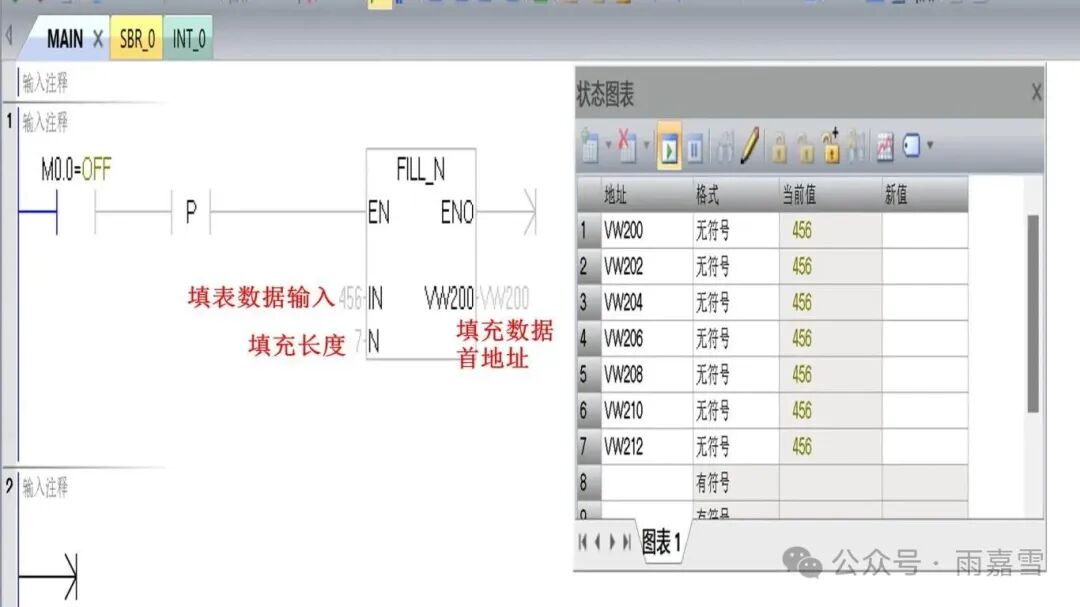
As shown in the figure, when M0.0 is activated, the Fill instruction FILL_N writes the word value (456) from the address IN into the first continuous N words starting from OUT (VW200), where N can range from 1 to 255. The seven words starting from VW200 are VW200, VW202, VW204, VW206, VW208, VW210, and VW212.

 END
END
Generally, the above instructions are not used independently but are combined to achieve different functions. For example, the AD_T_TBL (Add to Table instruction) is primarily used for dynamic data accumulation, appending source data to the end of the data table. If the table is not full, it writes and updates the length; if full, it reports an error (maximum of 100 entries can be written), suitable for continuous data collection scenarios such as temperature sampling and fault code caching. The FIFO (First In First Out instruction) follows the principle of “first in, first out”, moving subsequent data forward after retrieving the first data and updating the length, suitable for scenarios where data is retrieved in the order of entry. The LIFO (Last In First Out instruction) complements the FIFO instruction, retrieving data based on the “last in, first out” principle, directly extracting the latest data without moving other data, only updating the length, suitable for scenarios requiring priority handling of the latest data, such as fault prioritization and stack-based material retrieval. The TBL_FIND (Table Find instruction) searches for target data in the data table, returning a pointer to the matching entry in the table if found, suitable for fault code localization and historical data tracing that require precise data retrieval. The FILL_N (Fill instruction) performs bulk overwriting of a continuous memory area with specified data, writing according to set length and data type, suitable for parameter initialization, data table clearing, and unified configuration across multiple stations for batch data processing scenarios. Additionally, it is important to note that all instructions related to table reading and writing must be triggered correctly to function properly.