Word count: 1266, reading time approximately 7 minutes
Set your home cloud life as a “star⭐” to never miss the latest articles
Friends who often tinker with NAS have a common trait: they love to experiment and refine, and email is no exception! I hope to create a dedicated personal email. Recently, I just set up an email, and here is my custom email signature; it looks pretty good, right? When communicating externally, it’s important to design your business card well!
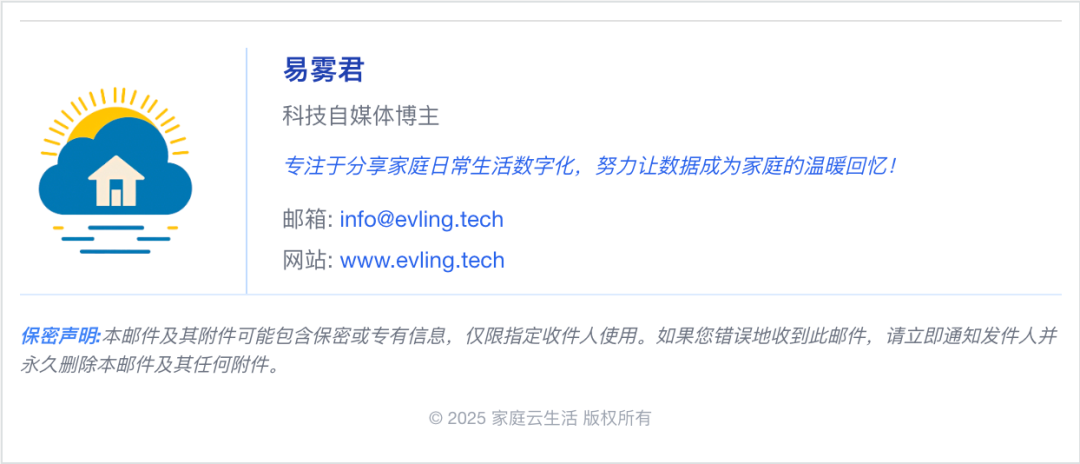
I personally prefer Tencent’s products and have been using their WeChat Work, which comes with an email function. You only need to bind a domain name to have your own dedicated email, eliminating the hassle of setting up and maintaining a server.
To bind the domain name, if the domain resolution is hosted by a domestic provider, just follow the official instructions. My resolution is hosted by Cloudflare, and I need to manually add the corresponding records. Then comes the verification, which takes a while; it took about a day or two for my verification to go through, so just be patient.
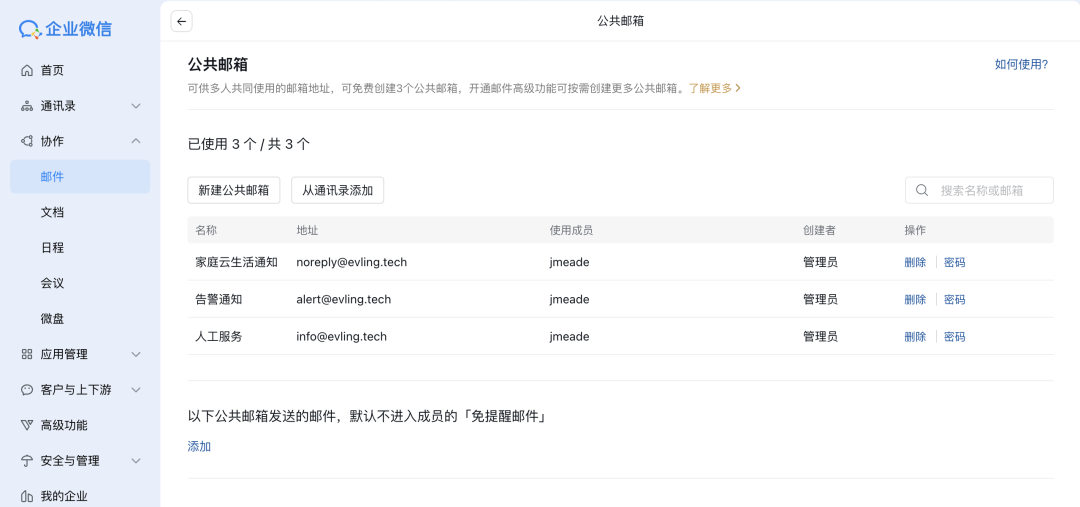
The free plan of WeChat Work email includes three public email slots, which I plan to utilize as follows.
| Email Address | Usage | Administrator |
| [email protected] | For customer service | jmeade |
| [email protected] | For monitoring alerts | jmeade |
| [email protected] | For automated customer service | jmeade |
Once the domain is bound, you can configure email for members. Member email addresses can be changed at any time, and the three public emails need to be assigned to a member for management. I assigned it to myself, Joseph Meade, with the username jmeade.
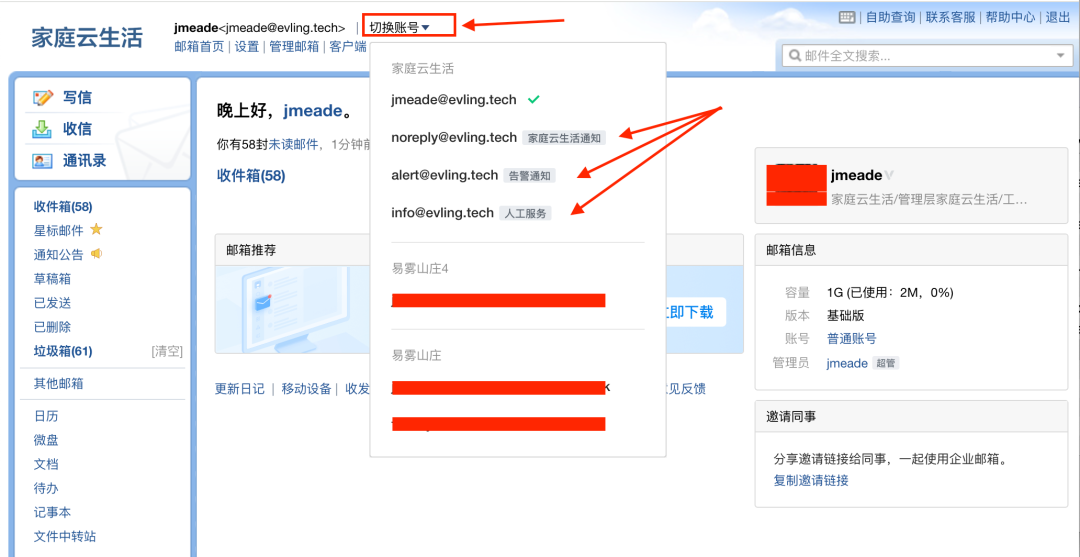
Next is a crucial step: setting up a personalized signature. Here, I will take the public info email as an example. Make sure to log in to the member email first; this detail is important as many people cannot find the management entry for public emails, which can be found in the dropdown menu in the image.
Enter the settings page of the info email, edit the signature, switch to HTML mode, and paste the following content. Some elements in the content need to be changed to your own before pasting.
<table cellspacing="0" cellpadding="0" border="0" style="font-family:Arial,Helvetica,sans-serif;font-size:13px;color:#333;max-width:600px;line-height:1.5"><tbody><tr><td style="border-top:1px solid #e0e0e0;padding-top:15px"></td></tr><tr><td><table cellspacing="0" cellpadding="0" border="0" width="100%"><tbody><tr><td style="vertical-align:middle;padding-right:20px;width:110px"><img src="https://www.evling.cf/upload/HomeCloudHub.png" width="110" style="border:0;max-width:110px;height:auto;display:block"></td><td style="vertical-align:middle;border-left:1px solid #BFDBFE;padding-left:20px"><table cellspacing="0" cellpadding="0" border="0" style="width:100%"><tbody><tr><td style="padding-bottom:5px"><strong style="font-size:16px;color:#1E40AF">易雾君</strong></td></tr><tr><td style="padding-bottom:10px"><span style="color:#6B7280;font-size:13px">Technology self-media blogger</span></td></tr><tr><td style="padding-bottom:12px"><span style="color:#2563EB;font-style:italic">Focusing on sharing the digitalization of daily family life, striving to make data a warm memory for families!</span></td></tr><tr><td style="padding-bottom:10px"><a href="mailto:[email protected]" style="color:#2563EB;text-decoration:none;display:block;margin-bottom:4px;font-size:13px"><span style="color:#6B7280">Email:</span> [email protected]</a><a href="https://www.evling.tech" target="_blank" style="color:#2563EB;text-decoration:none;display:block;font-size:13px"><span style="color:#6B7280">Website:</span> www.evling.tech</a></td></tr></tbody></table></td></tr><tr><td style="padding:15px 0 8px;border-top:1px solid #DBEAFE;font-size:11px;color:#6B7280;line-height:1.5"><div style="margin-bottom:10px;font-style:italic"><strong style="color:#3B82F6">Confidentiality Statement:</strong> This email and its attachments may contain confidential or proprietary information, intended only for the designated recipient. If you have received this email in error, please notify the sender immediately and delete this email and any attachments permanently.</div><div style="color:#9CA3AF;text-align:center;font-size:10px;padding-top:5px">© 2025 Home Cloud Life All Rights Reserved</div></td></tr></tbody></table>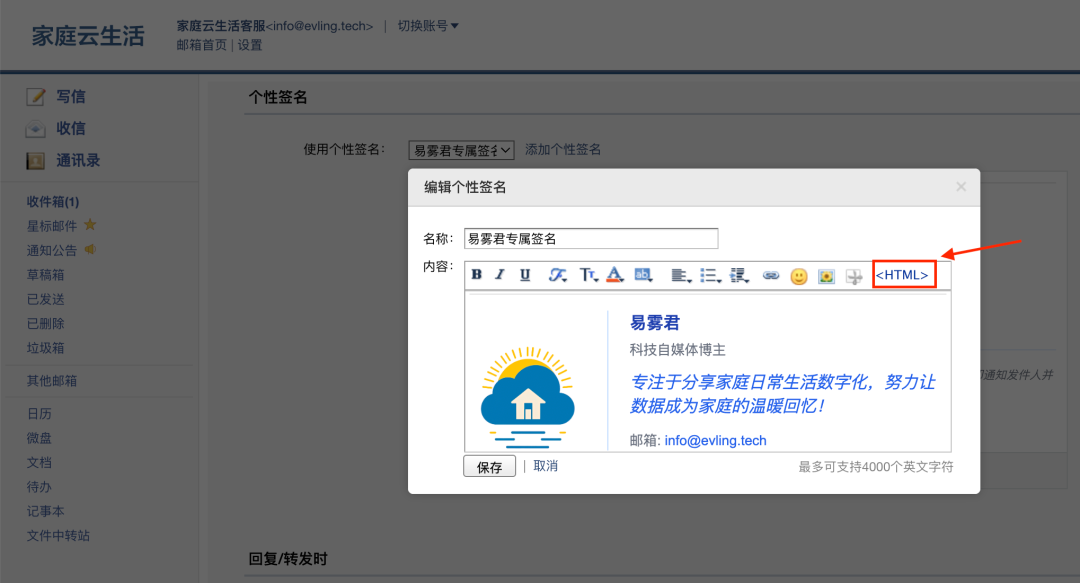
The logo in the signature can reuse the email avatar since the info email is public; its avatar can completely use your exclusive logo, saving the need for an image hosting service, as it is all part of the email system, ensuring sustainability!
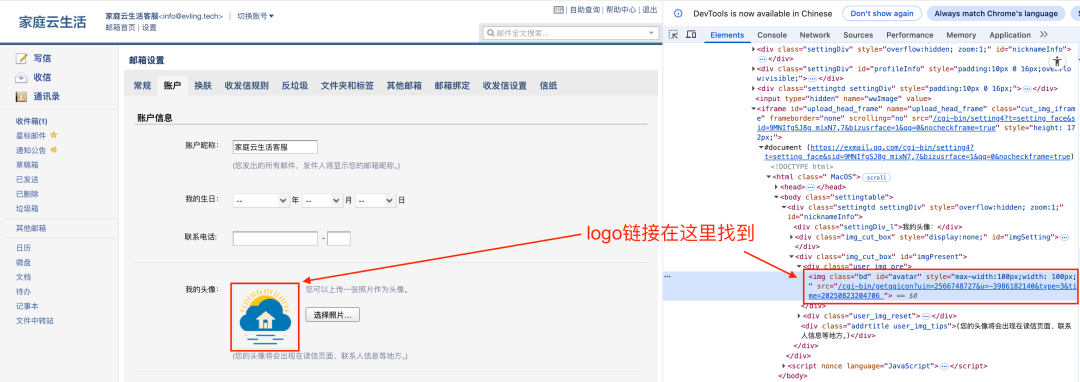
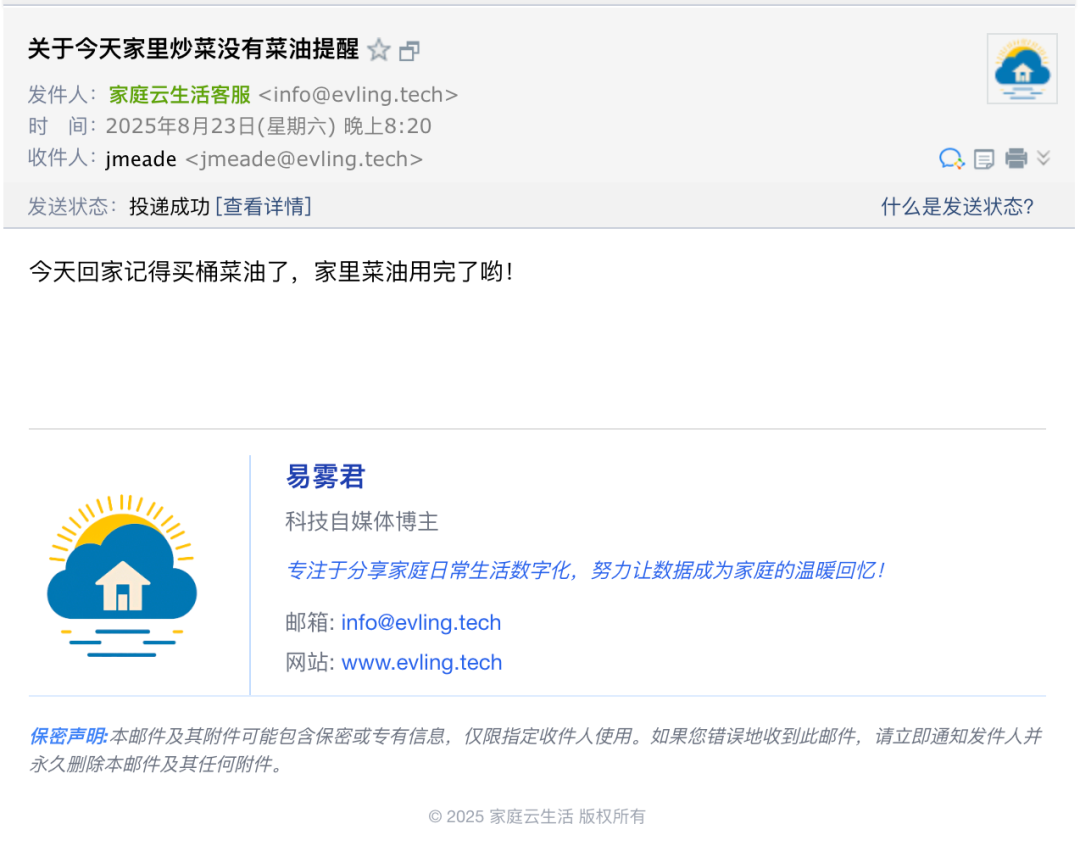
Everything is ready; let’s send a test email to see how it looks on the computer.
Here’s how it looks on mobile.
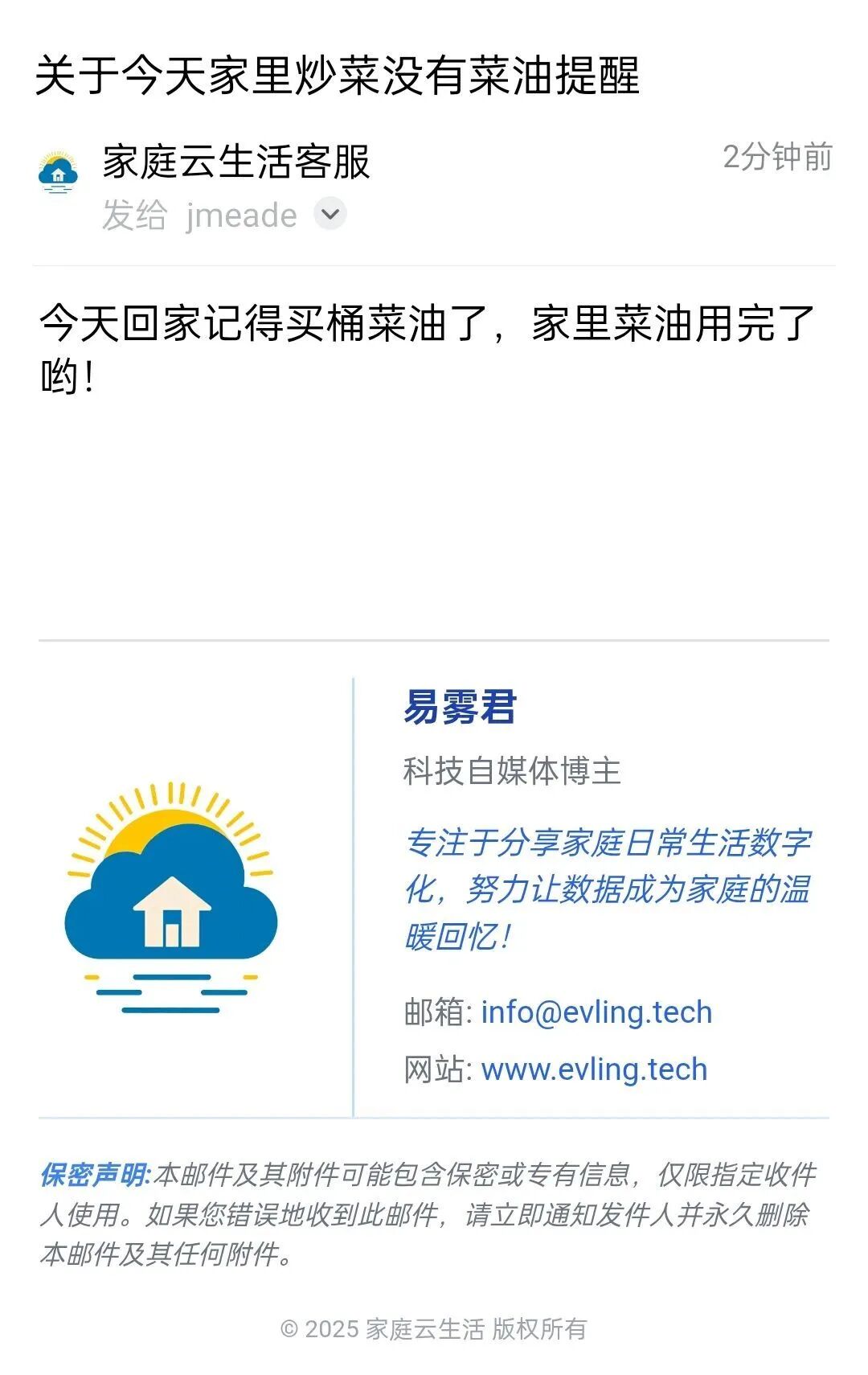
Doesn’t it feel great? My signature template has been optimized for mobile.
Thus, the construction of a personal exclusive email is complete! Act quickly! Building a home network is a long-term endeavor, and gradually adding to it is a very fulfilling task!
Recommended Reading
- • Join the family infrastructure learning exchange!
- • NAS enthusiasts rejoice: Achieve remote networking for home networks at almost zero cost (Part 16)
- • Upgrading PVE virtual machines is a thrill, but returning home becomes a fortress!
- • After upgrading PVE to 9, virtual machines follow suit with the new Debian 13 upgrade
- • Family network unified identity authentication is taking shape, truly elegant!
Give a thumbs up👍, clicklike▼