Continuing with the fifth article on libubox: jshn.sh, which is also a widely used script library in the OpenWrt system. We can search for the keyword jshn in the OpenWrt source directory to find the following related files:
ruok@vm:~/Desktop/openwrt$ find . -name jshn*..../staging_dir/packages/mediatek/jshn_2021-05-16-b14c4688-2_aarch64_cortex-a53.ipk./staging_dir/target-aarch64_cortex-a53_musl/pkginfo/jshn.provides./staging_dir/target-aarch64_cortex-a53_musl/root-mediatek/usr/bin/jshn./staging_dir/target-aarch64_cortex-a53_musl/root-mediatek/usr/share/libubox/jshn.sh– jshn is a library for converting JSON objects, used for generating JSON objects in scripting languages and extracting data from JSON objects.
– The jshn software consists of two files: jshn and jshn.sh
Compiling <span>libubox/jshn.c</span> will generate an executable file named <span>jshn</span>.
-
The jshn tool provides the following two functionalities:
-
① Reads JSON formatted strings and exports them to standard output (stdout) using json_add_* commands.
-
② Combines settings from environment variables into a JSON string and outputs it to standard output.
-
Common options:
-
-r: Use this option to read JSON formatted strings and export them to standard output by type and name.
-
-w: Can read environment variable settings to generate JSON object strings.
The tool is located at <span>/usr/bin/jshn</span>, and you can view the help information with the following command:
root@OpenWrt:/# jshn -h jshn: unrecognized option: h Usage: jshn [-n] [-i] -r <message>|-R <file>|-o <file>|-p <prefix>|-wjshn.sh
-
jshn.sh is a more convenient wrapper for JSON operations using the
<span>/usr/bin/jshn</span>tool, allowing other modules to operate more easily. -
It mainly provides the following three functionalities:
-
① Imports and exports JSON formatted strings in
<span>environment variables</span>. -
② Sets configuration content into environment variables.
-
③ Queries the values of configuration settings from environment variables.
-
jshn.sh defines a large number of functions for programming operations on JSON data. Its internal implementation stores defined variables in shell space, allowing functions to operate on each JSON object. After the operations are completed, the
<span>json_dump</span>function is called to output all content. -
Note: Before using functions in jshn.sh, you need to execute the
<span>/usr/share/libubox/jshn.sh</span>using the source command. The source command executes in the current environment, and the environment variables set are effective for subsequent commands. The source command is equivalent to the dot command “.” (as introduced in the demonstration case below).
. /usr/share/libubox/jshn.shSupports 5 basic types:
-
string
-
int
-
boolean
-
double
-
null
Supports 2 composite types:
-
array
-
object
Below is the list of all <span>json_</span> functions: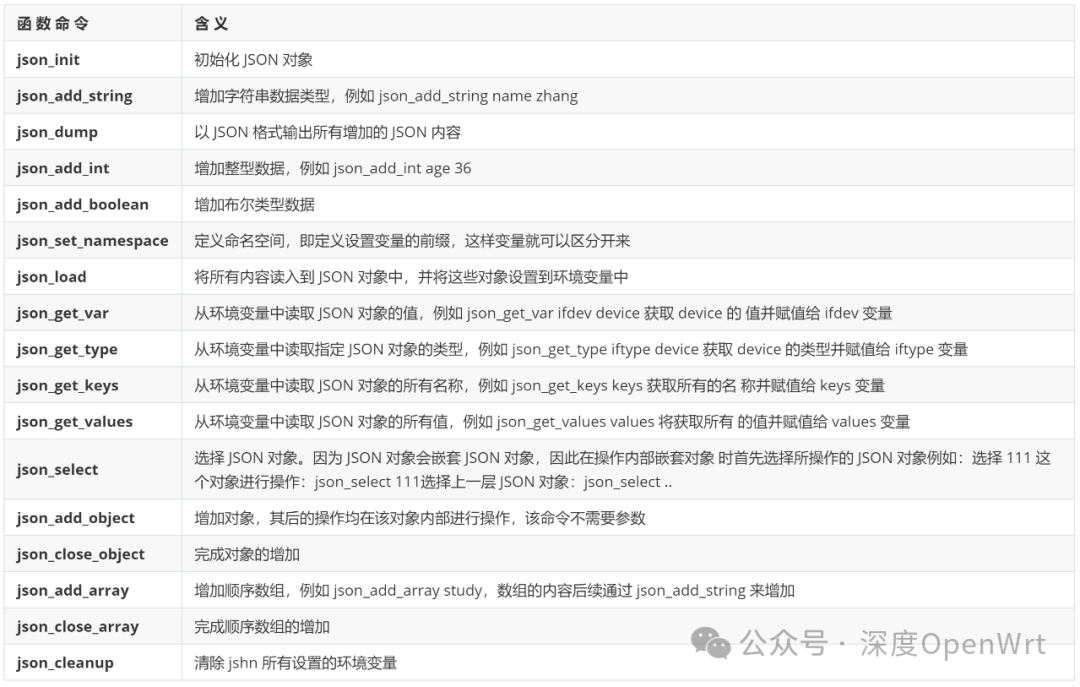
Demonstration Case – Constructing JSON Format
This example demonstrates constructing the following JSON data format:
{ "up": true, "uptime": 18804, "l3_device": "eth0.2", "proto": "dhcp", "device": "eth0.2", "ipv4-address": [ { "address": "192.168.5.102", "mask": 24 }, { "address": "192.168.5.103", "mask": 24 } ], "dns-server": [ "1.1.1.1", "2.2.2.2", "223.6.6.6", "223.5.5.5" ]}When constructing, follow the order below:
-
Use
<span>json_init</span>to start and initialize the environment variables. -
Set the properties and values of key-value pairs in the order of the
<span>JSON</span>data to be constructed from top to bottom. -
Finally, use
<span>json_dump</span>to output the complete<span>JSON</span>data.
The script for generating the above JSON data is as follows:
#!/bin/sh. /usr/share/libubox/jshn.sh
# start
json_init
json_add_boolean 'up' 1
json_add_int 'uptime' 18804
json_add_string 'l3_device' 'eth0.2'
json_add_string 'proto' 'dhcp'
json_add_string 'device' 'eth0.2'
json_add_array 'ipv4_address'
json_add_object '0'
json_add_string 'address' '192.168.5.102'
json_add_int 'mask' 24
json_close_object
json_add_object '1'
json_add_string 'address' '192.168.5.103'
json_add_int 'mask' 24
json_close_object
json_close_array
json_add_array 'dns_server'
json_add_string '0' '1.1.1.1'
json_add_string '1' '2.2.2.2'
json_add_string '2' '223.6.6.6'
json_add_string '3' '223.5.5.5'
json_close_array
#end
json_dump
Series of articles on the core components of OpenWrt’s libubox:Core Components of OpenWrt: libubox(1): Project IntroductionCore Components of OpenWrt: libubox(2): utilsCore Components of OpenWrt: libubox(3): md5Core Components of OpenWrt: libubox(4): ulog