Python functions are organized, reusable blocks of code designed to perform specific tasks. Using functions can enhance code reusability and readability.
Functions are the core of all programming languages. Learning to encapsulate logic into functions and organizing multiple functions to work together is the beginning of programming.
Come on, friends, let’s get started together~~
Table of Contents:
- 1. Function Definition
- 2. Function Parameters
- 3. Function Return Values
- 4. Function Scope
1. Function Definition[Function Definition Method]Functions are defined using the def statement. Function names are generally composed of lowercase letters and underscores, with formal parameters (arguments) in parentheses. After the parentheses, a colon is followed by the function body, which is indented by four spaces, and the return value follows the return statement. In addition to the def statement, anonymous functions can also be defined using the lambda expression.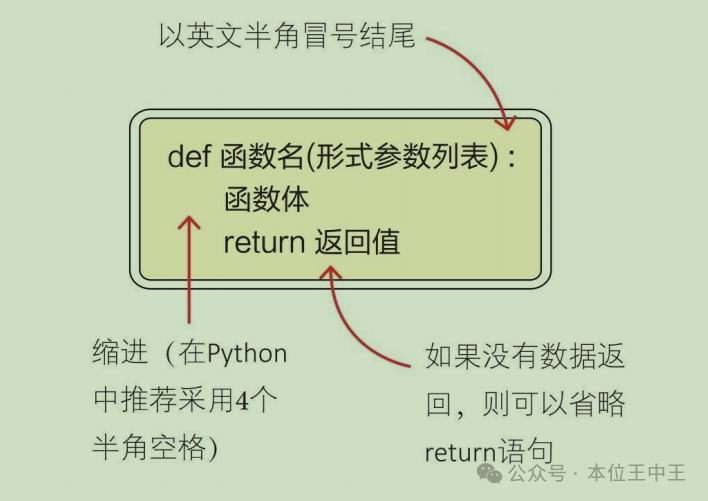
# Define function
def add(x, y):
    return x + y
# Call function
add(3, 4)  # Returns 7
# Anonymous function using lambda
add = lambda x, y: x + y
add(3, 4)
2. Function Parameters[Basic Concepts]What are formal parameters: The parameters defined when creating a function are not actual data; they will receive actual data when the function is called. Therefore, we refer to the parameters defined in the function as formal parameters, abbreviated as formals.What are actual parameters: The actual data passed to the function when it is called is known as actual parameters, abbreviated as actuals.What are positional parameters: Actual parameters are passed in the order of their position when calling the function, and the order and number must match.What are keyword parameters: Actual parameters are passed in the form of parameter_name=value, explicitly specifying which formal parameter corresponds to which actual parameter, without relying on positional order.Default parameters: When defining a function, default values can be assigned to formal parameters, for example, def res_area(w=100, h=100). Function calling: Functions can be called by passing parameters, using positional parameters, keyword parameters, or default parameters without passing any.
# Using positional and keyword parameters to call function
def add(x, y):
    return x + y
add(3, 4)  # Using positional parameters to call function
add(x=3, y=4)  # Using keyword parameters to call function
# Function definition with default parameter values
def res_area(w=100, h=100):
    return w * h
res_area()  # Calling function using default parameters
When using positional parameters to call a function, it is advisable not to have too many parameters, as excessive parameters can confuse the caller. When the number of parameters exceeds three, it is recommended to use keyword parameters.[Mixed Usage] Mixing positional and keyword parameters:In the function parameter list, adding an asterisk (*) makes the parameters following the asterisk only accept keyword arguments, for example: def func(a, b, *, c, d, e), where c, d, e must be passed using keyword arguments when calling the function.
# Mixed parameter passing
def func(a, b, *, c, d, e):
    return a + b + c + d + e
func(1, 2, c=3, d=4, e=5)  # c, d, e must be passed using keyword arguments
[Variable Parameters]:Variable positional parameters *args: Variable parameters based on tuples, which will be assembled into a tuple and passed to the function.Variable keyword parameters **kwargs: Variable parameters based on dictionaries, which will be assembled into a dictionary and passed to the function.The definition method for variable parameter functions:
def func(*args, **kwargs):
    for x in args:
        print(x)
    for key, value in kwargs.items():
        print(f"{key}: {value}")
func(1, 2, 3, 4, 5, name="Alice", age=30, city="SY")
Order requirements when using mixed parameters: regular parameters → *args → **kwargs, for example:
def func(a, b, c, *args, **kwargs):
    pass
Using variable parameters makes functions more flexible, allowing them to handle an uncertain number of inputs, commonly seen in utility functions, decorators, etc.3. Function Return ValuesUse return in function definitions to return the result of the function.Returning function results: A common way to return a single value from a function.
def add(x, y):
    return x + y
No return value: Commonly used in operation-type functions, using return None or omitting it, for example, the methods mentioned in the previous article 《Introduction to Python Data Types》 for operations on mutable elements: append(), pop(), which return None after performing specified operations.
# Equivalent writing for performing specified operations without return value
def func(*ages):
    pass

def func(*ages):
    pass
    return

def func(*ages):
    pass
    return None
Early return and multiple return values: For clearer, more readable, and maintainable function logic, return results as early as possible and multiple times, for example, comparing the following two writing styles:
# Style 1
def func(a):
    b = ""
    if a > 90:
        b = "A"
    elif a > 60:
        b = "B"
    else:
        b = "C"
    return b

# Style 2
def func(a):
    if a > 90:
        return "A"
    elif a > 60:
        return "B"
    else:
        return "C"
4. Function ScopeDefinition:Scope refers to the range in which a variable can be accessed in a program. Understanding scope helps avoid variable naming conflicts and clarifies variable lifetimes, which is fundamental to writing clear and maintainable code.Variable visibility: Variables defined within a function are, by default, only accessible within that function; while variables defined outside a function may be accessible in multiple functions.Scope classification: Ranging from smallest to largest:
- Local scope: Variables defined within a function are only valid within that function and are automatically destroyed after the function execution ends.
- Closure scope: Variables in the outer function are visible to both the outer and inner functions.
- Global scope: Variables declared at the top level of a module are visible to all functions within that module.
- Built-in scope: Functions and variables built into Python, such as
print,len,True, are visible in all modules.
5. ConclusionThis article briefly introduced the basics of Python functions, from function definitions, parameter classifications, return value techniques, to scope concepts. We have now entered the world of functions, and I believe that after reading this article, you can start writing your own small tools using functions. Let’s get started~