Source: DeepHub IMBAPython is one of the most commonly used scripting languages in Data Science (DS) and Machine Learning (ML). According to the “Popularity of Programming Languages,” Python is the most searched language on Google. In addition to being an excellent glue language that connects various DS/ML solutions, it also has many libraries for convenient data processing.We have previously published articles with some tests on version 3.11. The main feature of this version is the significant speed improvement.In this article, a foreign expert conducts data analysis, which proves that Python 3.14 is faster than C++.The method used in this article is: estimating Pi using the Monte Carlo method.The idea of this algorithm is simple and is introduced in some university mathematics courses: there is a square of size 2r, within which we fit a circle of radius r. Using a random number generator that generates numbers in the plane: <-r, r>, <-r, r>. The ratio of points within the circle to points within the square (read: all points) is an approximation of the area ratio, which we can use to estimate Pi. The formula is as follows: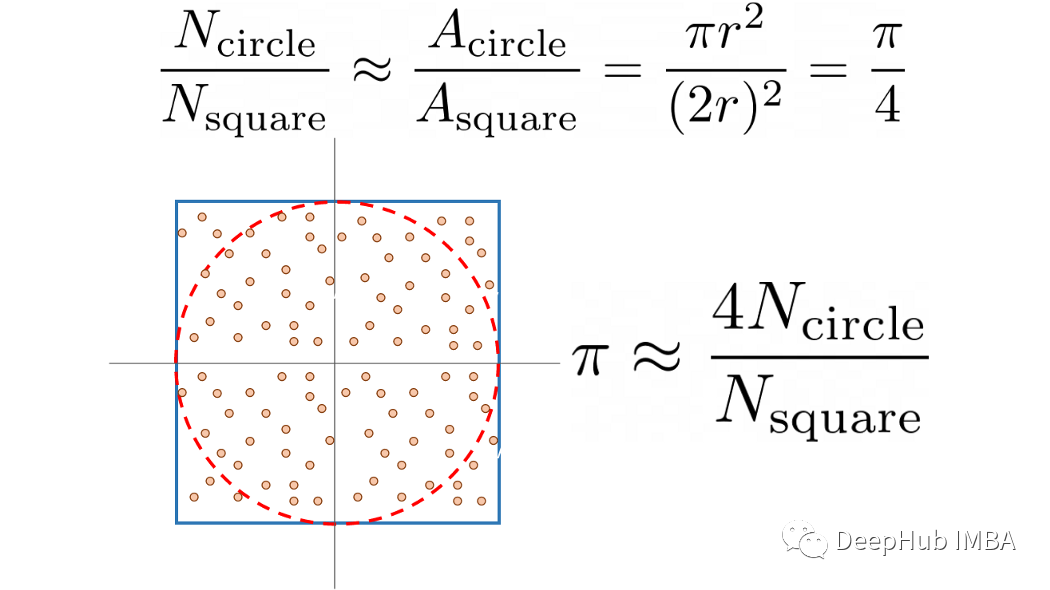 Separating the actual estimation from the test script allows for repeated testing and averaging. Here, we also parameterized the script using Argparse, which is a standard library for parsing parameters from the command line interface (CLI). The Python code is as follows:
def estimate_pi( n_points: int, show_estimate: bool, ) -> None: """ Simple Monte Carlo Pi estimation calculation. Parameters ---------- n_points number of random numbers used to for estimation. show_estimate if True, will show the estimation of Pi, otherwise will not output anything. """ within_circle = 0 for _ in range(n_points): x, y = (random.uniform(-1, 1) for v in range(2)) radius_squared = x**2 + y**2 if radius_squared <= 1: within_circle += 1 pi_estimate = 4 * within_circle / n_points if not show_estimate: print("Final Estimation of Pi=", pi_estimate) def run_test( n_points: int, n_repeats: int, only_time: bool, ) -> None: """ Perform the tests and measure required time. Parameters ---------- n_points number of random numbers used to for estimation. n_repeats number of times the test is repeated. only_time if True will only print the time, otherwise will also show the Pi estimate and a neat formatted time. """ start_time = time.time() for _ in range(n_repeats): estimate_pi(n_points, only_time) if only_time: print(f"{(time.time() - start_time)/n_repeats:.4f}") else: print( f"Estimating pi took {(time.time() - start_time)/n_repeats:.4f} seconds per run." )The simplest way to test multiple Python versions is to use Docker. Installing Docker is relatively easy on Linux and Mac, but slightly more complicated on Windows. While running in Docker may incur some efficiency loss, since the tests are conducted in Docker, the error can be ignored. To run local scripts in a containerized Python environment, you can use the following command:
docker run -it --rm \ -v $PWD/your_script.py:/your_script.py \ python:3.11-rc-slim \ python /yourscript.pyWe also use a Python script to automate this process:
def test_version(image: str) -> float: """ Run single_test on Python Docker image. Parameter --------- image full name of the the docker hub Python image. Returns ------- run_time runtime in seconds per test loop. """ output = subprocess.run([ 'docker', 'run', '-it', '--rm', '-v', f'{cwd}/{SCRIPT}:/{SCRIPT}', image, 'python', f'/{SCRIPT}', '--n_points', str(N_POINTS), '--n_repeats', str(N_REPEATS), '--only-time', ], capture_output=True, text=True, ) avg_time = float(output.stdout.strip()) return avg_time # Get test time for current Python version base_time = test_version(NEW_IMAGE['image']) print(f"The new {NEW_IMAGE['name']} took {base_time} seconds per run.\n") # Compare to previous Python versions for item in TEST_IMAGES: ttime = test_version(item['image']) print( f"{item['name']} took {ttime} seconds per run." f"({NEW_IMAGE['name']} is {(ttime / base_time) - 1:.1%} faster)" )The results of these tests depend on the CPU. Here are the results for seven major Python versions:
The new Python 3.11 took 6.4605 seconds per run. Python 3.5 took 11.3014 seconds.(Python 3.11 is 74.9% faster) Python 3.6 took 11.4332 seconds.(Python 3.11 is 77.0% faster) Python 3.7 took 10.7465 seconds.(Python 3.11 is 66.3% faster) Python 3.8 took 10.6904 seconds.(Python 3.11 is 65.5% faster) Python 3.9 took 10.9537 seconds.(Python 3.11 is 69.5% faster) Python 3.10 took 8.8467 seconds.(Python 3.11 is 36.9% faster)The benchmark average time for Python 3.11 is 6.46 seconds. Compared to previous versions (3.10), this is almost 37% faster. The difference between versions 3.9 and 3.10 is roughly the same, and we visualize this data in the following figure: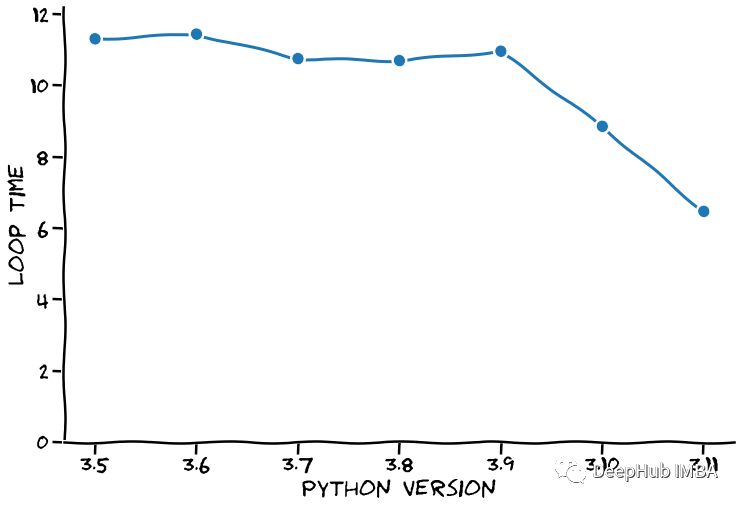 When discussing speed, people always say: if you want speed, why not use C.
C is much faster than Python!Here we used GNU C++, as it comes with a nice timing measurement library (chrono), and our C++ code is as follows:
#include <stdlib.h> #include <stdio.h> #include <chrono> #include <array> #define N_POINTS 10000000 #define N_REPEATS 10 float estimate_pi(int n_points) { double x, y, radius_squared, pi; int within_circle=0; for (int i=0; i < n_points; i++) { x = (double)rand() / RAND_MAX; y = (double)rand() / RAND_MAX; radius_squared = x*x + y*y; if (radius_squared <= 1) within_circle++; } pi=(double)within_circle/N_POINTS * 4; return pi; } int main() { double avg_time = 0; srand(42); for (int i=0; i < N_REPEATS; i++) { auto begin = std::chrono::high_resolution_clock::now(); double pi = estimate_pi(N_POINTS); auto end = std::chrono::high_resolution_clock::now(); auto elapsed = std::chrono::duration_cast<std::chrono::nanoseconds>(end - begin); avg_time += elapsed.count() * 1e-9; printf("Pi is approximately %g and took %.5f seconds to calculate.\n", pi, elapsed.count() * 1e-9); } printf("\nEach loop took on average %.5f seconds to calculate.\n", avg_time / N_REPEATS); }C++ is a compiled language, and we need to compile the source code before using it:
g++ -o pi_estimate pi_estimate.cAfter compiling, run the built executable. The output is as follows:
Pi is approximately 3.14227 and took 0.25728 seconds to calculate. Pi is approximately 3.14164 and took 0.25558 seconds to calculate. Pi is approximately 3.1423 and took 0.25740 seconds to calculate. Pi is approximately 3.14108 and took 0.25737 seconds to calculate. Pi is approximately 3.14261 and took 0.25664 seconds to calculate. Each loop took on average 0.25685 seconds to calculate.The same loop only takes 0.257 seconds. Let’s add this as a line in the previous graph, as shown below.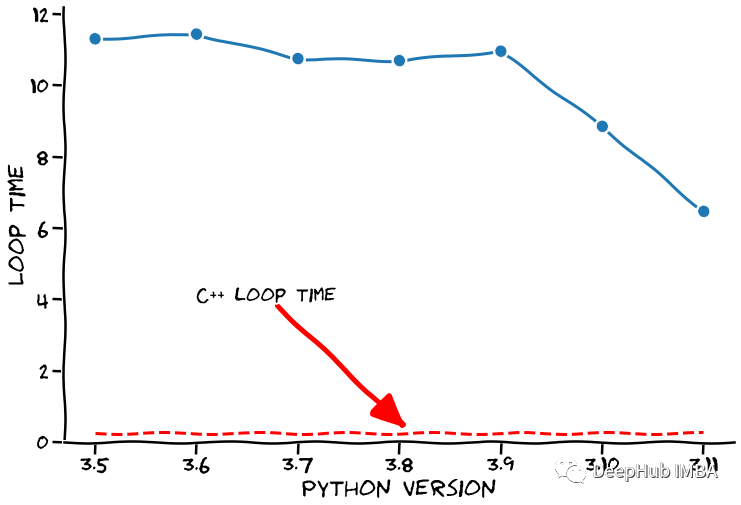 We can clearly see that C++ is fast, but Python developers mention that the upcoming versions will significantly improve speed. Under this assumption, our core argument will come into play, so please keep your thoughts clear and pay attention.We assume that this speed will be maintained (yes, a super safe assumption 🙃). Under this momentum, when will Python surpass C++? We can certainly use extrapolation to predict the loop times of the next few Python versions, as shown in the figure below.
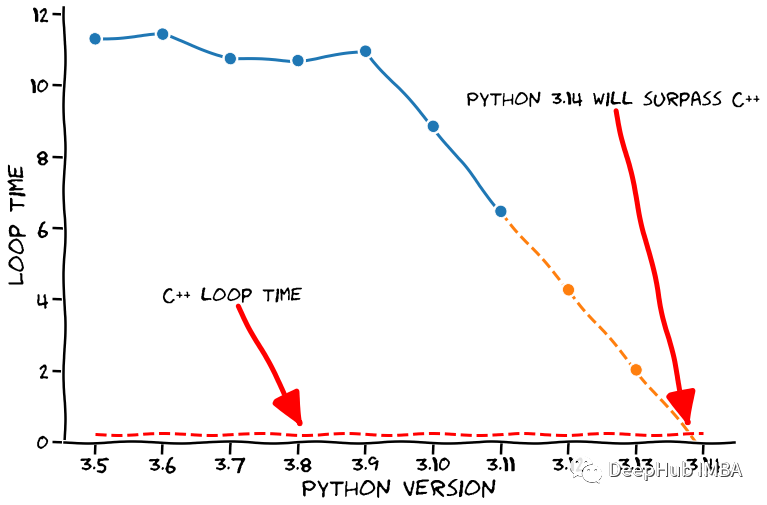 See, after our rigorous analysis and prediction, if this speed continues, Python 3.14 will be faster than C++. Specifically, the time taken to run our tests is -0.232 seconds, which means it will complete before we want to perform the calculation (amazing 🤣).Now it’s time for the disclaimer:Python 3.11 has made significant progress in speed, although it still lags far behind compiled languages, the development team is still working hard on speed optimization, so we hope that Python’s execution speed will see even greater improvements. The above is just a joke from the expert, but the code above can be found at the link below, so our conclusion is still well-founded 😏https://github.com/dennisbakhuis/python3.11_speedtestAuthor: Denn·is Bakhuis