Over 80,000 friends have followed the industrial control WeChat platform:Technical sharing,Learning exchange,Industrial control videos
What is a Sensor?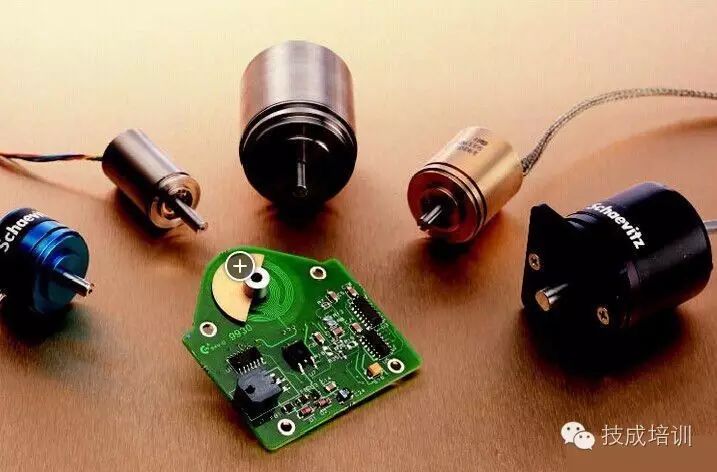 A sensor (English name: transducer/sensor) is a detection device that can sense the information being measured and convert it into electrical signals or other required forms of information output according to certain rules, to meet the requirements of information transmission, processing, storage, display, recording, and control.
Classification of Sensors Generally, they can be classified into ten categories based on their basic sensing functions: thermal elements, light-sensitive elements, gas-sensitive elements, force-sensitive elements, magnetic-sensitive elements, humidity-sensitive elements, sound-sensitive elements, radiation-sensitive elements, color-sensitive elements, and taste-sensitive elements. The functions of sensors are often compared to the five major human sensory organs: Pressure-sensitive/temperature-sensitive/flow sensors—Touch Gas-sensitive sensors—Smell Light-sensitive sensors—Sight Sound-sensitive sensors—Hearing Chemical sensors—Taste Mainstream Sensor Types and Applications in 2016Temperature SensorIntroduction: Temperature sensors appeared in early mobile phones, capable of detecting changes in the temperature of the phone’s battery and processor. Nowadays, smartphones are equipped with more temperature sensors to monitor the phone’s operating conditions and control its heating levels. With the addition of API support for temperature and humidity sensors in Windows 8 and Android 4.0, third-party developers can create numerous applications based on this. Application scenarios: 1. Hardware monitoring 2. Monitoring environmental temperature and humidity, etc.
Pressure SensorIntroduction: Mid- to high-end mobile devices are now equipped with pressure sensors. These sensors are divided into two parts: external pressure sensors and internal pressure sensors. The external pressure sensor detects atmospheric pressure in our living environment, using changes in atmospheric pressure to detect our altitude. This also serves as an auxiliary position sensor. Additionally, outdoor enthusiasts know that pressure changes can indicate short-term weather changes, although such software is currently lacking in the market. Application scenarios: 1. Outdoor sports altitude measurement 2. Detecting the internal sealing degree of waterproof devices, etc.
Gravity SensorIntroduction: The gravity sensor was first applied in the Apple iPhone; prior to this, phones and tablets were not equipped with such sensors. The primary application of the gravity sensor was to facilitate user switching between landscape and portrait modes. Over time, gravity sensors have been endowed with more functions and application extensions. Application scenarios: 1. Games and 3D applications 2. Camera applications 3. Inertial navigation
Angular Velocity Sensor (Gyroscope)Introduction: The gyroscope, also known as the angular velocity sensor, differs from the accelerometer (G-sensor) in that it measures the rotational angular velocity during deflection and tilt. In phones or tablets, using only the accelerometer is insufficient to measure or reconstruct complete 3D actions, as it cannot detect rotational movements. Therefore, the accelerometer can only detect linear actions along axes. However, the gyroscope can effectively measure rotational and deflection actions, allowing for precise analysis of the user’s actual movements, which can then trigger corresponding actions on the phone or tablet. Application scenarios: 1. Games and 3D applications 2. Camera applications 3. Inertial navigationPosition SensorIntroduction: The most common understanding of a position sensor is GPS, which provides location services and is available even in budget phones. However, the functions of position sensors go far beyond this. Application scenarios: 1. Map positioning 2. Locating lost devices 3. Attendance checking
Proximity SensorIntroduction: The primary function of the proximity sensor is to automatically turn off the screen when the user is on a call, which not only saves unnecessary battery power but also reduces misoperations during calls. The principle of the proximity sensor is to emit a beam of infrared light and measure the distance between objects based on the reflection of that light. However, the distance measured by the proximity sensor in phones is very short, only a few centimeters. Application scenarios: 1. Turning off the screen during calls 2. Flipping the phone to hang up/answer calls, etc.
Light SensorIntroduction: The light sensor, also known as a brightness sensor (English name: Light-Sensor), is equipped in many tablets and phones, generally located above the device screen. It can automatically adjust the screen brightness based on the current ambient light, providing the best visual effect for users. For example, in dark environments, the backlight of the screen will automatically dim; otherwise, it can be blinding. Application scenarios: Adjusting screen brightness with changes in light.NFC Proximity SensorIntroduction: Near Field Communication (NFC) is a short-range high-frequency wireless communication technology that allows electronic devices to exchange data non-contact (within ten centimeters). This technology evolved from contactless radio frequency identification (RFID) and is backward compatible with RFID, originally developed by Sony and Philips, mainly providing M2M (Machine to Machine) communication for handheld devices like phones and tablets. Application scenarios: 1. Quick payments 2. Fast information retrieval 3. Data transmission
Magnetic SensorIntroduction: The magnetic sensors in phones and tablets comprise two types, and we will introduce these two types together. First, the Earth’s magnetic sensor, commonly known as a compass, can determine the cardinal directions as a positioning aid and can also exist independently. Upon initial use, users are often prompted to move the device in a “figure-eight” motion to help the sensors accurately determine orientation. Application scenarios: 1. Compass 2. Lock screen, etc.
Ultra-sensitive Touch SensorIntroduction: The ultra-sensitive touch sensor primarily assists capacitive screen touch functions. Since the capacitive screens in today’s touch-screen phones and tablets rely on changes in voltage to detect finger positions on the screen, users wearing gloves in winter often find it difficult for capacitive screens to detect subtle voltage changes. This type of ultra-sensitive touch sensor can detect minute currents on the screen, allowing users to operate their phones normally while wearing gloves.
✌ Share on Moments to Learn Together!


Long press to recognize the QR code
Follow Ji Cheng Training
Click to read the original text to view history