In C/C++ projects, CMake has become the industry standard for build systems, and cross-compilation is a hurdle that every embedded developer will encounter. Simply put, it involves setting up a code compilation environment for Arm boards to run code on Arm devices. The commonly used compilation tools are Makefile and CMake, and this article records some common techniques for CMake.
1. Getting Started: Writing a Single Source File
<span>Project Structure</span><span> and </span>CMakeList File Structure
# Project Structure
. ├── CMakeLists.txt
├── abstract_factory.cc
├── factory_method.cc
└── simple_factory.cc
# CMakeList File Structure
# Specify minimum version
cmake_minimum_required(VERSION 2.8)
# Specify C++11 version
set(CMAKE_CXX_STANDARD 11)
# Specify project name
project(FactoryMode)
# Add source files in the current path and subdirectories with precompiled definitions
# add_definitions(-DFOO -DDEBUG ...)
# Compiler settings
set(CMAKE_C_COMPILER "gcc")
set(CMAKE_CXX_COMPILER "g++")
# Set C++ compilation parameters (CMAKE_CXX_FLAGS is a global variable)
set(CMAKE_C_FLAGS "${CMAKE_C_FLAGS} -Wall -g3")
set(CMAKE_CXX_FLAGS "${CMAKE_CXX_FLAGS} -Wall -std=c++11 -g3 -fpermissive")
# Generate bin file AbFactory
add_executable(AbFactory abstract_factory.cc)
# Generate bin file FacMethod
add_executable(FacMethod factory_method.cc)
# Generate bin file SmpFactory
add_executable(SmpFactory simple_factory.cc)Project Compilation After writing the CMakeList, execute cmake [CMakeList path], then make.
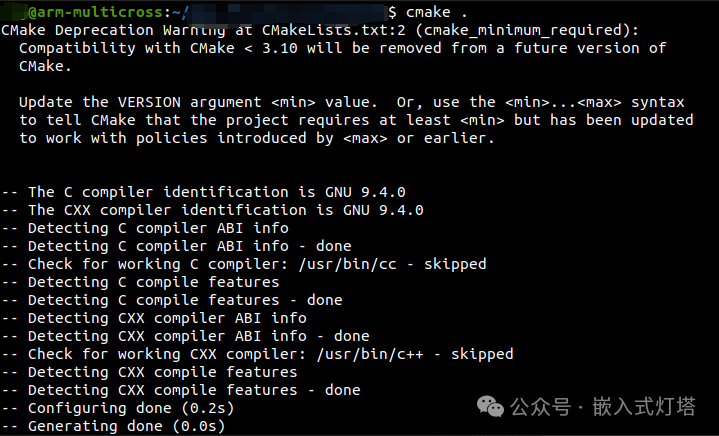
$ cmake .
-- The C compiler identification is GNU 7.5.0
-- The CXX compiler identification is GNU 7.5.0
-- Check for working C compiler: /usr/bin/cc
-- Check for working C compiler: /usr/bin/cc -- works
-- Detecting C compiler ABI info
-- Detecting C compiler ABI info - done
-- Detecting C compile features
-- Detecting C compile features - done
-- Check for working CXX compiler: /usr/bin/c++
-- Check for working CXX compiler: /usr/bin/c++ -- works
-- Detecting CXX compiler ABI info
-- Detecting CXX compiler ABI info - done
-- Detecting CXX compile features
-- Detecting CXX compile features - done
-- Configuring done
-- Generating done
-- Build files have been written to: /work/src/DesignMode/FactoryMode
$ make
Scanning dependencies of target SmpFactory
[ 16%] Building CXX object CMakeFiles/SmpFactory.dir/simple_factory.cc.o
[ 33%] Linking CXX executable SmpFactory
[ 33%] Built target SmpFactory
Scanning dependencies of target AbFactory
[ 50%] Building CXX object CMakeFiles/AbFactory.dir/abstract_factory.cc.o
[ 66%] Linking CXX executable AbFactory
[ 66%] Built target AbFactory
Scanning dependencies of target FacMethod
[ 83%] Building CXX object CMakeFiles/FacMethod.dir/factory_method.cc.o
[100%] Linking CXX executable FacMethod
[100%] Built target FacMethod
2. Multiple Source Files and Other Usages
See the previous article: CMake User Guide (Part 2): Operations and Basic Usage with Multiple Source Files
3. Modifications Required for Configuring Cross-Compilation Environment
Setting Default Library and Header File Search Paths
CMake will by default look for header files in the /usr/include directory and for dependency libraries in the /usr/lib directory. When the CMAKE_SYSROOT variable is set, the search paths will change to <CMAKE_SYSROOT>/usr/include (header files) and <CMAKE_SYSROOT>/usr/lib (dependency libraries).
## System library path: ${SDKTARGETSYSROOT}/usr/lib
## System header files: ${SDKTARGETSYSROOT}/usr/include
set(CMAKE_SYSROOT "${SDKTARGETSYSROOT}")
Setting Cross-Compilation Toolchain
When compiling for an embedded target board running a Linux system, it is necessary to use a cross-compilation toolchain that matches the development board. Similarly, application code that runs in that Linux environment must also be compiled using the same cross-toolchain that was used to compile the Linux system. When compiling local programs on development hosts like Ubuntu, it is usually sufficient to set the compiler to gcc/g++. These cross-compilation toolchains are typically provided by hardware vendors or BSP providers, and we only need to correctly configure the toolchain path and related parameters in the project’s build scripts (such as CMakeLists.txt or Makefile).A typical configuration for a cross-compilation toolchain is as follows:
## Absolute path
set(CMAKE_C_COMPILER "xxx/arm-linux-gcc")
set(CMAKE_CXX_COMPILER "xxx/arm-linux-g++")
Setting Floating Point Operation Handling
Some GCC compilers perform strict checks on soft-float (soft-float) and hard-float (hard-float) settings, and the error log is as follows:
armv7at2hf-neon-poky-linux-gnueabi/usr/include/gnu/stubs-32.h:7:11: fatal error: gnu/stubs-soft.h: No such file or directory 7 | # include <gnu/stubs-soft.h>Preliminary analysis of the error message indicates that the missing file is because the compiler does not have the file <span>stubs-soft.h</span>, which suggests that the current compiler toolchain does not support soft-float mode.
The solution is to force the setting to hard-float mode in the build script. The method is as follows:
## First method
add_definitions("-mfloat-abi=hard -mfpu=neon")
## Second method
add_compile_options(-mfpu=neon -mfloat-abi=hard)
## Third method
set(CMAKE_C_FLAGS   "${CMAKE_C_FLAGS} -mfloat-abi=hard -mfpu=neon")
set(CMAKE_CXX_FLAGS "${CMAKE_CXX_FLAGS} -mfloat-abi=hard -mfpu=neon")
4. Common Scenarios
Compiling Executable Files
## Generate test bin
include_directories  (${PROJECT_SOURCE_DIR}/inc)
set(SRC_BIN_TEST  ${PROJECT_SOURCE_DIR}/src/demo.cpp)
add_executable       (demo ${SRC_BIN_TEST})
set_target_properties(demo PROPERTIES OUTPUT_NAME "demo")
set_target_properties(demo PROPERTIES LINK_FLAGS "-Wl,-rpath-link=${LIBRARY_OUTPUT_PATH}")
target_link_libraries(demo stdc++)
add_dependencies     (demo libstdc++)
Compiling Static Libraries
## Generate libtest.a
aux_source_directory (xxx/src            SRC_LIB_TEST)
add_library          (testlib STATIC     ${SRC_LIB_TEST})
set_target_properties(testlib PROPERTIES OUTPUT_NAME "test")
set_target_properties(testlib PROPERTIES LINKER_LANGUAGE CXX)
target_link_libraries(testlib stdc++)
add_dependencies     (testlib libstdc++)
Compiling Dynamic Libraries
## Generate libtest.so
### Add source path
aux_source_directory (xxx/src            SRC_LIB_TEST)
### Generate so library
add_library          (libtest SHARED     ${SRC_LIB_TEST})
### Specify target name libtest.so
set_target_properties(libtest PROPERTIES OUTPUT_NAME "test")
### Link language C++
set_target_properties(libtest PROPERTIES LINKER_LANGUAGE CXX)
### Link dependency library
target_link_libraries(libtest stdc++)
### Add dependencies, check if the dependency library is generated first
add_dependencies     (libtest libstdc++)
5. Compilation Warnings
CMake Compilation Warning and Error Settings
The GCC compiler provides a series of options for controlling compilation warnings and errors, which can be mainly categorized as follows:
1. Promote Warnings to Errors:
-
<span><span>-Werror</span></span>: Promotes all compilation warnings to errors. -
<span><span>-Werror=<warning></span></span>: Promotes specified warnings<span><span><warning></span></span>to errors. -
Example:
<span><span>-Werror=selector</span></span>(Objective-C selector issue),<span><span>-Werror=return-type</span></span>(function return value issue).
2. Warning Sets:
-
<span><span>-Wall</span></span>: Enables a set of common, recommended compilation warnings that should always be turned on. -
<span><span>-Wextra</span></span>: Enables a set of additional, useful warnings (these warnings are not included in<span><span>-Wall</span></span><code><span><span>).</span></span>
3. Language Standard Conformance Checks:
-
<span><span>-Wpedantic</span></span>/<span><span>-pedantic</span></span>: Issues warnings for all usages in the source code that do not conform to ISO C or ISO C++ language standards. -
<span><span>-pedantic-errors</span></span>: Treats warnings generated by<span><span>-Wpedantic</span></span><code><span><span> as errors (equivalent to </span></span><code><span><span>-Werror=pedantic</span></span><code><span><span>).</span></span>
4. Specific Warning Types:
-
<span><span>-Wconversion</span></span>: Issues warnings when implicit type conversions may lead to unexpected value changes (explicit conversions are recommended to avoid potential issues). -
<span><span>-Wshadow</span></span>: Issues warnings for variable shadowing situations (e.g., when an inner scope declares a variable with the same name as a variable in the outer scope). Its sub-options can refine the detection scope:*<span><span>-Wshadow=global</span></span>: Reports any type of variable shadowing (default).*<span><span>-Wshadow=local</span></span>: Only reports local variable shadowing situations (e.g., a variable with the same name in nested loops).*<span><span>-Wshadow=compatible-local</span></span>: Reports local variable shadowing situations, but only issues warnings when the shadowed variable is compatible with the shadowing variable’s type (e.g., if the types are different, it may not warn).
For example, to enable all compilation warnings and treat warnings as errors, abandon compilation if any warnings occur:
set(CMAKE_CXX_FLAGS "${CMAKE_CXX_FLAGS} -Wall -Wextra -Werror")Common Warnings
The GCC compiler has code diagnostic capabilities that can identify code patterns in the source code that, while not syntax errors, may pose potential risks or suspected logical issues. The compiler will issue warnings for such situations. Compilation warning options are used to precisely control which specific types of diagnostic warnings GCC enables. Here are some common diagnostic warning options:
- -Wall This is a widely adopted core compilation option that enables a set of common and easily fixable compilation warnings. These warnings mainly perform basic code quality checks aimed at discovering potential error patterns and bad practices in the code, such as the following:
| Option | Effect |
| -Waddress | Checks for suspicious memory address usage |
| -Wformat | Checks if the usage format of standard library functions is correct, such as whether the format specifiers in printf’s format string match the corresponding parameters |
| -Wunused-function | Issues warnings for declared but undefined static functions and unused non-inline static functions |
| -Wswitch | Issues warnings when using switch for enumeration types, checking if all enumeration values are included in the branches |
| -Wunused-variable | Issues warnings for declared but unused variables |
| -Wunused-but-set-variable | Issues warnings for declared and assigned but unused variables |
| -Warray-bounds=1 | Array out-of-bounds checks, requires enabling the -ftree-vrp option |
For a complete list, refer to Warning-Options[4]
Note: When needing to exclude certain types of warnings, use <span>-Wno-xxx</span>. For example, using <span>-Wall -Wno-unused-variable</span> can exclude <span>-Wunused-variable</span> from <span>-Wall</span>.
- -Wextra Just having
<span>-Wall</span>may not be strict enough; GCC also has<span>-Wextra</span>as a supplement, which includes additional warning types not covered by<span>-Wall</span>, such as:
| Option | Effect |
| -Wcast-function-type | Issues warnings when a function is cast to an incompatible function pointer |
| -Wempty-body | Issues warnings when there are empty if, else, or do while statements |
| -Wunused-parameter | Issues warnings when a function has unused parameters, needs to be used with -Wall |
| -Wunused-but-set-parameter | Issues warnings for parameters that are set but not used, needs to be used with -Wall |
| -Wsign-compare | Issues warnings when comparing signed and unsigned values |
Conclusion: The Art of Building
The essence of CMake managing multiple source files lies in:
-
Modularity: Decomposing into independent components
-
Automation: Utilizing wildcards and scripts
-
Maintainability: Clear target dependencies
-
Scalability: Supporting incremental additions
Ultimate Advice: In projects with over 100,000 lines of code, it is essential to adopt:
Modular CMake structure
Target-oriented dependency management
Automated testing integration
Continuous integration configuration
References
[1] Introduction to CMake Options: https://blog.csdn.net/lhl_blog/article/details/123553686
[2]
GCC and CMake Compilation Warning and Error Settings: https://blog.csdn.net/LCHUESTC/article/details/122602001
[3]
Common GCC Compilation Options: https://zhuanlan.zhihu.com/p/393419013
[4]
Warning-Options: https://gcc.gnu.org/onlinedocs/gcc/Warning-Options.html
 Thank you for your attention and support. I will update various useful content from time to time. If you have any questions or different opinions, feel free to comment or leave a message for us to exchange and learn together!
 Welcome to follow the public account, give a “Share“, “Like“, “View“~Wishing you successful compilation and no debugging errors!