
 Click the blue text to follow the author
1. Introduction: Checking External Libraries
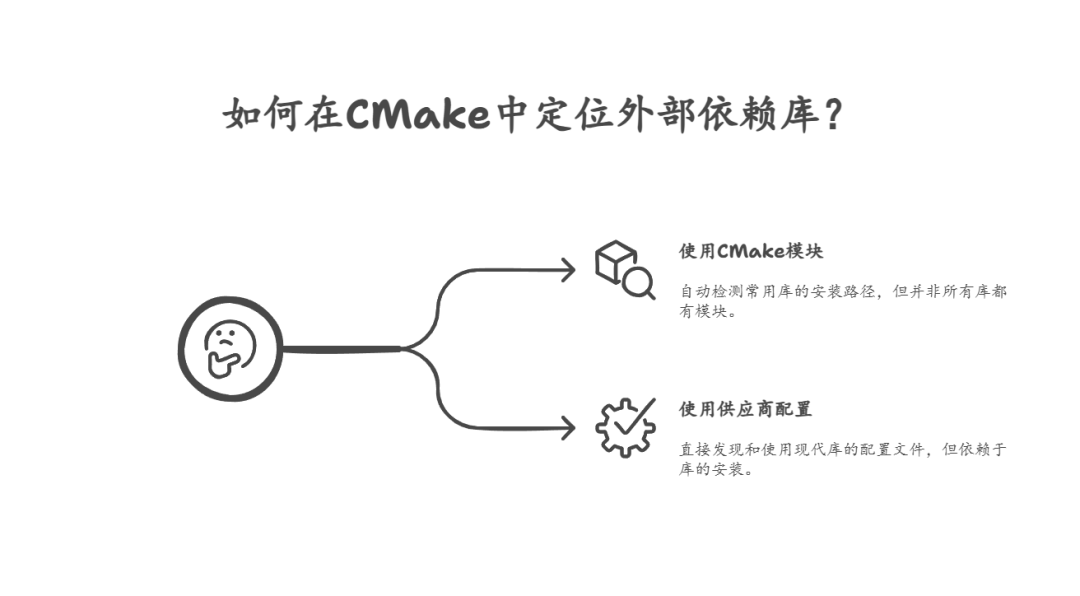
In CMake, there are two main methods to locate external dependency libraries:
- Using CMake’s built-in
<span>find_package</span>module: CMake provides built-in find modules for many common libraries (e.g.,<span>FindBoost.cmake</span>,<span>FindOpenSSL.cmake</span>, etc.). These modules can usually automatically detect the installation paths of libraries, header files, and library files. However, not all libraries have corresponding CMake<span>Find</span>modules. - Using vendor-provided configuration (Config) files: Many modern libraries provide their own CMake configuration files upon installation, such as
<span><package>Config.cmake</span>,<span><package>ConfigVersion.cmake</span>, and<span><package>Targets.cmake</span>. These files are typically installed in standard locations, allowing CMake to discover and use them directly via<span>find_package(<package> CONFIG)</span>.
When a dependency lacks both a built-in CMake find module and a vendor-packaged CMake configuration file, alternative solutions must be sought. In this case, there are primarily two options:
- Rely on the
<span>pkg-config</span>program:<span>pkg-config</span>is a cross-platform command-line tool that helps compile and link applications. It relies on configuration files provided by library vendors, which contain metadata about the library, such as header file paths, library file paths, and required link flags. - Write a custom
<span>FindPackage</span>module for the dependency: If<span>pkg-config</span>also fails to meet the needs, or if finer control over the library search process is desired, a custom<span>Find<PackageName>.cmake</span>module can be written for that dependency.

2. Using pkg-config
This section focuses on how to use <span>pkg-config</span> to find and use external libraries.
2.1. Preparation
To demonstrate the usage of <span>pkg-config</span>, we will use a classic “Hello World” example from the ZeroMQ manual. This example consists of two simple C++ source files:<span>hwserver.cpp</span> (server) and <span>hwclient.cpp</span> (client). These two files will be compiled into separate executable files. When they run, the server will wait for connections and reply with “Hello, World”, while the client will send requests and receive replies.
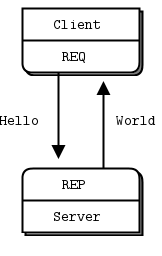
hwserver: Hello World server in C++
//  Hello World server in C++
//  Binds REP socket to tcp://*:5555
//  Expects "Hello" from client, replies with "World"
#include <zmq.hpp>
#include <string>
#include <iostream>
#ifndef _WIN32
#include <unistd.h>
#else
#include <windows.h>
#define sleep(n) Sleep(n)
#endif

int main () {
    //  Prepare our context and socket
    static const int kNumberOfThreads = 2;
    zmq::context_t context (kNumberOfThreads);
    zmq::socket_t socket (context, zmq::socket_type::rep);
    socket.bind ("tcp://*:5555");

    while (true) {
        zmq::message_t request;

        //  Wait for next request from client
        auto result = socket.recv (request, zmq::recv_flags::none);
        assert(result.value_or(0) != 0); // Check if bytes received is non-zero
        std::cout << "Received Hello" << std::endl;

        //  Pretend to do some 'work'
        sleep(1);

        //  Send reply back to client
        constexpr std::string_view kReplyString = "World";
        zmq::message_t reply (kReplyString.length());
        memcpy (reply.data (), kReplyString.data(), kReplyString.length());
        socket.send (reply, zmq::send_flags::none);
    }
    return 0;
}
hwclient: Hello World client in C++
//  Hello World client in C++
//  Connects REQ socket to tcp://localhost:5555
//  Sends "Hello" to server, expects "World" back
#include <zmq.hpp>
#include <string>
#include <iostream>

int main () {
    //  Prepare our context and socket
    zmq::context_t context (1);
    zmq::socket_t socket (context, zmq::socket_type::req);

    std::cout << "Connecting to hello world server..." << std::endl;
    socket.connect ("tcp://localhost:5555");

    //  Do 10 requests, waiting each time for a response
    for (int request_nbr = 0; request_nbr != 10; request_nbr++) {
        zmq::message_t request (5);
        memcpy (request.data (), "Hello", 5);
        std::cout << "Sending Hello " << request_nbr << "..." << std::endl;
        socket.send (request, zmq::send_flags::none);

        //  Get the reply.
        zmq::message_t reply;
        socket.recv (reply, zmq::recv_flags::none);
        std::cout << "Received World " << request_nbr << std::endl;
    }
    return 0;
}
All examples of ZeroMQ are stored in a public GitHub repository:
git clone --depth=1 https://github.com/imatix/zguide.git
Then browse the examples subdirectory. You will find examples categorized by language.
Important Note: Before starting, ensure that the <span>pkg-config</span> tool and the development library for ZeroMQ (usually <span>libzmq-dev</span> or <span>zeromq-devel</span>, etc.) are installed on your system.
2.2. Specific Steps
Build a <span>CMakeLists.txt</span> file to compile the above ZeroMQ examples. This project is a C++ project and follows the C++11 standard.
(1) Declare a C++ project and specify the required minimum version of CMake. At the same time, enforce the use of the C++11 standard and disable GNU C++ extensions to ensure cross-platform compatibility of the code.
cmake_minimum_required(VERSION 3.6 FATAL_ERROR)  # Require CMake minimum version 3.6, error if lower
project(recipe-20 LANGUAGES CXX)                   # Declare a C++ language project
set(CMAKE_CXX_STANDARD 11)                         # Set C++ language standard
set(CMAKE_CXX_EXTENSIONS OFF)                      # Disable C++ language extensions (e.g., GNU extensions)
set(CMAKE_CXX_STANDARD_REQUIRED ON)                # Enforce the compiler to adhere to C++11 standard
(2) Use CMake’s built-in <span>FindPkgConfig</span> module to find the <span>pkg-config</span> program. The <span>REQUIRED</span> parameter indicates that if <span>pkg-config</span> cannot be found, the CMake configuration process will fail. The <span>QUIET</span> parameter indicates that CMake will not print additional status information when successfully finding <span>pkg-config</span>.
find_package(PkgConfig REQUIRED QUIET) # Find PkgConfig module, error if not found, do not print extra info on success
(3) Use <span>pkg_search_module</span> to find ZeroMQ: Once <span>pkg-config</span> is found, its provided functions can be used to search for any libraries that come with <span>.pc</span> configuration files. The <span>pkg_search_module</span> function will attempt to find the first available module in the provided name list.
pkg_search_module(
  ZeroMQ                 # This is a prefix for naming the variables and imported targets that store search results
  REQUIRED               # Error if ZeroMQ library is not found
  libzeromq libzmq lib0mq # Possible names of the ZeroMQ libraries to search for
  IMPORTED_TARGET        # Create an imported target, which is best practice in modern CMake
  )
(4) After successfully finding ZeroMQ with <span>pkg_search_module</span>, it creates an imported target named <span>PkgConfig::ZeroMQ</span> (because the <span>IMPORTED_TARGET</span> option was used). You can confirm that ZeroMQ was successfully found by checking if this target exists.
if(TARGET PkgConfig::ZeroMQ) # Check if the imported target named PkgConfig::ZeroMQ exists
    message(STATUS "Found ZeroMQ") # If it exists, print status message
endif()
(5) Now, add two executable target files: <span>hwserver</span> and <span>hwclient</span>, and link them to the <span>PkgConfig::ZeroMQ</span> imported target. The benefit of using imported targets is that it automatically sets the correct include directories (<span>INCLUDE_DIRS</span>) and link libraries (<span>LIBRARIES</span>), greatly simplifying the linking process.
add_executable(hwserver hwserver.cpp)         # Add hwserver executable
 target_link_libraries(hwserver PkgConfig::ZeroMQ) # Link hwserver to ZeroMQ imported target

add_executable(hwclient hwclient.cpp)         # Add hwclient executable
 target_link_libraries(hwclient PkgConfig::ZeroMQ) # Link hwclient to ZeroMQ imported target
The complete content of the CMakeLists.txt is as follows:
cmake_minimum_required(VERSION 3.10 FATAL_ERROR)
project(recipe_20 LANGUAGES CXX)
set(CMAKE_CXX_STANDARD 11)
set(CMAKE_CXX_EXTENSIONS OFF)
set(CMAKE_CXX_STANDARD_REQUIRED ON)

find_package(PkgConfig REQUIRED QUIET)

pkg_search_module(ZeroMQ REQUIRED libzeromq libzmq lib0mq IMPORTED_TARGET)

if(TARGET PkgConfig::ZeroMQ) # Check if the imported target named PkgConfig::ZeroMQ exists
    message(STATUS "Found ZeroMQ") # If it exists, print status message
endif()

add_executable(hwserver hwserver.cpp)         # Add hwserver executable
 target_link_libraries(hwserver PkgConfig::ZeroMQ) # Link hwserver to ZeroMQ imported target

add_executable(hwclient hwclient.cpp)         # Add hwclient executable
 target_link_libraries(hwclient PkgConfig::ZeroMQ) # Link hwclient to ZeroMQ imported target
2.3. Build and Run
After completing the <span>CMakeLists.txt</span> file, you can configure and build the example:
Create a build directory and enter it:
mkdir -p build
cd build
Run CMake configuration: You will see a status message like “Found ZeroMQ”.
cmake ..
Build the project: This will generate the <span>hwserver</span> and <span>hwclient</span> executable files in the <span>build</span> directory.
cmake --build .
Run the example:
First, start the server in one terminal:
./hwserver
The server will output:
Current 0MQ version is 4.2.2
Then, start the client in another terminal:
./hwclient
The client will print the following:
Connecting to hello world server…
Sending Hello 0…
Received World 0
Sending Hello 1…
Received World 1
Sending Hello 2…
...
This indicates that the client successfully connected to the server and exchanged messages, proving that the ZeroMQ library has been successfully linked via <span>pkg-config</span>.
2.4. How pkg-config Works
When CMake finds <span>pkg-config</span> through <span>find_package(PkgConfig)</span>, it provides two CMake functions that encapsulate the functionality of the <span>pkg-config</span> command-line tool:
<span>pkg_check_modules(<prefix> [REQUIRED] [QUIET] <module_names>...)</span>: This function attempts to find all modules (libraries and/or programs) in the provided list. If<span>REQUIRED</span>is specified, all modules must be found; if<span>QUIET</span>is specified, no success messages will be printed.<span>pkg_search_module(<prefix> [REQUIRED] [QUIET] <module_names>...)</span>: This function is similar to<span>pkg_check_modules</span>, but it only finds the first working module in the provided list of module names. Once one is found, it stops searching.
Like <span>find_package</span>, these functions also accept <span>REQUIRED</span> and <span>QUIET</span> parameters, with the same behavior as in <span>find_package</span>.
Let’s analyze the call to <span>pkg_search_module</span> in detail:
pkg_search_module(
  ZeroMQ                 # 1. Prefix (PREFIX)
  REQUIRED               # 2. Search behavior options
  libzeromq libzmq lib0mq # 3. List of module names
  IMPORTED_TARGET        # 4. Result handling options
  )
<span>ZeroMQ</span>(prefix): This is one of the most important parameters. It defines a prefix for naming all CMake variables and imported targets related to this<span>pkg-config</span>search result. For example, if ZeroMQ is successfully found, it will create an imported target named<span>PkgConfig::ZeroMQ</span>. Additionally, in versions of CMake prior to 3.6 (or if not using<span>IMPORTED_TARGET</span>), it will also set variables such as<span>ZeroMQ_INCLUDE_DIRS</span>(for header file paths) and<span>ZeroMQ_LIBRARIES</span>(for link libraries).<span>REQUIRED</span>: This keyword indicates that if<span>pkg-config</span>cannot find any ZeroMQ modules in the provided name list, the CMake configuration process will terminate immediately and report an error.<span>libzeromq libzmq lib0mq</span>(module name list):<span>pkg_search_module</span>will try these names in order until it finds a matching<span>.pc</span>file. The reason for providing multiple names is that different operating systems, Linux distributions, or package managers may choose different<span>pkg-config</span>module names for the same library. For example, on some systems it may be<span>libzmq.pc</span>, while on others it may be<span>zeromq.pc</span>or<span>libzeromq.pc</span>. By providing a list, you can ensure that the library can be successfully found in various environments.<span>IMPORTED_TARGET</span>: This is a very important option in modern CMake (version 3.6 and above). When specified,<span>pkg_search_module</span>will create an imported target named<span>PkgConfig::<PREFIX></span>globally. This imported target encapsulates all necessary information about the library, including its header file paths, library file paths, link dependencies, etc.
<span>IMPORTED_TARGET</span> Advantages: Using imported targets is the recommended modern CMake practice. It makes linking libraries very simple and clean: you just need to pass <span>PkgConfig::ZeroMQ</span> to <span>target_link_libraries</span>, and CMake will automatically handle all necessary include directories and link libraries.
Old Behavior (CMake versions prior to 3.6 or not using <span>IMPORTED_TARGET</span>): In versions of CMake prior to 3.6, or when omitting the <span>IMPORTED_TARGET</span> option, <span>pkg_search_module</span> (and <span>pkg_check_modules</span>) will not create imported targets. Instead, it will set a series of variables prefixed with <span><PREFIX></span>, such as:
<span>ZeroMQ_FOUND</span>: A boolean indicating whether the module was found.<span>ZeroMQ_INCLUDE_DIRS</span>: A list of directories containing header files.<span>ZeroMQ_LIBRARY_DIRS</span>: A list of directories containing library files.<span>ZeroMQ_LIBRARIES</span>: A list of library files to link against.<span>ZeroMQ_CFLAGS</span>: Compilation flags.<span>ZeroMQ_LIBS</span>: Link flags.
In this case, you need to manually use these variables to set target properties, for example:
# For older CMake versions or when not using IMPORTED_TARGET
add_executable(hwserver hwserver.cpp)
target_include_directories(hwserver PRIVATE ${ZeroMQ_INCLUDE_DIRS})
target_link_libraries(hwserver PRIVATE ${ZeroMQ_LIBRARIES})
Clearly, using <span>IMPORTED_TARGET</span> and linking directly to the imported target is much more concise and robust.
Through the above steps, we demonstrated how to use <span>pkg-config</span> to find and link external libraries in a CMake project, especially those that do not provide a native CMake find mechanism.
3. Custom Find Modules
In CMake projects, when existing find mechanisms cannot meet the needs, writing a custom <span>Find</span> module becomes a necessary solution. This section will detail how to create such a module to locate and link external libraries like ZeroMQ, especially in cases where <span>pkg-config</span> may not be applicable, such as on non-Unix operating systems.
In the previous section, we discussed using <span>pkg-config</span> to find external libraries; however, <span>pkg-config</span> primarily performs well on Unix-like systems. For other platforms like Windows, or when a library does not provide a <span>.pc</span> file, it becomes crucial to write a custom <span>Find<PackageName>.cmake</span> module.
This example will supplement the previous section by demonstrating how to write a custom <span>FindZeroMQ.cmake</span> module for the ZeroMQ messaging library. We will continue using the previous server-client example code to ensure its executability.
3.1. Specific Steps
Build the main <span>CMakeLists.txt</span> file and delve into the custom <span>FindZeroMQ.cmake</span> module. This project will be a C++ project and follow the C++11 standard.
(1) Declare a C++ project and specify the required minimum version of CMake. At the same time, enforce the use of the C++11 standard and disable compiler extensions to ensure cross-platform compatibility and standard compliance of the code.
cmake_minimum_required(VERSION 3.5 FATAL_ERROR) # Require CMake minimum version 3.5, error if lower
project(recipe-20-2 LANGUAGES CXX)                 # Declare a C++ language project named "recipe-20-2"
set(CMAKE_CXX_STANDARD 11)                       # Set C++ language standard to C++11
set(CMAKE_CXX_EXTENSIONS OFF)                    # Disable C++ language extensions (e.g., GNU extensions)
set(CMAKE_CXX_STANDARD_REQUIRED ON)              # Enforce the compiler to adhere to C++11 standard
(2) To allow CMake to find the custom <span>FindZeroMQ.cmake</span> module, you need to add the directory containing that module to the <span>CMAKE_MODULE_PATH</span> variable. Custom <span>Find</span> modules are typically placed in a specific subdirectory of the project or directly in the directory where the main <span>CMakeLists.txt</span> file is located. Here, <span>FindZeroMQ.cmake</span> is in the same directory as the main <span>CMakeLists.txt</span>.
# Add the current source directory to the CMake module search path to find the custom FindZeroMQ.cmake
list(APPEND CMAKE_MODULE_PATH ${CMAKE_CURRENT_SOURCE_DIR})
(3) Once the <span>FindZeroMQ.cmake</span> module is available in <span>CMAKE_MODULE_PATH</span>, you can use the <span>find_package</span> command to search for the required ZeroMQ dependencies just like any built-in or third-party provided module. Since the <span>QUIET</span> parameter is not passed, if the library is successfully found, CMake will automatically print a status message.
# Find the ZeroMQ library, REQUIRED indicates an error if not found
# The FindZeroMQ.cmake module will be responsible for the actual search logic
find_package(ZeroMQ REQUIRED)
(4) After the <span>find_package</span> command executes successfully, the custom <span>FindZeroMQ.cmake</span> module will set a series of variables, the most important of which are <span>ZeroMQ_INCLUDE_DIRS</span> (include directories) and <span>ZeroMQ_LIBRARIES</span> (link libraries). These variables will be used to configure the <span>hwserver</span> executable target.
# Add hwserver executable
add_executable(hwserver hwserver.c)
# Set hwserver's private include directories
 target_include_directories(hwserver
  PRIVATE
      ${ZeroMQ_INCLUDE_DIRS}
  )
# Link hwserver to ZeroMQ library
 target_link_libraries(hwserver
  PRIVATE
      ${ZeroMQ_LIBRARIES}
  )
(5) Perform the same operations for the <span>hwclient</span> executable target.
# Add hwclient executable
add_executable(hwclient hwclient.c)
# Set hwclient's private include directories
 target_include_directories(hwclient
  PRIVATE
      ${ZeroMQ_INCLUDE_DIRS}
  )
# Link hwclient to ZeroMQ library
 target_link_libraries(hwclient
  PRIVATE
      ${ZeroMQ_LIBRARIES}
  )
This custom <span>FindZeroMQ.cmake</span> module is the core of this example. It will use CMake’s built-in <span>find_path</span> and <span>find_library</span> commands to search for the header files and library files of ZeroMQ, and utilize <span>find_package_handle_standard_args</span> to standardize the handling of <span>find_package</span> parameters and results.
# FindZeroMQ.cmake

# Check if the user has provided a custom ZeroMQ installation path via the ZeroMQ_ROOT variable.
# This allows users to specify non-standard installation locations or set in environment variables.
if(NOT ZeroMQ_ROOT)
    # If ZeroMQ_ROOT is not set, try to get it from environment variables
    set(ZeroMQ_ROOT "$ENV{ZeroMQ_ROOT}")
endif()

# Search for ZeroMQ's header file (zmq.h)
# First, try to determine a possible root path based on ZeroMQ_ROOT (_ZeroMQ_ROOT)
if(NOT ZeroMQ_ROOT)
    # If ZeroMQ_ROOT is not set, look for the path containing zmq.h in standard locations
    # NAMES include/zmq.h means looking for directories containing 'include/zmq.h'
    # For example, if ZeroMQ is installed in /usr/local, it will look for /usr/local/include/zmq.h
    find_path(_ZeroMQ_ROOT NAMES include/zmq.h)
else()
    # If ZeroMQ_ROOT is set, use it as the root path
    set(_ZeroMQ_ROOT "${ZeroMQ_ROOT}")
endif()

# Actually find the directory where the zmq.h header file is located
# HINTS ${_ZeroMQ_ROOT}/include hints to look in the _ZeroMQ_ROOT/include directory
find_path(ZeroMQ_INCLUDE_DIRS NAMES zmq.h HINTS ${_ZeroMQ_ROOT}/include)

# If the header file is successfully found, try to extract ZeroMQ version information
if(ZeroMQ_INCLUDE_DIRS)
    set(_ZeroMQ_H "${ZeroMQ_INCLUDE_DIRS}/zmq.h")

    # Define an internal function to extract version components from zmq.h
    # _ZeroMQ_VER_COMPONENT: The macro name to look for (e.g., ZMQ_VERSION_MAJOR)
    # _ZeroMQ_VER_OUTPUT: The variable name to store the extracted version number
    function(_zmqver_EXTRACT _ZeroMQ_VER_COMPONENT _ZeroMQ_VER_OUTPUT)
        # Default value in case no match is found
        set(CMAKE_MATCH_1 "0")
        # Build a regex to match lines like #define ZMQ_VERSION_MAJOR 123
        set(_ZeroMQ_expr "^[ \t]*#define[ \t]+${_ZeroMQ_VER_COMPONENT}[ \t]+([0-9]+)$")
        # Read all lines from the zmq.h file and filter out lines matching the regex
        file(STRINGS "${_ZeroMQ_H}" _ZeroMQ_ver REGEX "${_ZeroMQ_expr}")
        # Perform regex matching, results stored in CMAKE_MATCH_0, CMAKE_MATCH_1, etc.
        string(REGEX MATCH "${_ZeroMQ_expr}" ZeroMQ_ver "${_ZeroMQ_ver}")
        # Set the extracted version number to the output variable in the parent scope
        set(${_ZeroMQ_VER_OUTPUT} "${CMAKE_MATCH_1}" PARENT_SCOPE)
    endfunction()

    # Call the function to extract major, minor, and patch version numbers
    _zmqver_EXTRACT("ZMQ_VERSION_MAJOR" ZeroMQ_VERSION_MAJOR)
    _zmqver_EXTRACT("ZMQ_VERSION_MINOR" ZeroMQ_VERSION_MINOR)
    _zmqver_EXTRACT("ZMQ_VERSION_PATCH" ZeroMQ_VERSION_PATCH);

    # Prepare the ZeroMQ_VERSION variable based on the version requirements of find_package
    # The ZeroMQ_FIND_VERSION_COUNT variable is set by the find_package command
    if(ZeroMQ_FIND_VERSION_COUNT GREATER 2)
        # If find_package requires the full version number (X.Y.Z)
        set(ZeroMQ_VERSION "${ZeroMQ_VERSION_MAJOR}.${ZeroMQ_VERSION_MINOR}.${ZeroMQ_VERSION_PATCH}")
    else()
        # Otherwise, only require the major and minor version (X.Y)
        set(ZeroMQ_VERSION "${ZeroMQ_VERSION_MAJOR}.${ZeroMQ_VERSION_MINOR}")
    endif()
endif()

# Search for ZeroMQ library files
# Since library naming varies greatly across different platforms and build configurations, handle separately
if(NOT CMAKE_C_PLATFORM_ID STREQUAL "Windows")
# Unix-like platforms (Linux, macOS, etc.)
  find_library(ZeroMQ_LIBRARIES
    NAMES
        zmq # Common library name
    HINTS
      ${_ZeroMQ_ROOT}/lib # Hint to look in the ZeroMQ_ROOT/lib directory
      ${_ZeroMQ_ROOT}/lib/x86_64-linux-gnu # Path for specific Linux distributions
    )
else()
# Windows platform
  find_library(ZeroMQ_LIBRARIES
    NAMES
        libzmq # Common Windows library name
        # Patterns for specific versions and build configurations of ZeroMQ library
        # e.g., libzmq-mt-4_2_2.lib (multi-threaded runtime, version 4.2.2)
        "libzmq-mt-${ZeroMQ_VERSION_MAJOR}_${ZeroMQ_VERSION_MINOR}_${ZeroMQ_VERSION_PATCH}"
        # e.g., libzmq-v140-mt-4_2_2.lib (Visual Studio 2015 toolset, multi-threaded runtime)
        "libzmq-${CMAKE_VS_PLATFORM_TOOLSET}-mt-${ZeroMQ_VERSION_MAJOR}_${ZeroMQ_VERSION_MINOR}_${ZeroMQ_VERSION_PATCH}"
        libzmq_d # Debug version library name
        # Debug version library name patterns
        "libzmq-mt-gd-${ZeroMQ_VERSION_MAJOR}_${ZeroMQ_VERSION_MINOR}_${ZeroMQ_VERSION_PATCH}"
        "libzmq-${CMAKE_VS_PLATFORM_TOOLSET}-mt-gd-${ZeroMQ_VERSION_MAJOR}_${ZeroMQ_VERSION_MINOR}_${ZeroMQ_VERSION_PATCH}"
    HINTS
        ${_ZeroMQ_ROOT}/lib # Hint to look in the ZeroMQ_ROOT/lib directory
    )
endif()

# Include CMake's standard module for handling common find_package logic
include(FindPackageHandleStandardArgs)

# Call find_package_handle_standard_args to handle parameters of find_package command
# FOUND_VAR: Set the ZeroMQ_FOUND variable indicating whether ZeroMQ was found
# REQUIRED_VARS: List of variables that must be found; if these variables are undefined, the search is considered a failure
# VERSION_VAR: Variable for version checking; if find_package specifies version requirements, it will compare with this variable
find_package_handle_standard_args(ZeroMQ
  FOUND_VAR
      ZeroMQ_FOUND
  REQUIRED_VARS
      ZeroMQ_INCLUDE_DIRS
      ZeroMQ_LIBRARIES
  VERSION_VAR
      ZeroMQ_VERSION
  )

# If ZeroMQ is found, print information via message(STATUS)
# find_package_handle_standard_args will automatically handle QUIET parameter
if(ZeroMQ_FOUND)
    message(STATUS "Found ZeroMQ (Version: ${ZeroMQ_VERSION})")
    message(STATUS "  Include Dir: ${ZeroMQ_INCLUDE_DIRS}")
    message(STATUS "  Libraries: ${ZeroMQ_LIBRARIES}")
endif()

# Mark variables as internal, not displayed in CMake GUI
mark_as_advanced(
    ZeroMQ_ROOT
    ZeroMQ_INCLUDE_DIRS
    ZeroMQ_LIBRARIES
    ZeroMQ_VERSION_MAJOR
    ZeroMQ_VERSION_MINOR
    ZeroMQ_VERSION_PATCH
    _ZeroMQ_ROOT
    _ZeroMQ_H
    _ZeroMQ_ver
    _ZeroMQ_expr
)
<span>find_package_handle_standard_args</span> is responsible for:
- Handling the
<span>REQUIRED</span>,<span>QUIET</span>, and version parameters passed to the<span>find_package</span>command. - Setting the
<span><PACKAGE_NAME>_FOUND</span>variable (e.g.,<span>ZeroMQ_FOUND</span>) to<span>TRUE</span>or<span>FALSE</span>based on whether all variables listed in<span>REQUIRED_VARS</span>have been found. - If
<span>find_package</span>specifies version requirements, it will compare the version provided in<span>VERSION_VAR</span>with the user-specified version. - Deciding whether to print success or failure status messages based on the
<span>QUIET</span>parameter.
Note: The above <span>FindZeroMQ.cmake</span> module is a simplified version to demonstrate core concepts. The actual ZeroMQ project provides a more comprehensive <span>FindZeroMQ.cmake</span> module in its <span>azmq</span> library, which includes more complex logic to handle various ZeroMQ versions, build configurations, and platform differences.
3.2. How It Works
Custom <span>Find</span> modules typically follow a standard pattern to ensure compatibility with CMake’s <span>find_package</span> command and provide a consistent user experience:
- The module first checks if the user has provided a custom installation path for the library via specific CMake variables (e.g.,
<span>ZeroMQ_ROOT</span>) or environment variables. This allows users to manually specify the location when the library is not installed in standard paths, guiding the search process. - Using
<span>find_</span>family commands to search for components: This is the core part of the<span>Find</span>module. CMake provides a series of<span>find_</span>commands to locate different types of components:<span>find_path</span>,<span>find_library</span>,<span>find_program</span>, and<span>find_file</span>for finding arbitrary files. - Many libraries define version macros in their header files. By reading these header files and using string operations and regular expressions, the version number of the library can be extracted. This is crucial for the version-checking functionality of
<span>find_package</span>. - Calling
<span>find_package_handle_standard_args</span>: This is the last and most important step of the<span>Find</span>module, which is accomplished by including the<span>FindPackageHandleStandardArgs.cmake</span>module and calling the<span>find_package_handle_standard_args</span>command. By using<span>find_package_handle_standard_args</span>, you can ensure that the behavior of the custom<span>Find</span>module is consistent with CMake’s built-in<span>Find</span>modules, providing standardized output and error handling.
Tip: The complete documentation for any CMake command can be obtained via the command line. For example, <span>cmake --help-command find_file</span> will output the detailed manual page for the <span>find_file</span> command. For the manuals of CMake standard modules, you can use <span>--help-module</span> in the CLI, such as <span>cmake --help-module FindPackageHandleStandardArgs</span> will output the manual page for <span>FindPackageHandleStandardArgs.cmake</span>.
4. Conclusion
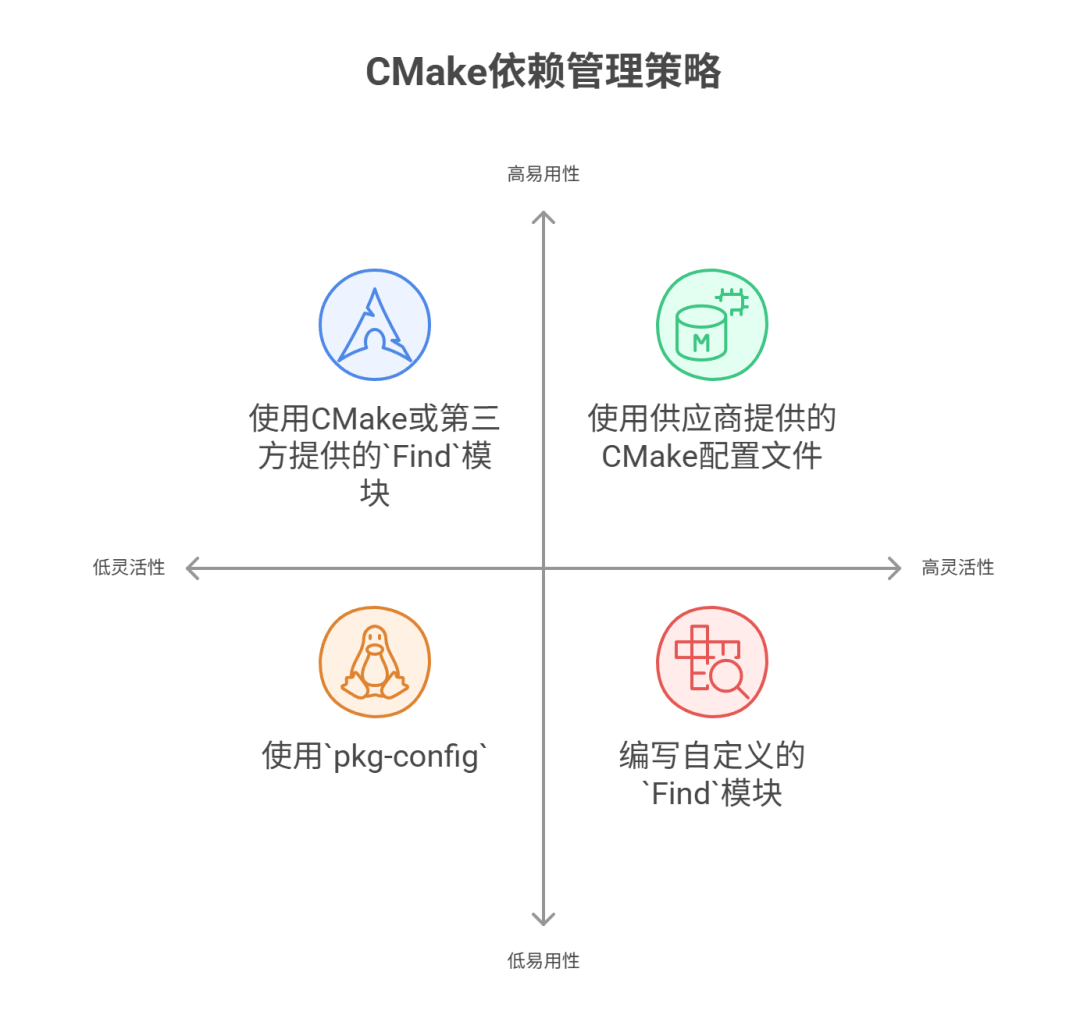
There are four main strategies for locating and linking external dependency packages in CMake projects, ranked by recommendation level, each with its unique advantages and applicable scenarios:
-
Using vendor-provided CMake configuration files: This is the most recommended modern CMake method. Many libraries now provide files such as
<span><package>Config.cmake</span>,<span><package>ConfigVersion.cmake</span>, and<span><package>Targets.cmake</span>upon installation. These files are typically installed in standard locations, allowing CMake to discover and use libraries directly via<span>find_package(<package> CONFIG)</span>. This method is powerful, capable of exporting library interfaces, link dependencies, and properties, making it easy for third-party code to integrate. As CMake becomes more popular, more package vendors are adopting this approach. -
Using Find modules provided by CMake or third parties: This has been the mainstream dependency finding method in CMake for a long time. CMake comes with a large number of
<span>Find</span>modules (e.g.,<span>FindBoost.cmake</span>,<span>FindOpenSSL.cmake</span>), and the community has contributed many. These modules can usually automatically detect the installation paths of libraries and set corresponding variables (such as<span>Boost_INCLUDE_DIRS</span>,<span>PYTHON_INTERPRETER</span>). However, most of them still rely on setting variables rather than creating imported targets, which may not be robust when dealing with transitive dependencies. -
Using
<span>pkg-config</span>:<span>pkg-config</span>is a widely used tool on Unix-like systems that provides library metadata through<span>.pc</span>configuration files. CMake provides support for<span>pkg-config</span>through the<span>find_package(PkgConfig)</span>module, encapsulating functions like<span>pkg_check_modules</span>and<span>pkg_search_module</span>. This method is very effective in the Unix ecosystem as it has become the de facto standard. Its main drawback is the lack of cross-platform compatibility (especially not commonly used on Windows), and as noted in CMake documentation, users may sometimes inadvertently override detection results, leading to incorrect information provided by<span>pkg-config</span>. -
Writing custom
<span>Find</span>modules: When all of the above methods are not feasible, writing your own<span>Find<PackageName>.cmake</span>module is the last resort. This method provides the greatest flexibility and control, allowing developers to customize based on the complexity of specific libraries, platform differences, and search logic. It typically relies on commands like<span>find_path</span>,<span>find_library</span>, etc., and combines with<span>FindPackageHandleStandardArgs.cmake</span>to standardize output. However, writing a comprehensive and robust custom<span>Find</span>module is no easy task; it requires consideration of various possibilities, such as library naming conventions across different operating systems, version compatibility, debug/release configurations, etc.
<span>pkg-config</span> is acceptable in Unix, but it cannot be easily ported to non-Unix platforms. CMake configuration files are powerful, but not all software developers are familiar with CMake syntax.
To unify package finding methods, the Common Package Specification (CPS) project is a recent attempt to merge the advantages of <span>pkg-config</span> and CMake configuration file methods. More information can be found on its project website: https://mwoehlke.github.io/cps/.
Previous Tutorials
C++ Bootcamp: Solidify Skills, Sprint to Big Companies, All Done!
Concurrency
Still struggling with parallel programming? CMake solves it with one click!
C++
STL Algorithms: Master these, and your code efficiency will increase tenfold!
News
The interviewer’s favorite question about epoll: A comprehensive understanding of its principles, patterns, and code implementation!
 Lion RyanWelcome to follow my public account Learn technology or submit articles