Many of you have probably seen videos of enthusiasts cooking meat using computer CPUs. Is the temperature of a computer CPU really that high? Let’s take a look at the temperature of our computer’s CPU.
There are many ways to check the CPU temperature on a PC. A simple method is to install benchmarking software on Windows, which can display the CPU temperature, such as the software “Luda Master”:

Additionally, there are many methods to check this on Linux, which we will not cover here.
Next, we will introduce some methods to check the CPU temperature of embedded devices running Linux. To obtain the CPU temperature, sensors (it is unclear how the CPU temperature is collected) and related drivers are required. We will not delve into these lower-level details; let’s just use them.
Typically, the Linux kernel includes drivers for CPU temperature detection, and the device files related to the CPU can be found in /sys and /proc.
In this case, I am using a development board from Baiwen Network, which has a virtual file for the CPU temperature object located at /sys/devices/virtual/thermal/thermal_zone0. The temp file in this directory can be used to obtain the CPU temperature. For example:
cat /sys/devices/virtual/thermal/thermal_zone0/temp
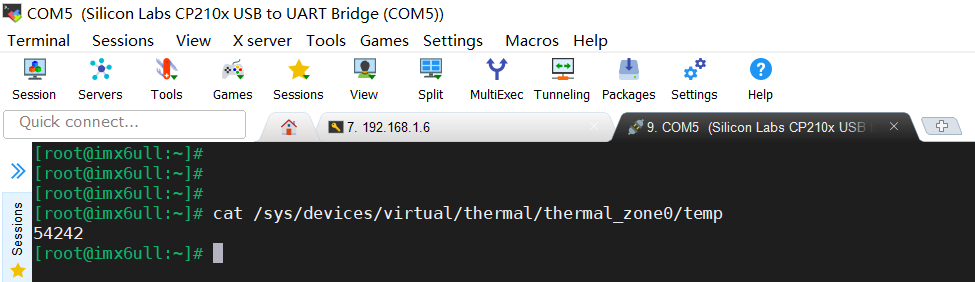
Here, 54242 represents 54.242℃.
We can view the contents of a file directly in the shell command line or programmatically. Before coding, let’s look at a diagram:
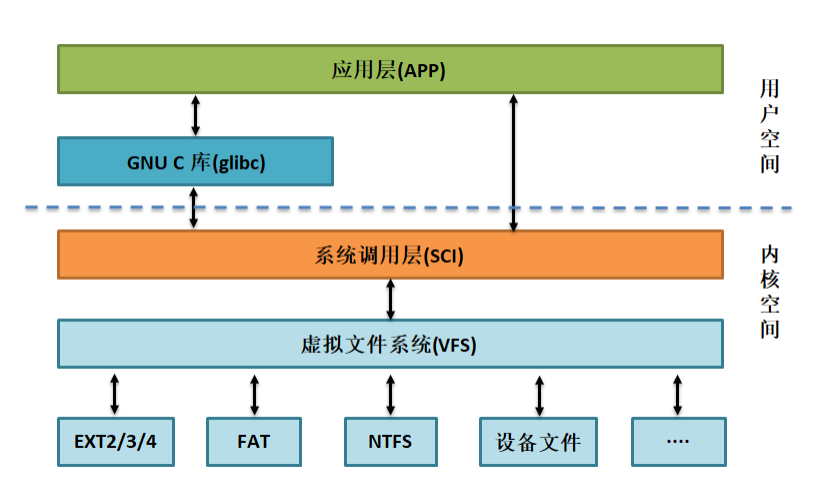
This is a fundamental diagram that one must be familiar with when learning embedded Linux. We can write applications in two ways: one is to directly use system call layer interfaces (i.e., functions like open, read, write), and the other is to indirectly call system call layer interfaces through glibc interfaces (i.e., functions like fopen, fread, fwrite). Recommended notes:
Basics of Application Development on Linux
What are Linux Kernel Space and User Space?
Here, we will use the glibc method to write our application for reading the CPU temperature. The code is as follows:
Swipe left and right to view all code>>>
#include <stdio.h>
#include <stdlib.h>
#include <unistd.h>

int main(int arc, char *argv[])
{
 FILE *fp = NULL;
 unsigned int temperature = 0;

 fp = fopen ("/sys/devices/virtual/thermal/thermal_zone0/temp", "r");
 if (fp < 0)
 {
  printf("fopen error!\n");
  exit(1);
 }
 while(1)
 {
  fscanf(fp, "%d", &temperature);
  printf("cpu temperature: %d.%d\n", temperature/1000, temperature%1000/100);
  sleep(1);
 }
 fclose(fp);
 return 0;
}
Cross-compile, transfer it to the board, and run:
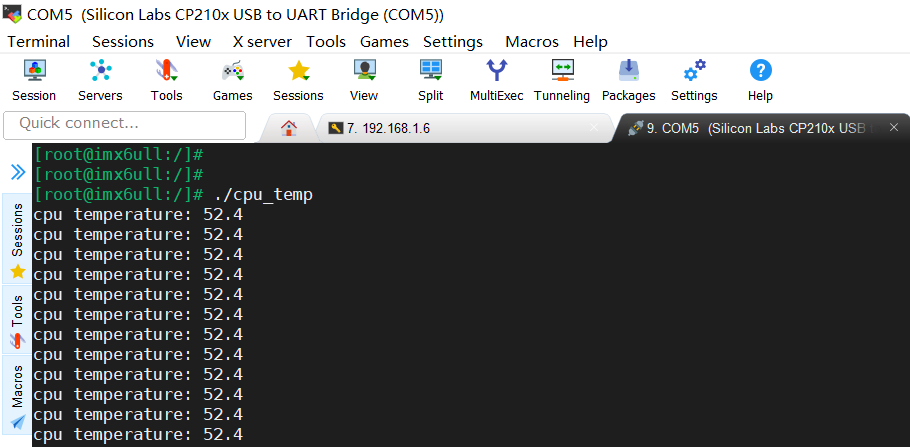
This concludes our sharing on obtaining CPU temperature. If there are any errors, please feel free to point them out. Go check if your CPU temperature can cook meat!


Recommended Articles
My Journey from Microcontroller to Embedded Linux
[Linux Notes] PC, Development Board, Ubuntu Ping Experiment
[Linux Notes] Mounting Network File Systems
1024G of embedded resources are being released! Including but not limited to C/C++, microcontrollers, Linux, etc. Reply “1024” in the public account chat interface to get it for free!

Previous Reviews
|
01 |Detailed Explanation of the ESP8266 Module |
|
02 |What is a DA Converter? Let’s Learn Together! |
|
03 |Detailed Explanation of Interrupt Priorities in STM32 |
|
04 |New Ideas for Downloading Programs in STM32 – Using Serial Port to Download Programs |