Overview
This tutorial will guide you step by step to implement a high-performance Mini-Redis from scratch, covering core technologies such as RESP protocol parsing, event-driven network programming, data structure implementation, persistence, and master-slave replication.
This KV storage project is a C++ project that can truly be added to your resume. Unlike other KV storage projects available online, which can only achieve over a thousand QPS after adding persistence, this project can reach over 55,000 QPS, making its performance comparable to Redis.
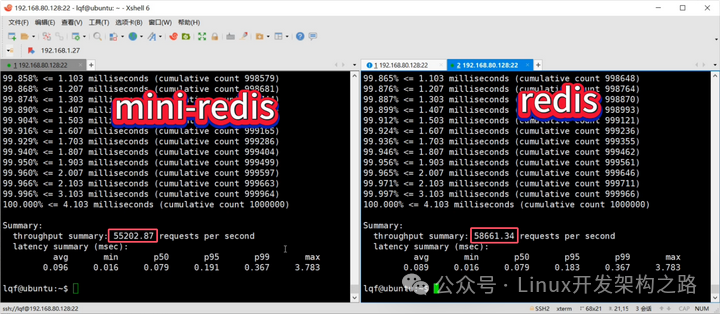
Video explanation and source code access:
https://www.bilibili.com/video/BV12oemzEEjQ/
Project Goals
-
Protocol Compatibility: Supports the standard RESP protocol, compatible with redis-cli tools
-
High Performance: Single-machine QPS reaches over 50,000, maintaining high performance even with AOF enabled
-
Complete Functionality: Data structures, persistence, expiration, master-slave replication
-
Educational Focus: Clear code, detailed documentation, suitable for learning
Technology Stack
-
Language: C++17
-
Networking: epoll event-driven
-
Protocol: RESP (Redis Serialization Protocol)
-
Data Structures: unordered_map + skip list
-
Persistence: AOF + RDB
-
Build System: CMake
Chapter 1: Project Architecture Design
1.1 Overall Architecture
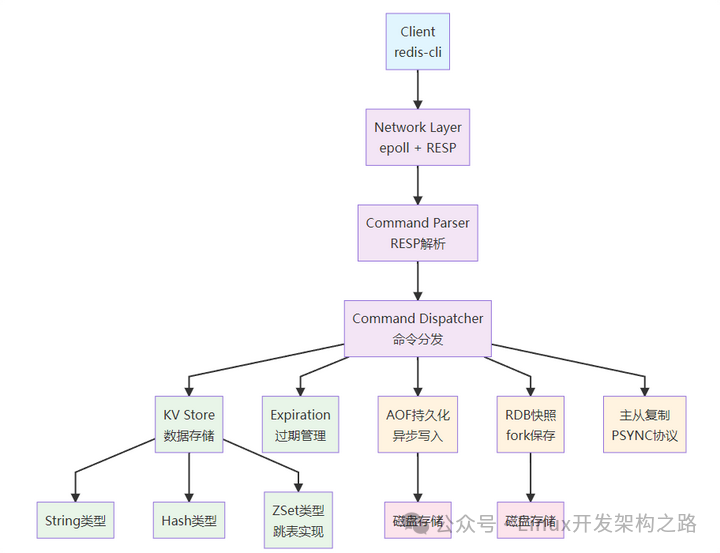
1.2 Request Processing Flow
A complete request goes through the following stages:
-
Network Reception: epoll listens for client connections and data
-
Protocol Parsing: Parses commands in RESP format
-
Command Execution: Executes operations in the KV storage
-
Persistence: AOF records commands, RDB takes periodic snapshots
-
Master-Slave Replication: Synchronizes commands to slave nodes
-
Response Return: Serializes the result back to RESP format
1.3 Module Division
| Module | File | Responsibilities |
|---|---|---|
| Network Layer | server.cpp | epoll event loop, TCP connection management |
| Protocol Layer | resp.hpp/cpp | RESP protocol parsing and serialization |
| Storage Layer | kv.hpp/cpp | Data structure implementation, expiration management |
| Persistence | aof.hpp/cpp, rdb.hpp/cpp | AOF/RDB persistence |
| Replication | replica_client.hpp/cpp | Master-slave replication |
| Configuration | config.hpp, config_loader.cpp | Configuration parsing |
Chapter 2: Environment Preparation and Project Setup
2.1 Environment Requirements
# Ubuntu/Debian
sudo apt install build-essential cmake pkg-config

# CentOS/RHEL
sudo yum install gcc-c++ cmake make

# Check versions
g++ --version  # Needs to support C++17
cmake --version  # Recommended 3.15+
2.2 Project Structure Creation
mkdir mini-redis && cd mini-redis
mkdir -p include/mini_redis src docs tools build
Project directory structure:
mini-redis/
├── CMakeLists.txt          # CMake build file
├── include/mini_redis/     # Header files
│   ├── config.hpp         # Configuration structure
│   ├── resp.hpp           # RESP protocol
│   ├── kv.hpp             # KV storage
│   ├── aof.hpp            # AOF persistence
│   ├── rdb.hpp            # RDB persistence
│   └── replica_client.hpp # Master-slave replication
├── src/                   # Source files
│   ├── main.cpp          # Program entry
│   ├── server.cpp        # Main server logic
│   ├── resp.cpp          # RESP implementation
│   ├── kv.cpp            # KV storage implementation
│   ├── aof.cpp           # AOF implementation
│   ├── rdb.cpp           # RDB implementation
│   ├── replica_client.cpp # Replication implementation
│   └── config_loader.cpp # Configuration loading
├── docs/                 # Documentation
├── tools/                # Utility scripts
└── build/               # Build directory
2.3 CMake Configuration File
Create <span>CMakeLists.txt</span>:
cmake_minimum_required(VERSION 3.15)
project(mini_redis)

set(CMAKE_CXX_STANDARD 17)
set(CMAKE_CXX_STANDARD_REQUIRED ON)

# Compilation options
set(CMAKE_CXX_FLAGS "-Wall -Wextra -g")
set(CMAKE_BUILD_TYPE Release)
set(CMAKE_CXX_FLAGS_RELEASE "-O3 -march=native")

# Header file paths
include_directories(include)

# Source files
set(SOURCES
    src/main.cpp
    src/server.cpp
    src/resp.cpp
    src/kv.cpp
    src/aof.cpp
    src/rdb.cpp
    src/replica_client.cpp
    src/config_loader.cpp
)

# Executable file
add_executable(mini_redis ${SOURCES})

# Link libraries
find_package(Threads REQUIRED)
target_link_libraries(mini_redis PRIVATE Threads::Threads)
2.4 Build and Use
2.4.1 Build Project
cd mini-redis
cmake -S . -B build
cmake --build build -j
2.4.2 Standalone Startup Mode
Mini-Redis supports three persistence configuration modes:
1. No Persistence Mode (none.conf)
Suitable for: Testing, caching scenarios, no data persistence required
# Start server
./build/mini_redis --config build/none.conf

# The server will start on port 6388, with no AOF and RDB
2. Every Second Sync Mode (everysec.conf)
Suitable for: Production environment, balancing performance and data safety
# Start server
./build/mini_redis --config build/everysec.conf

# The server will start on port 6388, AOF syncs every second
3. Immediate Sync Mode (always.conf)
Suitable for: Scenarios with extremely high data consistency requirements
# Start server
./build/mini_redis --config build/always.conf

# The server will start on port 6388, syncing every write operation to disk immediately
Configuration File Details
none.conf
port=6388
aof.enabled=false
rdb.enabled=false
everysec.conf
port=6388
aof.enabled=true
aof.mode=everysec
aof.dir=./data
aof.filename=appendonly.aof
rdb.enabled=false
aof.batch_bytes=262144
aof.batch_wait_us=2000
aof.prealloc_bytes=67108864
aof.sync_interval_ms=250
always.conf
port=6388
aof.enabled=true
aof.mode=always
aof.dir=./data
aof.filename=appendonly.aof
rdb.enabled=false
2.4.3 Master-Slave Replication Mode
Master Node Startup
Create master node configuration file <span>master.conf</span>:
port=6379
bind_address=0.0.0.0

# AOF Persistence
aof.enabled=true
aof.mode=everysec
aof.dir=./data-master
aof.filename=appendonly.aof

# RDB Snapshot
rdb.enabled=true
rdb.dir=./data-master
rdb.filename=dump.rdb
Start master node:
./build/mini_redis --config master.confSlave Node Startup
Create slave node configuration file <span>replica.conf</span>:
port=6380
bind_address=0.0.0.0

# RDB for receiving master node snapshots
rdb.enabled=true
rdb.dir=./data-replica
rdb.filename=dump.rdb

# Slave nodes generally do not enable AOF
aof.enabled=false

# Replication configuration
replica.enabled=true
replica.master_host=127.0.0.1
replica.master_port=6379
Start slave node:
./build/mini_redis --config replica.conf2.4.4 Testing with redis-cli
Connection Test
# Connect to standalone mode
redis-cli -p 6388

# Connect to master node
redis-cli -p 6379

# Connect to slave node
redis-cli -p 6380
Basic Command Testing
Connection and Status
# Test connection
redis-cli -p 6388 PING

# Get server information
redis-cli -p 6388 INFO

# Echo test
redis-cli -p 6388 ECHO "Hello Mini-Redis"
String Operations
# Set key value
redis-cli -p 6388 SET mykey "Hello World"

# Get value
redis-cli -p 6388 GET mykey

# Delete key
redis-cli -p 6388 DEL mykey

# Set expiration time (seconds)
redis-cli -p 6388 SET tempkey "temporary"
redis-cli -p 6388 EXPIRE tempkey 60

# Check remaining expiration time
redis-cli -p 6388 TTL tempkey

# Check if key exists
redis-cli -p 6388 EXISTS mykey
Hash Operations
# Set Hash field
redis-cli -p 6388 HSET user:1 name "Alice"
redis-cli -p 6388 HSET user:1 age "25"
redis-cli -p 6388 HSET user:1 city "Beijing"

# Get Hash field
redis-cli -p 6388 HGET user:1 name

# Get all fields and values
redis-cli -p 6388 HGETALL user:1

# Check if field exists
redis-cli -p 6388 HEXISTS user:1 email

# Delete field
redis-cli -p 6388 HDEL user:1 age

# Get field count
redis-cli -p 6388 HLEN user:1
ZSet (Sorted Set) Operations
# Add members and scores
redis-cli -p 6388 ZADD leaderboard 100 "player1"
redis-cli -p 6388 ZADD leaderboard 85 "player2"
redis-cli -p 6388 ZADD leaderboard 92 "player3"

# Query by score range (default ascending)
redis-cli -p 6388 ZRANGE leaderboard 0-1

# Query by score range and display scores
redis-cli -p 6388 ZRANGE leaderboard 0-1 WITHSCORES

# Get member score
redis-cli -p 6388 ZSCORE leaderboard "player2"

# Delete member
redis-cli -p 6388 ZREM leaderboard "player2"
Other Operations
# List all keys
redis-cli -p 6388 KEYS "*"

# Clear all data
redis-cli -p 6388 FLUSHALL

# Trigger RDB snapshot save
redis-cli -p 6388 BGSAVE
Master-Slave Replication Test
1. Write data on master node
# Connect to master node and write
redis-cli -p 6379 SET repl:test "master-data"
redis-cli -p 6379 HSET repl:hash field1 "value1"
redis-cli -p 6379 ZADD repl:zset 90 "item1"
2. Read data on slave node
# Connect to slave node and read
redis-cli -p 6380 GET repl:test
redis-cli -p 6380 HGETALL repl:hash
redis-cli -p 6380 ZRANGE repl:zset 0-1 WITHSCORES
Batch Operation Test
Using Pipeline Mode
# Create test data file
echo -e "SET key1 value1\nSET key2 value2\nSET key3 value3" > test-commands.txt

# Execute through pipeline
redis-cli -p 6388 --pipe < test-commands.txt
Performance Testing
# Basic performance test
redis-benchmark -h 127.0.0.1 -p 6388 -n 10000 -c 50

# Test SET operation
redis-benchmark -h 127.0.0.1 -p 6388 -t set -n 10000 -d 100

# Test GET operation
redis-benchmark -h 127.0.0.1 -p 6388 -t get -n 10000
Chapter 3: RESP Protocol Implementation
Chapter 4: Network Programming and Event Loop
Chapter 5: KV Storage Engine Implementation
Chapter 6: Persistence Implementation
Chapter 7: Master-Slave Replication Implementation
These chapters need to be viewed alongside the source code, and detailed learning documents and source code are provided in this video explanation, which you can watch to access.
https://www.bilibili.com/video/BV12oemzEEjQ/
Chapter 8: Performance Optimization and Tuning
8.1 Performance Testing Benchmark
Use <span>redis-benchmark</span> for performance testing, comparing the effects before and after optimization:
# Benchmark test command
redis-benchmark -h 127.0.0.1 -p 6379 -n 100000 -c 50 -P 10 -t set,get
redis-benchmark -h 127.0.0.1 -p 6379 -n 50000 -c 10 -P 1 -d 100 -t set,get
8.1.1 Performance Optimization Comparison
| Optimization Item | QPS Before Optimization | QPS After Optimization | Improvement Factor | Remarks |
|---|---|---|---|---|
| Basic Implementation | 15k | – | – | Blocking I/O + Synchronous AOF |
| Non-blocking I/O + epoll | 15k | 45k | 3x | Event-driven |
| Edge Triggered (EPOLLET) | 45k | 52k | 1.15x | Reduced system calls |
| writev Batch Sending | 52k | 58k | 1.12x | Reduced network system calls |
| AOF Asynchronous Writing | 1.4k | 55k | 39x | Significant improvement in AOF mode |
| Group Commit | 55k | 48k | 0.87x | Trade-off in always mode |
8.2 Key Optimization Techniques
8.2.1 Core AOF Performance Optimization
The most critical optimization is the asynchronous writing mechanism of AOF:
// Before optimization: synchronous writing (performance killer)
void appendAOF_slow(const std::string &cmd) {
    std::ofstream file(aof_path_, std::ios::app);
    file << cmd;
    file.flush();  // Immediate flush, QPS plummets
}

// After optimization: asynchronous batch writing
void appendAOF_fast(const std::string &cmd) {
    {
        std::lock_guard <std::mutex> lock(queue_mutex_);
        aof_queue_.push(cmd);
        pending_bytes_ += cmd.size();
    }
    cv_.notify_one();  // Wake up background writing thread
}
8.2.2 Network I/O Optimization
// Optimization Technique 1: TCP_NODELAY to avoid Nagle's algorithm delay
int opt = 1;
setsockopt(client_fd, IPPROTO_TCP, TCP_NODELAY, &opt, sizeof(opt));

// Optimization Technique 2: writev batch sending
struct iovec iov[64];  // Increase to 64 iovec
int count = 0;
for (const auto &chunk : out_chunks) {
    iov[count].iov_base = (void *)chunk.data();
    iov[count].iov_len = chunk.size();
    if (++count >= 64) break;
}
writev(fd, iov, count);

// Optimization Technique 3: Edge-triggered read all at once
while (true) {
    ssize_t n = read(fd, buf, sizeof(buf));
    if (n <= 0) {
        if (errno == EAGAIN) break;  // Finished reading
        // Handle error
    }
    process_data(buf, n);
}
8.3 Memory and Algorithm Optimization
8.3.1 Adaptive Storage for ZSet
// Small sets use vector, large sets use skip list
class ZSetRecord {
    static constexpr size_t THRESHOLD = 128;

    std::vector <std::pair <double, std::string>> small_set;  // <128 elements
    std::unique_ptr <Skiplist> skiplist;                     // >=128 elements

    void checkAndConvert() {
        if (!use_skiplist && small_set.size() >= THRESHOLD) {
            convertToSkiplist();  // Automatic upgrade
        }
    }
};
8.3.2 Pre-allocation and Object Reuse
// Pre-allocate AOF file space to avoid frequent expansion
void preallocateAOF(int fd, size_t size) {
    if (posix_fallocate(fd, 0, size) == 0) {
        printf("Preallocated %zu bytes for AOF\n", size);
    }
}

// Connection object reuse
class ConnectionPool {
    std::vector <std::unique_ptr <Conn>> free_conns_;

    std::unique_ptr <Conn> acquire() {
        if (!free_conns_.empty()) {
            auto conn = std::move(free_conns_.back());
            free_conns_.pop_back();
            conn->reset();  // Reset state
            return conn;
        }
        return std::make_unique <Conn>();
    }
};
Conclusion
Technical Highlights
-
High Performance: Asynchronous AOF, batch I/O, edge-triggered
-
Complete Architecture: Separation of network layer, protocol layer, and storage layer
-
Data Structures: Skip list, adaptive ZSet, hash table
-
Persistence: Dual assurance of AOF + RDB
-
Replication: Master-slave synchronization, partial resynchronization
-
Optimization: Performance improvement from 1.4k to 55k QPS (this is for SET), GET can be comparable to Redis.
Learning Value
-
System Design Capability: Understanding high-performance server architecture
-
Network Programming Skills: Mastering epoll, non-blocking I/O
-
Storage System Knowledge: Learning to design persistence schemes
-
Performance Tuning Experience: Mastering common optimization techniques
-
Interview Preparation: Covering high-frequency interview questions related to Redis