Scan the QR code to follow Chip Dynamics and say goodbye to “chip” congestion!

 Search WeChat
 Chip Dynamics
In C language, a regular array can only store data of the same type (for example, int arr[5] can only store 5 integers). However, in reality, we often need to store a “set of related different types of data”: for example, a student’s name (char array), age (int), and score (float); or a cup of milk tea’s name (char array), sweetness (int), and price (float). In such cases, a regular array simply cannot handle it!
This is where structures (struct) come into play—they can package these different types of data into a “whole” (for example, struct Student). A struct array is essentially a batch production of this “whole”, creating an “array” where each element is a complete struct variable!
For example: if you want to store information for 3 students, using regular variables would require defining 9 variables (3 names, 3 ages, 3 scores); but with a struct array, you only need to define 1 struct template and then create 1 array to hold all 3 students’ information!
Defining a Struct Array
Defining a struct array involves two steps:
Step 1: Define the struct template (equivalent to the “blueprint of the file folder”);
Step 2: Use the template to create an array (equivalent to “mass-producing file folders”).
Code Example:
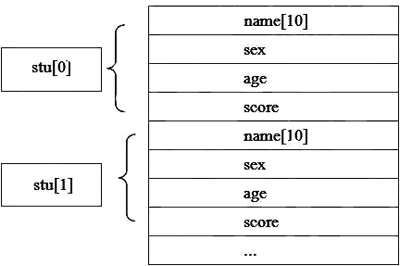
// Step 1: Define the struct template (blueprint of the student file folder)struct Student { char name[10]; // Name (up to 10 characters) char sex; // Gender int age; // Age float score; // Score}; // Note: The semicolon is essential!// Step 2: Create an array that can store 3 students (mass-producing 3 file folders)struct Student stu[3]; // stu[0] is the first student, stu[1] is the second, stu[2] is the thirdHere, stu is a struct array, and each of its elements (like stu[0]) is a complete struct Student variable, equivalent to an independent “student file folder”.
Key Concept Analysis:
-
Struct Template: struct Student is the type name, specifying what members (name, age, score) must be included in the “file folder” and their types (char[10], int, float).
-
Struct Array: stu[3] is an array of size 3, where each element is of struct Student type.
-
Memory Layout: Struct arrays are stored contiguously in memory, with each element’s size equal to the size of the struct template (memory alignment will be discussed later).
 Initializing a Struct Array
Initializing a struct array means filling in initial values for each member in the “file folder”. This step may seem simple, but it hides complexities—filling in the wrong order, type, or omitting members can lead to program crashes or data errors!
2.1 Three Ways to Initialize
Method 1: Sequential Initialization
Assign values to each element’s members in the order defined in the struct, like filling out a form.
Code Example:
// Initializing an array of 3 students (order: name→age→score)struct Student class[3] = { {"Zhang San", 18, 90.5}, // class[0]: Zhang San's file folder {"Li Si", 19, 85.0}, // class[1]: Li Si's file folder {"Wang Wu", 20, 92.5} // class[2]: Wang Wu's file folder};Key Points:
-
The order of each element’s members must match the struct template exactly (first name, then age, finally score). If the order is wrong, the compiler will issue a warning (for example, if age is written before name, the compiler will think you are assigning an integer to name, leading to a type mismatch).
-
Types must match strictly: name is char[10], so it must use a string literal (like “Zhang San”); age is int, so it must use an integer (like 18); score is float, so it must use a floating-point number (like 90.5).
Method 2: Designated Member Initialization (C99 Standard, Recommended!)
C99 introduced the “designated member initialization” feature, allowing values to be assigned using .member_name=value, regardless of order, and even skipping some members.
Code Example:
// Designated member initialization (order doesn't matter, only fill needed ones)struct Student class[3] = { {.age = 18, .name = "Zhang San"}, // class[0]: age 18, name Zhang San (score defaults to 0.0) {.score = 95.0}, // class[1]: score 95 (name and age default to 0) {.name = "Wang Wu", .score = 92.5} // class[2]: name Wang Wu, score 92.5 (age defaults to 0)};Advantages:
-
Order is irrelevant, making the code more readable. For example, clearly stating “Zhang San’s age is 18” is more intuitive than remembering “the first element is name, the second is age”.
-
Suitable for scenarios where only some members need to be initialized.
Method 3: Define and Then Assign
struct Student class[3];class[0] = (struct Student){"Zhang San", 18, 90.5}; // C99 syntaxclass[1].age = 19; // Modify a specific memberApplications of Struct Arrays
The core advantage of struct arrays is batch management of the same type of data. Below are two practical scenarios demonstrating its “superpowers”!
3.1 Student Score Management (Sorting + Searching + Statistics)
Requirement: A class has 5 students, and the following operations need to be completed:
-
Sort by score from highest to lowest;
-
Find students with scores greater than 90;
-
Calculate the average score.
Step 1: Define the struct array and initialize it
#include <stdio.h>#include <string.h>struct Student { char name[20]; int age; float score;};int main() { struct Student class[5] = { {"Zhang San", 18, 90.5}, {"Li Si", 19, 85.0}, {"Wang Wu", 20, 92.5}, {"Zhao Liu", 18, 95.0}, {"Zhou Qi", 19, 88.0} }; // ...subsequent operations... return 0;}Step 2: Sort by score from highest to lowest (Bubble Sort)
The core of bubble sort is “comparing adjacent elements and swapping positions”. Since each element of the struct array is a whole, you can directly swap them using = without needing to swap each member individually.
Code Implementation:
int n = 5; // Number of studentsfor (int i = 0; i < n-1; i++) { for (int j = 0; j < n-i-1; j++) { // Compare class[j] and class[j+1]'s scores if (class[j].score < class[j+1].score) { // Swap two struct variables (direct assignment) struct Student temp = class[j]; class[j] = class[j+1]; class[j+1] = temp; } }}Step 3: Find students with scores greater than 90
Traverse the array and use an if condition to filter students that meet the criteria.
Code Implementation:
printf("Students with scores greater than 90:");for (int i = 0; i < n; i++) { if (class[i].score > 90.0) { printf("- %s (age %d, score %.1f)", class[i].name, class[i].age, class[i].score); }}Step 4: Calculate the average score
Traverse the array, summing all students’ scores, then divide by the number of students.
Code Implementation:
float total = 0.0;for (int i = 0; i < n; i++) { total += class[i].score;}float average = total / n;printf("Class average score: %.1f", average);Running Result:
Students with scores greater than 90: Zhao Liu (age 18, score 95.0) Wang Wu (age 20, score 92.5) Zhang San (age 18, score 90.5)Class average score: 90.2Pitfall GuidePitfall 1: Array Out-of-Bounds Access
Error Scenario: Defined an array that can store 3 students but attempted to access the 4th element.
struct Student class[3] = { {"Zhang San",18,90.5}, {"Li Si",19,85.0}, {"Wang Wu",20,92.5}};printf("%s's score: %f", class[3].name, class[3].score); // Out of bounds!Consequence: class[3] points to memory outside the array (possibly the address of another variable), causing the program to crash or output garbage (like printing ?? or the value of another variable).
Solution: When accessing elements, the index range must be 0 ≤ i < array size (for example, for an array of 3 elements, the index can only be 0, 1, or 2). You can use sizeof to calculate the array size:
int size = sizeof(class) / sizeof(class[0]); // size=3for (int i = 0; i < size; i++) { ... } // Safe traversalPitfall 2: Using = for String Assignment
Error Scenario: Incorrectly using = to assign a value to the name member.
struct Student s;s.name = "Zhang San"; // Error! Char arrays cannot be assigned directly with =Consequence: The compiler will report an error (error: assignment to expression with array type) because name is a char array, and the array name is a constant pointer that cannot be reassigned.
Solution: Strings must be assigned using the strcpy function (imported from the string.h header file):
#include <string.h>strcpy(s.name, "Zhang San"); // Correct! strcpy(destination array, source string)Note: strcpy does not check the size of the destination array. If the length of the source string exceeds the length of the destination array (for example, name[20] storing 21 characters), it will cause a buffer overflow (overwriting memory), leading to security vulnerabilities. A safer function is strncpy (specifying the maximum copy length):
strncpy(s.name, "Zhang San", 19); // Copy at most 19 characters to avoid overflows.name[19] = '\0'; // Manually add the string terminator ('\0')Pitfall 3: Passing Struct Arrays as Function Parameters by Value
void update_score(struct Student s) { // Error: passing by value (copying the entire struct) s.score = 100.0; // Modifying a copy, original array remains unchanged!}int main() { struct Student class[3] = {{"Zhang San",18,90.5}}; update_score(class[0]); printf("%f", class[0].score); // Outputs 90.5 (not changed!) return 0;}Consequence: The function modifies a copy of the struct (unrelated to the original array element), and the original array will not be modified.
Solution: Pass the pointer to the array (struct pointer) to directly manipulate the original array.
void update_score(struct Student* s) { // Correct: passing pointer (address) s->score = 100.0; // Use -> to access members, modifying the original array}int main() { struct Student class[3] = {{"Zhang San",18,90.5}}; update_score(&class[0]); // Pass the address of class[0] printf("%f", class[0].score); // Outputs 100.0 (successfully changed!) return 0;}If the struct is large, it is recommended to pass by pointer instead of the entire struct, as passing the entire struct can degrade performance.

If you find this article helpful, click “Like“, “Share“, and “Recommend“!